Online Gaming in 2026: Why Pros Shouldn’t Touch Fixed Wireless
Wired is always the best way to compete online

Jul 17, 2026 | Share 


Sponsored
This article is sponsored by Spectrum.

A wired connection is best for multiplayer gaming because it provides a more stable connection and isn’t affected by radio interference, range, or obstructions.
Fixed wireless can suffer from performance issues such as interference, congestion, and high latency, making it less ideal for competitive online gaming.
Read on to find out why hardcore and professional gamers should avoid using fixed wireless for online competition.
Gameplay killers every pro should defeat
Three primary network characteristics affect online gameplay: latency, packet loss, and jitter. Lower values are better for all three.
Latency
Latency is the delay between a gamer’s action and the server’s response. Low latency allows near-instant actions, while high latency causes noticeable delays. The ping tool is a common utility for measuring the round-trip time required to send test data from the client to the server and back.
We discuss different latency ranges in our guide on making an internet connection better for gaming, but ideally, hardcore and professional gamers should keep latency below 50 milliseconds (ms).
Problems caused by high latency
- Voice chat issues
- Hit registration issues
- Rubber-banding
- Input delay
- Slower reaction times
Packet loss
A packet is a unit of data reformatted for transmission over a wired or wireless network. Packet loss occurs when packets do not reach their destination.
In online gaming, packet loss causes delayed actions, rubber-banding, and targeting issues. During a livestream, packet loss can cause buffering or video stutter.
Competitive online gaming typically requires packet loss between 0% and 1% for smooth gameplay. Anything higher can lead to noticeable issues such as stuttering, rubber-banding, and missed targets.
However, packet loss does not always create latency. The missing data can make gameplay feel laggy because actions, movement, or game state updates may be delayed or skipped.
Problems caused by packet loss
- Voice chat issues
- Hit registration issues
- Rubber-banding
- Input delay
- Teleporting players
Jitter
Jitter represents a variation in latency. Data packets typically arrive at a steady pace, but network congestion and other issues can cause some packets to arrive later than expected. Jitter measures these fluctuations in packet arrival times.
In online gaming, high jitter can cause stuttering movement, hit registration issues, voice chat problems, input inconsistencies, and rubber-banding.
Hardcore and professional gamers typically need a jitter value of 10 ms or less, although values up to 20 ms are generally acceptable and typically cause few, if any, noticeable gameplay issues.
Problems caused by jitter
- Voice chat issues
- Hit registration issues
- Rubber-banding
- Stuttered movement
- Inconsistent input response
Other factors that can thwart fluid gameplay
While latency, packet loss, and jitter are the primary factors that can make or break online gameplay, two other elements can also cause issues.
Network congestion
Network congestion occurs when points along the path between the gamer and the remote server become overloaded with traffic. This congestion can cause delays by increasing packet loss, latency, and jitter.
Bandwidth
We’ve already established that gamers don’t need a lot of bandwidth to play games online. However, if available bandwidth suddenly drops below the minimum requirement to compete online, network congestion can occur, leading to increased latency, jitter, and packet loss.
Our wired vs. fixed wireless benchmarks
We recently ran hourly speed tests using one wired internet service and one 5G home internet service. The comparison was to show the speed consistency and reliability of a wired connection versus a 5G one. However, we also recorded other data related to latency, jitter, and packet loss.
Download/upload latency and jitter
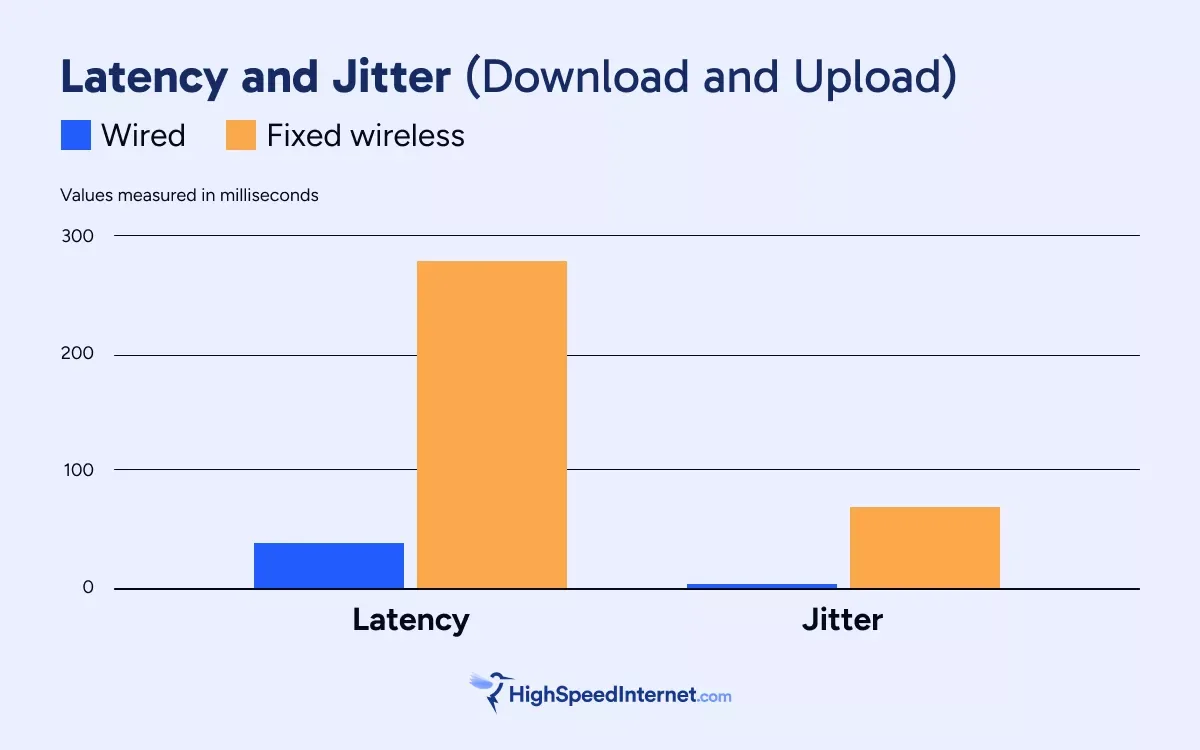
The bar graphs clearly show why competitive hardcore and professional gamers should avoid fixed wireless internet.
Our hourly speed tests used a wired Windows computer connected directly to the provider-supplied equipment. We did not use Wi-Fi in the tests.
With the fixed wireless tests, we used an uncapped (grandfathered) 5G home internet plan and recorded speeds ranging from 180Mbps to 942Mbps across 40 hourly speed tests.
Meanwhile, we used a current wired gigabit plan and recorded speeds ranging from 878Mbps to 954Mbps across 123 hourly tests.
In both cases, each connection provides enough speed to play games online. However, the larger bandwidth numbers are ideal for downloading and installing games and updates quickly, not necessarily for competing online.
That all said, the key to playing games online competitively is to keep the latency and jitter at an extremely low rate.
First, let’s compare the download latency and jitter numbers.
Download
| Wired* | Fixed wireless* | Target value | |
|---|---|---|---|
| Latency | 38.28 ms | 282.28 ms | 50 ms |
| Latency low | 23.18 ms | 26.85 ms | 50 ms |
| Latency high | 222.43 ms | 658.78 ms | 50 ms |
| Latency jitter | 5.32 ms | 68.87 ms | 1 ms |
* Test results are averages
Wired internet is the clear winner, even though we weren’t happy with some of the wired connection results (namely, the jitter and high latency value).
Still, even when a gaming rig connects to a 5G gateway via Ethernet, distance, interference, and tower congestion can still create major performance limitations. While 5G home internet is far better than satellite, it still can’t match the consistency of a wired connection.
Now let’s compare the upload values.
Upload
| Wired* | Fixed wireless* | Target value | |
|---|---|---|---|
| Latency | 61.23 ms | 598.81 ms | 50 ms |
| Latency low | 23.65 ms | 38.88 ms | 50 ms |
| Latency high | 100.13 ms | 1182.98 ms | 50 ms |
| Latency jitter | 14.77 ms | 97.22 ms | 1 ms |
* Test results are averages
Once again, wired internet is the clear choice for upload speeds. You don’t need a lot of upload bandwidth for competitive gaming, but it’s still important because gaming platforms must upload player inputs and voice communications to the remote server. A higher upload bandwidth is better.
Idle latency and jitter
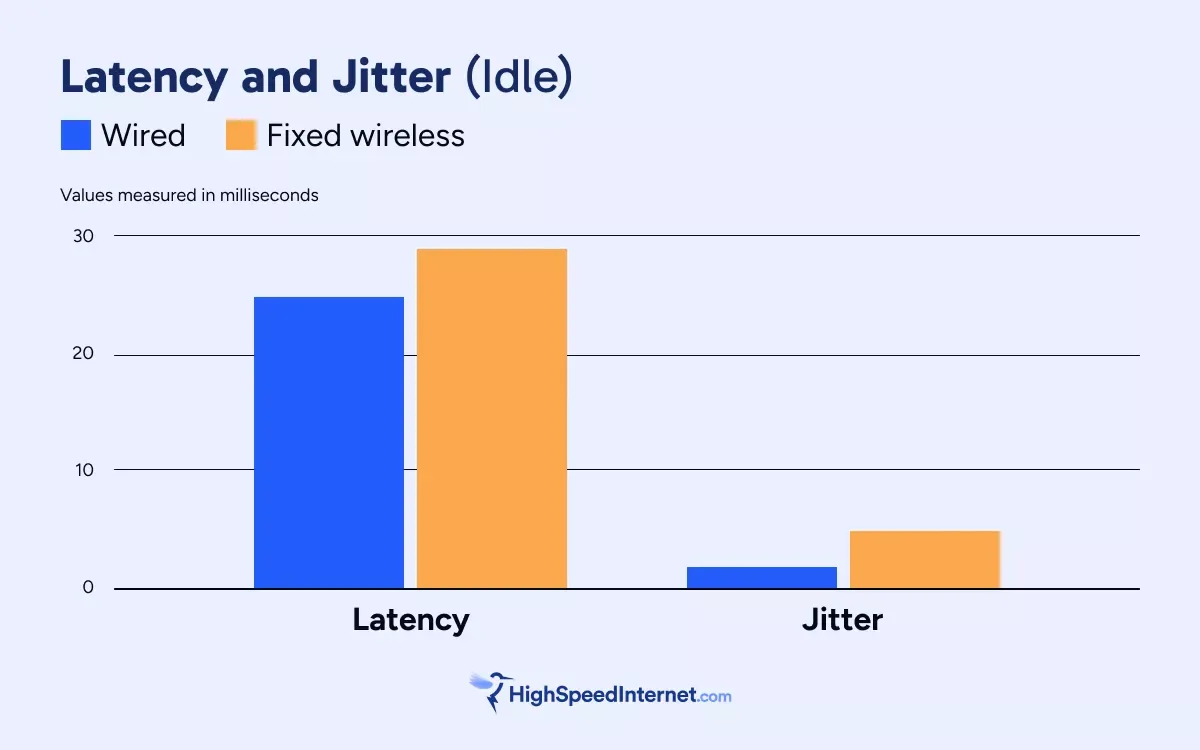
Idle latency is the amount of network delay recorded when an internet connection is inactive.
Idle jitter is a measurement of inconsistent packet timing recorded when an internet connection is inactive.
Most speed tests report idle latency alongside download latency and upload latency.
| Wired* | Fixed wireless* | Target value | |
|---|---|---|---|
| Idle latency | 24.65 ms | 29.28 ms | 50 ms |
| Idle jitter | 1.52 ms | 4.65 ms | 1 ms |
* Test results are averages
The idle latency value should be 50 ms or less, although under 20 ms is ideal for competitive online gaming. Both connections passed this test.
The idle jitter value should be 1 ms or lower for the best competitive online gameplay, although under 5 ms is generally acceptable. Both connections passed this test as well.
Packet loss
Both tests reported zero packet loss, which was surprising for the 5G home internet test, given the susceptibility of RF signals to interference and degradation over long distances. However, zero packet loss may not be typical across all fixed wireless services—we’re still gathering data on other 5G home internet services.
The reason why pros should avoid fixed wireless should be clear
As hardcore gamers, we don’t need to ask the pros why they avoid fixed wireless for competitive online gaming. Many won’t even use Wi-Fi because it introduces additional latency that can affect reaction times. Wired will always be the go-to solution for the best performance and most accurate input delivery.
Our speed test results show that wired connections have far lower latency and jitter, which is essential for competitive multiplayer gaming. Low latency and jitter are also important for cloud gaming, where games are rendered remotely and streamed directly to the gaming device. Other non-gaming applications benefit from low latency and jitter as well, including videoconferencing, remote desktop work, and live streaming.
Of course, we’re not suggesting that gamers avoid 5G home internet entirely.
“After thousands of sessions over three years in fast-paced games like Battlefield and WRC Rally, I’d say I’m a believer in 5G as a suitable gaming connection,” says Austin Aguirre, who ran our fixed wireless test. “I don’t notice any difference between it and my cable connection.”
Still, when every click, key press, or button mash counts, a wired connection remains the best choice for hardcore and professional gamers over fixed wireless.
Spectrum Internet® is a great platform for gaming
Spectrum is a hybrid fiber-coaxial (HFC) provider. Its core network is fiber-based and delivers internet to homes using either a fiber or coaxial connection, depending on the area.
Spectrum doesn’t offer gaming-specific features, but our 30-day speed test shows it delivers rock-solid wired performance, which is vital for competitive online gaming.
Spectrum’s asymmetrical internet plans offer upload speeds of up to 35Mbps, but we recommend the Premier plan or faster for the most upload bandwidth Spectrum has to offer. Some areas provide symmetrical connections, meaning download and upload speeds are identical.
All Spectrum Internet plans and pricing
| Get the plan | Your price* | Download speed |
|---|---|---|
| Spectrum Internet® Advantage | $30/mo. for 1 year | Up to 100Mbps (wireless speeds may vary) |
| Spectrum Internet® Premier | $40/mo. for 1 year | Up to 500Mbps (wireless speeds may vary) |
| Spectrum Internet® Gig | $60/mo. for 1 year | Up to 1,000Mbps (wireless speeds may vary) |
| Spectrum Internet® 2 Gig | $70/mo. for 1 year | Up to 2,000Mbps (wireless speeds may vary) |
* Availability and speed may vary by location, and prices are subject to change. See disclaimers.
FAQ about gaming on wired and fixed wireless
What is rubber-banding?
The term rubber-banding refers to a sudden teleportation in multiplayer games caused by a high latency between the player and the remote server.
In the game, the player moves forward, but there’s so much time between the movement and the server acknowledging the movement that the player is snapped back to where the server recorded the player’s last position.
What is a good latency value for gaming online?
The ideal latency value for competitive online gaming is 0–20 milliseconds (ms), although anything under 50 ms is generally acceptable.
- 0–20 ms: Excellent—ideal for competitive gaming
- 20–50 ms: Good—smooth, consistent gameplay
- 50–100 ms: Fair—input delay becomes obvious
- 100+ ms: Poor—lag and rubber-banding become obvious
What is a good jitter value for gaming online?
The ideal jitter value for competitive online gaming is 0–10 milliseconds (ms), although anything up to 20 ms is generally acceptable.
- 0–10 ms: Excellent—ideal for competitive gaming
- 10–20 ms: Good—smooth, consistent gameplay
- 20–30 ms: Fair—stuttering becomes obvious
- 30+ ms: Poor—lag and rubber-banding become obvious
What is a good packet loss value for gaming online?
The ideal packet loss value for competitive online gaming is 0%, although anything at or below 1% is generally acceptable.
- 0%: Excellent—ideal for competitive gaming
- 1%: Good—smooth, consistent gameplay
- 1–2%: Fair—stuttering becomes obvious
- 2%+: Poor—lag and rubber-banding become obvious
What is ping?
Ping is a utility used to measure latency, although the term is commonly used in gaming as shorthand for latency. A ping of 50 milliseconds (ms) generally means there is 50 ms of round-trip latency between the player and the remote server.
Plans disclaimers
Spectrum Internet plans
All plans — Limited-time offer; subject to change; new residential customers only (no Spectrum service in past 30 days). Standard rates apply after promo period or service change. Actual speeds (including wireless) vary and are not guaranteed. Activation fee additional; taxes may apply. Gig speeds require a compatible modem; see spectrum.net/modem for list. Terms and conditions apply, subject to change. Not available in all areas. Restrictions apply. Spectrum Internet® is powered by fiber and connected to the premises by coaxial lines.
Internet Gig | Internet 2 Gig | Internet 7 Gig — Spectrum Advanced WiFi included in price.
Internet 2 Gig | Internet 7 Gig — Invincible WIFI included in price.
Author - Kevin Parrish
Kevin Parrish has more than a decade of experience working as a writer, editor, and product tester. He began writing about computer hardware and soon branched out to other devices and services such as networking equipment, phones and tablets, game consoles, and other internet-connected devices. His work has appeared in Tom’s Hardware, Tom's Guide, Maximum PC, Digital Trends, Android Authority, How-To Geek, Lifewire, and others. At HighSpeedInternet.com, he focuses on network equipment testing and review.
Editor - Jessica Brooksby
Jessica loves bringing her passion for the written word and her love of tech into one space at HighSpeedInternet.com. She works with the team’s writers to revise strong, user-focused content so every reader can find the tech that works for them. Jessica has a bachelor’s degree in English from Utah Valley University and seven years of creative and editorial experience. Outside of work, she spends her time gaming, reading, painting, and buying an excessive amount of Legend of Zelda merchandise.
Related Posts