How To Find Old Websites
Behind the scenes, the Internet Archive is fighting link rot

Feb 6, 2026 | Share 


FAQ, How-To, Technology
Have you ever tried to show your friends something cool on the internet, only to get a 404 error? Or worse, have you ever tried to track down an important piece of information, only to find that it’s seemingly been scrubbed from existence? This phenomenon, known as “link rot,” is actually a serious problem for our modern, digital world.
Fortunately, the Internet Archive has been quietly cataloging the internet for 30 years, preventing important information from being lost and preserving your favorite cat pictures in the process. If you’ve ever wanted to find an old version of a website that has changed or disappeared, then we’re going to show you how.
What is the Internet Archive?
The Internet Archive, often simply referred to by its URL, archive.org, was founded in 1996, less than six years after the first page appeared on the World Wide Web. In 2001, it made this digital archive more accessible with the Wayback Machine, a search feature on its website that allows anyone to search through its massive collection of over a trillion web pages (and counting).
The Internet Archive later expanded its scope to include items like books, audio, video, and software, but web archiving remains its primary focus. It operates as a non-profit library headquartered in San Francisco, but stores its data in numerous locations, including the Bibliotheca Alexandrina in Egypt.
How do I use the Wayback Machine?
As you might imagine, searching through decades of internet history is quite a bit more complicated than your average Google search. There are a few ways to find what you’re looking for, but the easiest is if you have the web address or URL of the site you want to find.
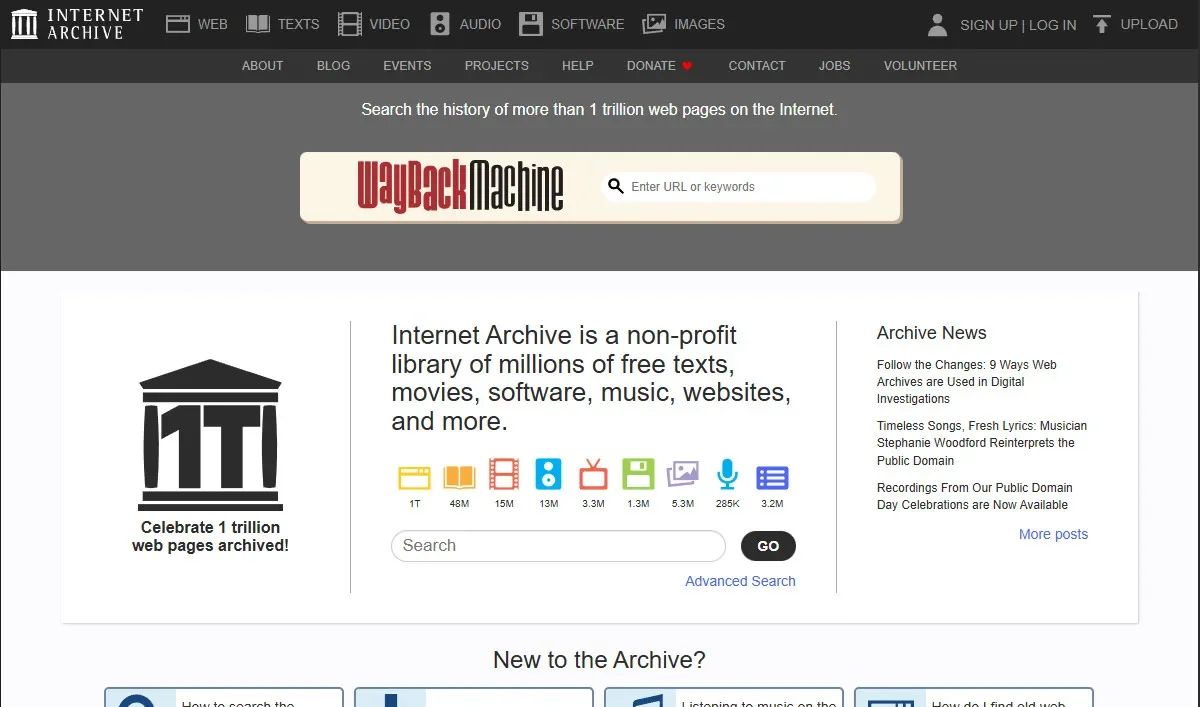
Screenshot of Internet Archive | HighSpeedInternet.com
If you have a dead link to where the page used to be, or a link that goes to a newer version of that page, you can right-click on the link, copy the address, and then paste it into the Wayback Machine. You can also get a page’s address by opening up the HTML code of a page that links to it, or by looking through your browser history if you’ve visited it before.
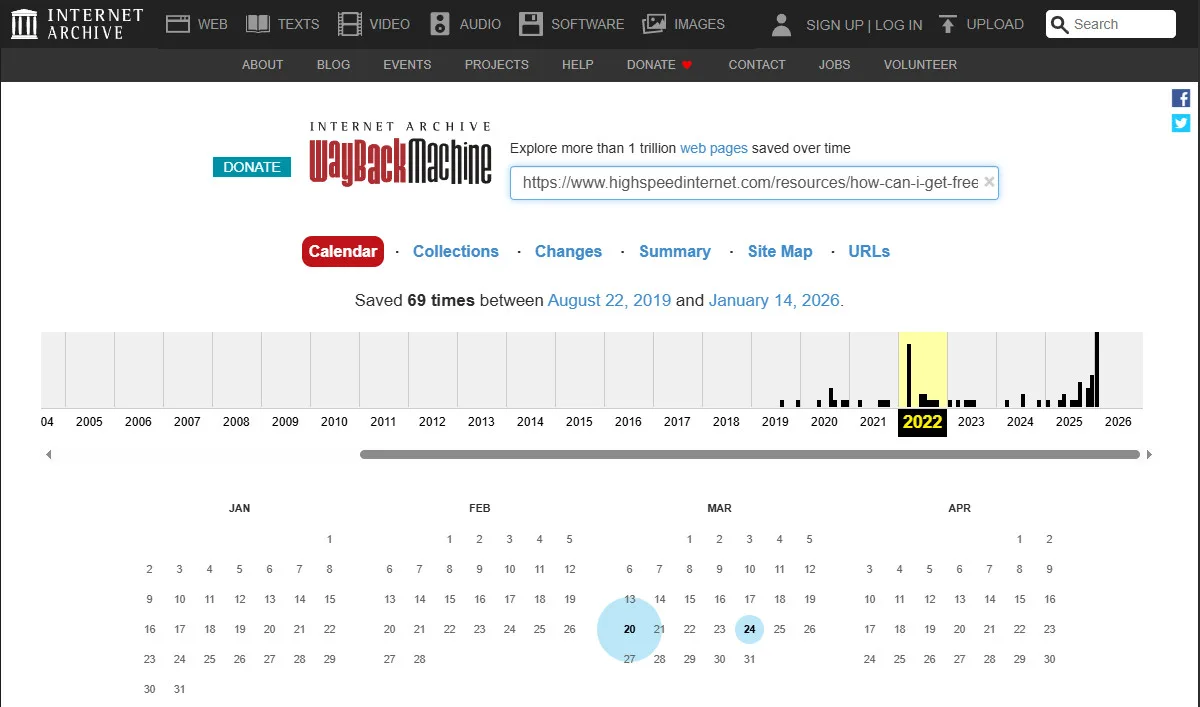
Screenshot of Internet Archive | HighSpeedInternet.com
Once you enter the URL, the Wayback Machine will show you how many times, if any, the page has been archived. Along the top of the page, it displays a graph of how often the page has been recorded with a calendar of dates below.
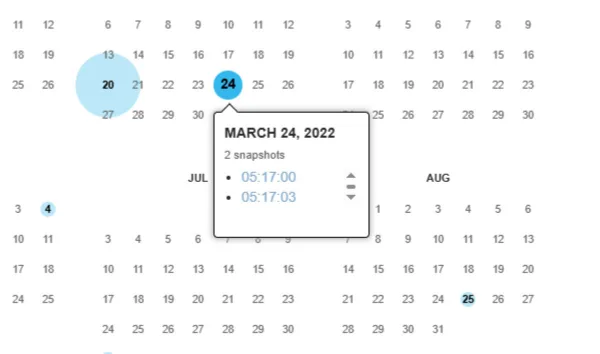
Screenshot of Internet Archive | HighSpeedInternet.com
To look at a specific snapshot of the page you’re looking for, first click on one of the years when the page has been archived. Then, hover over one of the calendar dates and select the timestamp of the one you want.
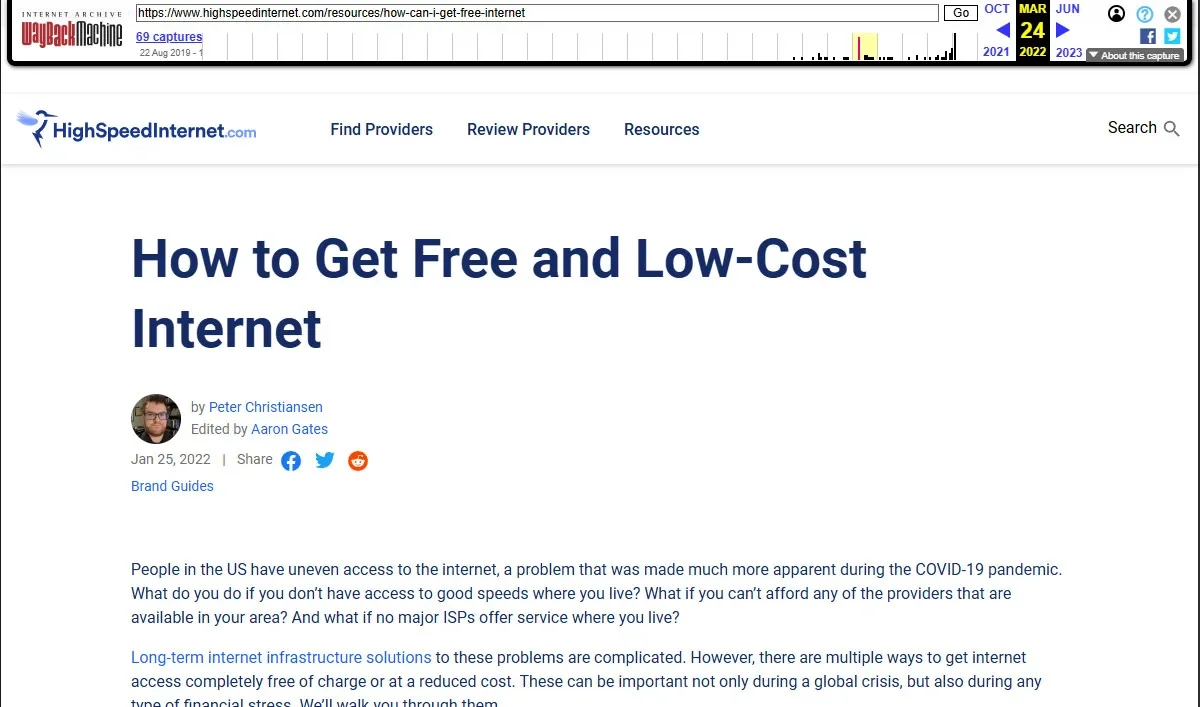
Screenshot of Internet Archive | HighSpeedInternet.com
The Wayback Machine will then display the archived version of the page you’re looking for, below a timeline of snapshots that allow you to look at the page going forward and backward in time.
Depending on how the original webpage was created, not all the content on the page will be able to display exactly as it did in the past. For example, images on the page that were linked from other sites might not display. And if the page links to a style sheet that wasn’t archived, the formatting might not work correctly. Regardless, the content of the page should still be there, which is usually the most important part.

Pro tip:
Retrieving a page from a huge database like the Internet Archive is a much slower process than connecting to a web server, so expect very long load times when pulling up old pages.
What if I don’t know the URL?
If you don’t have the exact URL of the page, there are a few more ways to find it. If you know the name of the site the page is on or another site that would have had a link to it, you can search for one of those pages, then look for a snapshot of that page at a time when that link was still there.
When you click on a link in the Wayback Machine, instead of taking you to a live version of that page, it will try to send you to an archived version. This means that in addition to going to specific pages, you can explore entire sites, as long as all their pages have been archived.
If you can’t remember the addresses of any sites related to the page you’re looking for, you can also search the Wayback Machine using a keyword. Unlike a Google search, which will try to figure out the most relevant pages to your search term, the Wayback Machine tends to prioritize sites with the keyword in the URL or in the title of the page. If you’re going to search by keyword, it’s a good idea to look for the homepage of the site you’re looking for, rather than a specific page.
Why is the Internet Archive so important?
While the Internet Archive is great for indulging in nostalgia, it also serves an important function. Large parts of our society, from politics to news reporting to scientific research, operate primarily online. Online platforms are great for reaching a large audience quickly, but most people aren’t thinking about long-term preservation when they make a blog post. Link rot is surprisingly common, even on prominent websites, so learning how to get past a broken link is a valuable skill.
One place where you might notice the Internet Archive being used extensively is on Wikipedia. References that link to webpages often have an additional link taking you to a page “archived from the original” so that you can see the actual information the editor was citing, even if the page no longer exists. In fact, the Internet Archive spent years looking for broken links in Wikipedia pages and ended up fixing over nine million broken links.
Lawyers also frequently make use of the Internet Archive to strengthen their cases. Public statements posted by a company on its website or posts made on someone’s personal blog can be relevant to a wide range of cases. It can be especially useful when one party realizes that it’s done something wrong and tries to quickly erase its mistake.
The Internet Archive is a great tool for anyone to have in their toolbelt. If you’re writing a school paper on the dot-com bubble, it might be helpful to see what the actual Pets.com website looked like at the time when it was spending millions of dollars on Super Bowl ads. If you’re pitching a website redesign to your boss, you might want to research how the competition’s site has changed over the years. A savvy internet user should be as familiar with the Internet Archive as they are with Google or Wikipedia.
The bottom line: The internet is forever
Whether you’re trying to win a bet with your friend or prove a point in a lawsuit, the Internet Archive is an invaluable resource. Much like Wikipedia, it’s a passion project that has gone on to benefit everyone on the internet, even if we don’t always realize it. If you get a lot of use out of it, you might consider making a donation. And even if you don’t, it’s good to remember that it’s there the next time you’re about to post your latest hot take on your blog.
Author - Peter Christiansen
Peter Christiansen writes about telecom policy, communications infrastructure, satellite internet, and rural connectivity for HighSpeedInternet.com. Peter holds a PhD in communication from the University of Utah and has been working in tech for over 15 years as a computer programmer, game developer, filmmaker, and writer. His writing has been praised by outlets like Wired, Digital Humanities Now, and the New Statesman.
Editor - Jessica Brooksby
Jessica loves bringing her passion for the written word and her love of tech into one space at HighSpeedInternet.com. She works with the team’s writers to revise strong, user-focused content so every reader can find the tech that works for them. Jessica has a bachelor’s degree in English from Utah Valley University and seven years of creative and editorial experience. Outside of work, she spends her time gaming, reading, painting, and buying an excessive amount of Legend of Zelda merchandise.
Related Posts