Is Valorant Down?
How to troubleshoot a Valorant outage and get back to gaming.

Jun 25, 2026 | Share 


Home Networking, How-To, Internet Outage

Did your connection slip right when you had an agent in the crosshairs? Don’t fret; Riot Games makes troubleshooting Valorant outages and lag easy with its official channels. While Riot runs scheduled maintenance often, unexpected and widespread outages are rare.
We’ll show you how to find out if the Valorant servers are online. If you don’t find any evidence of an outage, use our Valorant-specific troubleshooting steps to find issues with your system or local network. We’ve provided steps and links to every solution below.
How to troubleshoot a Valorant outage
Thankfully, Riot Games makes it easy to find information on the status of all its games, and it regularly posts updates to social media on known issues. If Valorant is offline because of an outage or maintenance, all you can do is wait for it to be resolved.
If you can’t find evidence of an outage, it’s time to look at Valorant error codes and run through a couple of troubleshooting steps to rule out an issue with your system or home network.
Check the Riot Games server status page
Riot Games maintains a reliable server status page for its multiplayer games. This should be your first stop when running into connection issues with Valorant.
Step 1: Navigate to the Riot Games Service Status Page.
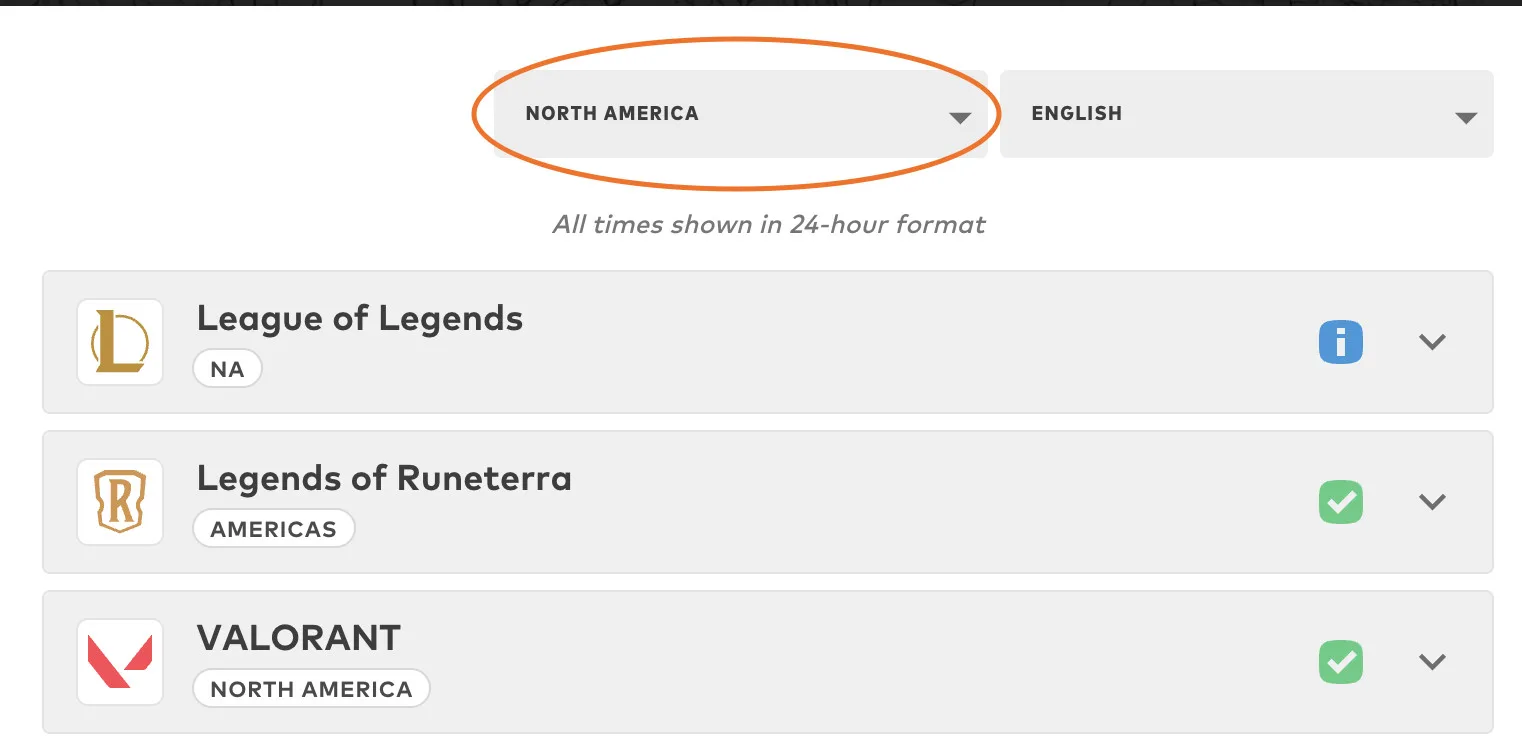
Step 2: Select your region.
Step 3: Click on Valorant.
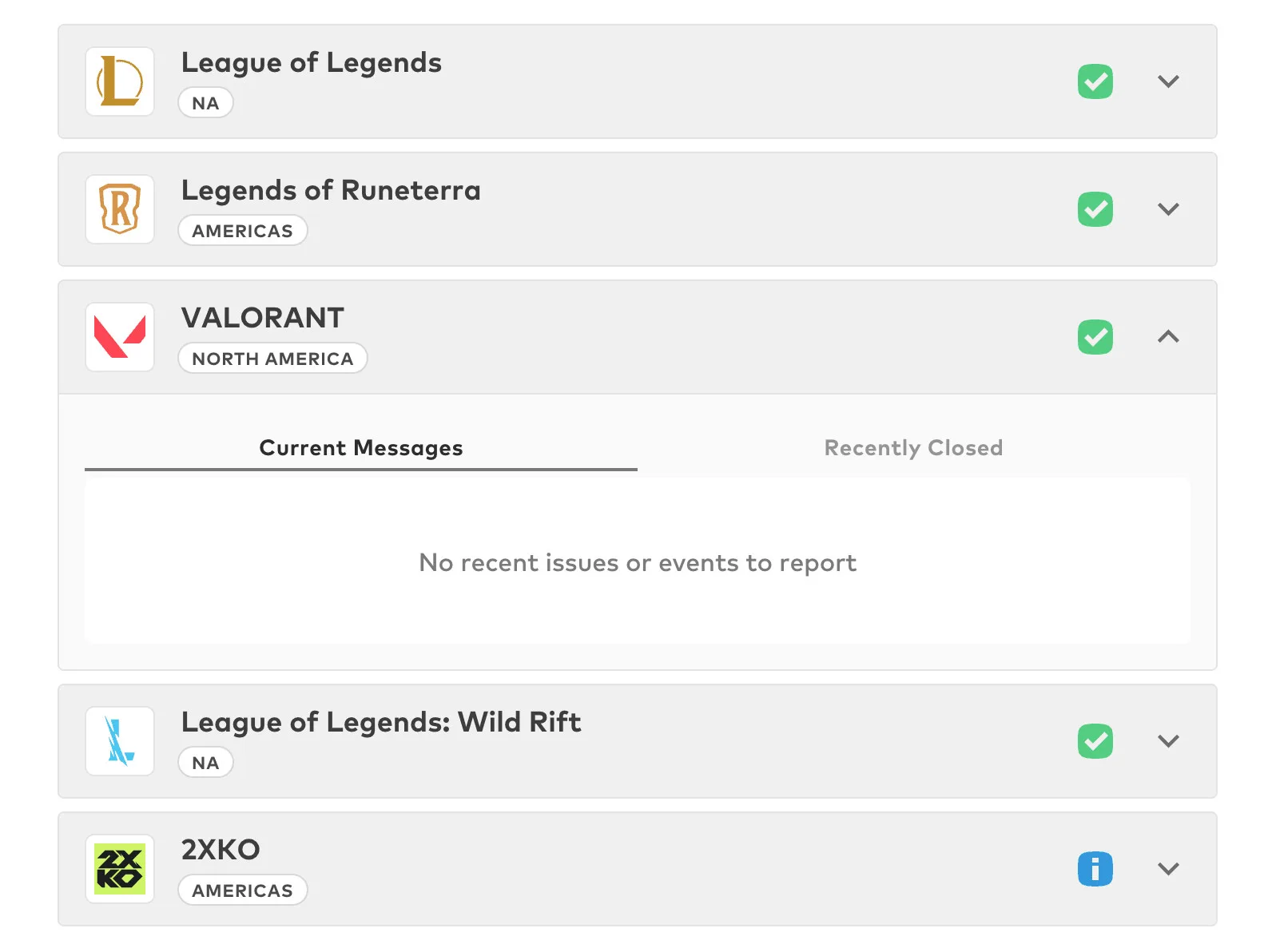
Step 4 (what to look for): A red or yellow warning icon or a critical-labeled message signals an unexpected service issue with the servers, while blue icons may notify of planned maintenance. The status details are important, so be sure to read the description. All is well in the example above.
If Valorant is in the middle of an outage or an update, all you can do is wait for it to come back online.
Look for outage reports on social media
Sometimes it may take a bit for an issue to be officially recognized on the Riot server status page, in which case you should head over to X and check the official Riot Support handle or run a broad search for Valorant reports.
- Check the official @RiotSupport Riot routinely posts about unexpected outages, login errors, extended maintenance windows, or disabled features (like when Clash mode or Ranked queues get temporarily turned off).
- Search keywords like “Valorant down” or “Valorant servers” on X and filter by latest. If thousands of players just got booted, you’ll see an immediate flood of reports and probably a lot of memes and angry tweets.
- Check r/VALORANT/ on Reddit. If there’s a widespread issue, odds are high that someone is posting about it.
Learn if others are experiencing issues
If you haven’t found the info you need, check a third-party down detector’s Valorant page. Outage detector sites can tell you how many people have reported a Valorant issue in the last 24 hours. This is helpful, but also prone to false positives and negatives. Pay close attention to the actual numbers represented in the charts. Outage trackers are useful tools, but take the data with a grain of salt.
What if the servers are up, but you still can’t connect?
The Riot servers might be running perfectly fine, but loading very slowly or not at all due to a local issue with your home network or internet connection.
Check for Valorant error codes, restart Vanguard, and check your system
If all the status trackers show a healthy green light, the issue is likely a mismatch between your PC, Riot’s anti-cheat software (Vanguard), and your network. Run through these rapid-fire troubleshooting steps:
- Look up the error code: If you see a specific error number on your screen (like VAL 5, VAL 19, or VAL 43), Google that exact code. For example, VAL 43 usually means the system failed to fetch your player account details, which can often be solved by simply restarting the Riot Client.
- Restart Riot Vanguard: Valorant‘s anti-cheat software runs deep in your system and can easily cause connection blocks if it hits a snag. Right-click the Vanguard tray icon (the little red shield in your Windows taskbar), select Exit Vanguard, and then restart your computer to force a clean reboot of the service.
- Check your system clock: If your PC’s time and date do not perfectly align with real-world time, Vanguard’s security certificates will fail authentication, leading to endless login errors. Right-click your Windows clock, hit Adjust date/time, and click Sync now.

Pro tip:
If you manage to log back in after a crash but notice your ping is fluctuating heavily or the client feels sluggish, do not queue for Competitive. Losing RR because of unstable server routing is a terrible way to drop a rank. Stick to Swiftplay or the Range until the connection stabilizes.
Check your internet connection
If you still can’t get into your game, there’s a good chance your internet connection is the problem. Your best first step is to run a quick speed test. A speed test provides you with a bunch of useful info (like download speed and ping) along with verification that your connection is indeed working.
If you don’t get results at all, you’re either experiencing an internet outage or there’s something wrong with your home network. If you get results but they’re slower than what you’re paying for, check out our tips to improve your connection.
Valorant requires a rock-solid, packet-loss-free connection. If you are playing on Wi-Fi, try hooking up an Ethernet cable temporarily to see if local wireless interference is causing you to drop packets and time out from the game host.
Is your internet slowing down your gaming?
Run our speed test to check if your connection is keeping up with your games.
Download speed
000 Mbps
Upload speed
000 Mbps
Latency (ping)
00 ms
Jitter
00 ms
Upgrade your internet plan
Fast-paced shooters like Valorant benefit greatly from a zippy connection with lightning-quick latency times.
These days, it’s easy to find a better deal on internet service, and customers have more options than ever with new technologies. Plug your zip code into the search below and see if there’s a better internet plan in your future.

Tired of losing to lag?
Enter your zip below to find faster internet service in your area.
Author - Austin Aguirre
Austin worked as a broadband technician installing and troubleshooting countless home internet networks for some of the largest ISPs in the U.S. He became a freelance writer in 2020 specializing in software guides. After graduating with a BS in technical communication from Arizona State University, he joined the team at HighSpeedInternet.com where he focuses on home network improvement and troubleshooting.
Editor - Jessica Brooksby
Jessica loves bringing her passion for the written word and her love of tech into one space at HighSpeedInternet.com. She works with the team’s writers to revise strong, user-focused content so every reader can find the tech that works for them. Jessica has a bachelor’s degree in English from Utah Valley University and seven years of creative and editorial experience. Outside of work, she spends her time gaming, reading, painting, and buying an excessive amount of Legend of Zelda merchandise.
Related Posts