Are You Missing Out on Xfinity’s WiFi PowerBoost?
How to log in, stay safe, and unlock gig speeds for free

Aug 7, 2026 | Share 


Brand Guides, How-To, Technology
Xfinity Mobile customers can hit hotspot speeds up to 1Gbps thanks to WiFi PowerBoost, a proprietary technology that turns Xfinity’s public Wi-Fi network into a gig-speed connection for eligible phones.
You don’t need Xfinity Mobile to use Xfinity’s hotspots, though — any Xfinity internet subscriber gets free access to the network. PowerBoost is the extra layer: it requires an Xfinity Mobile line, a nearby XB7 or XB8 gateway, and a compatible device (iPhone 12 or later, or select Samsung phones).
With 23 million secure hotspots across the Xfinity footprint, that speed boost is easy to find.

Is Xfinity an option where you live?
Enter your zip code for a list of every local provider.
How Xfinity hotspots work
When you log in to one of Xfinity’s free hotspots with an Xfinity Mobile device, you get speeds of up to 1Gbps automatically. Those mobile speeds are available regardless of your Xfinity Internet tier, so can be a great way to enjoy fast speeds on your phone while sticking to a budget.
Xfinity offers these secure hotspots using the wireless gateways it supplies to residential and business customers. In addition to hosting the password-protected private network used in homes and businesses, the gateways broadcast additional public networks that allow guests to sign in using their own Xfinity logins.
It means you can sign into Xfinity in most neighborhoods and business areas where Xfinity offers internet service. Even if some Xfinity customers disable the gateway’s hotspot or use their own networking equipment, other customers likely participate.
How to access WiFi PowerBoost
You need three things to enjoy gig speeds with Xfinity’s WiFi PowerBoost:
- An Xfinity Mobile subscription
- Proximity to an Xfinity gateway (models XB7 and XB8 qualify)
- An Apple iPhone 12 or later or certain Samsung smartphones
To access your faster speeds, use your Xfinity Mobile device to connect to Xfinity Wi-Fi. If the network is using the right gateway, the faster speeds will be automatic.
How to sign in to an Xfinity hotspot
Even if you don’t have the right devices for WiFi PowerBoost, you can use Xfinity hotspots as long as you’re a paying internet customer.
The first step is finding a legitimate Xfinity hotspot. If you know you’re in an Xfinity area, just open your Wi-Fi settings on your phone, tablet, or laptop and look for one of these secure networks:
- xfinitywifi
- XFINITY
- Xfinity Mobile
From there, you can either connect through the Xfinity app for Android or Apple, or tap the network and sign in using your Xfinity ID and password. If you use the app, you’ll connect to secure hotspots anywhere they’re available.
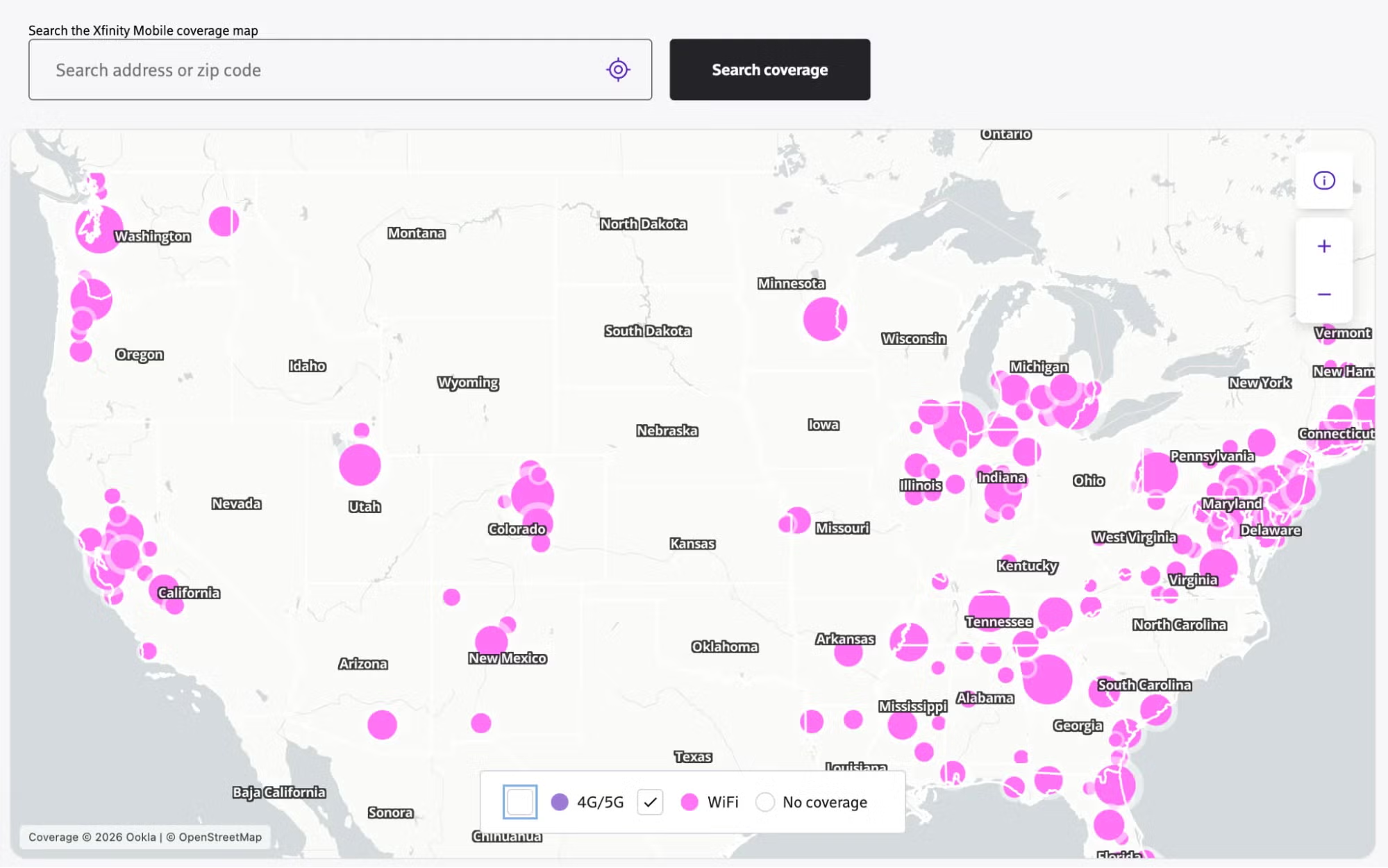
If you don’t see any of the above networks, use the Xfinity hotspot map to locate a secure hotspot nearby.

Pro tip: Turn on Wi-Fi calling
Wi-Fi calling swaps your cellular signal for a Wi-Fi connection, converting your calls into data and routing them over whatever network you’re on. It snaps back to cellular automatically the moment you’re out of range. Turning it on takes three taps: Settings > Cellular > Wi-Fi Calling on iPhone, or Phone app > Settings > Wi-Fi Calling on Android.
Is my internet router acting as a public hotspot?
Yes, there’s a good chance your gateway (router + modem) is acting as a public hotspot if you’re an Xfinity internet customer. It won’t slow down your private network, though, and you could get speeds that are even faster than you pay for on certain mobile devices, thanks to WiFi PowerBoost technology.
Other providers that offer free Wi-Fi hotspots
Xfinity makes its secure hotspots available to all Xfinity internet customers, not just Xfinity Mobile customers. It’s a great perk, and it may work if you’re in an Optimum footprint rather than an Xfinity one thanks to the CableWiFi™ alliance. To log in, look for the CableWiFi network name (SSID) in your device’s Wi-Fi settings.
The project kicked off in 2012, but we haven’t heard providers talk about it lately. However, many other big internet providers offer their own hotspots. The biggest brands are Xfinity, Cox, Optimum, and Spectrum. AT&T also offers hotspots, but they’re for AT&T Mobile customers, not necessarily AT&T Fiber or AT&T Internet Air subscribers.
Learn more about other secure hotspots from internet providers.
How to tell whether a hotspot is safe (and legit)
Before you connect to anything labeled “xfinitywifi” check the spelling. Evil twin hotspots love to spoof those exact names, sometimes with a stray character or extra space. Once you’re on their network, they can see everything you send.
Better yet, skip picking from the Wi-Fi list entirely. Connect through the mobile app so you’re not just eyeballing SSIDs and hoping you get it right.
Even on a legit hotspot, treat it like any public network: stick to HTTPS sites and run a VPN if you’ve got one. Then, be careful about the info you give. Don’t log into banking apps, enter card numbers, or type sensitive passwords while you’re on public Wi-Fi. Save that for your home network.
How hotspots boost your cell phone speed
Using a hotspot means you’re connecting to Wi-Fi rather than relying on the best-available cellular network, and that means speeds that are faster and more reliable (most of the time). If you’re an Xfinity customer, it gets even better. Thanks to WiFi PowerBoost technology, you could see speeds up to 1Gbps on hotspots all around town.
How hotspots reduce mobile data usage
When you connect to a Wi-Fi hotspot, your phone doesn’t use mobile data. You’re free to stream, scroll, or download while connected to a hotspot, and none of it counts against your data allowance.
If you don’t spend most of your time on Wi-Fi, you need a great mobile data plan, and you’ll probably want to use your phone to tether a tablet or laptop on occasion. Learn more about the best unlimited hotspot data plans of 2026.
When provider hotspots make sense
Provider hotspots are great for anyone trying to reduce reliance on a limited mobile data plan. Frequent travelers, commuters, gig workers, and budget-conscious users in dense metro areas benefit most, since hotspot coverage is typically strongest in cities and along common travel routes.
They’re less useful in areas with sparse hotspot coverage, including many rural regions. Anyone handling sensitive work data should avoid relying on them, and they may not be worth the trouble if you pay for unlimited premium data on your mobile plan.
My take: Use your hotspots—you pay for them anyway
If you pay for Xfinity internet, it makes sense to use secure Xfinity hotspots any time you need them. They can improve your speeds and reliability and save you on data, and they don’t carry the same risks as free public hotspots or ones you’d find at a coffee shop or restaurant.
I also think it makes sense to let your Xfinity gateway act as a public hotspot because it won’t impact your speeds or security, and it can be helpful to visitors and neighbors. Xfinity won’t publish your address either. I get that this one’s a personal choice, though. If you would rather share a QR code with guests so they can log onto your home network or use Bridge Mode to add an independent router and create your own guest network, go for it!
If you’re not yet an Xfinity customer but thinking about switching, keep the hotspot network in mind. It’s a great way to keep your speeds fast and reliable all around town, and it won’t cost you one penny extra.
FAQ about Xfinity hotspots
Do I pay extra for Xfinity hotspots, or are they included?
Author - Chili Palmer
Chili Palmer covers home tech services, with a special focus on understanding what families need and how they can stay connected on a budget. She handles internet access and affordability, breaking news, mobile services, and consumer trends. Chili’s work as a writer, reporter, and editor has appeared in publications including Telecompetitor, Utah Business, Idaho Business Review, Benton Institute for Broadband & Society, and Switchful.com.
Editor - Jessica Brooksby
Jessica loves bringing her passion for the written word and her love of tech into one space at HighSpeedInternet.com. She works with the team’s writers to revise strong, user-focused content so every reader can find the tech that works for them. Jessica has a bachelor’s degree in English from Utah Valley University and seven years of creative and editorial experience. Outside of work, she spends her time gaming, reading, painting, and buying an excessive amount of Legend of Zelda merchandise.
Related Posts