Public Wi-Fi Statistics: How Do We Use It, and Is It Safe?

Sep 3, 2026 | Share 


Data and Research, Industry Exclusive/Entertainment
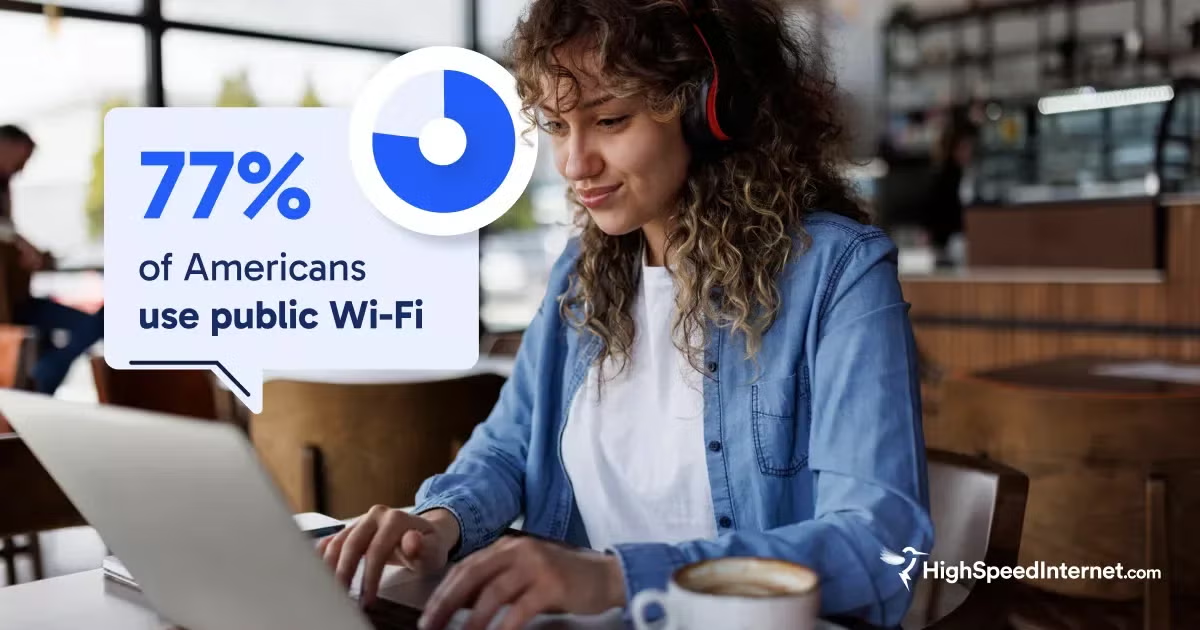
In a study by HighSpeedInternet.com, 77% of respondents reported using public Wi-Fi networks. Most Americans rely on free public Wi-Fi to lower cellular data usage while away from home, but this reliance exposes devices to security threats that many users cannot identify or prevent.
On this page:
What is public Wi-Fi? | Logging into provider hotspots | Connecting to free Wi-Fi | Why people use public Wi-Fi | Is public Wi-Fi safe? | Choosing a network | ‘Evil twin’ Wi-Fi attacks | Staying safe on public Wi-Fi | Antivirus and security software | Using a VPN in public | Conclusion | Methodology
On this page:
What is public Wi-Fi?
Public Wi-Fi networks allow users to access the internet in shared spaces such as cafes, airports, and hotels without using mobile cellular data. These connections broadcast signals through local wireless access points, functioning similarly to home Wi-Fi setups. Unlike private home networks protected by individual passwords, public networks are accessible to anyone within signal range.
For individuals looking for temporary internet access without a mobile data plan, finding free public hotspots at local libraries or community centers provides a direct connection point while away from home.
How do people log into their provider’s hotspot?
Many internet service providers (ISPs) maintain nationwide networks of public hotspots for their subscribers. You can connect to ISP hotspots either automatically or by manually logging in.
| How users log in to their ISP's hotspot | Stratified answers (%) |
|---|---|
| It happens automatically | 35.51% |
| Log in through the provider's app | 28.13% |
| Enter account name and password in Wi-Fi settings | 25.67% |
| I don't know | 10.69% |
Our data reveals that 36% of users connect to provider hotspots automatically, while 28% authenticate through a provider application. Another 26% manually enter account credentials in their device settings, and 11% are unsure how their device connects.
Connecting to free Wi-Fi in public
When Americans hop on public Wi-Fi, they’re usually somewhere they’d stop anyway. Think grabbing food, staying overnight, or working on the go. Restaurants and hotels top the list.
| Location | Stratified respondents (%) |
|---|---|
| Restaurants or fast food | 46.23% |
| Hotels | 44.20% |
| Coffee shops or cafes | 39.69% |
| Stores or retail | 29.16% |
| Hospitals or doctor's offices | 27.95% |
People use public Wi-Fi where they would already linger. A meal, a hotel stay, or a break for coffee involves enough downtime to make connecting to Wi-Fi worth it, unlike a quick stop at a gas station or convenience store.
Restaurants and fast-food spots lead the way at 46%, with hotels close behind at 44%. Coffee shops and cafes come in at 40%, retail stores at 29%, and health care facilities at 28%.
Why do people use public Wi-Fi?
Managing monthly mobile data limits drives the majority of public Wi-Fi usage.
| Main reason for connecting | Stratified answers (%) |
|---|---|
| To cut down on cellular data usage | 51.38% |
| To work from locations other than office/home | 17.84% |
| To stream content | 17.53% |
| Better than home internet | 7.31% |
Saving on cellular data is the biggest reason people have for connecting to public Wi-Fi. Remote work and streaming tie for a distant second at 18% each, and a smaller 7% actually get faster speeds on public Wi-Fi than at home. If joining a stranger’s network feels like a bridge too far, a mobile hotspot from a cell plan can give a private connection instead.
Is public Wi-Fi safe?
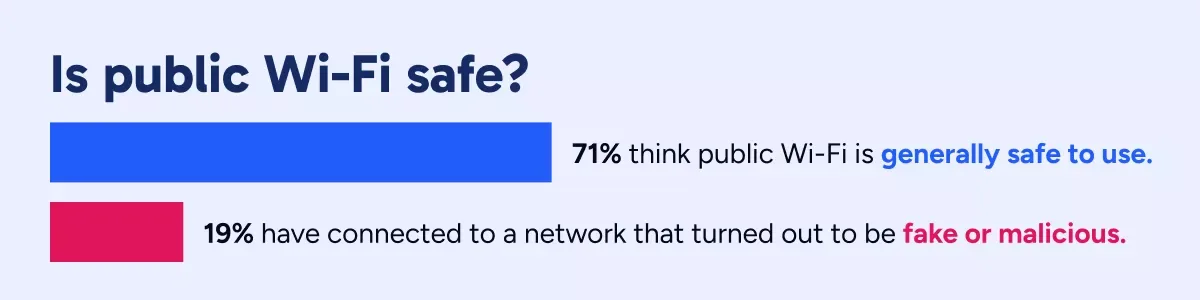
Most people trust public Wi-Fi, even though 19% of respondents have connected to a fake or malicious one.
| Security awareness and behavior | "Yes" (%) |
|---|---|
| I think public Wi-Fi is generally safe to use. | 70.78% |
| I have avoided doing something like online banking. | 63.10% |
| My phone connects to known Wi-Fi hotspots automatically. | 56.51% |
| I have changed a password after using public Wi-Fi, out of caution. | 38.63% |
| I have connected to a fake or malicious network. | 19.12% |
71% of respondents consider public Wi-Fi generally safe to use, but that doesn’t mean they aren’t cautious. 63% avoid sensitive activities like online banking when connected, and 19% have already landed on a fake or malicious network. Knowing how safe free Wi-Fi is before you connect can help you decide when the risk is worth it.
How do people decide which network to join?
Airports are one of the trickiest places to pick a network, with multiple open options, similar-sounding names, and no easy way to tell which one is legitimate. 23% of respondents said they’ve used public Wi-Fi at an airport, and when we asked how they’d choose between something like “Airport_WiFi” and “Airport_WiFi_Free,” the answers were more about convenience than verification.
| How users decide which network to join | Stratified answers (%) |
|---|---|
| Pick the strongest signal. | 40.33% |
| Ask the staff. | 25.25% |
| Pick the one I've used before. | 18.98% |
| I just guess. | 15.43% |
40% pick whichever network has the strongest signal. Another 25% ask a staff member for the official name, 19% go with one they’ve connected to before, and 15% just guess.
What are evil twin Wi-Fi attacks, and how does network spoofing work?
An evil twin attack happens when someone sets up a Wi-Fi network that copies the name and look of a legitimate public hotspot. Once a device connects to the fake one, whoever sets it up can watch or log the traffic passing through.
| Cybersecurity threat awareness | "Yes" (%) |
|---|---|
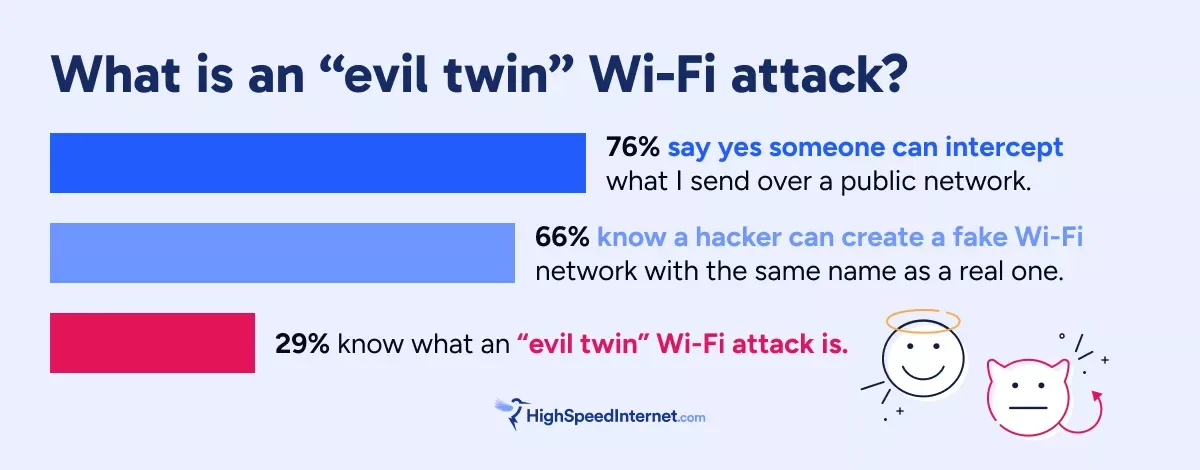
| Someone can intercept what I send over a public network. | 76.19% |
| I know I could have my information stolen while using public Wi-Fi. | 75.96% |
| A fake login or sign-in page can steal my info on public Wi-Fi. | 75.09% |
| Malware can be installed through a public network. | 70.41% |
| I know a hacker can create a fake Wi-Fi network with the same name as a real one. | 65.66% |
| I'm confident I could tell a real public Wi-Fi network from a fake one. | 49.17% |
| I know what an evil twin Wi-Fi attack is. | 29.13% |
76% of respondents know that data sent over public networks can be intercepted, and 66% know that someone can duplicate a network name. But only 29% recognize the term “evil twin attack,” and 49% say they could tell a real network from a fake one.

Fewer than half of internet users feel confident they can distinguish a real public Wi-Fi network from a fake one. Image credit: HighSpeedInternet.com
Understanding structural security flaws in your Wi-Fi helps clarify how unencrypted broadcast signals allow third parties to view unencrypted traffic on shared channels.
Staying safe on public Wi-Fi
A few simple habits go a long way toward reducing exposure on public networks.
| Safety habits on public Wi-Fi | "Often" or "Always" combined (%) |
|---|---|
| Check whether a website uses "https" | 33.77% |
| Turn off Wi-Fi when not actively using it | 32.66% |
| How concerned are you about your personal info being exposed | 31.75% |
| Leave Wi-Fi auto-join turned on | 28.61% |
| Use hotspots from your internet provider when away from home | 26.94% |
| Verify a network's name with an employee | 24.75% |
A few habits reduce exposure on public networks, though most people don’t practice them regularly. 34% check for HTTPS encryption in their browser bar, 33% turn off Wi-Fi when they’re not using it, and 25% verify the network name with a staff member before connecting.
Do people protect their devices with security software?
Antivirus software on the device itself adds a second line of defense when the network can’t be trusted.
| Antivirus/security software on device used for public Wi-Fi | Stratified answers (%) |
|---|---|
| Yes | 40.28% |
| No | 43.58% |
| Don't know | 16.14% |
Only 40% of respondents have active antivirus or security software on the device they use for public Wi-Fi. 44% don’t, and 16% aren’t sure either way.
Using a VPN in public
A virtual private network (VPN) encrypts the traffic leaving your device, so anyone watching the network can’t read what you’re sending.
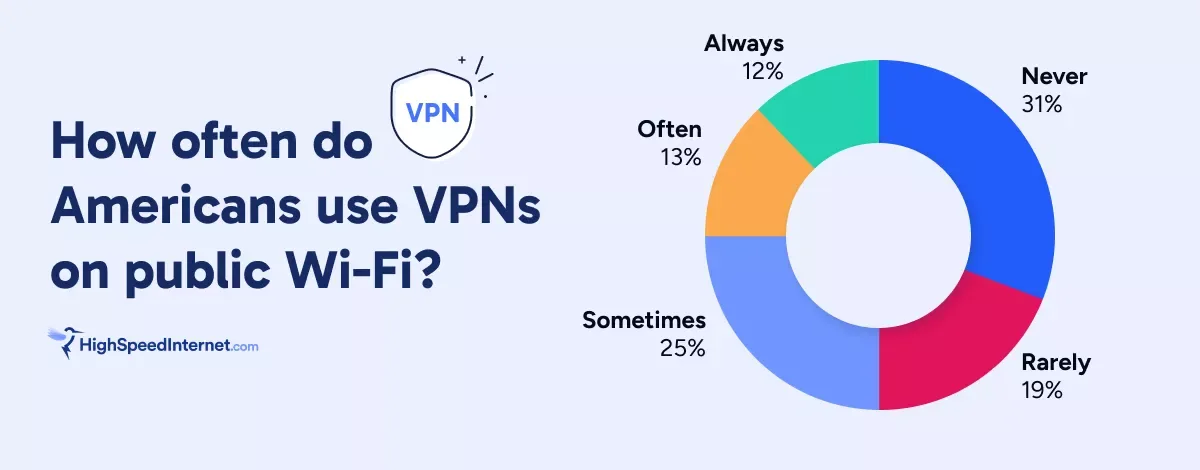
31% of public Wi-Fi users never use a VPN, while 12% always turn one on. Image credit: HighSpeedInternet.com
| Frequency of VPN use on public Wi-Fi | Stratified answers (%) |
|---|---|
| Never | 31.43% |
| Sometimes | 24.51% |
| Rarely | 18.82% |
| Often | 13.22% |
| Always | 12.02% |
Even though most people know their data can be intercepted on public Wi-Fi, they’re still slow to adopt regular use of VPNs. 31% of public Wi-Fi users never use a VPN, 19% rarely do, 25% use one sometimes, 13% often, and 12% always.
For anyone weighing it, there are plenty of reasons to use one on public networks, simple ways to confirm it’s working, and a fair question about whether it slows your connection down.
The bottom line on public Wi-Fi safety
More than three-quarters of Americans use public Wi-Fi regularly, mostly to save on cellular data. But few take steps to protect themselves once they’re connected. Fewer than half have security software on their devices, only a quarter use a VPN often or always, and 15% pick a network by guessing. Public Wi-Fi keeps getting easier to find. Making it safer to use is still up to the person connecting.
Methodology
HighSpeedInternet.com surveyed 1,000 adult internet users on Aug. 14, 2026, to analyze public Wi-Fi usage habits, security awareness, and ISP hotspot connections. The survey was conducted online via Pollfish. Results were then post-stratified to establish a representative sample of internet users across the United States.
Author - Tim Tincher
Tim Tincher is a Media Relations Specialist at HighSpeedInternet.com, where he connects journalists with data-driven insights on internet, mobile, and consumer tech. He has secured coverage in outlets like Ars Technica, CNBC, The New York Times, and USA Today, with his work syndicated across NBC affiliates and local broadcast sites. His research on broadband funding and consumer trust has also been featured in trade outlets such as Telecompetitor. HighSpeedInternet.com provides journalists with exclusive survey data, state-by-state broadband access and funding analysis, and expert insights for timely, data-driven stories.
Editor - Jessica Brooksby
Jessica loves bringing her passion for the written word and her love of tech into one space at HighSpeedInternet.com. She works with the team’s writers to revise strong, user-focused content so every reader can find the tech that works for them. Jessica has a bachelor’s degree in English from Utah Valley University and seven years of creative and editorial experience. Outside of work, she spends her time gaming, reading, painting, and buying an excessive amount of Legend of Zelda merchandise.
Related Posts