What’s the Cheapest Way To Stay Connected in a Natural Disaster?
Without reliable power or Wi-Fi, here's your backup plan

Jul 7, 2026 | Share 


Emergency, Internet Buying Guides
The easiest way to stay connected during a disaster is to use your smartphone. For a few dollars and five minutes of trouble, you could add a backup eSIM. If you don’t think you’ll need to evacuate, the cheapest way to stay connected is a router with backup 5G internet. If you want to stay connected even if 5G towers are down, your cheapest option is to buy a Starlink Mini Kit and sign up for a standby plan.
I’ll get into the pros and cons of each option below, but you should start by seeing which internet providers are available at your address now. If you’re lucky, you might be able to get backup 5G internet or cheap mobile bundles without paying extra.

Start by knowing all your options
Enter your zip for a quick list of every provider in your area.
How I rank each emergency connectivity solution
Not all emergency connectivity solutions are worth the time and expense. Read on for more details, but here’s my quick take (ranked from cheapest to most expensive):
- Use your smartphone: Free, but won’t work for long without a portable charger
- Get an eSIM backup data plan: Cheap, but complicated
- Router with backup 5G home internet: Affordable and dependable (unless you have to evacuate)
- Standalone hotspot device with data-only plan: Expensive, and rarely worth it
- Starlink Mini Kit + Standby Plan: Bulletproof when you add a portable battery, but pricey
The cheapest option: Your smartphone
The best way to stay connected in a disaster is simple: Just use your smartphone’s data plan. Even if you don’t have unlimited data or run into network congestion, you can use it to contact your family or emergency service, or to get directions to somewhere safe.
If you need to connect to the internet on a second device, such as a laptop or tablet, you can use your phone as a hotspot. It’s not a long-term solution, but it will work in a pinch.
The big difference between now and the recent past is that most mobile plans now have a lot more data than you really need, so you probably won’t run out of high-speed data even if you don’t have Wi-Fi for a few hours.
If you’re on the hunt for a great mobile plan that will work day-to-day and in case of a disaster, check out my recommendations for the best hotspot plans of 2026.

Pro tip: Invest in a portable charger
Even if you have plenty of data, your phone will eventually run out of juice. A portable charger with about 20,000 mAh will let you charge a new smartphone about three times.
You can get a decent one with fast charging ability (20–30W) for $50 or less.
Cheap but technical: Backup eSIM
Wireless networks are more reliable than ever, but they still fail sometimes. In a disaster, your network could get so congested it becomes nearly unusable.
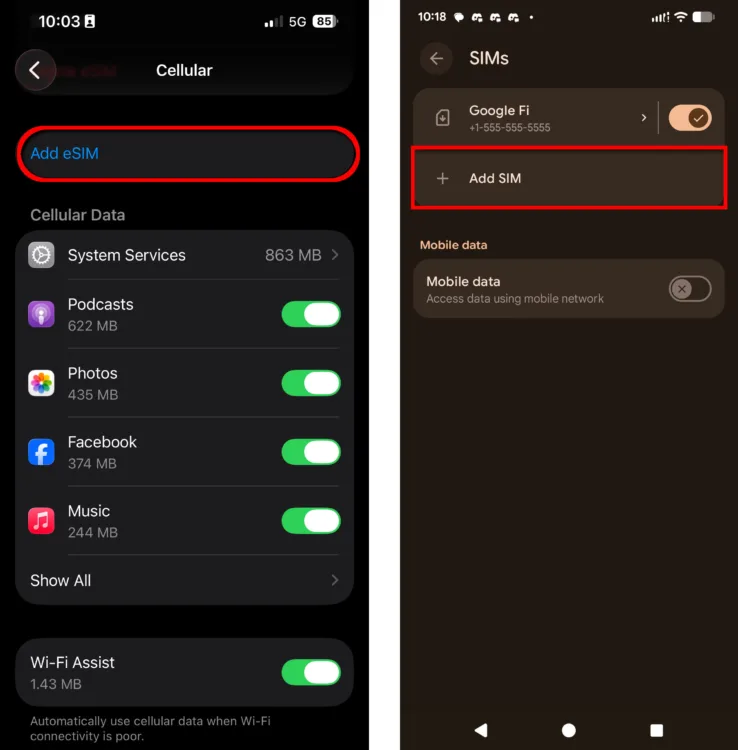
If you want to rely on your phone for connectivity but don’t want to rely on just one network, consider adding a backup eSIM to your smartphone. Instead of popping in a tiny plastic card, you scan a QR code and activate a second line via QR code in about five minutes.
If you choose a prepaid data plan as your backup eSIM provider, this solution could cost as little as $3 with a pay-as-you-go provider such as Keepgo (which piggybacks on the AT&T and T-Mobile networks, depending on your location). Google Fi, Mint Mobile, and US Mobile also offer eSIM-compatible prepaid plans for $15–$25 per month.
Which phones work?
If you have an iPhone XS, XR, or anything newer, you’re good to go. On the Android side, most phones from Samsung, Google Pixel, and OnePlus released in the last few years support eSIM. You can check on your own phone by finding “Cellular” or “SIMs” in your phone’s settings and looking for an eSIM option.
Pro tip: Get free eSIM backup for a year with your internet service
Some of the biggest cable internet companies out there now offer mobile service, and you can try a mobile line free for a year with most of them. If you want an eSIM backup but don’t have any extra cash lying around, consider adding mobile service to your Xfinity, Spectrum, Sparklight, or Breezeline internet service.
With any backup eSIM provider, make sure the wireless network is different from your primary network. Xfinity Mobile and Spectrum Mobile use the Verizon network, for instance, while Sparklight and Breezeline Mobile are AT&T MVNOs.
Affordable but not portable: Backup 5G home internet
Cable and fiber internet service may go down in a natural disaster if local infrastructure is damaged. If you need to ensure internet connectivity at home, even in a bad storm, consider purchasing a router with backup 5G internet capabilities.
Many internet providers offer backup 5G internet as an add-on service. Prices start around $7 per month, but the service is free with certain higher-tier plans.
If you don’t get service from one of those providers, you might want to purchase an Eero Signal router with an Eero Plus subscription.
Pro tip: If you might need to leave, get 5G internet from T-Mobile AWAY instead
Backup 5G home internet is part of your home network, so it won’t work if you have to evacuate. Instead, you’ll need a portable 5G home internet service.
Right now, https://go.highspeedinternet.com/aff_ad?campaign_id=33&aff_id=1002&hostNameId=22063 plan is the best option. At $110 per month, it’s expensive. You can get discounts for bundling with mobile, though, and the internet gateway is included with the monthly price.
Expensive and old school: Standalone hotspot devices
Standalone hotspot devices are still expensive, but aren’t as cool as they used to be. Only a few models take full advantage of 5G, and they aren’t much better than the smartphone you probably already own.
That said, adding a prepaid data plan to a hotspot device you already own can be economical, and it could be a way to keep your whole family connected if you have to evacuate due to a flood, storm, or wildfire.
Here’s a list of all the new hotspot devices I recommend, and you can check out the best data-only plans while you’re at it.
Pricey but bulletproof: Starlink Mini
Starlink Mini connects directly to satellites, so it works even when cell towers are down or overloaded. That makes it the most reliable emergency option on this list, but also the most expensive.
The Mini kit costs around $250 if you buy it outright. The cheapest way to keep it active is the $10-per-month Standby plan. Speeds are barely fast enough for texts, weather updates, and Wi-Fi calling. Fortunately, you can upgrade to a Roam plan any time at about $55 per month, then pause it when you’re back to reliable Wi-Fi. At that tier, you’ll have enough high-speed data for about 10 days of use, and unlimited low-speed data after that.
The Mini dish is small enough to fit in a backpack and has a built-in router. Set it up somewhere with a clear view of the northern sky, and you’re online in minutes. You will need a portable power station to run it, though — the Mini draws 20–40W, and a 500Wh battery will keep it going for about 20 hours.
If you don’t have a large power bank with a three-prong outlet on hand, consider buying the USB-C charger from Starlink and plugging it into your vehicle.
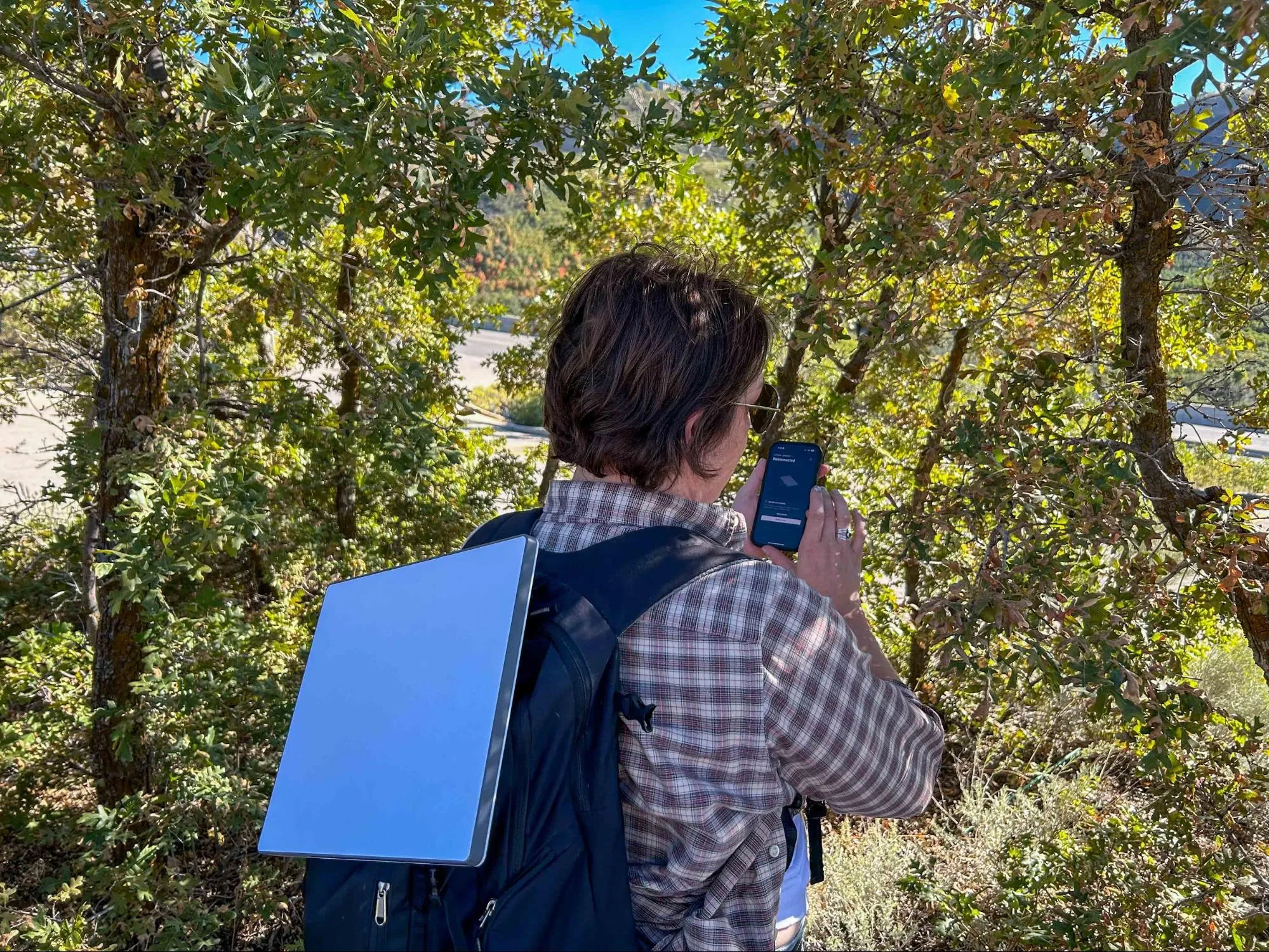
Chili Palmer sets up the Starlink Mini in the foothills of Utah. The Mini dish, which doubles as a router, is small enough to fit into a standard consumer backpack alongside a MacBook and a portable power bank. Katie McEntire | HighSpeedInternet.com
Pro tip: Starlink only works outside
Unlike 5G home internet, Starlink only works when it has a clear view of the sky. In other words, it needs to be outside. The included cords are long enough to run through the window of a cabin or RV, but be mindful of tree cover or obstructions from nearby mountains or buildings.
The Starlink mobile app will help you find the best location and tilt for your receiver dish, but if you can’t get away from obstructions, your latency could be too slow for video calls.
What to consider when planning for connectivity in an emergency
Planning ahead for a potential disaster pays off in peace of mind, but the right solution for you depends on where you live, how much you have to spend, and more. Answer the questions below to make sure you’ll be able to connect in an emergency.
Will you have access to a power source?
It’s possible to lose access to electricity in a natural disaster long before you have to evacuate. In wildfire season, for example, power companies often turn off lines in high-risk areas as a way to prevent fires.
If you’re planning on using your smartphone or a standalone hotspot for emergency connectivity, you won’t need backup for a few hours. However, you’ll need a generator, or a big power bank or UPS (uninterruptible power supply) for 5G internet backup, Starlink, or T-Mobile AWAY.
Get more tips on setting up a tech go bag in case of an emergency.
Will you have mobile data?
Mobile networks are likely to stay operational during disasters, and are usually the first way to get a signal after a storm or fire passes. All the big providers (like AT&T, Verizon, and T-Mobile) outfit their towers with backup power and generator capacity, and they send in fleets of satellite-connected trucks, planes, and helicopters in natural disasters. They also use AI network management to make capacity available where it’s needed, even when demand changes rapidly.
It’s all pretty cool, but you could still lose mobile signal or run into networks that are heavily congested, despite the best efforts of your provider. Alternatively, you could be in a remote area where signal just doesn’t reach.
If there’s a chance you could lose mobile signal entirely, Starlink is your best option for emergency connectivity.
How much can you spend?
Mobile connectivity solutions range from free (your smartphone) to hundreds of dollars (Starlink and standalone hotspot devices, plus service plans). Before you hand over your hard-earned cash, think about the relative importance of internet connectivity in case of a disaster.
Some people absolutely need to be able to connect for health and safety reasons. But if you’re just trying to stay connected so you can browse TikTok or your kids can watch “Ms. Rachel” (again), it may not be worth the cost. Instead, pack a few books and games in your emergency evacuation kit and be grateful for an excuse to disconnect from the wider world for a while.
How many devices will you need to connect?
Modern smartphones can connect a handful of devices with no problem, but you’ll need a standalone hotspot if you want to connect 10 to 15 devices. If you need to connect dozens of people at once, you’ll need 5G internet backup (if you have access to a mobile signal) or a Starlink Mini.
How long will you need emergency connectivity?
If you have a premium mobile plan, you’ll have enough data for about a week of intensive use on a single device. If you’re using hotspot data, you’ll need 1 to 3GB per day for one connected device. If you’re using Starlink’s Roam plan for more than one person, expect to use about 5 to 10GB per day.
My take: Stay connected, and stay safe
You don’t have to be the kind of person who stocks a bunker to think about this staying connected in an emergency. A backup eSIM takes five minutes to set up. A Starlink Mini sits in a closet until you need it.
Whatever you choose, a little planning now can give you peace of mind for whatever comes your way.
Author - Chili Palmer
Chili Palmer covers home tech services, with a special focus on understanding what families need and how they can stay connected on a budget. She handles internet access and affordability, breaking news, mobile services, and consumer trends. Chili’s work as a writer, reporter, and editor has appeared in publications including Telecompetitor, Utah Business, Idaho Business Review, Benton Institute for Broadband & Society, and Switchful.com.
Editor - Jessica Brooksby
Jessica loves bringing her passion for the written word and her love of tech into one space at HighSpeedInternet.com. She works with the team’s writers to revise strong, user-focused content so every reader can find the tech that works for them. Jessica has a bachelor’s degree in English from Utah Valley University and seven years of creative and editorial experience. Outside of work, she spends her time gaming, reading, painting, and buying an excessive amount of Legend of Zelda merchandise.
Related Posts