Wildfire Power Shutoffs Can Kill Your Cell Signal
Make a backup plan for staying in touch during a disaster

Jul 8, 2026 | Share 


How-To
The smartphone in your pocket is your best tool for staying connected in a wildfire evacuation, tornado, or other natural disaster.
But when wildfire risk is high, power can be cut to your entire area long before evacuations are ordered. This prevents cables from sparking new fires, but it can take down local cell towers. Even if some towers stay operational, the network could be too congested to place a call.
You need a plan for low-signal and no-signal situations, and you’ll need to make sure your devices are set up properly for emergencies. Add a backup power source to your evacuation kit, and you’ll be able to stay connected until you can get to safety.
In this guide:
How to prepare | Rely on your smartphone | How to check mobile coverage | Off-grid connectivity | My take
In this guide:
How to prepare while you still have signal
If you live in an area that’s prone to disasters, you can take steps now that will help you stay safe—and connected—in case of a wildfire or other disaster.
Download offline maps
Save your region in Google Maps or Apple Maps while you still have signal, so you can navigate evacuation routes even when the network is down. Plan and practice a few exit routes in advance.
Enable alert apps and check wireless emergency settings
Install an app like Watch Duty (particularly strong in Western wildfire states) for real-time wildfire and evacuation updates sourced from local emergency crews, and confirm Wireless Emergency Alerts are switched on in your phone settings so official warnings reach you automatically. These push through even when you’re not actively checking your phone.
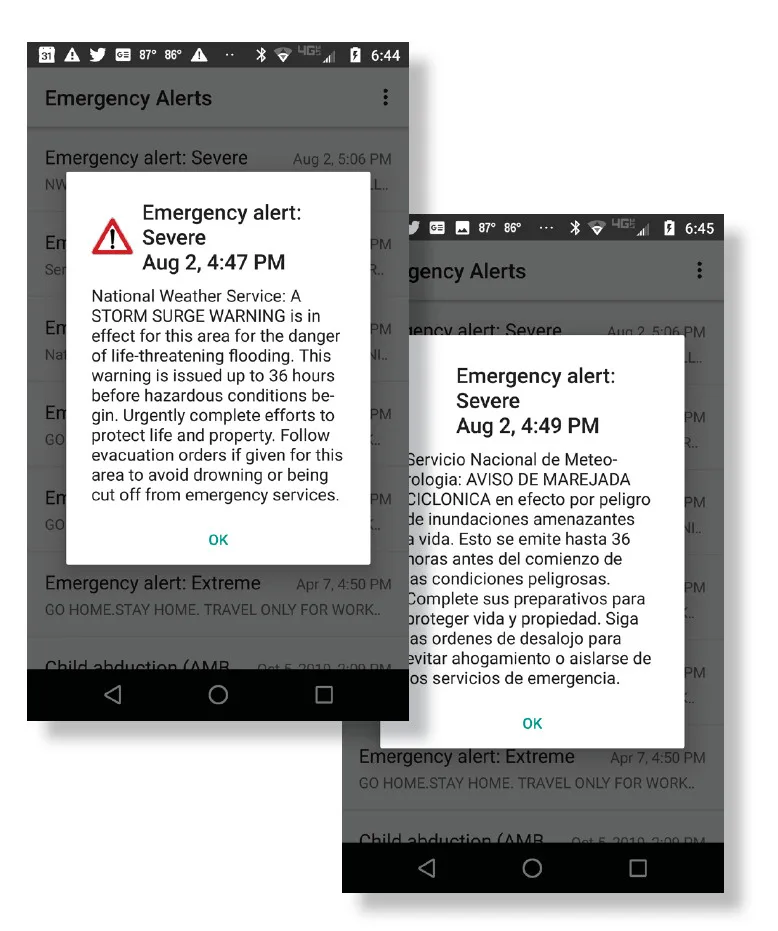
Examples of emergency weather alerts that you might get on your mobile phone, in English and Spanish. Source: National Weather Service

Pro tip: Avoid airplane mode
Wireless emergency alerts work on any phone that’s turned on, even if you don’t have an active eSIM or wireless plan. However, they won’t come through if you turn on airplane mode.
If you’re trying to save battery, try turning off Wi-Fi, reducing your screen brightness, and turning off background apps instead.
Set one out-of-area contact as your family’s check-in hub
Pick one person outside the fire zone for everyone to text or call, since long-distance lines often work when local ones are jammed. It’s far easier for scattered family members to reach a single hub than to reach each other.
Set up emergency medical alerts in case you need help
Set up Medical ID and Emergency SOS on your phone so first responders can see critical health info and reach your contacts even from a locked screen. If you have a newer iPhone or Android, enable Emergency SOS via satellite as a last resort when there’s no cell signal at all.
Your smartphone as a foundation
You can use your smartphone to get emergency alerts, send and receive text messages, and place calls. When you’re somewhere safe, you can also use your smartphone as a Wi-Fi hotspot to connect other devices like laptops or tablets.
Texting is better than calling
When towers are congested, a text will slip through where a call won’t. That’s because SMS needs just a sliver of bandwidth and keeps retrying in the background until it lands. Stick to plain SMS when the network is struggling—messaging apps like iMessage, WhatsApp, or Signal need a working data connection, and data won’t be prioritized if the network is busy.
Pro tip: Consider satellite texting
T-Satellite from T-Mobile lets your phone send and receive texts using Starlink satellites when there’s no cell signal at all, no tower required. It’s included on some plans and about $10 a month on others, and it works with most modern phones.
Verizon partners with Skylo for free satellite texting on newer phones, and AT&T is rolling out AST SpaceMobile. None of it is fast, but a slow text is better than being stranded without a communication lifeline.
Consider messaging apps to keep everyone updated at once
Once you’re back to Wi-Fi, a hotspot, or a restored mobile signal, a group chat saves you from repeating yourself to five worried people one at a time.
Set up family chat groups ahead of time so you can send just one message. The same apps we recommend for family video calling double as easy group-text hubs, so you can jump from a quick text to a face-to-face check-in without switching apps.
Choose a backup power solution
Match your backup power to how long you expect to be without the grid, and whether you’ll be using your smartphone as a hotspot. A pocket-sized power bank will top off a single device for a day or two and is worth throwing in any go bag. For a longer outage, a higher-capacity portable charger keeps several devices going. The latest portable solar chargers also work well enough for emergencies (though I wouldn’t rely on them for streaming, gaming, or anything that takes a lot of juice). You may also be able to use your car, as long as it has gas and you have a dependable cable on hand.
I keep a few power banks charged year-round—one at home, one at the office, and one in my commuter bag, plus extra cables to charge all my devices (headphones, Kindle, smartphone, book light, etc.).
How to check your mobile coverage
Before you turn to your phone in an emergency, find out whose signal is strongest in your location. Start with the carriers’ own maps (Verizon, T-Mobile, and AT&T), but take them with a grain of salt. For a straighter answer, enter your address into the National Broadband Map, managed by the Federal Communications Commission (FCC).
How to check mobile signal strength on the FCC map
- Navigate to the map and enter your exact address.
- Scroll down or find the right side panel and select the Mobile Broadband tab.
- Toggle to the In Vehicle Mobile view.
- Compare provider networks.
The best possible rating is 35/3 in the 5G column. If none of your providers lists that figure, look for a 7/1 in the 5G column. That failing, look for a simple checkbox in the 4G LTE column.
I checked a random address in an Arizona mountain town, and saw that Verizon was the only decent option:
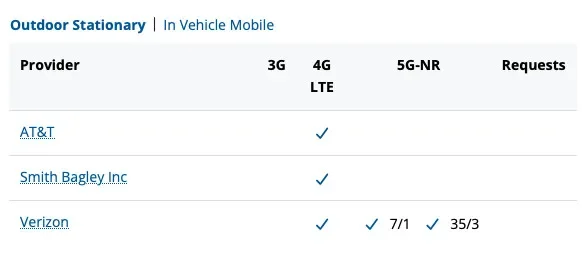
Screenshot of the results page from an address search of the FCC’s National Broadband Map.
While you shouldn’t expect fast 5G in case of an outage, choosing a capable carrier now will give you the best chance of placing calls or sending texts in an emergency.
How to choose the right carrier
There are only a few big nationwide carriers (Verizon, T-Mobile, and AT&T), but you can use their networks by going through a mobile virtual network operator (MVNO). Xfinity Mobile and Spectrum Mobile are Verizon MVNOs, while Optimum Mobile uses the T-Mobile network.
If you live or spend time somewhere remote, pick your carrier based on who covers that spot. If you don’t have a street address, you can search by longitude and latitude. The easiest way to find it is to drop a pin in Google Maps.

Looking for a new mobile and internet bundle?
Enter your zip to shop and compare top local options.
Consider a backup eSIMs
If staying in touch on your smartphone is essential, consider a backup SIM. Most phones from the last few years let you run two lines at once—a physical SIM plus an eSIM, or two eSIMs. That means you can add a second carrier as a backup, so if your main network goes dark in a disaster, you flip to the other one.
Unfortunately, this works only if your phone is carrier-unlocked, and it’s kinda technical. If you’re up for it, I recommend activating and testing that second line when you’re home and safe, with no wildfire or hurricane on the radar. You don’t want the hassle of activating an eSIM in the middle of an evacuation.
How to stay connected when towers are down
If mobile networks are down completely, get a dependable radio to stay up to date on emergency conditions and a satellite connection for when you need to reach out.
Invest in a NOAA radio
When the power’s out and your phone’s dead, a NOAA (National Oceanic and Atmospheric Administration) Weather Radio keeps working. It picks up official warnings and forecasts from the nearest office of the National Weather Service (NWS), nonstop. Buy a radio that’s battery-powered, solar-powered, or hand-cranked so it runs no matter what.
You can find your local station and frequency ahead of time using the NWS station search, or just spend a few minutes playing with the dial. It’s old-school tech, but it’s the most reliable way to hear what’s coming when everything else is down.
Regular AM radios will also broadcast emergency alerts (including the one in your car). You can find it by scanning through the dial or looking for highway advisory signs that give frequency info.
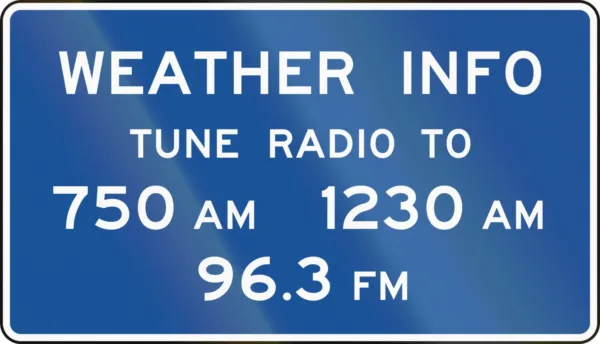
Signs posted alongside remote highways tell you which stations to tune into during emergencies. If you don’t see any in your area, spend a few minutes scanning your AM dial before disaster strikes.
Built-in satellite SOS on newer iPhones/Pixels
If you’ve bought a phone in the last few years, you may already have a satellite lifeline in your pocket. Every iPhone 14 and newer has Emergency SOS via satellite built in, free for two years after activation, and Google’s Pixel 9 and 10 lineup (except the Pixel 9a) has its own Satellite SOS. When you try to reach 911 with no signal, the phone walks you through pointing at the sky and texting emergency services directly.
Ultra-reliable (but expensive) satellite internet
If you want real internet when the grid’s gone, the Starlink Mini is the gold standard. It’s a full satellite dish small enough to fit in a backpack, and it’ll give you working internet anywhere you have a clear view of the sky. It isn’t cheap, and it needs its own power source, but for anyone who has to stay reachable through a long outage, it’s hard to beat.
We break down the costs and setup process in our backup internet guide.
How to stay connected on a budget
Not everyone can drop hundreds on satellite gear, and the good news is you don’t have to. A charged power bank, your phone’s built-in satellite SOS, a cheap NOAA radio, and a solid text plan cover most of what you actually need in a disaster.
For the full rundown of low-cost options, see our guide to the Cheapest Ways To Stay Connected During a Natural Disaster.
My Take: Pack a tech bug-out bag now
I’ve seen wildfires tear through acres of pristine wilderness in minutes, and witnessed the aftermath of major floods and windstorms firsthand. Devastation is an understatement—there’s nothing quite like the ravages of Mother Nature to remind us how small we are. But whether you’re a one-man band or the master planner for a big family, doing a little prep work ahead of time can keep you safe—and sane—in the face of disaster.
Plan ahead for no-signal and low-signal situations, keep your phones charged and gas tanks at least half full, and put together a tech go bag now, before it becomes urgent. And just in case your phone itself is the problem, consider a weather-proof contact card so you don’t have to rely on your memory to reach the people you love.
Author - Chili Palmer
Chili Palmer covers home tech services, with a special focus on understanding what families need and how they can stay connected on a budget. She handles internet access and affordability, breaking news, mobile services, and consumer trends. Chili’s work as a writer, reporter, and editor has appeared in publications including Telecompetitor, Utah Business, Idaho Business Review, Benton Institute for Broadband & Society, and Switchful.com.
Editor - Jessica Brooksby
Jessica loves bringing her passion for the written word and her love of tech into one space at HighSpeedInternet.com. She works with the team’s writers to revise strong, user-focused content so every reader can find the tech that works for them. Jessica has a bachelor’s degree in English from Utah Valley University and seven years of creative and editorial experience. Outside of work, she spends her time gaming, reading, painting, and buying an excessive amount of Legend of Zelda merchandise.
Related Posts