How To Stay Connected in a Natural Disaster
How to get online during hurricanes, tornadoes, and wildfires

Jul 7, 2026 | Share 


Emergency, How-To
Staying alive and staying safe are more important than staying online during a major disaster like a hurricane, wildfire, or earthquake. However, you may need to get connected to reach out for help or let your friends and family know you’re OK.
My go-to solution is to use my 5G smartphone as a personal hotspot, but that method uses a lot of data and can make your phone battery die quickly e(so it isn’t a long-term fix).
We’ll cover ways to get connected in a hurry, offer some insight into how local providers may help, and give you tips based on the kind of outage you’re experiencing.
How to communicate in a worst-case scenario
If you’ve been affected by a natural disaster and your safety is at risk, call or send a text message to 911. Even if your mobile network is down, you can piggyback on neighboring networks for emergency calls. There may be a lot of congestion, so keep trying if you can’t get through. Wait a few minutes between each call.
If it’s not an emergency but you need a place to shelter, text “Shelter” and your zip code to 43362 to get a list of options from FEMA (the Federal Emergency Management Agency). If you need other kinds of assistance, dial 211 to be connected to community services.
If you can’t get a signal on your cell but it’s safe to travel, look for a local AT&T, Spectrum, T-Mobile, or Verizon retail store. In emergencies, they often offer free charging and free Wi-Fi to the general public (not to mention air conditioning).
Hot tip: Find a neighbor with a sat phone or HAM radio
If you can’t leave your neighborhood due to fallen trees or broken up roads and can’t get a signal on your cell phone, your neighbors are your best hope. Someone may have a satellite phone you can use, or you might be able to spot a HAM radio tower near you. The towers are usually between 15 and 70 feet off the ground, and they’re the best way to communicate over long distances.
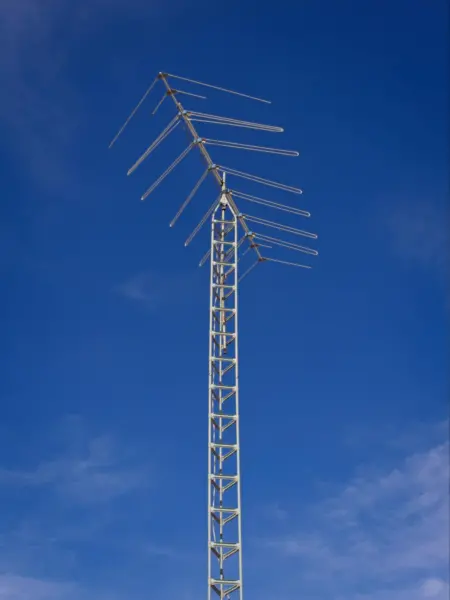
If you can check ahead of time, this HAM operator map is a good way to see who’s licensed near you. No time like today to make a new friend!
What happens to mobile and home internet connections in disasters
Whether you can stay online in a disaster depends on what’s happening and which infrastructure is impacted. Our deputy editor Kevin Parrish has lived through several hurricanes, and shared some insight.
Sometimes in hurricanes, you might have power outages and internet outages that last only minutes, he says. Other times, power can be down for several days, with very limited mobile phone service and widespread internet outages.
“Once a hurricane hits and knocks out your power, to be honest, accessing the internet isn’t a priority,” Parrish says. “If the power’s out, the internet’s probably out too.”
How internet companies prepare for disasters
Before disaster strikes, internet and cell phone providers set up their infrastructure with backup batteries and generators. They also build in a lot of redundancy, so a problem on a single cable or switch doesn’t take everything down. Check out how the internet works for more info.
What providers do during and after storms and wildfires
Disaster response from local cell phone carriers depends on the disaster. In big storms, they may send out fleets of trucks and trailers to act as portable cell towers. They may also send repair crews armed with portable power generators and infrastructure equipment, aided by dozens of drones that help assess damage in hard-to-reach areas.
But even if you can get a few bars during an emergency, don’t count on the same service you would expect in normal conditions. Instead, expect a lot of network congestion, which may mean trouble making calls or even sending text messages.
As mentioned above, many internet providers and mobile carriers also turn their local stores into emergency resource centers during emergencies. They offer chargers, free Wi-Fi, and sometimes even air conditioning to anyone who needs it.
Expect mobile data throttling if you exceed your high-speed limit
Big cell phone companies tend to make a big deal about waiving data overage fees for customers in disaster areas, but it’s really just talk. None of the major carriers charge data overage fees on new plans. Instead, they slow your data to 2G or 3G speeds once your high-speed data limit is reached. However, major MVNOs like Cox Mobile and Spectrum Mobile have plans that charge by the gigabyte. If you have one of those plans and end up using more data than usual because of a disaster, you’re likely to see a higher bill.
This post-allotment data slowdown policy applies to both regular phone data and hotspot data, but limits on hotspot usage are generally lower on any given plan.
If you discover that your hotspot is still working but you don’t yet have power or wired internet, we recommend staying off your devices as much as possible. You don’t want to burn through all your high-speed data for Minecraft or “The Bear,” only to face slowdowns when it’s time to video call your boss or upload photos for your insurance company.
What to do with your electronics during a power outages
Every disaster is different, but today’s smartphones and laptops are more reliable than ever. If you use common sense and don’t worry too much, you’ll be in good shape, Parrish says.
Here are a few suggestions along those lines:
- Keep devices away from water and out of direct heat.
- Try to keep air circulating by opening a window or even the front door.
- Turn devices off if they become hot to the touch.
- In the cold, keep your devices with you so buttons and ports don’t freeze.
- If you can’t call or text, you probably won’t have internet either. Find other ways to stay busy.
- Keep your brightness low and turn off Bluetooth, but keep airplane mode off so you can still get emergency alerts.
- Rely on battery-powered fans and radios or find a hand-crank radio for emergency updates.
How to stay connected in an internet outage
Often, big storms and wildfires take out internet infrastructure for entire communities. You could have a wired internet outage if your cable, fiber, or DSL network is damaged or if backup power fails. You could also have a cellular outage if local towers are damaged or if there are problems further upstream that take out hundreds of towers.
What to do if you have cell signal but no home Wi-Fi
If you have bars but can’t get online on your home Wi-Fi, use your smartphone as a personal hotspot. You’ll be able to connect a few devices and browse the internet. However, be careful about streaming too much video or browsing too long because you’ll burn through your phone’s battery (and your data plan) in a hurry.
If your home internet is down for more than a few hours but your cell signal is OK, you might want a standalone hotspot device. These connect more devices, have a bigger range, and have their own power supply. The options for plans and devices are endless, but here’s a roundup of the best hotspot devices and the best hotspot data plans of 2024.
What to do if you have home Wi-Fi but no cell signal
If you have no bars but you can access the internet through your home Wi-Fi, you’re in luck. Almost every device connects to Wi-Fi these days, and all major carriers support Wi-Fi calling. Just make sure each device is logged into the working network, and you’re good to go.
Home internet from 5G and 4G LTE providers, also known as fixed wireless, won’t work if you don’t have bars on your cell phone. That’s because these networks use cellular networks to provide home internet (and therefore, Wi-Fi).
What to do if both cellular and home internet is down
If your home internet is down and your phone network is down, too, there’s not much you can do. There are probably widespread issues affecting a wide geographic area.
However, there are a few things to try if it’s a true emergency. If you don’t already have one of the following, a helpful neighbor might:
Cell boosters: These devices turn a weak cell signal into a stronger one, and they may enable you to send a call or text in some disaster scenarios. However, they won’t solve problems related to congestion when all your neighbors are trying to call or text at the same time.
Satellite phones: Traditional satellite phones are expensive and usually reserved for first responders or wilderness adventurers, and they aren’t common. However, there’s a good chance you’ll be able to connect to a satellite for emergency texting if you have a relatively new iPhone. If you have T-Mobile, you may also be able to send texts and access certain apps through its T-Satellite service. Sometimes, the company pairs with Starlink to make that service free in disasters, but there’s no guarantee. If you want to sign up just in case you can’t get service any other way, it will cost you $10 per month (and it may be a hassle to sign up).
Radio: Whether you need tunes for entertainment or just want to catch the latest news and weather alerts, old-fashioned AM/FM radio is your friend. I just invested in a hand-crank radio for when I’m exploring in the great outdoors, but you can also tune in on battery-powered radios or listen in your car (just start the ignition and let the car run for a few minutes about once an hour so you don’t lose charge on your car battery).
How to prepare for next time
If you’re in the middle of a disaster, it’s too late to think about a tech go bag or backup internet. But when you get to safety, this article on preparing your tech for a natural disaster can help.
FAQs about emergency internet access in a disaster
What to do if Wi-Fi goes out during a storm?
If your internet goes out during a storm and you don’t have 5G backup internet set up, you may just have to wait it out. If you need to make an emergency call, try texting or calling 911 on your phone. Wait several seconds between calls, but keep trying. Even if your network is damaged or heavily congested, there’s still a chance you could get through.
If you’re trying to stay entertained during an outage, access downloaded shows and music on your phone but keep an eye on your battery usage. If the internet is down, it’s possible the power could fail soon too.
Can you make phone calls in a hurricane?
It can be almost impossible to make phone calls in a hurricane, but you might have success if you stand still, wait at least 10 seconds between calls, and keep trying. If nothing works, you might need to find someone with a satellite phone or HAM radio who can help.
How much do satellite phones cost?
For traditional satellite phones, you’ll pay monthly subscriptions between about $12 and $50 and you’ll need to buy a device for around $400, according to our partner site SatelliteInternet.com.
There’s a chance you could use satellites to connect in an emergency even without an expensive satellite phone, though. If you have an iPhone that’s been activated within the last few years but don’t have any cell or internet service, you can send a text message via satellite SOS to emergency responders with your Medical ID and a few details about your emergency. If it’s not an emergency, you can text roadside assistance. There’s no way to contact friends or family, unfortunately.
You may also be able to use satellites for connectivity through T-Mobile’s T-Satellite program. It’s free for certain premium T-Mobile wireless customers, but it’s available for a monthly fee to non-premium T-Mobile customers and customers of other carriers, as long as your phone is satellite-optimized and has eSIM capabilities.
Author - Chili Palmer
Chili Palmer covers home tech services, with a special focus on understanding what families need and how they can stay connected on a budget. She handles internet access and affordability, breaking news, mobile services, and consumer trends. Chili’s work as a writer, reporter, and editor has appeared in publications including Telecompetitor, Utah Business, Idaho Business Review, Benton Institute for Broadband & Society, and Switchful.com.
Editor - Jessica Brooksby
Jessica loves bringing her passion for the written word and her love of tech into one space at HighSpeedInternet.com. She works with the team’s writers to revise strong, user-focused content so every reader can find the tech that works for them. Jessica has a bachelor’s degree in English from Utah Valley University and seven years of creative and editorial experience. Outside of work, she spends her time gaming, reading, painting, and buying an excessive amount of Legend of Zelda merchandise.
Related Posts