What Do You Actually Pay for Kinetic Internet?
Know what to expect with every monthly bill

Aug 21, 2026 | Share 


Brand Guides
Kinetic Internet locks prices for up to three years on its fastest fiber plans and sometimes offers prepaid gift cards when you sign up. Prices are some of the lowest we’ve seen anywhere, and the service is fast and reliable.
Slower plans only have price locks for a year, though, and the advertised prices don’t include taxes, fees, or a $10.99 monthly equipment lease charge. It’s a solid deal for a Wi-Fi 7 router, but factor it into your budget.
So what happens when your price lock runs out? Kinetic doesn’t really say. The most specific answer on its pricing page is that your rate “varies by service availability,” which isn’t much to go on.
We can’t tell you what post-promo prices are, either, but we vetted current service terms and real-address pricing to help you keep your bill as low as possible.
On this page:
What to expect | Your first bill | Your monthly bill | Fees on mobile and TV | How to save | Learn more | FAQ
On this page:
What to expect as a Kinetic customer
When you sign up for Kinetic Internet, you’ll pay your promo rate for up to three years, depending on the plan. When that window ends, your bill goes up automatically, and Kinetic won’t call or email to warn you first.
Most customers also have to pay a $10.99 lease fee unless they have their own networking equipment, and you can get charged extra if you don’t want to set up autopay or want a paper bill.
There’s no way to know what your Kinetic Internet price will be after a year, but the starting prices are as low as they come, and new customer perks are too good to pass up.

Is Kinetic Internet the best option in your area?
Enter your zip code to shop and compare.
Your first Kinetic bill
Your first bill for Kinetic Internet will be higher than other monthly bills. You’ll have to pay a prorated charge for the partial month between your install date and your next billing cycle, then the full service plan rate for the next month. Add taxes and fees that “cannot always be estimated” when you originally ordered, and the total can look a lot bigger than the price you were quoted.
You’ll also see setup charges on that first bill, if they apply. Self-install is free, but if you need a professional installation instead, Kinetic charges around $35 for the technician visit. If you could have done the work yourself but opted for a pro to come out anyway, that fee could balloon to $100. A small number of addresses need actual construction to run service to the home; in those cases, Kinetic collects a non-refundable $750 fee up front before any work begins.
Finally, that first bill is also where equipment leasing shows up. More on that in a second.
How to pay
The best way to pay your bill is to log in to Go Kinetic with your account information. From there, you can make a single payment or set up autopay. That’s also where you’ll see your itemized bill and any details about appointments or requests for assistance.
Be aware that Kinetic adds a surcharge of $1.46 every time you pay by credit card, and you could be charged $4 extra if you want a paper bill.
If you don’t want to use the online portal, you can pay by mail or call in at +1-800-347-1991. There’s no charge if you pay through the automated system, but you could be charged a processing fee if you need to talk to a real person.
If you opt for a paper bill, here’s what to expect:
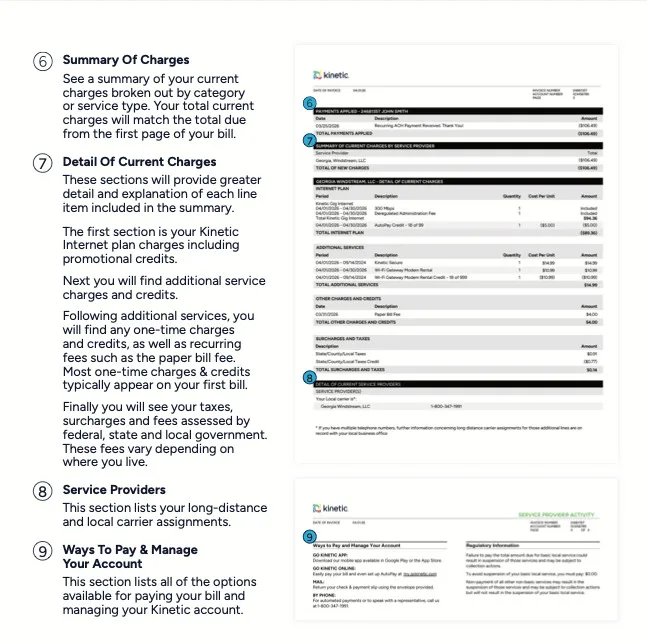
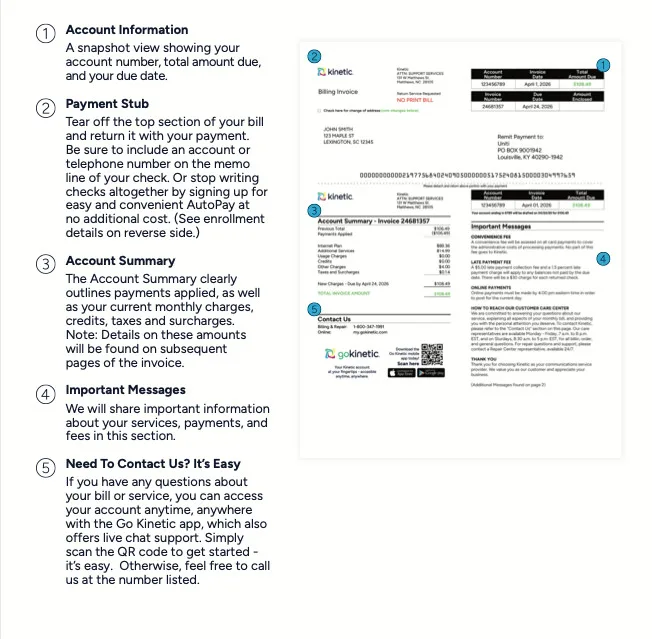
Example of a Kinetic bill, showing totals and itemized charges. You’ll see a bill like this only if you opt for a paper bill, but that will cost you $4 extra per month. Save by logging into your Go Kinetic portal and paying online instead.
Your monthly Kinetic bill
After your first bill, your monthly Kinetic bill will be consistent for the length of your price lock guarantee. In addition to your service plan price, you’ll see taxes and fees that vary based on where you live.
You’ll also see equipment charges, with a few exceptions. The Wi-Fi gateway runs $10.99 a month, and if your plan doesn’t already include them, extenders add $10 monthly for up to two and $5 for each one after that.
Here’s where the exceptions come in. If you choose the top-tier Max 2 Gig Kinetic plan, your router and any mesh extenders you need are included with the service plan price, so there’s no extra fee. You can also get out of the fee on any plan if you can use your own router. There’s no fee for the fiber jack.
Finally, you may see fees for add-ons. Here’s a quick list:
- AlwaysOn Wi-Fi cellular failover: $20/mo. after a first-month credit
- Kinetic Secure Essentials: $5/mo.
- Kinetic Secure Plus: $10/mo.
As with your first bill, the best way to pay is to log into Go Kinetic. If you set up autopay, you’ll get a $5 monthly discount, but it may not kick in for a few months.

Pro tip: Keep an eye on your accounts
Whether you set up autopay or not, it’s always a good idea to check your Kinetic account and bank account regularly. Making a habit of tracking your accounts is the best way to catch errors, notice new charges or fees, and keep track of price increases when your promo rate expires.
This rule applies to every internet plan, not just Kinetic. Most providers eventually find ways to charge more than customers expect.
Billing for Kinetic mobile and cable TV services
Kinetic doesn’t offer TV or mobile service, so you won’t see those charges on your bill.
If you want live TV, Kinetic points you to YouTube TV instead of selling a cable package. For mobile, it offers a $20 monthly discount if you’re already an AT&T Wireless customer. The $20 AT&T credit lands on your Kinetic bill, but your actual phone service is billed separately by AT&T. It’s one bundle, but two bills.
Kinetic Internet plans and prices
Here’s what you’ll pay for Kinetic Internet if you sign up today.
| Plan | Advertised price | Internet type |
|---|---|---|
| Kinetic Internet 50 Mbps | $44.99/mo. w/ autopay for 12 mos. | DSL |
| Kinetic Internet 100 Mbps | $19.99/mo. w/ autopay for 12 mos. | Fiber |
| Kinetic Internet 300 Mbps | $34.99/mo. w/ autopay for 12 mos. | Fiber |
| Kinetic Internet 1 Gig | $39.99/mo. w/ autopay for 12 mos. | Fiber |
| Kinetic Internet 2 Gig | $59.99/mo. w/ autopay for 24 mos. | Fiber |
| Kinetic Internet Max 2 Gig | $79.99/mo. w/ autopay for 36 mos. | Fiber |
* Availability and speed may vary by location, and prices are subject to change. See disclaimers.
Like we said up top, the price tag here is genuinely one of the best around. In our roundup of the year’s best cheap internet plans, Kinetic’s 100Mbps fiber plan landed in the top five, starting at $24.99 per month with autopay.
How to save money on Kinetic Internet
Follow these tips to avoid unnecessary fees and keep your Kinetic bill as low as possible:
- Enroll in autopay: It’s a $5 monthly credit for doing nothing extra, and it also keeps you off the radar for late fees.
- Go paperless: Switching off paper billing skips the $4 monthly paper bill fee outright.
- Choose self-install if you’re eligible: It skips the installation charge entirely—a professional visit runs about $35, or up to $100 if you were self-install eligible and picked a pro anyway.
- Ask before you add extenders: If you’ve already got a solid router, ask whether you actually need Kinetic’s extenders—those run $10 per month for the first two and $5 monthly for each one after, and you may not need all of them.
- Link up your AT&T Wireless account: Choosing AT&T for mobile service gets you a $20 monthly discount off your Kinetic internet bill.
- Grab the sign-up gift card: Depending on the plan, that’s another $50 to $200 back in your pocket before you’ve paid a single bill. Want to see how that stacks up against other providers running promos right now? Check out our list of the best internet deals.
- Pick the longest price lock you can: The 2 Gig and Max 2 Gig plans lock in their promo rate for two and three years instead of one, which pushes your first increase further out.
- Mark your calendar: Set yourself a reminder to call in shortly before your price lock ends and ask what your options are. Calling in doesn’t guarantee a better rate, but if Kinetic won’t negotiate, you can always shop for another provider.
Kinetic offers other great perks and promos from time to time, but they change often and vary based on where you live. Here’s the best they have on offer right now:

Save $100 with a self-install reward card from Kinetic Fiber Internet.
Learn more about Kinetic Internet
FAQ about Kinetic billing
Why is my Kinetic bill so high?
How much does Kinetic internet cost?
Do Kinetic's prices increase over time?
Plans disclaimers
Kinetic fiber plans
1 Gig | 2 Gig — With $5 Auto Pay for each month the customer is enrolled in AutoPay. Limited-time, non-transferable offer for residential customers that may not be combined with other promotions. Credit restrictions may apply. Subject to availability. Promotional period pricing ending after 24 months.
100 Mbps Tier 2 | 300 Mbps | 300 Mbps Tier 2 | 1 Gig Tier 2 — With $5 Auto Pay for each month the customer is enrolled in AutoPay throughout the life of the customer. Available to new and existing customers. Promotional period pricing ending after 12 months.
2 Gig Tier 2 — With $5 Auto Pay for each month the customer is enrolled in AutoPay throughout the life of the customer. Available to new and existing customers. Promotional period pricing ending after 24 months.
Max 2 Gig | Max 2 Gig Tier 2 — With $5 Auto Pay for each month the customer is enrolled in AutoPay. Limited-time, non-transferable offer for residential customers that may not be combined with other promotions. Credit restrictions may apply. Subject to availability. Promotional period pricing ending after 36 months.
Kinetic DSL plans
50 Mbps — With $5 Auto Pay for each month the customer is enrolled in AutoPay throughout the life of the customer. Available to new and existing customers. Promotional period pricing ending after 12 months.
Author - Chili Palmer
Chili Palmer covers home tech services, with a special focus on understanding what families need and how they can stay connected on a budget. She handles internet access and affordability, breaking news, mobile services, and consumer trends. Chili’s work as a writer, reporter, and editor has appeared in publications including Telecompetitor, Utah Business, Idaho Business Review, Benton Institute for Broadband & Society, and Switchful.com.
Editor - Jessica Brooksby
Jessica loves bringing her passion for the written word and her love of tech into one space at HighSpeedInternet.com. She works with the team’s writers to revise strong, user-focused content so every reader can find the tech that works for them. Jessica has a bachelor’s degree in English from Utah Valley University and seven years of creative and editorial experience. Outside of work, she spends her time gaming, reading, painting, and buying an excessive amount of Legend of Zelda merchandise.
Related Posts