Is Viasat Internet Down?
Find out if you're in a Viasat outage, and get tips for getting back online fast

Aug 18, 2026 | Share 


Brand Guides, Equipment Guides, Internet Outage
If Viasat is your internet provider and you’re having trouble connecting, a speed test can help you determine whether you’re in a service outage.
First, reconnect to your Viasat network, either through Wi-Fi or by plugging in an Ethernet cable. Then, click below.
Download speed
000 Mbps
Upload speed
000 Mbps
Latency (ping)
00 ms
Jitter
00 ms
What to look for in your speed test results
If you’re in a Viasat outage, the speed test either won’t load or will say “Loading,” and a light blue circle will spin, but you won’t get any results.
If you get results that show download speeds, upload speeds, and latency, though, you aren’t in an outage.
You could still be having problems, of course. Ideally, you should get speeds reasonably close to what your plan promises, but you need the following for a healthy satellite internet connection:
- Download speeds of at least 12Mbps
- Upload speeds of at least 3Mbps
- Latency of less than 700 ms
If you get speed test results back but they don’t meet the minimums above, you aren’t in an outage, but you may be having a problem with your Viasat account or your equipment setup.
Alternatively, bad weather either at your home or at the nearest Viasat ground station could be interfering with the signal.
In this guide:
Troubleshoot | Get a refund | Leave a review | Decide whether to switch | My take | FAQs
In this guide:
How to troubleshoot Viasat connection issues
If you get stuck on “Loading” on the speed test above, go through the steps below one by one.
Step 1: Try logging into your Viasat network with a different device, such as a gaming console, smart TV, or smartphone. Try both Wi-Fi and Ethernet connections.
Step 2: Check your Viasat wireless gateway (router + modem). A solid blue light means you’re connected.
Step 3: Check your Ethernet and power cables to make sure they are connected securely and haven’t been damaged.
Step 4: Restart (or unplug and reboot) your affected devices and your gateway. A full reset usually takes about 10 minutes.
Step 5: Log into your Viasat account for any outage-related notifications or check the My Viasat mobile app, available for iOS phones or Android phones.
Check the lights on your gateway
Viasat home networking equipment is included with your plan price, but what you get depends on where you live. Customers who signed up a few years ago may have the SurfBeam 2 Plus setup with the gateway shown below.
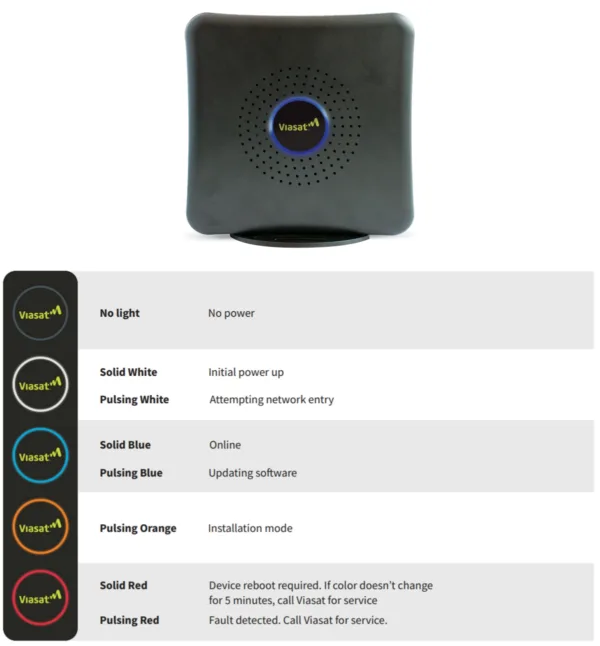
Viasat’s SurfBeam 2 Plus gateway with a steady blue light showing a steady internet connection. Source: Viasat, Inc.
You might instead have a Viasat Wi-Fi 5 (802.11ac or Wireless AC) gateway, which operates as both a modem and Wi-Fi router. These devices are typically used by business customers or residential customers with premium plans.
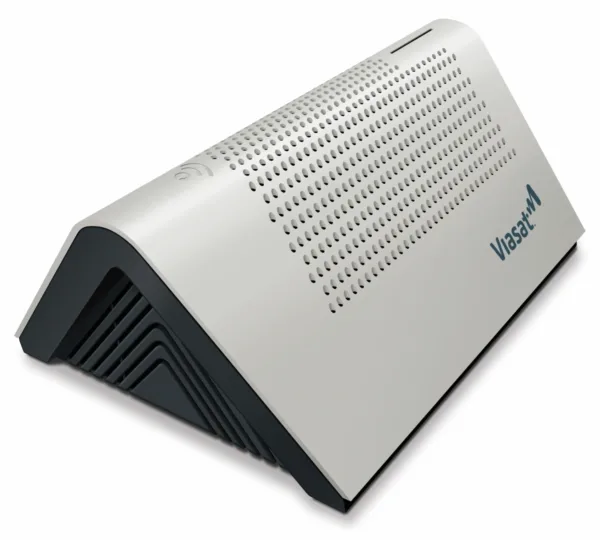
On this Viasat Gateway, a solid blue light means you’re online. No light (as shown above) means no power, while solid and blinking purple lights mean setup is underway. Solid or blinking red lights mean you have no connection or an error has been detected. Source: Viasat, Inc.
If the lights on your internet equipment look OK but you’re still having issues connecting, run a modem diagnostic test in the Viasat mobile app.
Learn more and troubleshoot your Viasat connection
Still can’t get online? Contact Viasat
If you can’t get online and can’t figure out why, it’s time to reach out to Viasat. Here are the best ways:
- Call Viasat at +1-855-463-9333.
- Manage your service with the My Viasat mobile app.
- If you are a California customer, check your address in the Viasat Outage Map.
Does Viasat offer refunds?
There’s no real refund program, but Viasat does offer discretionary bill credits for outages they cause.
Here’s what the terms and conditions say:
“We are not responsible for any interruptions of the Service that occur due to acts of God (including, without limitation, weather), power failure or any other cause beyond our reasonable control. However, because we value our customers, for an interruption of a significant length of time that is within our reasonable control, upon your request we may provide what we reasonably determine to be a fair and equitable adjustment to your account to make up for the Service interruption. This will be your sole remedy and our sole duty in such cases.”
There are no instructions for getting a refund, and no uptime guarantee, service guarantee, or money-back guarantee anywhere in the official legal documentation.
Leave a review about your Viasat service
If you’re a Viasat customer, we want to hear from you! Your honest reviews help us give better advice to other customers looking for great home internet. Once you’re done, check out what other Viasat customers have to say.
How Viasat compares
Viasat competes with other satellite internet providers, fixed wireless internet providers (including new 5G options), and some older DSL providers.
Satellite internet is more expensive and less reliable than fully wired cable or fiber internet, so it’s rarely the best choice if you live in a connected area. If you’re in a rural area and shopping for internet service, though, Viasat may be on your list of contenders. Here’s a look at how it compares.
Starlink vs. Viasat: Starlink’s low-orbit satellites give it noticeably lower latency and faster top speeds (up to 400Mbps vs. Viasat’s 150Mbps cap), though you’ll pay more upfront for equipment. Viasat counters with decades of experience and lower equipment costs, but it doesn’t have Starlink’s edge in speed or lag.
T-Mobile 5G Home Internet vs. Viasat: T-Mobile Home Internet outranks Viasat in nearly every category, including reliability, speed, and customer service, and it costs less with no data caps or contracts. Viasat’s main advantage is reach—it’s an option in remote areas where 5G signal hasn’t arrived yet.
Viasat also competes with Hughesnet, but we no longer recommend Hughesnet as an internet service provider.

Tired of slowdowns and outages with Viasat?
Enter your zip code to find other home internet providers where you live.
My take: Check your account and consider switching
If you’re having trouble with your Viasat internet, it might be time to choose a different internet provider. First, check your Viasat account to see if you’re locked into a contract. Viasat is one of the few remaining providers that still charges early cancellation fees, and you don’t want a surprise on your last bill.
From there, see if you can get 5G home internet from T-Mobile or another company, such as AT&T or Verizon. Equipment is free, and there are no contracts, so you can cancel and send everything back if it doesn’t work.
If you can’t get 5G or try it and don’t like it, consider Starlink. It uses thousands of satellites that are closer to the Earth to deliver internet, and promises speeds that are much faster and more reliable. Depending on when you order and which plan you choose, you may be able to get low-cost installation or free equipment you can take on the road.
Read more about Viasat and satellite internet
Viasat outage FAQ
How do I know if Viasat is down in my area?
Why isn't Viasat internet working?
How do I check my Viasat signal?
Does Viasat work when the power is out?
Author - Chili Palmer
Chili Palmer covers home tech services, with a special focus on understanding what families need and how they can stay connected on a budget. She handles internet access and affordability, breaking news, mobile services, and consumer trends. Chili’s work as a writer, reporter, and editor has appeared in publications including Telecompetitor, Utah Business, Idaho Business Review, Benton Institute for Broadband & Society, and Switchful.com.
Editor - Jessica Brooksby
Jessica loves bringing her passion for the written word and her love of tech into one space at HighSpeedInternet.com. She works with the team’s writers to revise strong, user-focused content so every reader can find the tech that works for them. Jessica has a bachelor’s degree in English from Utah Valley University and seven years of creative and editorial experience. Outside of work, she spends her time gaming, reading, painting, and buying an excessive amount of Legend of Zelda merchandise.
Related Posts