ASUS ZenWiFi BT10 Review
A step-down from the pricier Zen WiFi BQ16 Pro

May 8, 2026 | Share 


Equipment Guides, Product Reviews, Router Reviews
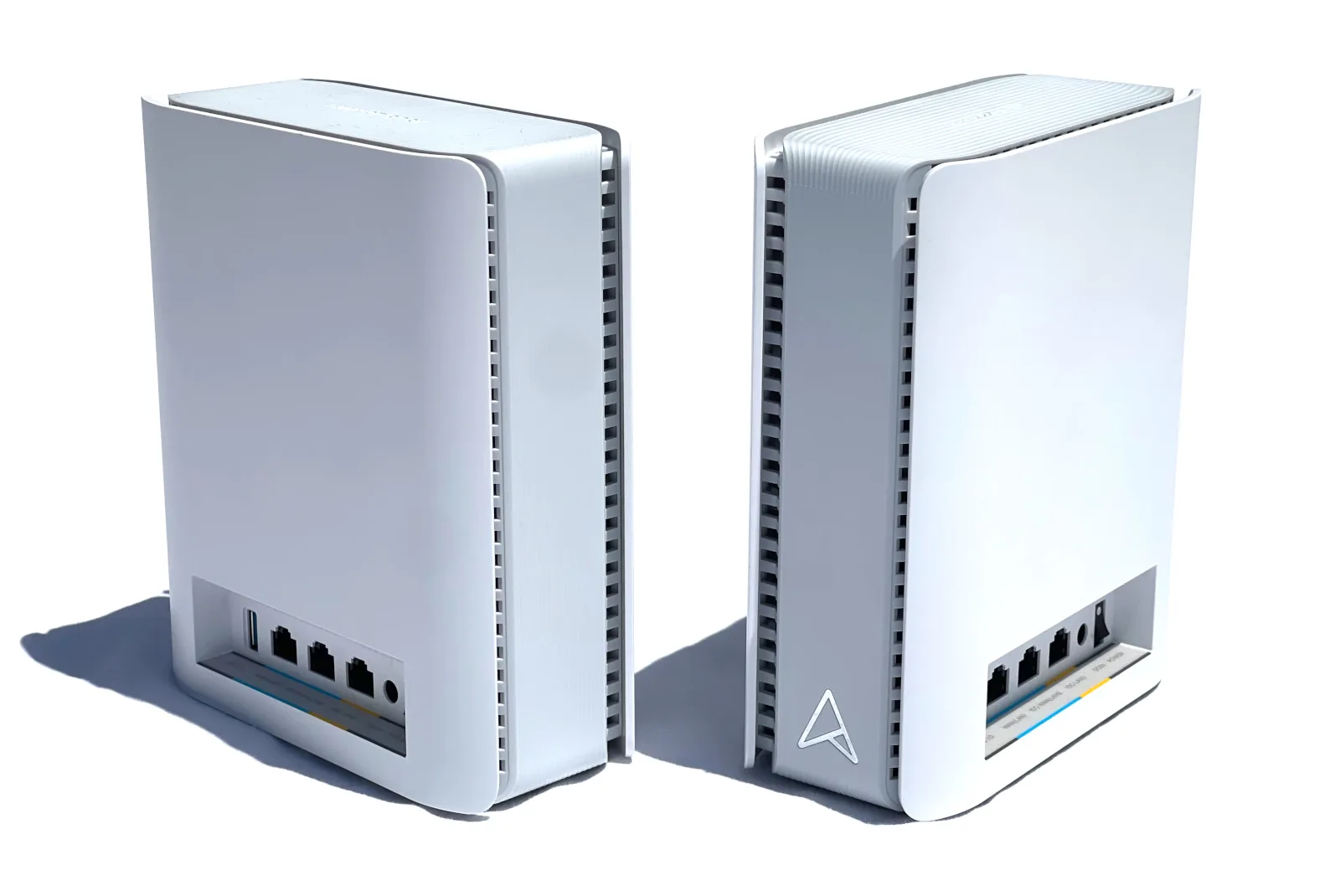
The ASUS ZenWiFi BT10 is a great Wi-Fi 7 mesh system, according to our tests. Kevin Parrish | HighSpeedInternet.com
Our score
(4.8/5)Specs:
- Up to 688Mbps (2.4 GHz)
- Up to 5,764Mbps (5 GHz)
- Up to 11,529Mbps (6 GHz)
Max internet speed:
- 9,400Mbps (9.4Mbps)
Retail price:
- $689.99
* See Amazon disclaimer.
The ZenWiFi BT10 is a cheaper version of the ASUS ZenWiFi BQ16, which is one of the best mesh systems I’ve tested to date. The BT10 is an excellent alternative if you’re not willing to spend over $1,000 for the pricier two-piece “pro” system, although it has one less Wi-Fi radio and fewer wired ports.
But like the BQ16 Pro, the BT10 packs tons of features under the hood for the price, like security tools and parental controls. Is it right for your home? We’ll dig into the benchmarks and specs to see if this system is the right fit to handle all your devices.
Pros
 Free security
Free parental controls
Built-in VPN tools
Cons
 Limited wired connectivity
High price
No EasyMesh support
In this review:
Standout features | Competitor comparisons | Scoring breakdown | The verdict | FAQ | Methodology
In this review:
ZenWiFi BT10 standout features
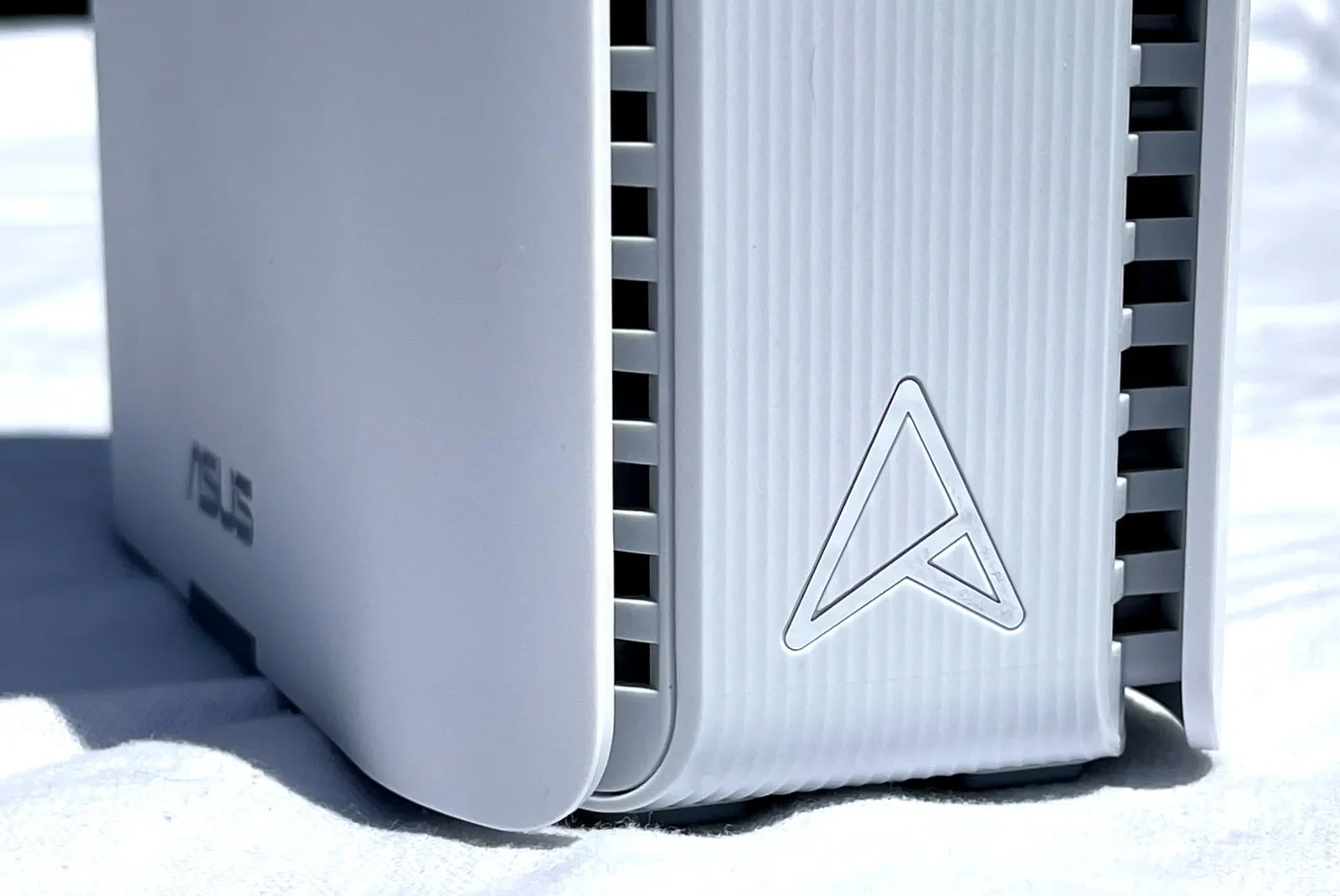
The ASUS ZenWiFi BT10 packs tons of features that don’t require subscriptions. Kevin Parrish | HighSpeedInternet.com
The good news is the ZenWiFi BT10 system doesn’t require subscriptions to use everything it offers, like security tools and parental controls. The feature list is extensive and includes support for 4G/5G backup internet.
The best features at a glance
Free security
Free parental controls
Backup internet support
Compare the ZenWiFi BT10 to the competition
| Product | Max throughput | Tested speed @ 40 ft.* | Where to buy† |
|---|---|---|---|
| ASUS ZenWiFi BT10 | 18,000Mbps | 2,321Mbps | Get on Amazon |
| NETGEAR Orbi 970 | 27,000Mbps | 2,331Mbps | Get on Amazon |
| ASUS ZenWiFi BQ16 Pro | 30,000Mbps | 2,377Mbps | Get on Amazon |
* Speed recorded using a Wi-Fi 7 client and a 320 MHz channel. See speed test disclaimer.
† See Amazon disclaimer.
The ZenWiFi BT10 is the cheapest two-piece mesh system on the chart for a few good reasons. First, it lacks the number of radios and streams offered with the other systems, so it has a lower throughput—meaning it handles fewer Wi-Fi devices at once. It also has fewer wired ports for internet and home networking, too, which may not be a big deal.
On a performance level, it keeps up with the other two systems, and even outperforms the Orbi 970 in some tests. And unlike the Orbi 970, it includes a USB port you can use for backup 5G internet, and premium features that don’t cost extra, like security tools and parental controls.
Read more router coverage
ZenWiFi BT10 scoring breakdown
| Category | Score* | Summary |
| Performance | 5 | Delivers some of the fastest speeds I’ve tested in a mesh system. |
| Features | 5 | Offers security and parental controls at no extra cost. |
| Design | 4 | Includes a decent amount of wired and wireless connectivity. |
| Setup | 5 | Sets up your home network quickly. |
| Ease of use | 4 | Provides decent interfaces for desktop and mobile. |
* out of 5 points
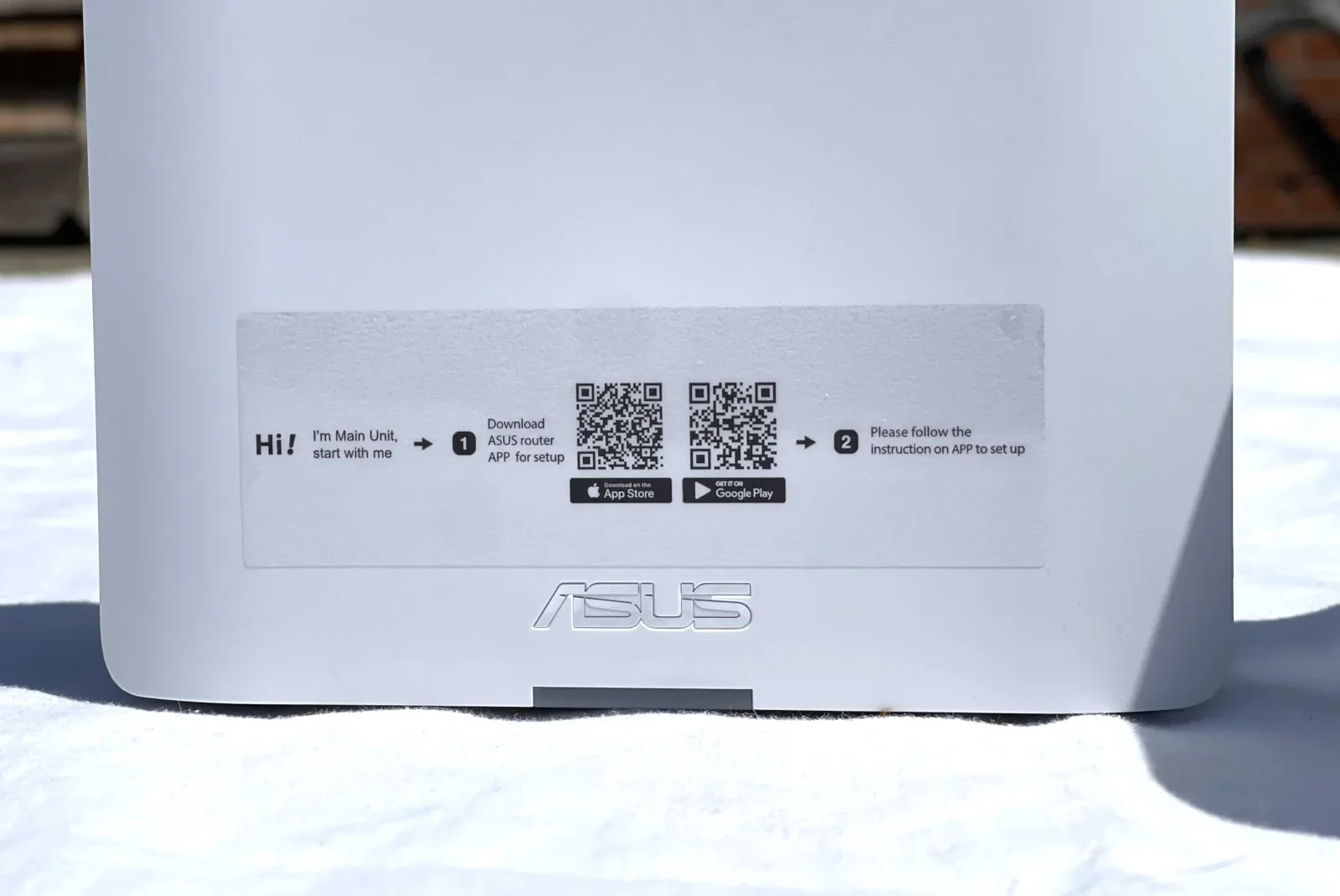
Both ZenWiFi BT10 units are the same, but ASUS clearly wants you to use one as the router. Kevin Parrish | HighSpeedInternet.com
Performance
5
Wi-Fi configuration
- 2.4 GHz band: 688Mbps (2 x 344Mbps)*
- 5 GHz band: 5,764Mbps (4 x 1,441Mbps)†
- 6 GHz band: 11,529Mbps (4 x 2,882Mbps)‡
* Using a 40 MHz channel width
† Using a 160 MHz channel width
‡ Using a 320 MHz channel width
After reviewing the ASUS ZenWiFi BQ16 Pro, testing the cheaper BT10 system seemed a little pointless, given that the only real difference between the two systems is the number of radios they have: four in the BQ16 Pro and three in the BT10. But what’s a review without a few benchmarks, right?
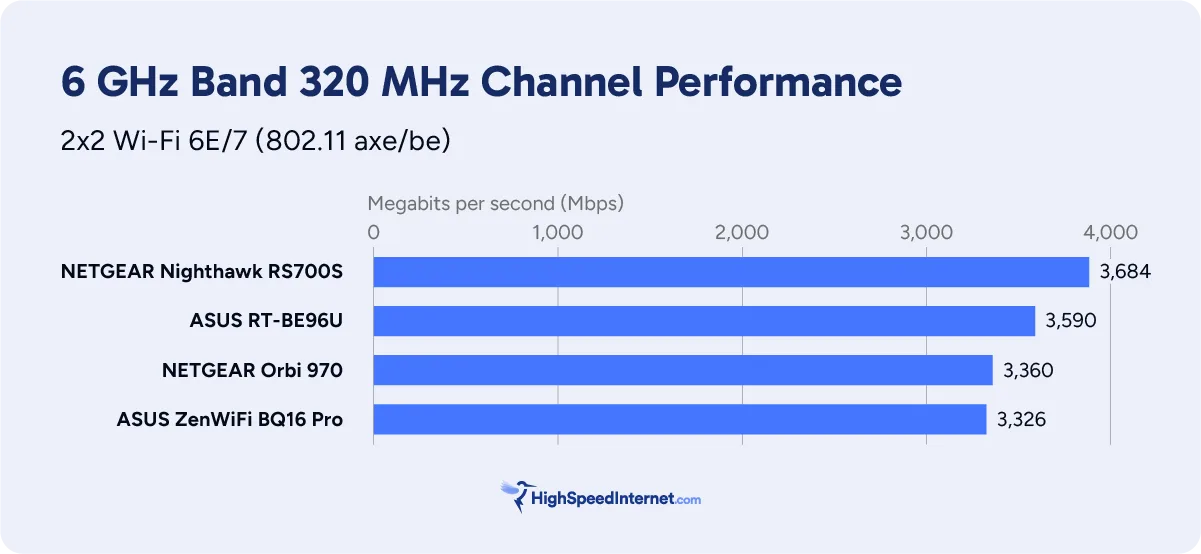
First, the 6 GHz benchmarks are on par with what I tested with the BQ16 Pro and NETGEAR Orbi 970 systems. All three tested slightly lower than what I can squeeze out of a standalone Wi-Fi 7 router, but mesh systems are designed to dodge corners, not blast Wi-Fi into the next county.
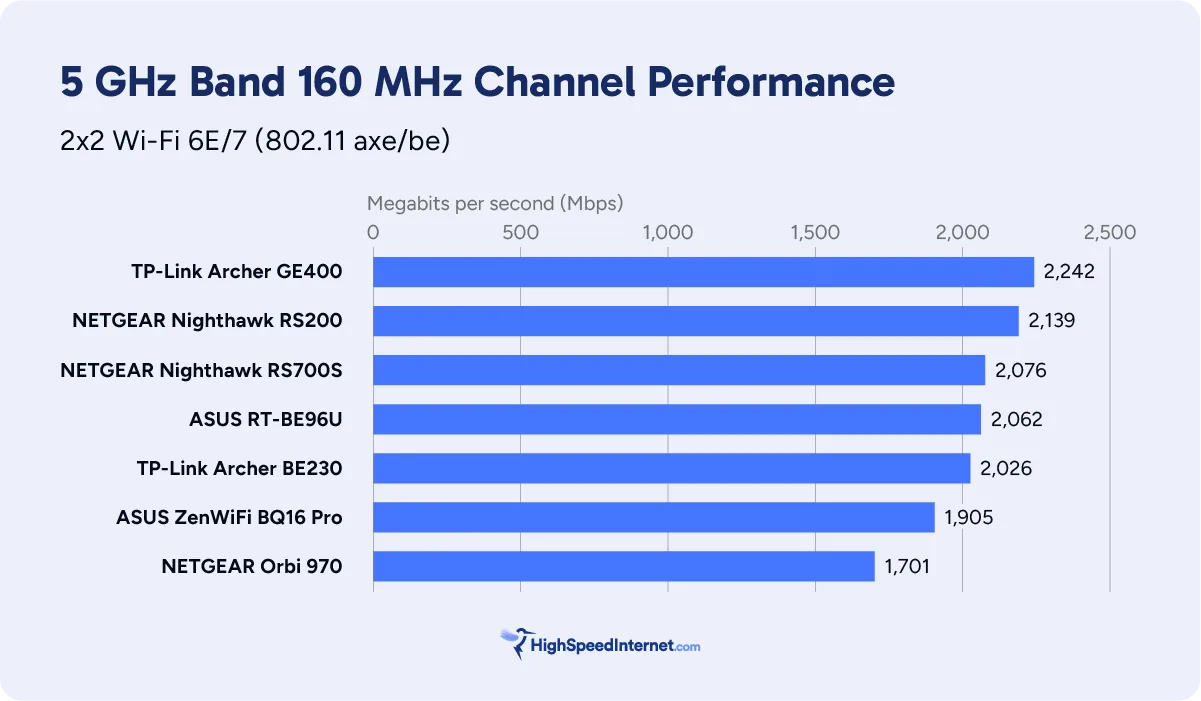
Next, looking at the 5 GHz tests, the only callout is that the BT10 and BQ16 Pro delivered slightly faster speeds in my bedroom than the Orbi 970. The signals must pass through extensive ceramic tile, steel, wood, and drywall to reach the satellite unit, so I’m surprised the results aren’t lower.
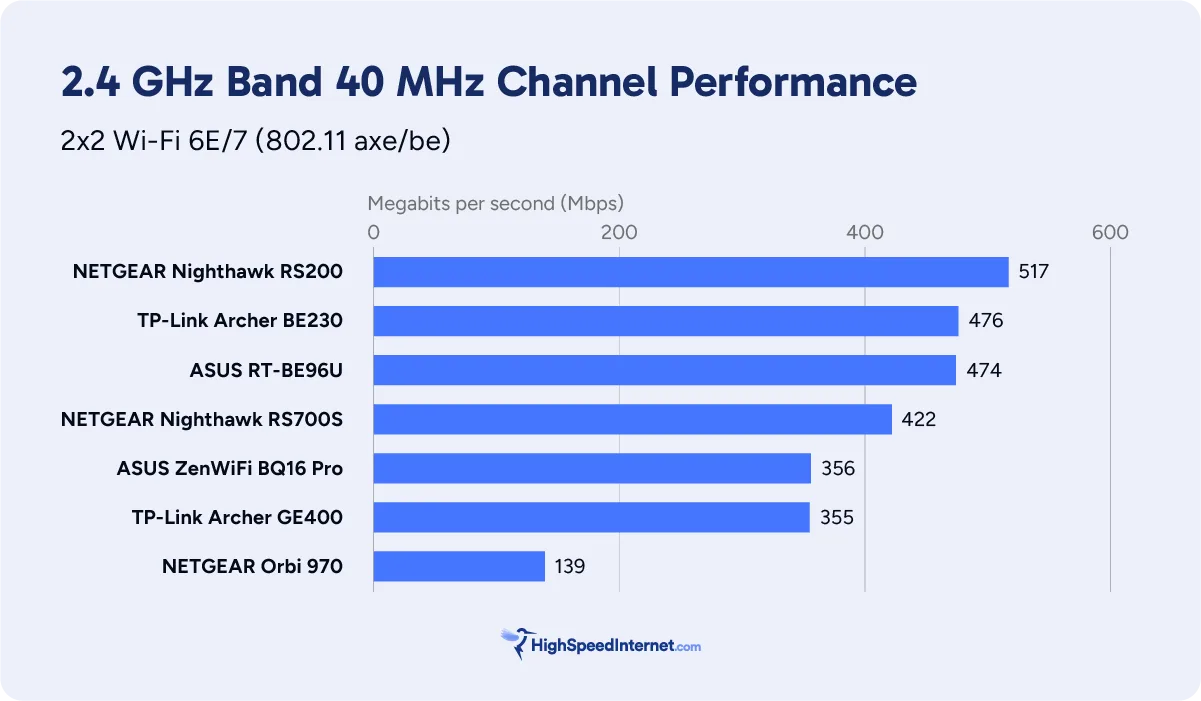
Finally, the BT10 clearly outperformed the Orbi 970 in my 2.4 GHz benchmarks. With the latter system, it’s unclear if an oversight—such as not forcing a 40 MHz channel width—affected the results.
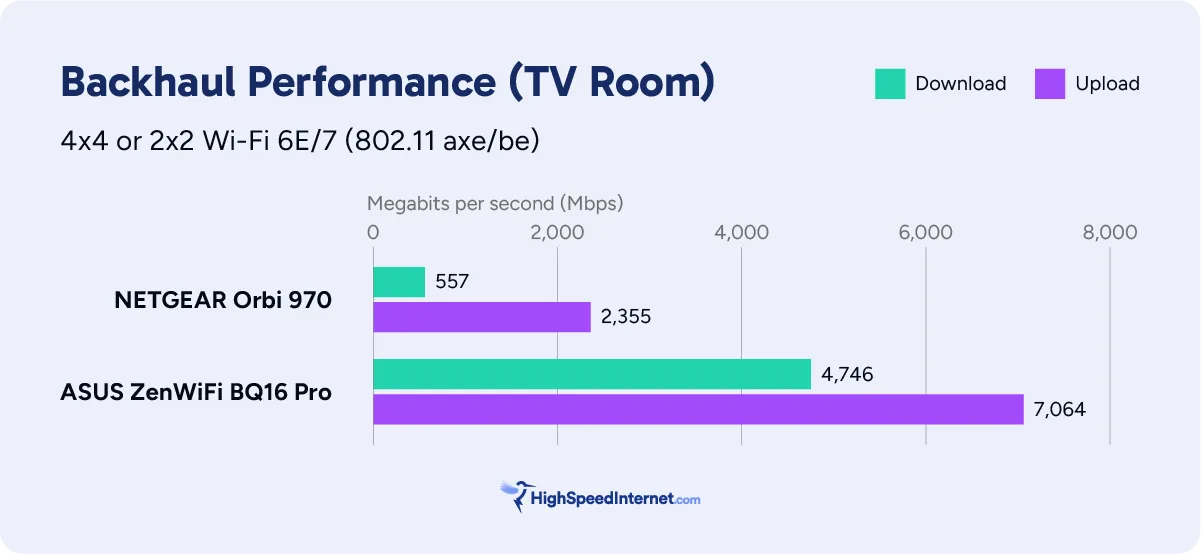
Turning to the wireless backhaul, the results are hard to decipher. I ran multiple tests on the BT10 in hopes of matching the top speeds I recorded with the BQ16 Pro, but something tells me I was striving for the unachievable. The BQ16 Pro has a second 6 GHz radio, and the BT10 doesn’t, so I can only assume the BQ16 Pro took advantage of the two 6 GHz radios to achieve a faster backhaul throughput.
Still, the BT10’s backhaul is the most symmetrical among Wi-Fi 7 mesh systems I’ve tested. Opt for Ethernet to prevent the backhaul from interfering with your Wi-Fi devices—the top wired speed is around 9.4Gbps.
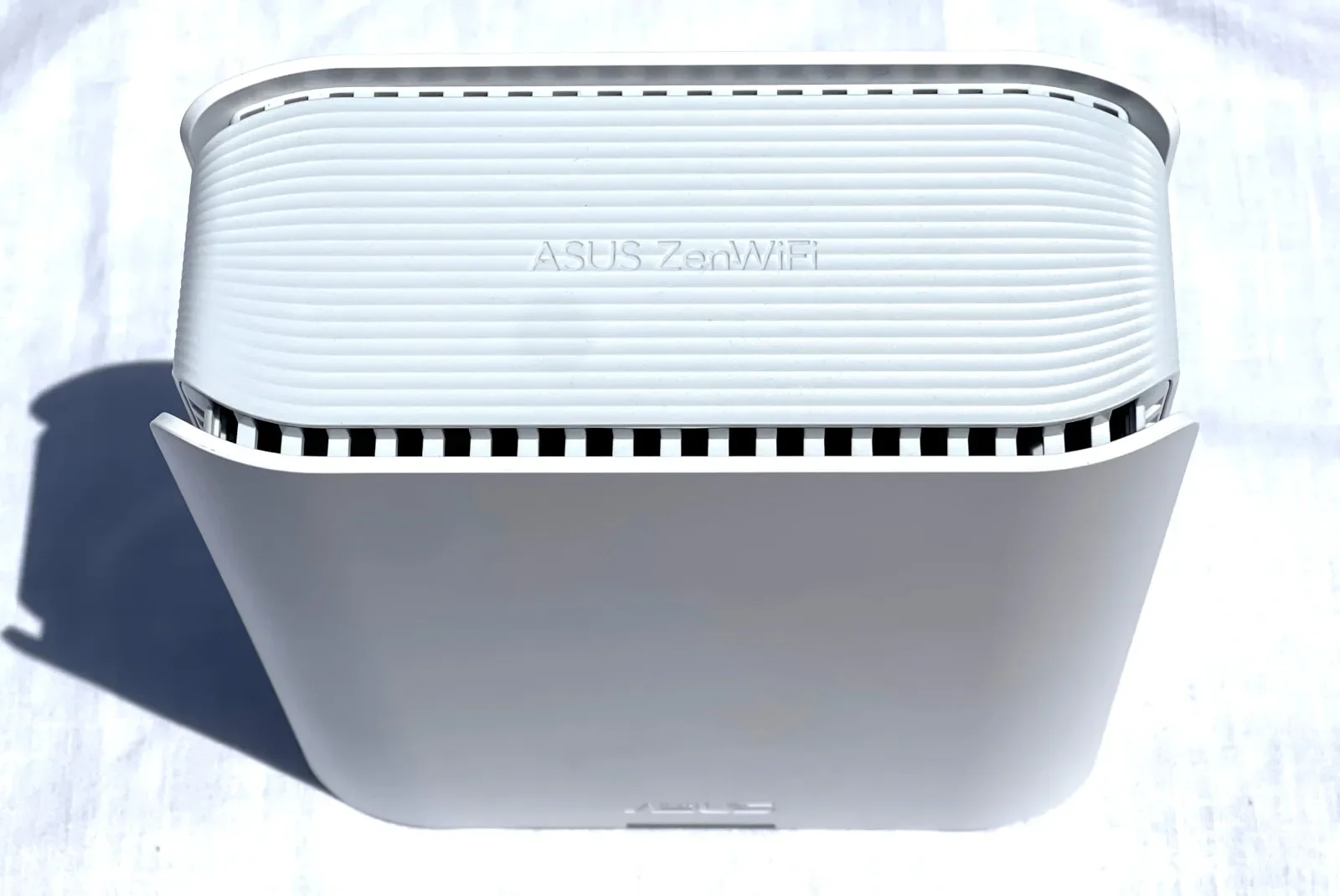
The ASUS ZenWiFi BT10 system looks great with any home decor. Kevin Parrish | HighSpeedInternet.com
Features
5
Notable features
- Free security
- Free parental controls
- Five-year warranty
ASUS crams loads of free features into its latest Wi-Fi 7 products, while the competition wants you to pay for subscriptions. Here’s what you get for the price:
- Mesh networking (AiMesh only)
- Free security powered by Trend Micro (AiProtection)
- Free profile-based parental controls
- USB-based media streaming and sharing
- USB-based printer sharing
- USB-based 4G/5G tethering
- Free VPN tools (server, client, and a mobile-based connection)
- Multiple SSIDs (I created at least five)
- Cloud-based file sharing (AiCloud 2.0)
- Dual WAN connectivity with failover and load balancing support
- Five-year warranty
One of the major callouts here is the system’s ability to support two internet connections simultaneously. Usually, you’ll see this feature in business access points, but I’m seeing a growing trend of offering it on residential products too. So, if your primary internet goes out, the secondary one kicks in. Or, you can balance the load between the two connections.
What the BT10 could do better
- One interface to manage it all
- EasyMesh support
Technically, you can access the web interface using a mobile or desktop browser, but it’s designed for power users, whereas the app is not. Having one interface with all the settings is ideal.
As for EasyMesh, ASUS says its AiMesh technology is only offered for the best compatibility. EasyMesh would allow you to pair this system with any off-brand system and router that supports it.
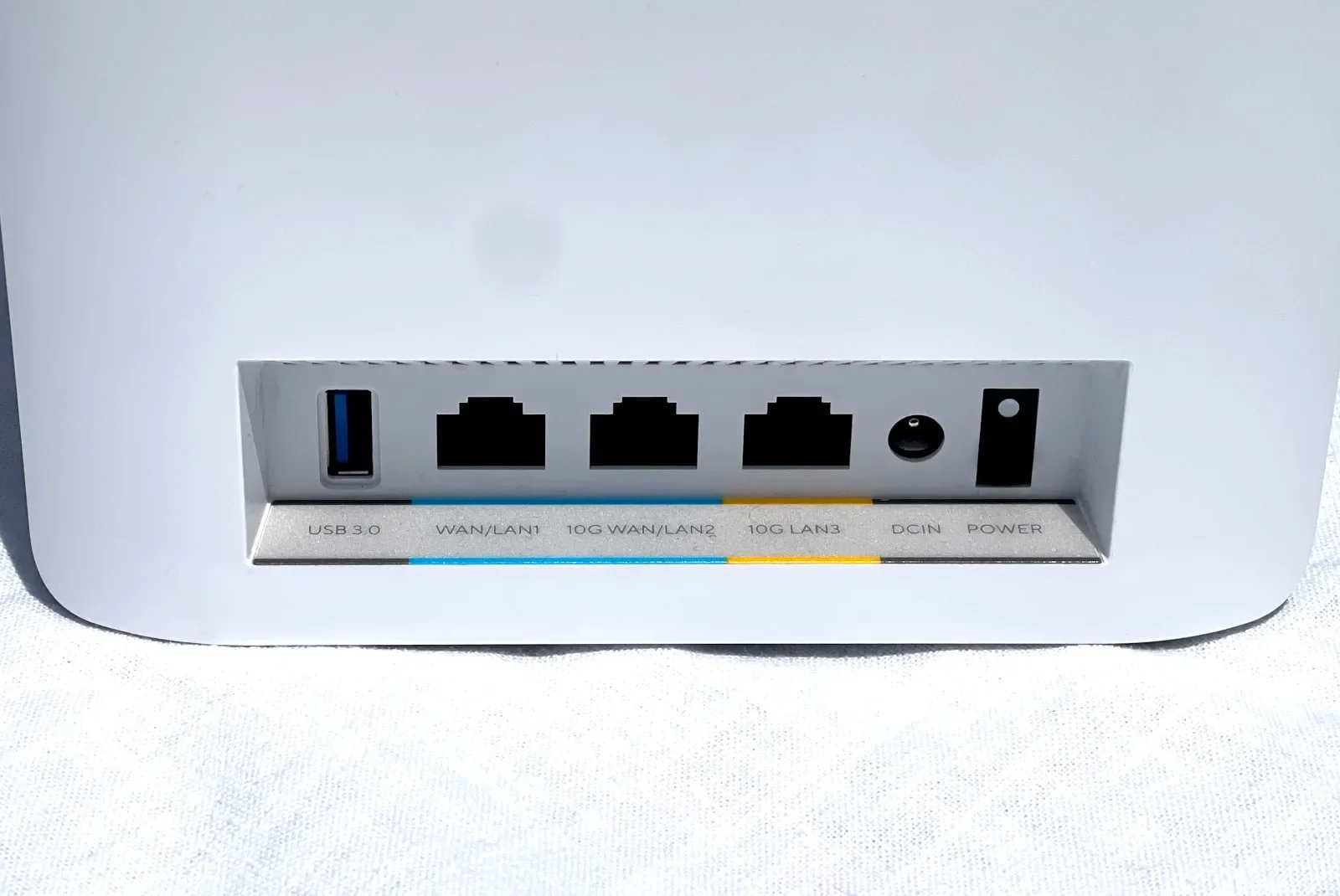
Each unit includes 10Gbps Ethernet ports for internet and wired devices. Kevin Parrish | HighSpeedInternet.com
Design
4
Buttons
- 1x Power switch (back)
- 1x Reset button (bottom)
- 1x WPS button (bottom)
Ports
- 1x Gigabit Ethernet WAN/LAN 1 port (back)
- 1x 10 Gigabit Ethernet WAN/LAN 2 port (back)
LAN ports
- 1x 10 Gigabit Ethernet LAN 3 port (back)
Other ports
- 1x USB 3.2 port (back)
The ZenWiFi BT10 has a great design for the money. It packs things like 10Gbps wired connectivity, link aggregation (if you’re using the 1Gbps WAN port), and 5G internet backup support via the USB port. The stream count allows up to five Wi-Fi devices to download simultaneously at full speed. Alternatively, if ten Wi-Fi devices are connected, each downloads at half of their maximum possible speed.
Setup
5
Inside the box
- 1x router
- 1x satellite
- 2x power adapters
- 1x Ethernet cable
- 1x Quick Start Guide
- 1x App Setup Instructions sheet
- 1x VIP Member Warranty Notice
I wish every router and mesh system had a setup like the one I experienced with the ZenWiFi BT10. The process was stupid simple: Connect to the router unit (it’s marked as such), cycle through the satellite placement instructions, set the network name and password, and update the firmware. Boom, there you go—you’re online and streaming cat videos in minutes (guilty). No weird settings to figure out. No security Q&A to complete.
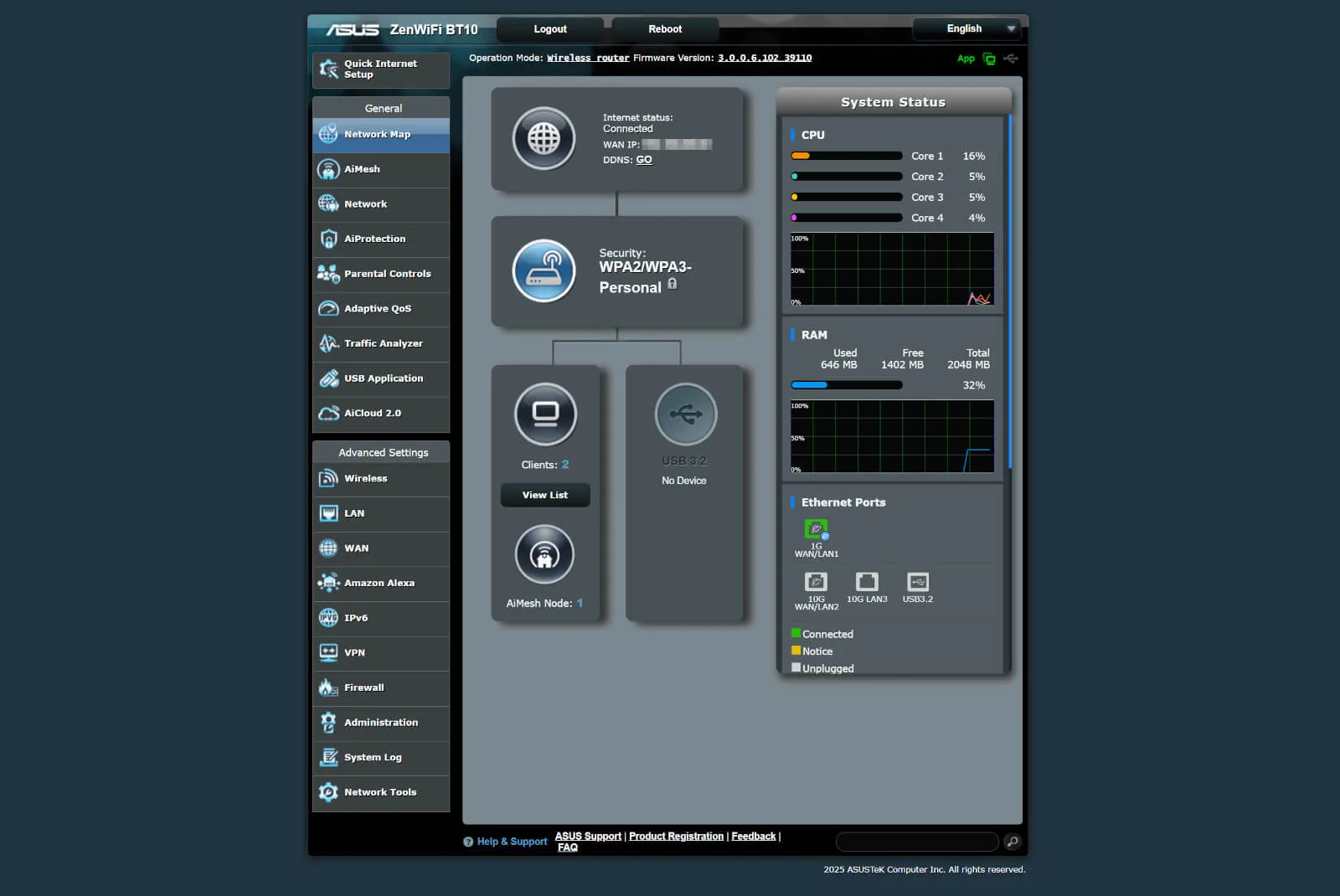
The ASUS ZenWiFi BT10 provides decent browser and app interfaces. Kevin Parrish | HighSpeedInternet.com
Ease of use
4
Router interface
- Web interface: http://www.asusrouter.com
- Mobile app: ASUS Router (App Store, Google Play)
The good news with the BT10 is that you’re not restricted to a single app to manage your home network, unlike other mesh systems. Many mesh systems I’ve tested use simplified apps, preventing you from changing Wi-Fi channels and similar settings. If a mesh system offers a web interface, it typically displays only essential information about the system.
The bad news with the BT10 is that you must use both its web interface and app to fully control your home network. For example, the app can’t change Wi-Fi channels, adjust channel widths, or toggle link aggregation. But unlike the web UI, the app lets you create profiles, assign devices, and set content filters.
Having a single interface to cover every setting would be ideal, but that is unlikely since the web UI targets power users, and apps focus on average users. Both excel in their roles, so there are no major complaints.
Additional costs and fees
The system I reviewed is a two-pack. If you need better whole-home coverage than what this system provides out of the box, you can add more units for $360 each.
On the subscription front, AdGuard DNS Starter is free to use, but limited to five devices and 300,000 monthly requests. The Personal plan costs $2.49 per month for 20 devices and 10 million monthly requests.
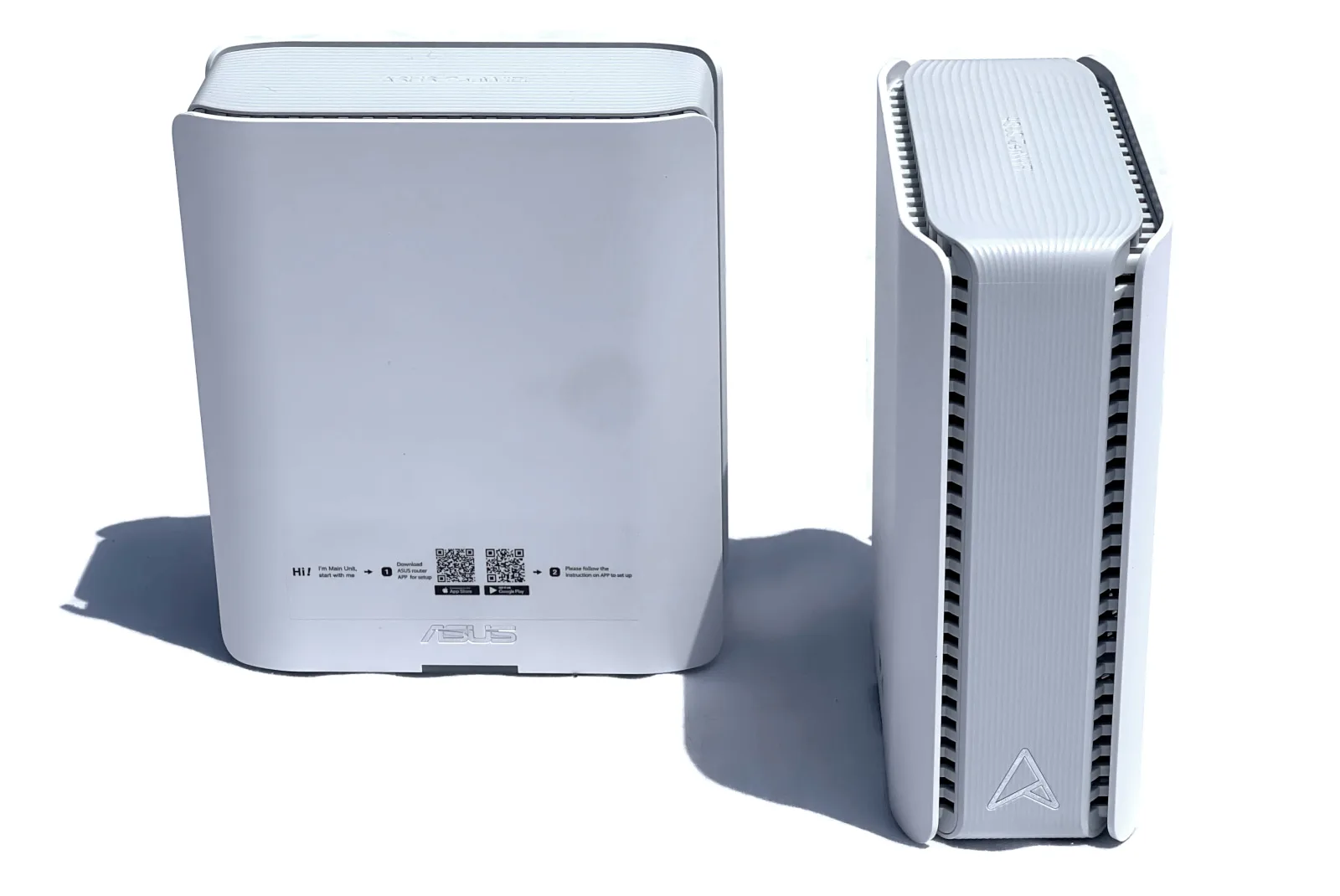
The ASUS ZenWiFi BT10 includes a five-year warranty. Kevin Parrish | HighSpeedInternet.com
My ZenWiFi BT10 review: The verdict
The ZenWiFi BT10 isn’t as expensive as the BQ16 Pro, but it’s still a pricey two-piece system. The cost is the equivalent of two $360 standalone ASUS Wi-Fi 7 routers with AiMesh, although you probably have more range and wired ports if you choose to use a dual-router setup. On the flip side, the ZenWiFi BT10 units are not as bulky and noticeable as standalone routers, so they blend in with any decor.
The pricing is a little concerning, though. Many internet providers now offer the Eero Max 7 mesh system at no extra cost. Customers get free upgrades, replacements, and technical support, which is not the case if you purchase an expensive mesh system.
Without testing the latest Eero, the only benefit I can see from buying the ZenWiFi BT10 is that it includes a lot of features that require a subscription with the Eero Max 7 system. Plus, your internet provider isn’t dipping into your home network—who knows what your provider does with the info it collects on you.
The bottom line is that the BT10 is an excellent system, but it may not be any better than what your internet provider already supplies. If you’re still using an outdated router or mesh system, check with your internet provider first before sinking money into a Wi-Fi 7 mesh system.
* See Amazon disclaimer.
FAQ about the ZenWiFi BT10
What's the difference between this system, the BQ16 Pro, and the BT6?
My methodology
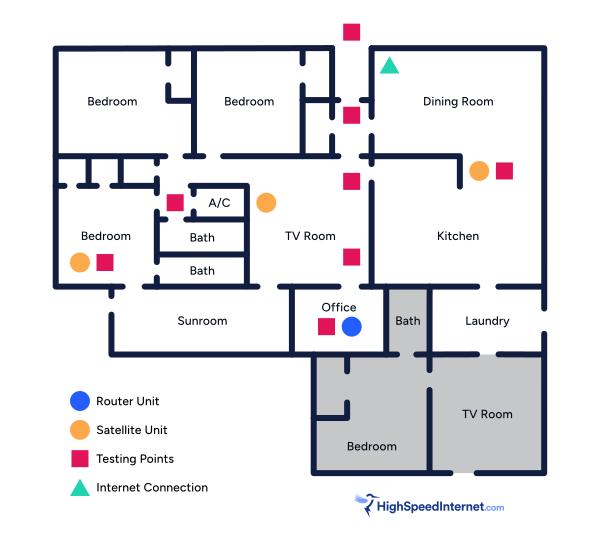
I benchmark a standalone router or mesh system by setting it up in my office and connecting it to a local server running speed test software. By using my own local server and software, I can control the input versus relying on fluctuating speeds caused by the connection between me and a remote test server. Routers aren’t internet equipment, so I exclude the internet from testing.
Once I connect the router or first mesh system unit to my local server, I transmit test data between my wireless devices and the server, taking numerous measurements to account for signal degradation, interference, and fluctuations. Here’s the testing path:
Wi-Fi client → router → local wired server → router → Wi-Fi client
The first tests occur close to the router or mesh system node wired to the test server, without obstructions, to get the strongest signal and record the fastest speed possible.
After that, I repeat the process straight out at 10, 20, and 30 feet, with only a glass door obstructing my view of the router.
Next, I go outside and run the speed test from the sidewalk (40 feet) and across the street (120 feet). The same glass door and an exterior door block my path when I run these tests.
Finally, I come back inside and run tests in a hallway to the left of the TV room and office—where a glass door, three walls, and an air handler unit block my view of the router. The dining room, another testing point, sits to the right of the kitchen, TV room, and office—two walls and a glass door block the path in this test.
Client devices used in testing
| OnePlus 11 5G | Google Pixel 6 | |
|---|---|---|
| Wi-Fi version | Wi-Fi 7 | Wi-Fi 6E |
| Stream configuration | 2 x 2 | 2 x 2 |
| Max channel width | 320 MHz | 160 MHz |
| Max 6 GHz speed (BE) | 5,764Mbps | – |
| Max 6 GHz speed (AXE) | – | 2,402Mbps |
| Max 5 GHz speed (BE) | 2,882Mbps | – |
| Max 5 GHz speed (AX) | 2,402Mbps | 2,402Mbps |
| Max 5 GHz speed (AC) | 866Mbps | 866Mbps |
| Max 2.4 GHz speed (BE) | 688Mbps | – |
| Max 2.4 GHz speed (AX) | 574Mbps | 286Mbps |
| Max 2.4 GHz speed (N) | 144Mbps | 144Mbps |
*Speed in megabits per second (Mbps)
ZenWiFi BT10 benchmarks
6 GHz tests
| OnePlus 11 5G* | Google Pixel 6† | |
|---|---|---|
| 2 feet | 3,342 | 1,896 |
| 10 feet | 3,201 | 1,879 |
| 20 feet | 2,915 | 1,732 |
| 30 feet | 2,786 | 1,659 |
| 40 feet (porch) | 2,321 | 1,538 |
| 120 feet (across street) | 845 | 839 |
| 160 feet (mailboxes) | No connection | No connection |
| 20 feet (hallway) | 3,012 | 1,701 |
| 20 feet (dining room) | 2,396 | 1,826 |
| 30 feet (bedroom) | 1,867 | 1,377 |
* Speeds in megabits per second (Mbps) using a 320 MHz channel width and a 5,764Mbps starting link rate.
† Speeds in megabits per second (Mbps) using a 160 MHz channel width and a 2,402Mbps starting link rate.
See speed test disclaimer.
5 GHz tests
| OnePlus 11 5G* | Google Pixel 6† | |
|---|---|---|
| 2 feet | 1,911 | 1,867 |
| 10 feet | 1,859 | 1,836 |
| 20 feet | 1,822 | 1,823 |
| 30 feet | 1,808 | 1,814 |
| 40 feet (porch) | 1,556 | 1,601 |
| 120 feet (across street) | 840 | 872 |
| 160 feet (mailboxes) | No connection | No connection |
| 20 feet (hallway) | 1,698 | 1,741 |
| 20 feet (dining room) | 1,731 | 1,711 |
| 30 feet (bedroom) | 1,232 | 1,302 |
* Speeds in megabits per second (Mbps) using a 160 MHz channel width and a 2,882Mbps starting link rate.
† Speeds in megabits per second (Mbps) using a 160 MHz channel width and a 2,402Mbps starting link rate.
See speed test disclaimer.
Backhaul tests
| Downstream* | Upstream* | |
|---|---|---|
| 20 feet (TV room) | 4,408 | 4,133 |
| 30 feet (dining room) | 4,284 | 4,079 |
| 30 feet (bedroom) | 2,807 | 2,543 |
* Speeds in megabits per second using a 10Gbps wired connection to the satellite and a wireless connection between the satellite and router.
Disclaimers
Amazon
Amazon.com Availability as of 2/19/26 17:35 MST. Product availability is accurate as of the date/time indicated and is subject to change. Any price and availability information displayed on Amazon.com at the time of purchase will apply to the purchase of this product. Highspeedinternet.com utilizes paid Amazon links.
CERTAIN CONTENT THAT APPEARS ON THIS SITE COMES FROM AMAZON. THIS CONTENT IS PROVIDED ‘AS IS’ AND IS SUBJECT TO CHANGE OR REMOVAL AT ANY TIME.
Speed test results
Our router and mesh system benchmark results are based on several factors, including:
- Router or mesh system configurations
- Client device configurations
- Local interference (neighboring Wi-Fi, radar, etc.)
- Local obstructions (walls, doors, etc.)
Our stated speed test numbers reflect the router-to-client connection only and do not include the internet. Reported speeds are not guaranteed. Your speeds will vary based on the list provided above.
Author - Kevin Parrish
Kevin Parrish has more than a decade of experience working as a writer, editor, and product tester. He began writing about computer hardware and soon branched out to other devices and services such as networking equipment, phones and tablets, game consoles, and other internet-connected devices. His work has appeared in Tom’s Hardware, Tom's Guide, Maximum PC, Digital Trends, Android Authority, How-To Geek, Lifewire, and others. At HighSpeedInternet.com, he focuses on network equipment testing and review.
Editor - Jessica Brooksby
Jessica loves bringing her passion for the written word and her love of tech into one space at HighSpeedInternet.com. She works with the team’s writers to revise strong, user-focused content so every reader can find the tech that works for them. Jessica has a bachelor’s degree in English from Utah Valley University and seven years of creative and editorial experience. Outside of work, she spends her time gaming, reading, painting, and buying an excessive amount of Legend of Zelda merchandise.
Related Posts