Our NordVPN Review: Will It Keep Your Data Private?
Nord’s fast, secure, and feature-rich VPN comes with a premium price, but you get what you pay for.
Availability and speed may vary by location, and prices are subject to change. Expand for disclaimers.
NordVPN plans
Basic — Services are subscription based and will automatically renew annually for an additional 1-year term after the first 2 years, unless canceled. You can cancel auto-renewal anytime by following the instructions in your Nord Account. The renewal price is $139.08/year, sales tax may apply. The price is subject to change, but we will notify you of any adjustments before charging. Payments are in USD and may include provider fees. By purchasing, you agree to the terms of service, auto-renewal terms, to receive electronic documents, and acknowledge our privacy policy.
Complete — Services are subscription based and will automatically renew annually for an additional 1-year term after the first 2 years, unless canceled. You can cancel auto-renewal anytime by following the instructions in your Nord Account. The renewal price is $219.48/year, sales tax may apply. The price is subject to change, but we will notify you of any adjustments before charging. Payments are in USD and may include provider fees. By purchasing, you agree to the terms of service, auto-renewal terms, to receive electronic documents, and acknowledge our privacy policy.
Prime — Services are subscription based and will automatically renew annually for an additional 1-year term after the first 2 years, unless canceled. You can cancel auto-renewal anytime by following the instructions in your Nord Account. The renewal price is $296.28/year, sales tax may apply. The price is subject to change, but we will notify you of any adjustments before charging. Payments are in USD and may include provider fees. By purchasing, you agree to the terms of service, auto-renewal terms, to receive electronic documents, and acknowledge our privacy policy.
Why use NordVPN
NordVPN is one of the most reliable VPN services available, with a good track record and a quality set of privacy features. This is a service for those who value security and privacy above all else.
Pros
 Proprietary NordLynx protocol and military-grade encryption
Fast download speeds
Proven history of preserving customer privacy
Cons
 Too much marketing and upsells in the apps
Heavy impact on latency and jitter
Limited to 10 devices
NordVPN is a highly trusted and comprehensive service packed with loads of privacy tools. Even the basic plan is undeniably feature-rich, including everything you need to safeguard your online activity. It’s also fast, with minimal impact on download speed, though our testing did find a heavier impact on latency and jitter (more on that below).
I tested NordVPN as my daily-driver privacy solution for two weeks, using the service for remote working, streaming, and everyday internet things. Using Nord is straightforward; the setup is a breeze, but the experience isn’t perfect. At times, the brand’s constant marketing and upselling of add-ons and adjacent services are a bit much. It’s also expensive compared to other services. You’re buying into the Nord name: a universally trusted and time-tested service with a 14-year track record of successful third-party audits and prioritization of customer privacy.
How much does NordVPN cost?
Price score: (2.5 /4) ★ ★ ½
| Plan | Price | Features |
|---|---|---|
| NordVPN Basic | $3.49–$14.99/mo. | |
| Nord Complete | $4.49–$19.99/mo. | |
| Nord Prime | $7.49–$29.99/mo. |
NordVPN is a premium option; its entry-level plan has enough features to rival top-tier offerings from other VPN providers, but it comes with a price tag to match. Compared with other VPN providers, Nord Basic’s $14.99 monthly rate is among the highest. Nord also has price hikes, one of our least-favorite practices. Technically, the monthly plan rates could increase at any time, but I signed up for a two-year contract at $215.07. In the account billing, I can already see a 37% increase proposed for the 2028 renewal date, along with a disclaimer that the exact price may change before then.
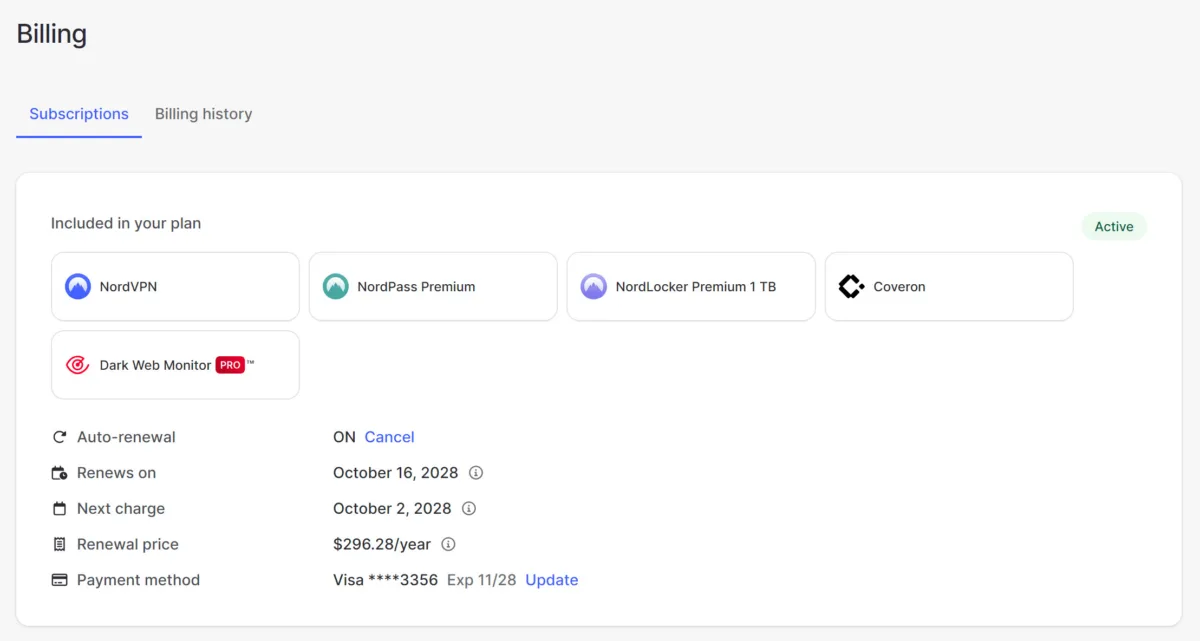
My NordVPN Billing page.
Which NordVPN plan should you get?
Most customers are going to be fine with the Basic plan. It comes with all the VPN features you need: multiple encryption types, split tunneling, kill switch, etc. The features offered by the Complete and Prime tiers can provide additional peace of mind, but I see them as adjacent services rather than anything that will directly improve your VPN experience.
The password manager, scam call protection, and secure cloud storage included with the Complete plan are all useful for sure; if you need a full suite of online security tools, this might be just what you’re looking for. I personally would prefer to select those services individually if I really felt I needed them, especially considering the pricing. For example, the insurance benefits of the Nord Prime plan would be nice, but it’s double the price of the Basic plan, which is already expensive compared to other VPN services.
How fast is NordVPN?
Speed and performance score: (3.2/4) ★ ★ ★
NordVPN’s performance is overall excellent. While using the app on my PC and phone, I couldn’t discern any difference in speed or performance for most applications. Things like streaming, downloading, and browsing were completely unaltered from my perspective.
Virtual meetings on a PC were the one exception, which felt noticeably less stable than usual. Constantly shifting levels of audio delay (even with video turned off) created an awkward experience when meeting with coworkers. Trying to talk with coworkers with constantly shifting levels of delay in audio was difficult, even with video deactivated. Our testing confirmed the cause: Nord does an incredible job of preserving download speed, but it significantly increases latency and jitter.
NordVPN performance testing results
| Local server | Distant server | No VPN | |
|---|---|---|---|
| Download speed | 890Mbps (- 5.3%) | 702Mbps (- 25.3%) | 940Mbps |
| Upload speed | 909Mbps (- 4.1%) | 152Mbps (- 84.0%) | 948Mbps |
| Latency | 110.94 ms (+ 332%) | 286 ms (+ 1,015%) | 25.66 ms |
| Jitter | 33.92 ms (+ 910%) | 45 ms (+ 1,239%) | 3.36 ms |
Speeds
According to our controlled testing over a symmetrical fiber connection, Nord’s download speed impact is minimal, especially when connecting to a server in your general area; average download speeds were only 5.3% (40Mbps) slower compared to average speeds from the same connection without using a VPN.
However, speeds were substantially slower when using a distant Nord server (Hong Kong); we detected a 25.3% decrease in average download speed. Considering the distance, this isn’t surprising or unexpected.
Upload speeds also performed very well over Nord’s local servers, but when testing the Hong Kong location, the impact on upload speed was severe, decreasing by 84%.
Latency and jitter
NordVPN increased latency and jitter substantially, even on local servers, with a 332% increase in latency and a 910% increase in jitter.
The heavy impact on upload speed is something we see with all VPNs, but the huge increases in latency and jitter are outliers in our testing so far, though not entirely unexpected. A VPN routes your traffic through an extra location, making increases in latency and jitter unavoidable. Increased latency and jitter won’t impact things like streaming or most web activities, but it will heavily impact time-sensitive activities like video calls and real-time multiplayer gaming.
Are the NordVPN apps good?
Apps and UX score: (2.4/4) ★ ★ ½
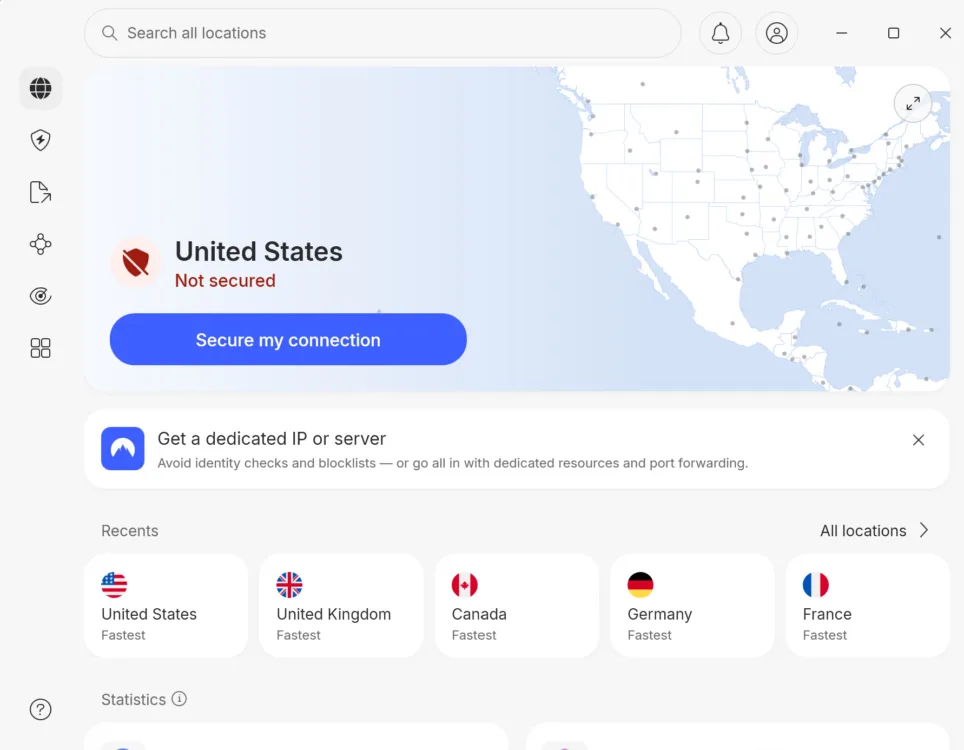
NordVPN’s PC app home screen.
The Nord apps feel solid. I didn’t experience any bugs or unexpected behavior on the desktop or mobile apps. Setup couldn’t be simpler, and turning on the VPN is a one-button affair, as it should be. It’s clear if the VPN is active when you’re in the app, and it’s easy to see which location you’re routing through, but there are no external indicators outside of the app (a checkmark in the app tray would be nice). The browser extensions do provide an icon indicating if the VPN is active.
You need to toggle a setting in the drop-down menu to show VPN details like IP address, server number, and time connected, which I’d prefer to be on by default. There’s no internet speed or latency information available; I would appreciate a ping measurement or some kind of performance indicator to show how the VPN affects my connection.
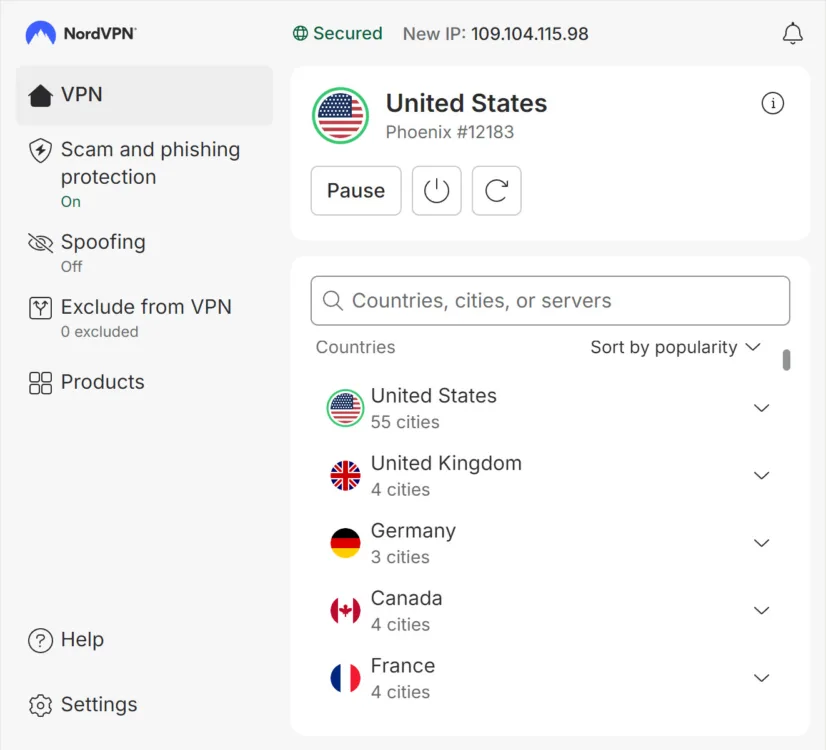
It’s easy to see if your VPN is active and what location you’re routing through.
Servers
Server score: (3.2/4) ★ ★ ★
Nord VPN supplies 9,400+ servers in 111 countries. Selecting a specific city or country is easy enough, but I wish it provided more detail. I’d like to order server options by speed estimates or distance, but the only sorting options are alphabetical order and server popularity. You can easily connect to the fastest server with a dedicated button, which is what I usually do.
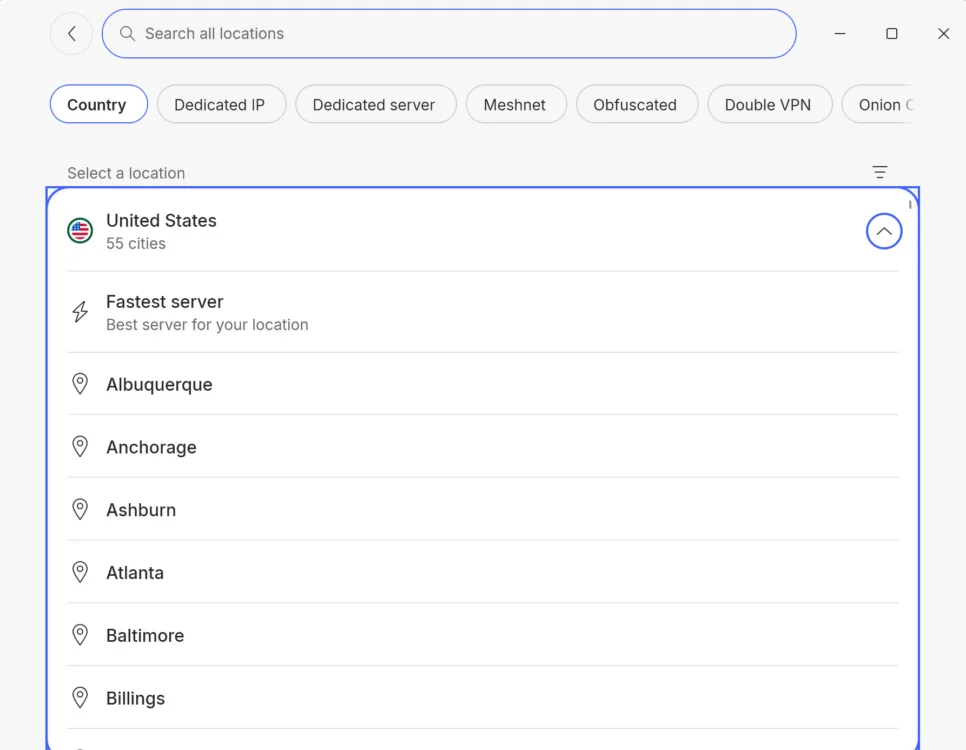
NordVPN’s server sorting options are limited.
The different tabs on the sidebar navigate to the extra features, like scam and phishing protection and dark web monitoring, and then there’s a Products tab that’s essentially a Nord store where you’re offered additional services for purchase. It’s odd to have these secondary services and upsells so accessible, while important features like encryption protocol and split tunneling are buried in the settings menu.
Does NordVPN work for age-restricted content?
Yes, Nord VPN can help you navigate around age-blocked content without creating a login on the blocked site. It can also help you get around regional blocks, such as elements of a site that don’t accept traffic from certain U.S. states.
To use NordVPN to get around regional login, age-verification, and site blocks, select or search for a server in a region in the US or elsewhere that isn’t subject to the restriction. You may need to refresh the browser page or restart your web browser after connecting to the VPN.
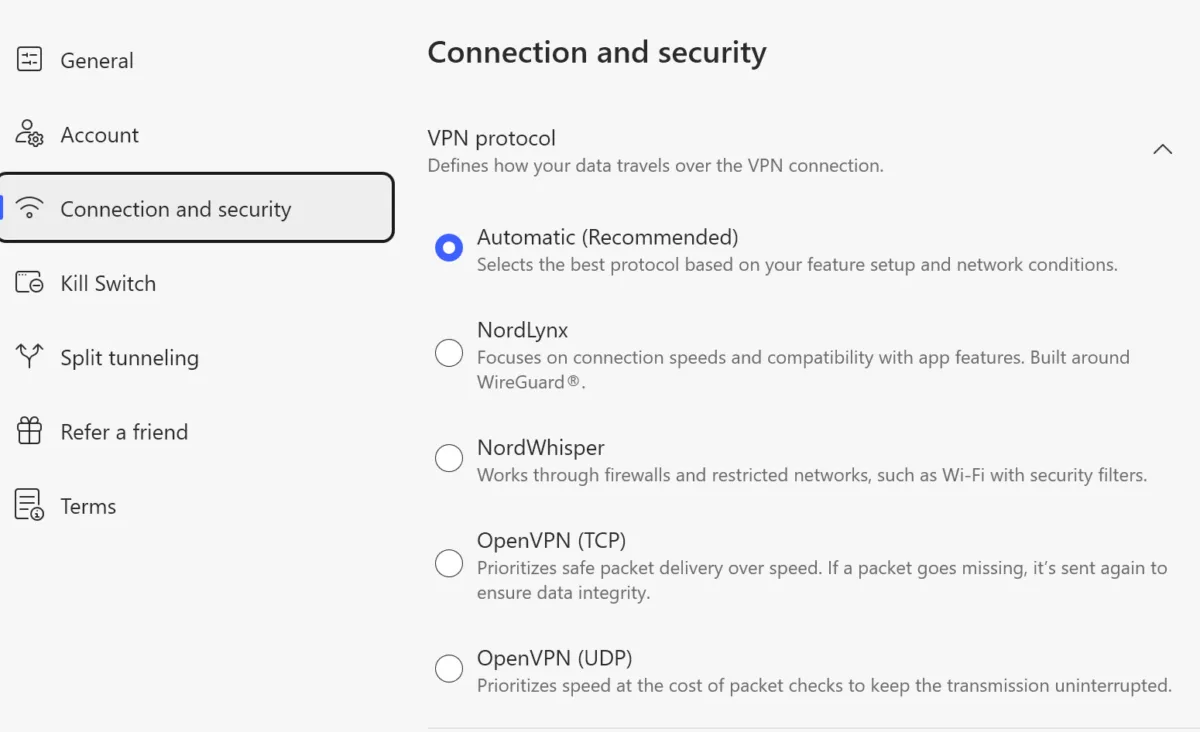
Most of Nord’s VPN-specific features (protocol, split tunneling, killswitch, etc.) are found in the settings.
How secure is NordVPN?
Security, confidence, and features score: (3.8/4) ★ ★ ★ ★
NordVPN is considered one of the most secure VPNs on the market, and I’d agree. Here are some of the ways Nord protects your online activity.
AES-256 encryption
This is the gold standard of modern cybersecurity, used by the military and many government agencies. Nord uses AES-256 encryption alongside its proprietary NordLynx protocol. The number of possible combinations AES-256 creates makes it practically impossible to crack. Many believe AES-256 encryption will hold up against future quantum computing attacks.
No-logs policy
NordVPN doesn’t track your online activity, such as browsing history. Third-party audits have verified this many times. In fact, Nord has made it impossible for their systems to track such activity by using RAM-only servers, which do not save data long-term.
The Nord name
NordVPN began in 2012 and has spent over a decade building one of the strongest names in cybersecurity, servicing over 15 million VPN users. It has an excellent reputation and track record of protecting connections from bad actors.
In addition to passing annual third-party audits, Nord’s actions have proved that it prioritizes its users’ privacy and safety above all else.
- In 2019, the Russian government required Nord to adhere to a registry of blocked websites. Rather than compromise its ethics, Nord refused to comply and shut down its Russian servers instead.
- Nord’s commitment was tested again in 2022 when the Indian government required it to store private consumer data for five years; again, Nord refused to comply and shut down its Indian servers in response.
These real-world tests give us a lot of confidence in Nord’s commitment to preserving its users’ privacy and online freedoms.
What additional features come with NordVPN?
| Plan | Features |
|---|---|
| Nord Basic | |
| Nord Prime | |
| Nord Complete | |
| Add-ons (available w/ any plan) |
NordVPN provides all the key features you need to stay safe online. Additionally, it offers extras, like spam call detection and password management, but some of these only come with the more expensive plans. Even so, take the Basic label of Nord’s starter tier with a grain of salt, as it is a fully comprehensive set of privacy tools. VPN-wise, Nord Basic has everything you need.
Multiple encryption options
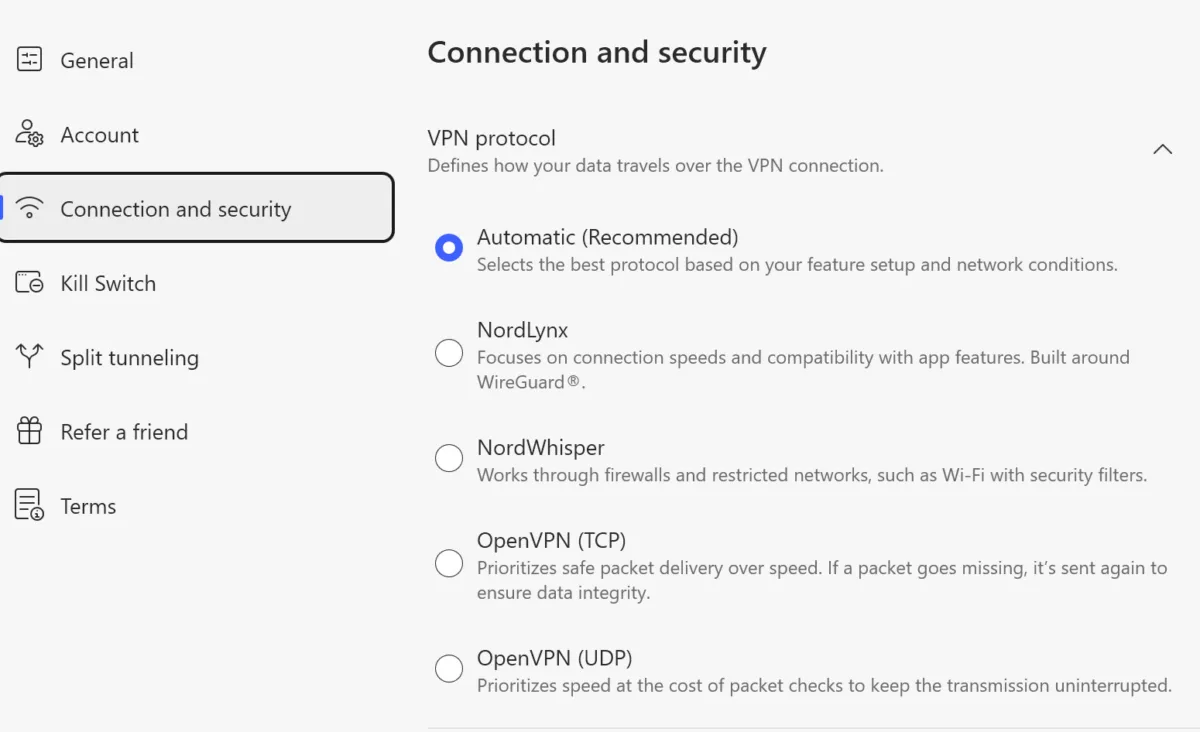
NordVPN offers multiple encryption options, each tailored to different online use cases.
This is one of my favorite Nord customization features. Even the basic plan allows you to choose an encryption type that matches your priorities.
NordLynx: Keeps your speeds fast and your apps working. This is the default setting.
NordWhisper: Designed to get around firewalls and obstacles that attempt to prevent VPN use.
OpenVPN (TCP): Prioritizes getting your data delivered as accurately as possible, as it will resend missing packets.
OpenVPN (UDP): Gives you more speed at the cost of letting missing packets go, probably a good option for video calls or any application where slow speeds could get in the way.
Post-quantum encryption
This is a future-proofing security feature designed for protection against quantum computing attacks, working on the assumption that these future quantum computing attacks will be able to easily decode current encryption protocols that take normal computers billions of years to crack.
This is a problem that doesn’t exist yet, but it’s possible your information is captured now and decrypted later, when quantum computing tech is available to bad actors. It’s worth noting that Nord’s post-quantum encryption doesn’t work with a dedicated IP, a dedicated server, or obfuscated servers. Enabling this feature also disables Meshnet, and it only works with the NordLynx encryption type.
Scam and phishing protection
This feature runs your traffic through Nord’s DNS servers to block malicious ads and web domains. It’s the only feature with a dedicated tab on the sidebar. One red flag for me was that my 7-Zip software was out of date and vulnerable, and it didn’t seem to like it when I took screenshots of webpages.
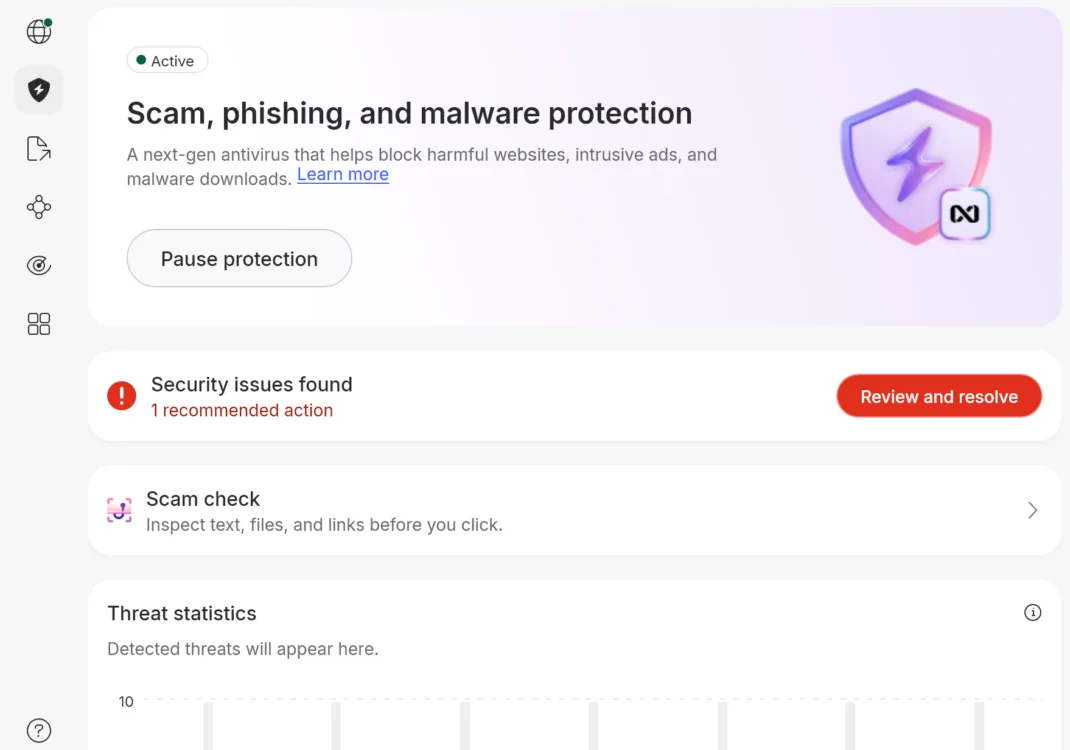
Nord’s scam, phishing, and malware protection page didn’t find much in my case.
When I dug into the advanced settings, it turned out most of the options for this protection are toggled off by default. Seems like this info would be useful directly on the main feature tab.
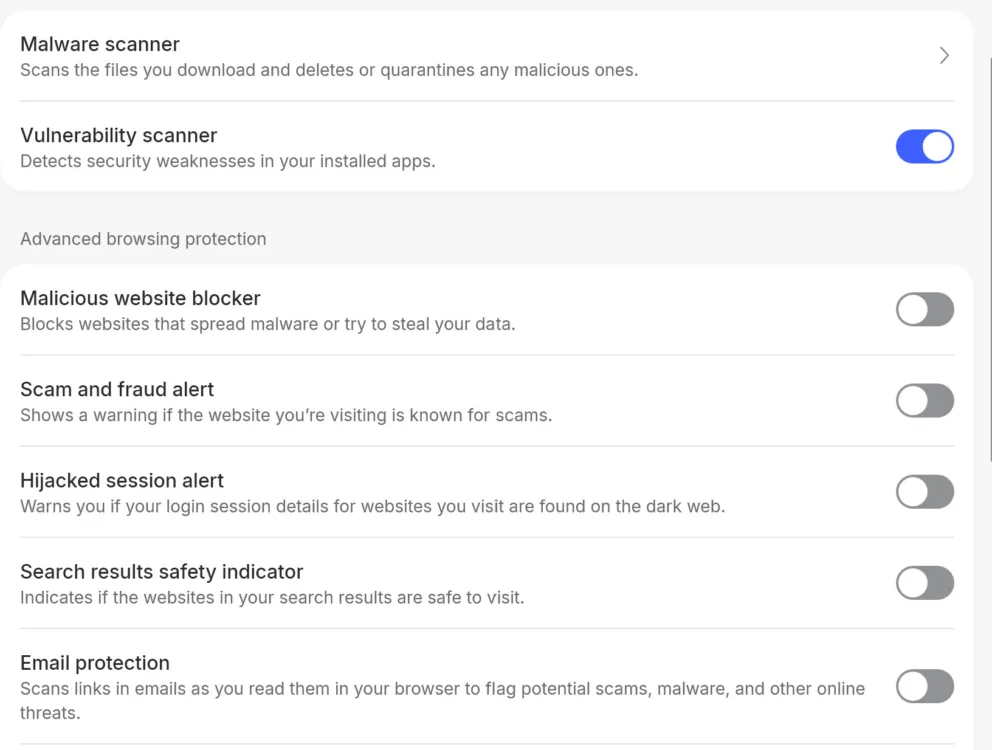
Most of the scam, phishing, and malware protection options are toggled off by default.
Split tunneling
Split tunneling gives you a fast lane for programs you don’t want affected by the VPN. This is great for gamers or remote workers, as you can have your games or meeting apps running smoothly without constantly toggling the VPN on and off.
One of my only gripes is that split tunneling is one of the features buried in the app settings. The other is that Nord doesn’t auto-detect many programs, so you have to select the browse option and dig through your program files to find most programs. On Windows, this can be quite the slog. Also, there’s no indicator that tells you if split tunneling is actually working. Do I need to restart the program after I select it in the settings? Is it really making its way around the VPN? I have no idea.
Kill switch
The kill switch feature cuts your device off from the internet if the VPN shuts off for any reason, so you’re never online unprotected. It’s worth noting that this feature is off by default; you need to activate it in the app settings.
Dark web monitor
Nord will cross-reference up to five email addresses with dark web activity and notify you if the addresses appear there. You can monitor more types of information with the Prime and Complete plans, such as phone numbers.
How does NordVPN do on major platforms and devices?
Device count and compatibility score: (3.2/4) ★ ★ ★
NordVPN covers up to 10 simultaneous devices, which is plenty for a single user, but a family trying to run on a single subscription would run into issues. I routinely use five devices almost every day, so I’m completely covered by the limit with plenty of room to breathe, but I could see households with three or more people feeling constrained.
Nord doesn’t offer any kind of family plan or deal, so the only way to cover more than 10 devices is to purchase more subscriptions. This isn’t terribly uncommon. Most VPN services either offer a 10-device limit or unlimited devices, with very few falling in between.
Supported operating systems
NordVPN covers a wider range of operating systems than most VPN services; all the big OS systems are supported, including Linux. Apple, PC, iOS, Android, and even Kindle Fire users can grab a NordVPN sub without thinking twice about compatibility.
Only the oddball systems are unsupported: ChromeOS, Volla OS, Ubuntu Touch, LineageOS, and GrapheneOS are unsupported, but that’s true for every major VPN aside from Hide.me VPN.
Billing and cancellation
Billing score: ★ ★ ★
Nord offers a 30-day money-back guarantee for new subscriptions. It’s easy to navigate your account billing, and you can access everything in the desktop app. What’s not so easy is the cancellation; at least it wasn’t for me. However, in the end, Nord did honor its guarantee, and I received a full refund.
How do I cancel my Nord VPN subscription?
These are Nord’s official instructions for getting a refund.
Step 1: Contact Nord via live chat at the bottom of the support page and request a refund.
Step 2: You’ll receive a link and then verify your identity.
Step 3: After ID verification, you’re sent to a page that lists out your payments. Payments eligible for a refund are supposed to have an adjacent Refund button.
Step 4: Click the refund button and confirm.
How I had to cancel my Nord VPN subscription
I followed Nord’s refund instructions, which took a while in itself due to some missing details and an error.
Step 1: I contacted support via chat, got my link, and verified my identity. So far, so good.
Step 2: This is where things take a turn. The instructions on the Nord page imply you’re led to the appropriate page after your identity verification, but this wasn’t the case for me. After some digging, I discovered that you actually need to navigate to the billing page.
Step 3: Once on the Billing page, I saw my one and only payment, but no refund button. According to Nord, this meant my payment was not eligible for a refund. Nord provides a host of reasons why your particular payment may not be eligible, but I did meet the criteria.
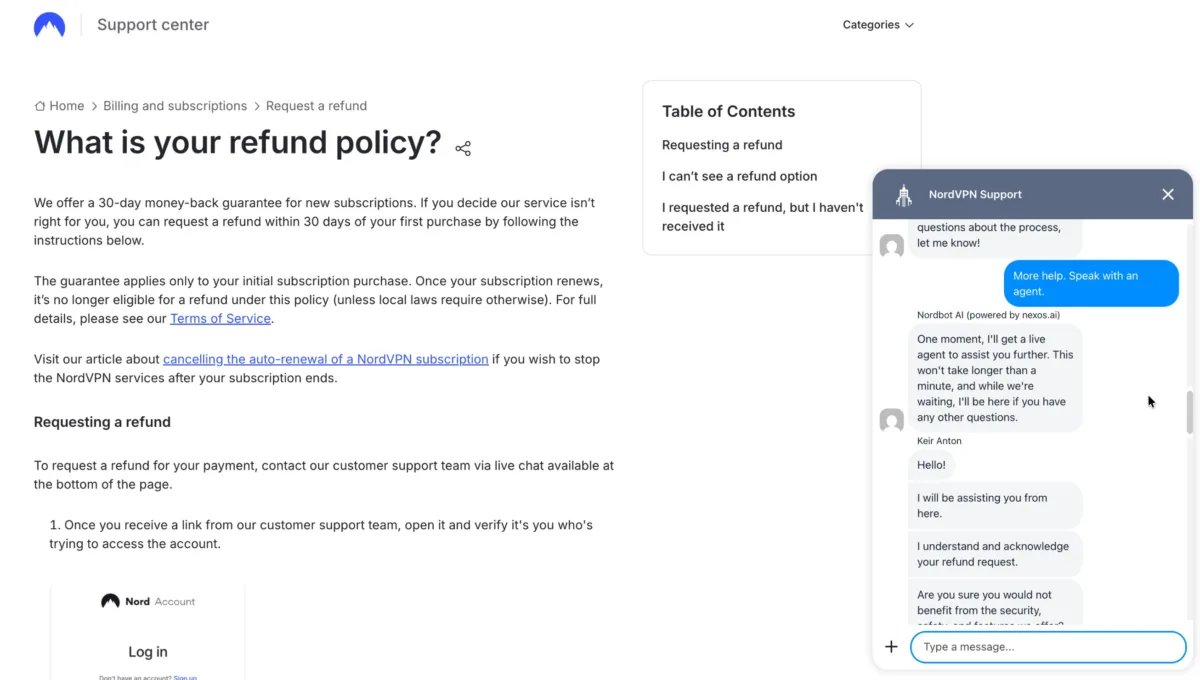
My cancellation chat interaction with Nord.
Step 4: Fortunately, a chat with a Nord live agent resolved everything. I used the same support chat to request a live agent, and they were able to correct the error and get me my refund button. The refund took about two hours to show up in the account.
Final call
Overall score: (77/100) ★ ★ ★
NordVPN is an excellent service. I trust the technology and the company with my online activity. Unfortunately, it’s not the VPN for me. I don’t like navigating around its constant marketing, and I wish the features I care about were easier to access. I also felt the app wasn’t providing me with as much information as it could if the user experience was prioritized over the upsells. Those issues, plus the high price, make it a bad fit for me, but that doesn’t mean it’s a bad fit for you.
Who is NordVPN for? Someone who wants the best VPN solution regardless of cost or minor marketing annoyances. Also, if you want all the extras Nord offers, like password management, secure digital storage, and sensitive information monitoring, Nord is an efficient way to grab a full suite of online protection with one swipe.
NordVPN score breakdown
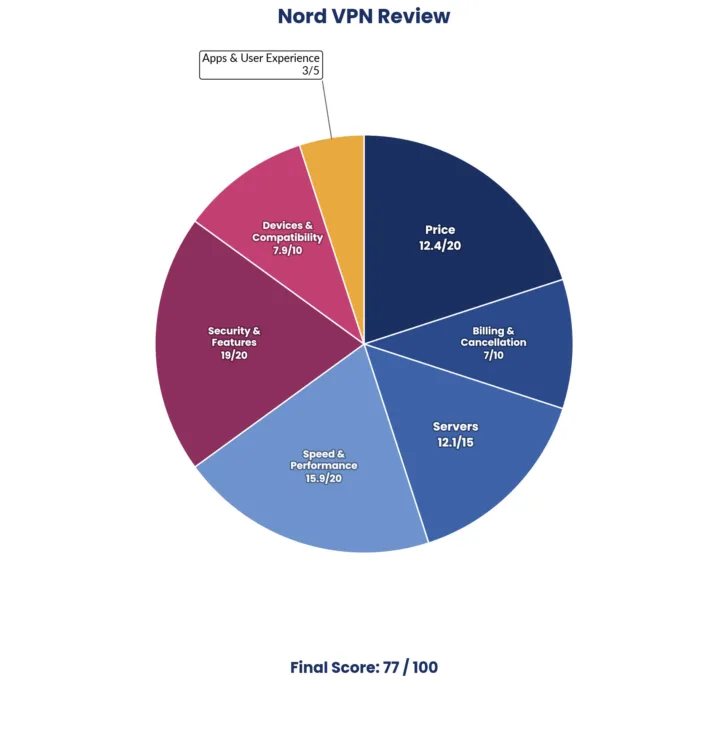
| Category | Points |
|---|---|
| Price | 12.4 / 20 (★ ★ ½ ) |
| Billing and cancellation | 7 / 10 (★ ★ ★) |
| Servers | 12.1 / 15 (★ ★ ★) |
| Speed and performance | 15.9 / 20 (★ ★ ★) |
| Security and features | 19 / 20 (★ ★ ★ ★) |
| Devices and compatibility | 7.9 / 10 (★ ★ ★) |
| Apps and user experience | 3 / 5 (★ ★ ½ ) |
| Final score | 77 / 100 |