
Norton VPN Review: Plans and Pricing 2026
Fast, feature-packed, and easy to use

Availability and speed may vary by location, and prices are subject to change. Expand for disclaimers.
Norton VPN plans
All plans — Subscription contracts begin when the transaction is complete and are subject to our Terms of Sale and License & Services Agreement. For trials, a payment method is required at sign-up and will be charged at the end of the trial period, unless cancelled first. Subscriptions automatically renew unless the renewal is canceled before billing. Renewal payments are billed annually (up to 35 days before renewal) or monthly depending on your billing cycle. Annual subscribers will receive an email with the renewal price beforehand. Renewal prices may be higher than the initial price and are subject to change. You can cancel the renewal as described here in your account or by contacting us here or at 844-488-4540.
Why use Norton VPN
This is a secure, fast, easy-to-use VPN backed by one of the most experienced brands in cybersecurity. Norton is an ideal pick for those who want the reliability and features of a cutting-edge VPN in an exceptionally usable package.
Pros
 Fast speeds
Superb usability
Advanced features with all plans
Cons
 Annual subscription required
Limited server info
Limited split tunneling
Norton VPN has a lot to like. It supplies the privacy chops, features, and reputation of a premium brand while maintaining very affordable rates. It’s also a top performer that keeps your internet speed intact while protecting your activity. The apps are designed with a user-first mindset, making it easy to get the most out of your subscription features and benefits, and it offers a generous 60-day refund window.
This isn’t to say Norton is perfect. Like all services, it does have its quirks. The subscription structure limits you to annual or longer commitments, its server network is on the smaller side, and its great UX comes at the cost of forfeiting some useful information, but I didn’t find any of these to be deal-breakers. For the customer who wants a trustworthy, fast, and easy VPN, Norton is ideal.
How much does Norton VPN cost?
Price score: (3/4) ★ ★ ★
| Plan | Price* | Features |
|---|---|---|
| Standard | $67.36 for 12 mos. ($4.49/mo.) | |
| Plus | $79.35 for 12 mos. ($5.39/mo.) | |
| Ultimate | $97.35 for 12 mos. ($6.49/mo.) |
* Availability and speed may vary by location, and prices are subject to change. See disclaimers.
Norton VPN plans are an excellent value compared to other providers. Even the Standard plan gets you premium privacy features like double VPN and rotating IP.
The biggest drawback is that there are no monthly plans; you must commit to an annual package at minimum. Granted, Norton offers a generous 60-day money-back guarantee for you to thoroughly try the service before you’re locked in, but the complete lack of any monthly options isn’t my favorite policy. The upside is that whichever plan you choose, you’ll certainly be paying less per month than if you had chosen a monthly subscription with another service, which typically averages about $12.99 per month.
You can save even more by signing up for two years; you’ll pay about 33% less for the extra time commitment and about 72% less than the typical $12.99 VPN monthly rate of other providers. So, while Norton’s long commitments are a bit demanding on new customers, you’ll likely save cash in the long run. I ran on a monthly VPN for far longer than I should have, about two years. It’s the kind of thing that’s easy to forget about as it sits in the background and slowly eats away your funds.
All plans include everything you need for a top-tier VPN experience. With the Ultimate plan, you get coverage for 20 devices instead of the 10 on the Standard and Plus plans. Aside from the device count, all Plus and Ultimate features are extras that are VPN-adjacent but don’t have any effect on the core functionality. These extras are useful extra layers of privacy and security, but they don’t improve the VPN directly.
Which Norton VPN plan should you get?
If you need coverage for more than 10 devices, the Ultimate plan is your best option with double the device limit (up to 20 devices). Ultimate is also the best fit for families, as it includes parental controls and iOS and Android phone location tracking.
If the VPN is all you need, the Standard plan is a good fit, as you get all the same VPN features minus the higher device count. The mid-tier Plan is a tough call. You’re still stuck with 10 devices, but if you need things like a password manager, 10GB of cloud storage, or dark web monitoring, it’s a good middle-ground without paying the higher Ultimate plan pricing.
How fast is Norton VPN?
Speed and performance score: (3.4/4) ★ ★ ★ ½
Norton VPN exhibited exceptional performance during my test run. The experience was completely transparent as far as my senses were concerned. Of course, we also ran some testing to see the exact impact on speeds, latency, and jitter.
Norton VPN speeds, latency, and jitter testing results
| Local server | Distant server | No VPN | |
|---|---|---|---|
| Download speed | 872.1Mbps (- 7.2%) | 556.4Mbps (- 40.8%) | 940Mbps |
| Upload speed | 847.8Mbps (- 10.6%) | 152.4Mbps (- 83.9%) | 948Mbps |
| Latency | 45.3 ms (+ 76.5%) | 307.7 ms (+ 1,099.1%) | 25.66 ms |
| Jitter | 10.1 ms (+ 200.6%) | 51.7 ms (+ 1,438.7%) | 3.36 ms |
Norton VPN speeds
Based on our controlled testing over a fiber-to-the-home connection, Norton’s impact on your internet speeds is minimal. The service does an excellent job of preserving download and upload speeds over a local server, which were only reduced by roughly 7% and 10%, respectively. The impact was much heavier when using a distant server, but this is the case with every VPN we test.
Norton VPN latency and jitter
Norton provided outstanding latency data during our testing. Latency managed to stay below an average of 50 milliseconds, which is fast enough for fast-paced multiplayer gaming and video calls. Jitter hiked just above 10 milliseconds, which is about average compared to other services
While using Norton, you’re unlikely to notice any type of negative effect on bandwidth, provided you use a nearby server. Downloads should keep up, and video loading won’t take noticeably longer. For more time-sensitive tasks, like fast-paced gaming and video calls, the service stacks up better than most VPNs. The low latency will keep things feeling snappy and responsive, but the increased jitter (about 200%) is enough to notice. So while you may not experience lag with gaming or video calls, the connection may feel less smooth and less consistent as your moment-to-moment internet latency shifts more than usual.
Are the Norton VPN apps good?
Apps and UX score: (4/4) ★ ★ ★ ★
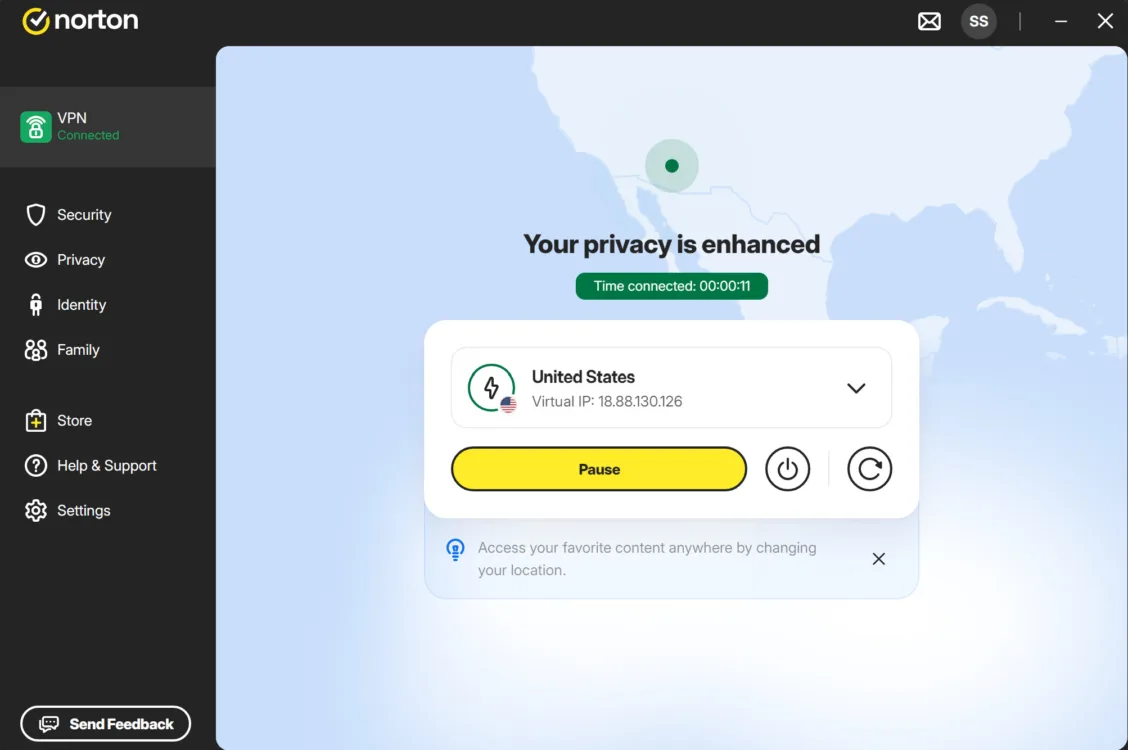
Norton VPN’s main interface is clean and uncluttered. Austin Aguirre | HighSpeedInternet.com
Norton’s apps surprised me. Usually, legacy brand apps are stuffed to the brim with diverting marketing that push extra features more than vital VPN functionality, but Norton manages to keep everything clean and simple without sacrificing your control, access, or options.
Turning the VPN on and off, plus knowing when it’s active, is very easy. You have a large connect button, and notifications pop up every time the VPN turns off. You also have an app tray icon that shows if the VPN is on. You can see the location of your VPN and the VPN IP address on the main page.
To keep the interface as clean as it is, some information has been omitted. For example, I couldn’t find my true IP address anywhere in the apps, and there are no performance indicators of any kind. No server pings, time connected, bandwidth measurements … nothing. But this isn’t necessarily a bad thing. While I would appreciate ping measurements when selecting a server, the rest is typically just distracting.
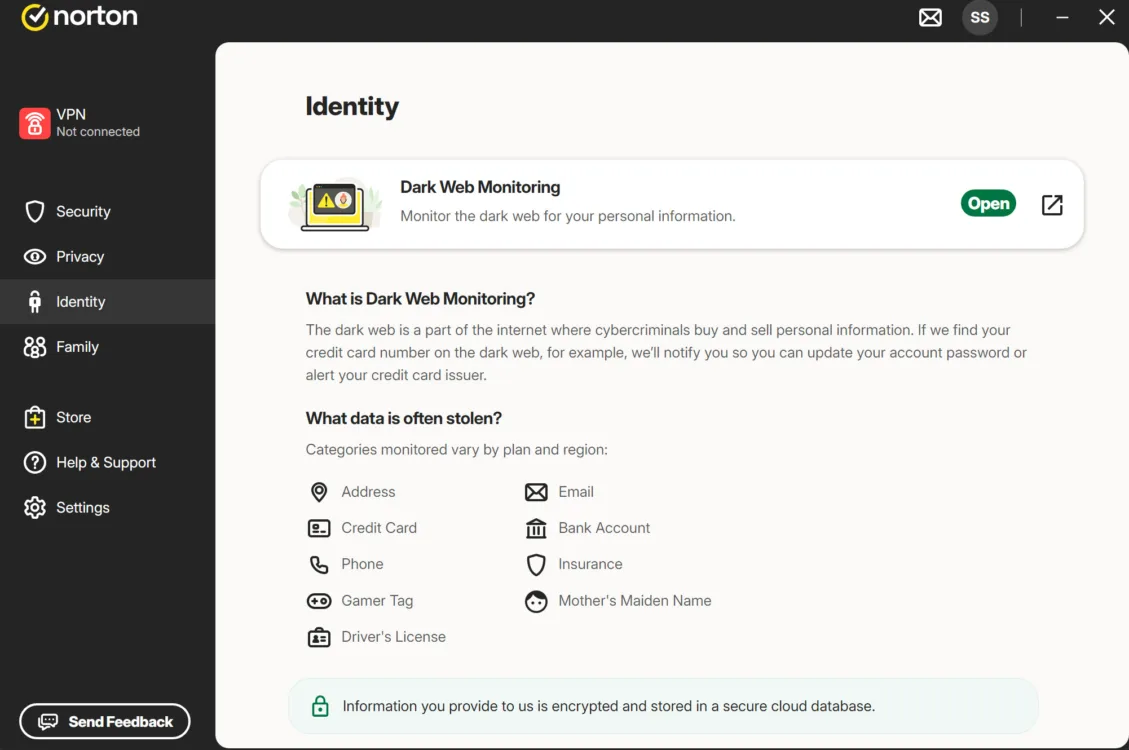
Extra features take up most of the main tabs, many of which lead you to browser links. Austin Aguirre | HighSpeedInternet.com
Like almost every VPN service, the main tabs are used to navigate to extra features, like dark web monitoring or malware protection. This is one of my VPN pet peeves, as I think this space would be much better utilized to provide quick access to core VPN functions, like split tunneling or the kill switch. I give Norton a pass because it presents those vital VPN functions quickly and efficiently as soon as you enter the settings menu. Also, the settings menu is more accessible than other providers, with its own dedicated tab in the large left-side menu.
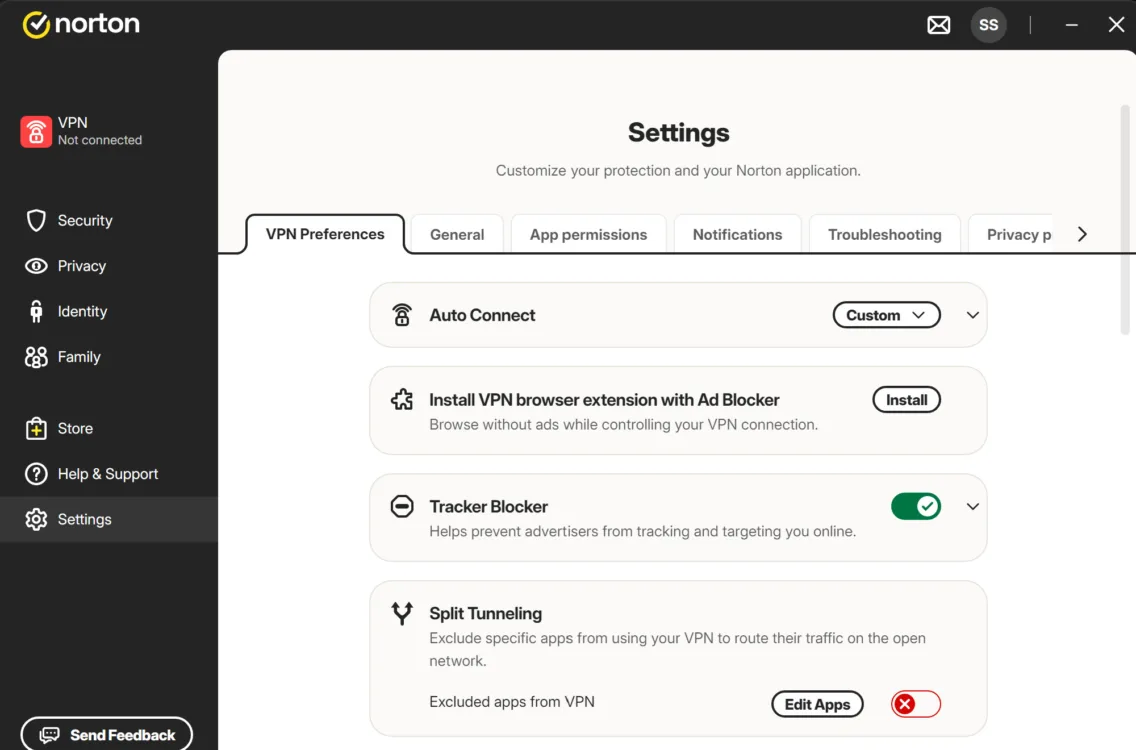
Vital VPN features are immediately accessible via the settings tab. Austin Aguirre | HighSpeedInternet.com
Does Norton VPN have a good server network?
Server score: (1.1/4) ★
Norton’s server network is small compared to other providers, with 2,000+ servers and 90+ countries. Most VPN providers this size have around 5,000–10,000 servers with 100+ countries. However, as long as you can reliably connect to a server in a suitable location while maintaining good network speed, this drawback has little impact.
Norton has already proven its excellent performance in our speed testing, so my guess is that Norton’s relatively small server network isn’t going to negatively impact your experience.
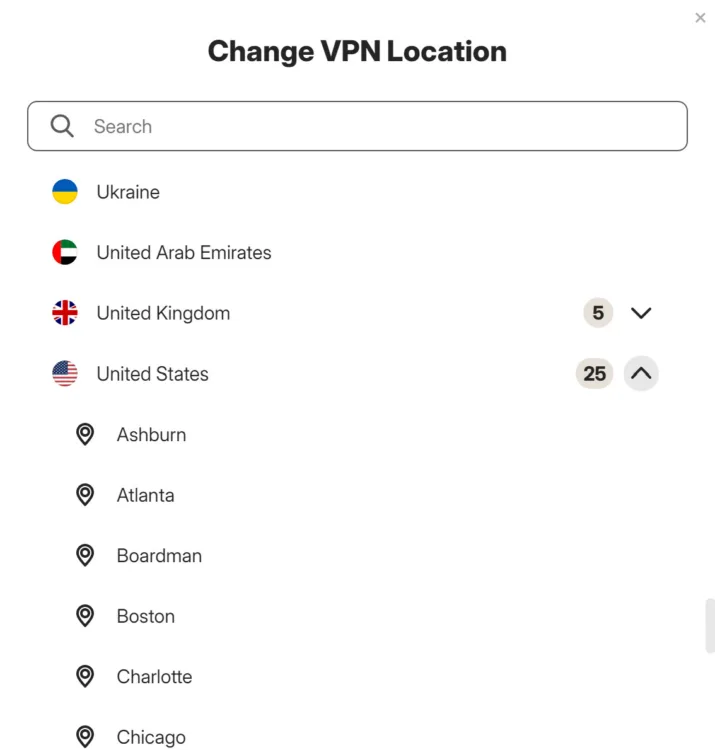
Selecting a server is simple, with some locations offering a drop-down menu of cities to choose from. Austin Aguirre. | HighSpeedInternet.com
In the app, it’s easy to find a server, but it provides limited information. You have a dedicated option at the top of the server list to choose the fastest server, but you can’t tailor that option any further, such as choosing the fastest server in a specific region.
Selecting a specific region is as easy as choosing it from an alphabetical list of countries; some countries also let you choose specific cities. Unfortunately, you don’t have any kind of performance data available. The server list doesn’t display ping measurements or any other performance indicators. If speed is your priority, you’re stuck either choosing the limited “fastest server” option at the top of the list, or choosing a server from the list and hoping for the best.
Peer-to-peer, double VPN, and rotating IP are easily found near the top of the server list, and you’re given a small list of locations to choose from for each. We’ll cover what these options are in more detail in the features section below.
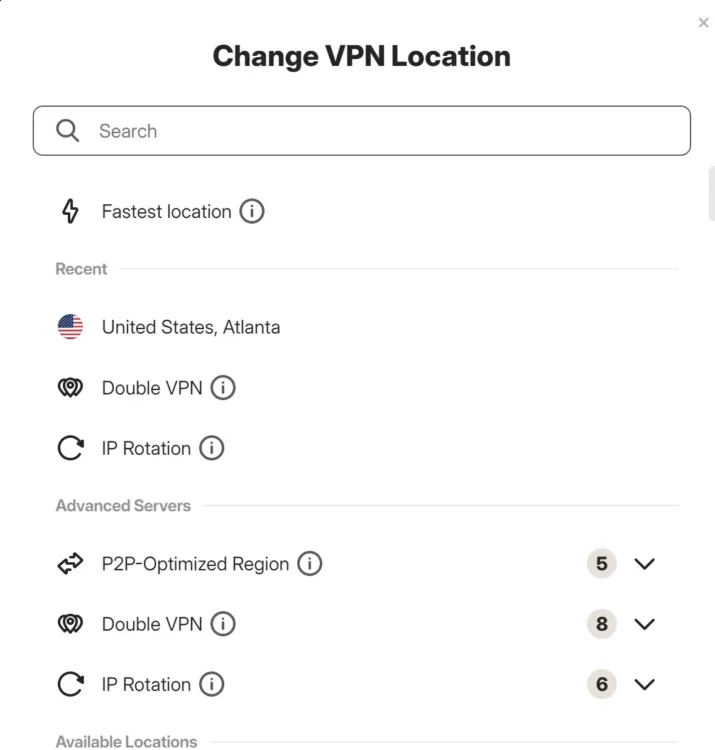
Double VPN and IP rotation servers are available at the top of the server list. Austin Aguire. | HighSpeedInternet.com
Does Norton VPN VPN work for age-restricted content?
Yes, Norton allows you to access regionally blocked and age-restricted content without creating a login on the restricted site. It also enables you to get around regional blocks, such as elements of a site that don’t accept traffic from certain U.S. states.
To use Norton VPN to get around regional login, age-verification, and site blocks, select or search for a server in a region in the U.S. or elsewhere that isn’t subject to the restriction. First, find the country you want to connect through, and then use the right-hand arrow to expand the available locations within that country. Alternatively, you can search the location using the search bar at the top of the server list.
You may need to refresh the browser page or restart your web browser after connecting to the VPN.
How secure is Norton VPN?
Security, confidence, and features score: (3.6/4) ★ ★ ★ ½
Norton VPN uses the best encryption technology, keeps a third-party verified no-logs policy, and is backed by one of the most experienced names in cybersecurity.
Encryption method
Norton uses AES-256 encryption, which is as good as it gets. This is the same encryption used by the military and many government agencies. AES-256 creates an enormous amount of possible combinations, making it exceptionally difficult to crack. Many believe AES-256 will even stand up to future quantum computing attacks.
No-logs policy
Norton has a third-party verified no-logs policy and is one of the most transparent VPN providers when it comes to data collection.
Norton’s no-logs policy was most recently verified by VerSprite in 2025, and Norton published the findings publicly on its website; most VPN providers only let subscribers access audit findings. The most recent report did find a discrepancy, but Norton quickly fixed the issue, and then VerSprite verified the issue was resolved. While it might be concerning that the most recent audit found a privacy discrepancy, seeing this information clearly called out in the audit findings and subsequently published publicly by Norton gives me a lot of confidence that it is a transparent provider.
Lastly, Norton provides a very clear info page that describes what data it does and doesn’t collect, exactly why it collects what it does, and exactly how long that data is stored.
The Norton name
It’s been over 40 years since Norton entered the cybersecurity market with a product designed to protect DOS systems back in 1982. Norton has evolved alongside the internet age itself as one of the most trusted and foundational names in cybersecurity. The VPN service launched in 2019, but the service rests on a foundation of experience and trust that goes back over four decades.
What additional features come with Norton VPN?
| Plan | Features |
|---|---|
| Standard | |
| Plus | |
| Ultimate |
Norton offers three plans, but all plans share the same VPN features except for the number of covered devices. The Standard and Plus plans allow for 10 connected devices and the Ultimate plan covers up to 20. The other differences are the extra privacy and security features you get, such as dark web monitoring or parental controls. But the most important features, like VPN kill switch, split tunneling, and IP rotation, are included with every plan.
Multiple encryption protocols
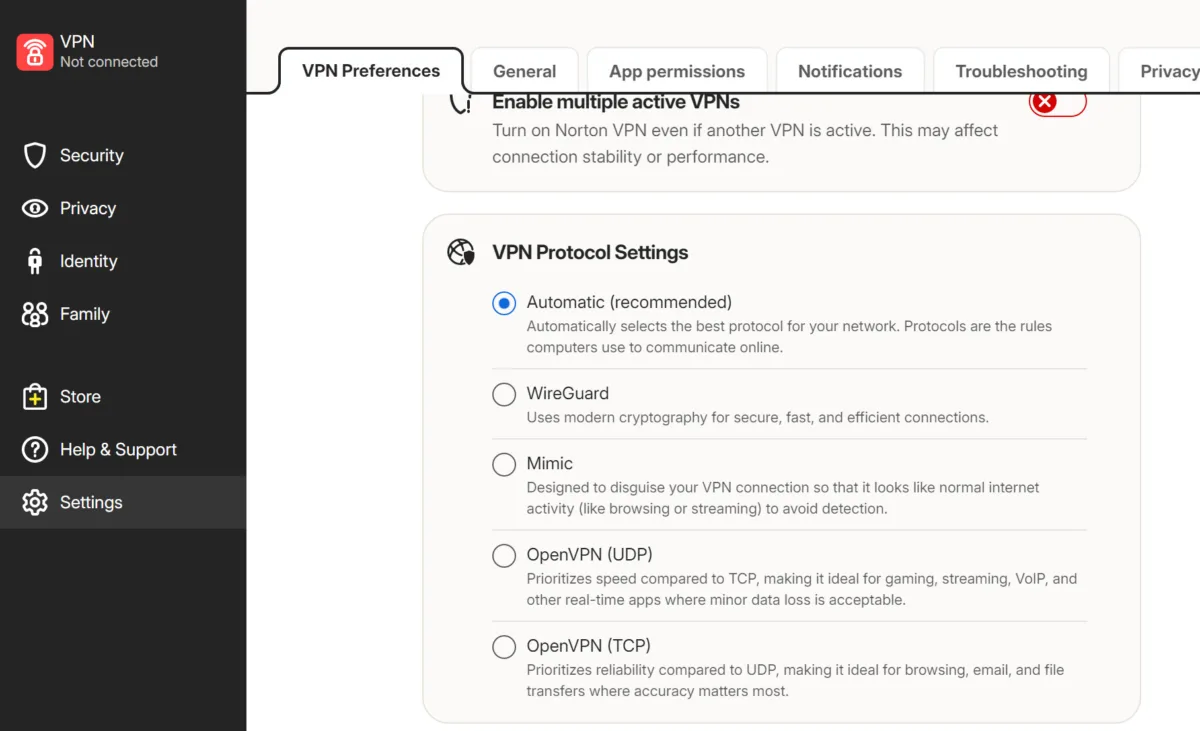
Select your VPN protocol under the settings tab. Austin Aguirre. | HighSpeedInternet.com
All plans include four different VPN protocols, each with its own strengths
- WireGuard: The best all-rounder VPN protocol balancing security and speed
- Mimic: Disguises your connection so services can’t tell you’re using a VPN; especially useful for streaming
- OpenVPN: Prioritizes speed; good for gaming and meetings
- OpenVPN: Prioritizes reliability; good for sensitive or low-bandwidth tasks (browsing, email, etc.)
Split tunneling
Split tunneling allows programs you choose to go around the VPN, which is useful for keeping meetings, games, and downloads running smoothly. It’s also a good remedy for compatibility issues. Some software and services don’t play nice with VPNs, and split tunneling lets you keep those services running while keeping the rest of your activity protected.
You can set up split tunneling in the app settings. It’s worth noting that different operating systems have different split tunneling options. On Windows, you can only split tunnel programs, not websites. Norton on Android allows for apps and websites to use split tunneling. Split tunneling is not available in Norton on iOS.
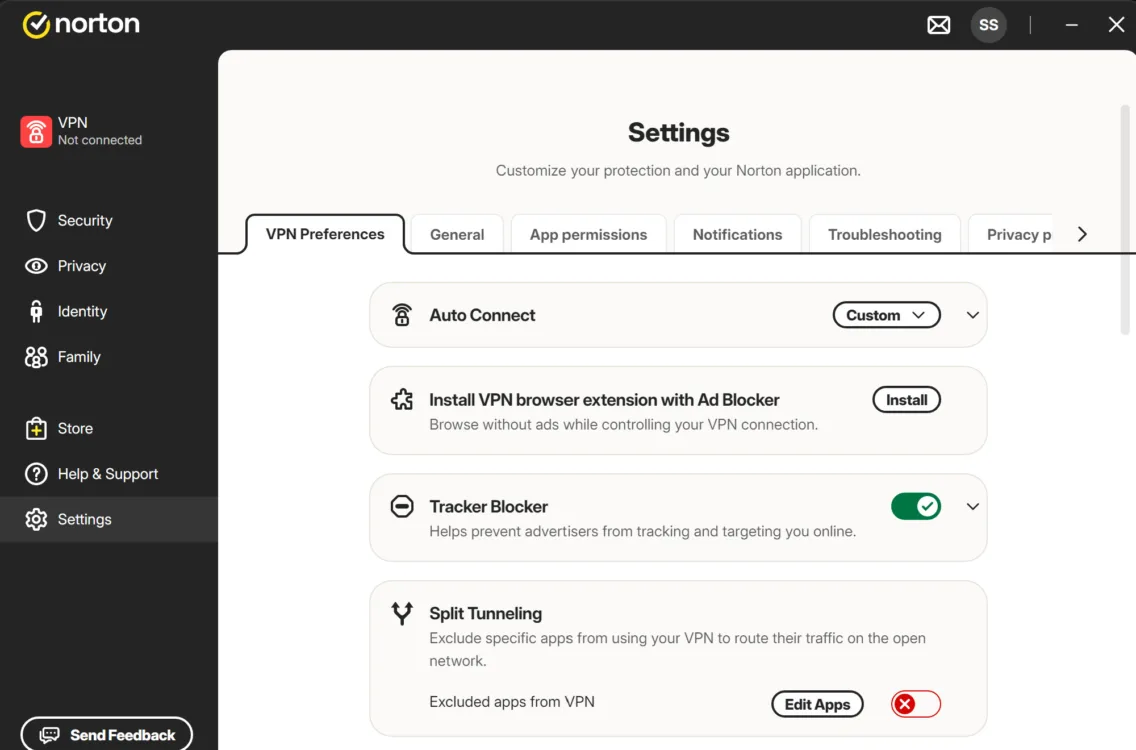
Access split tunneling under the settings tab. | HighSpeedInternet.com
Double VPN and IP Rotation
Selectable from the Norton server list, double VPN and IP rotation each make your connection far more secure in different ways. Double VPN runs your traffic through two VPN servers instead of just one for an added layer of privacy. IP rotation continuously changes your VPN server automatically, making your traffic a moving target and even more difficult to track and identify.
These features can’t be used simultaneously; you have to choose, and they will have a greater performance impact than the standard single VPN connection, but the extra security you get in exchange is substantial.
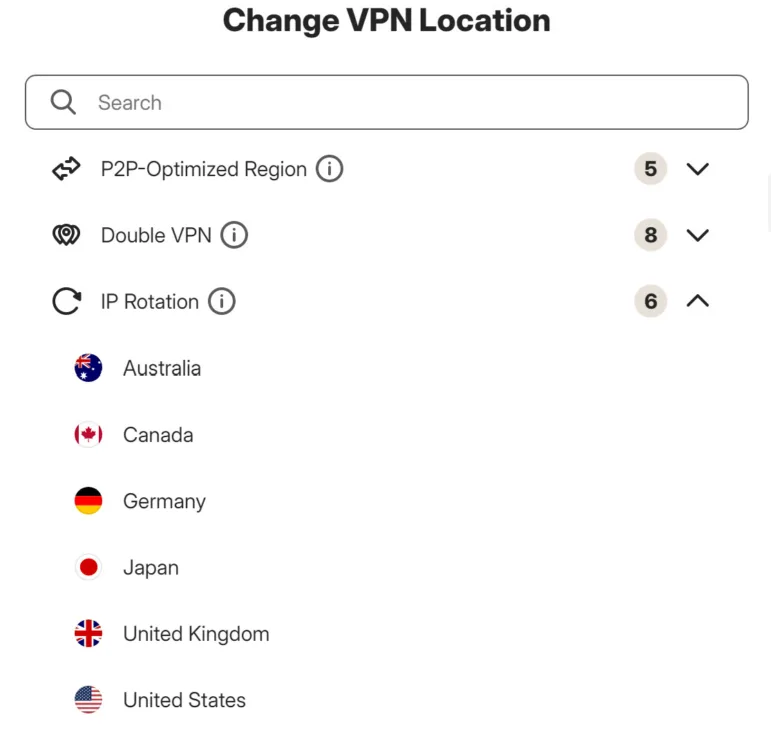
Select double VPN and rotating IP servers at the top of the Norton server list. Austin Aguirre. | HighSpeedInternet.com
What platforms and devices does Norton VPN support?
Device count and compatibility score: (2.8/4) ★ ★ ★
Norton’s Standard and Plus plans support up to 10 devices. If you need more devices protected, the Ultimate plan covers up to 20.
Supported operating systems
Norton VPN covers most major operating systems:
| Desktop client | Mobile | Browser | Other | |
|---|---|---|---|---|
Norton is not available on Linux systems.
How easy is Norton VPN’s billing and cancellation?
Billing score: (4/4) ★ ★ ★ ★
Norton offers a 60-day money-back guarantee if you change your mind, which is appropriate given the customer requirement to commit to annual subscriptions. All the account and billing settings are accessed via a browser. You can access shortcuts within the Norton apps to the various account URLs, usually by clicking your profile badge (top right on desktop).
Canceling your subscription is easily accessible from your account settings. You’ll be asked a series of questions and then given the final click to confirm your cancellation. Cancellation via your account management in a browser does not automatically provide you with a refund; that is a separate process.
My experience cancelling Norton VPN?
Cancelling Norton was fairly straightforward. I was able to complete the entire process via the chatbot. Before committing to the refund, the chatbot offered a few help articles, and two subsequent and increasing discounts. I simply kept pressing the refund option and the process was over in less than five minutes. The refund takes five to seven business days to hit your account.
Final call
Norton VPN overall score: (76/100) ★ ★ ★
After my time with Norton, I have little doubt that it’s an excellent VPN service. It includes all the best privacy tools in the business and makes them accessible enough that you’ll actually use them to safeguard your day-to-day online activity. I also appreciate that its pricing structure sets you up to pay much less than other services, even if it does so by forcing an annual commitment.
Who is Norton for? People who want privacy without a tech headache or a distracting interface. It’s also a good fit for families with the parental controls and device location tracking. Conversely, It’s not the best pick for power users or those looking for a ton of stats before choosing a server. Get Norton if you want a VPN that works when you hit the connect button while keeping speeds fast.
Norton VPN final score breakdown
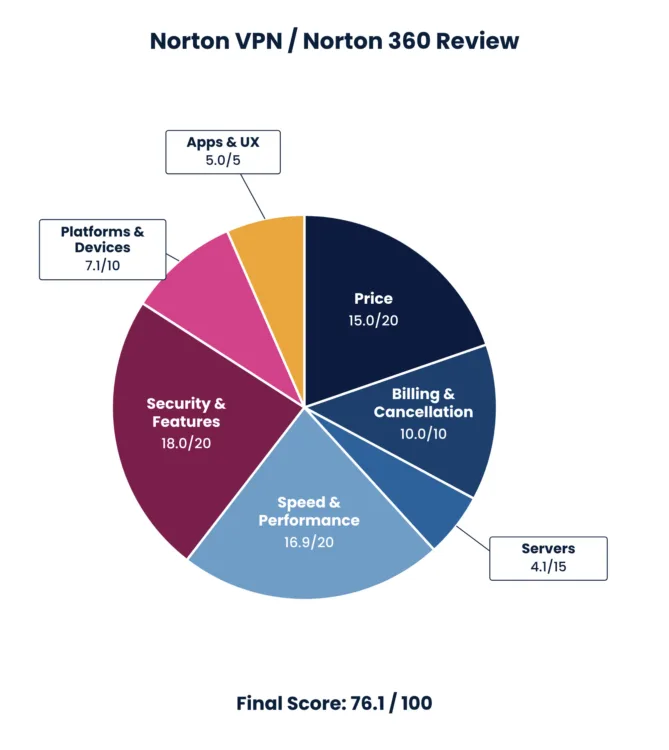
| Category | Points |
|---|---|
| Price | 15 / 20 (★ ★ ★ ★ ) |
| Billing and cancellation | 10 / 10 (★ ★ ★ ★) |
| Servers | 4.1 / 15 (★ ★ ★ ★ ★) |
| Speed and performance | 16.9 / 20 (★ ★ ★ ★ ) |
| Security and features | 18 / 20 (★ ★ ★ ★ ) |
| Devices and compatibility | 7.1 / 10 (★ ★ ★ ) |
| Apps and user experience | 5 / 5 (★ ★ ★ ★ ) |
| Final score | 76.1 / 100 |
Disclaimers
Norton VPN plans
All plans — Subscription contracts begin when the transaction is complete and are subject to our Terms of Sale and License & Services Agreement. For trials, a payment method is required at sign-up and will be charged at the end of the trial period, unless cancelled first. Subscriptions automatically renew unless the renewal is canceled before billing. Renewal payments are billed annually (up to 35 days before renewal) or monthly depending on your billing cycle. Annual subscribers will receive an email with the renewal price beforehand. Renewal prices may be higher than the initial price and are subject to change. You can cancel the renewal as described here in your account or by contacting us here or at 844-488-4540.
Prices and plan offerings are accurate as of Oct. 2026. We update VPN pricing data on a quarterly basis in order to compare providers fairly and to present stable pricing expectations. VPN services update prices frequently, so plans, prices, and offers may vary based on when you order.


