
Our Private Internet Access Review: The Most Trustworthy VPN?
This provider combines unmatched transparency, super stable connections, and good pricing

Best pick! Excellent 1-year protection.
One plan fits all
Starting at:
$1.33/mo.*
View Plans for Private Internet AccessAvailability and speed may vary by location, and prices are subject to change. Expand for disclaimers.
Private Internet Access plans
All plans — All amounts are shown in USD, and any discounts reflect a reduction based on the current monthly service pricing at $11.95 per month. The 30-day money-back guarantee is available to new subscribers only; for subscriptions purchased via third-party app stores (e.g., Apple App Store), refunds are subject to their respective terms and conditions.
Why use Private Internet Access
You get an efficient interface, privacy-focused features, and fair pricing. This VPN is for those who want a straightforward and dependable service with top-notch stability.
Pros
 Unlimited devices
Good pricing
Highly stable connections
Cons
 Modest impact on internet speed
Private Internet Access is a breath of fresh air in the VPN market. It focuses on providing the best VPN experience possible for its subscribers. It’s straightforward and competitively priced, with only one plan that includes all the features you need to keep your data private and secure.
Most VPN providers today try to upsell adjacent services the second you subscribe and crowd the app interface with add-ons and marketing, while hiding the important VPN settings in deep menu dives. Private Internet Access sticks to its guns with an efficient app that helps you get the most out of your VPN sub. If you’re looking for a no-nonsense VPN service, this one definitely deserves to be on your shortlist.
How much does Private Internet Access cost?
Price score: (3/4) ★ ★ ★
| Subscription length | Price |
|---|---|
| Monthly | $11.95/mo. |
| 1 year | $47.88/yr. ($3.99/mo.) |
| 3 years | $69.81 ($1.79/mo.) |
* Availability and speed may vary by location, and prices are subject to change. See disclaimers.
Not only is Private Internet Access fairly priced, but it’s also perhaps even a better value than the other options out there. After comparing the subscription rates for all the major VPN providers, Private Internet Access was right around the middle of the pack, but you get everything for that price. There isn’t a plethora of plans and associated perks and features to dig through. There’s only one Private Internet Access VPN plan, and it comes with every feature aside from the dedicated IP and antivirus add-ons.
Which Private Internet Access plan should you get?
First off, make sure to purchase your subscription directly from Private Internet Access, not from app stores. Private Internet Access offers a 30-day money-back guarantee, but only for subscriptions purchased directly from its site.
Since there’s no difference in feature sets or perks, the only decision you have to make is how long you’re willing to commit to a subscription. With the money-back guarantee, I’d say go with the annual plan. It doesn’t make much sense to go monthly, at least not for long, as it’s roughly four times as expensive.
How fast is Private Internet Access?
Speed and performance score: (3.2/4) ★ ★ ★
We ran controlled testing of Private Internet Access’s performance over a residential fiber-to-the-home internet connection, and the remarkable finding was that its servers provide highly stable connections. Private Internet Access preserves most of your internet speed when using local servers, with a heavier impact when using distant servers.
Private Internet Access speeds, latency, and jitter testing results
| Local server | Distant server | No VPN | |
|---|---|---|---|
| Download speed | 731.76Mbps (- 22.2%) | 388.53Mbps (- 58.7%) | 940Mbps |
| Upload speed | 749.03Mbps (- 21.0%) | 144.4Mbps (- 84.8%) | 948Mbps |
| Latency | 50.275 ms (+ 96%) | 372.82 ms (+ 1,353%) | 25.66 ms |
| Jitter | 7.61 ms (+ 126%) | 45.24 ms (+ 1,246%) | 3.36 ms |
Speeds
Connection speeds retained most of their bandwidth when running through Private Internet Access servers. The impact was minimal, but not negligible. Download speeds suffered an average 22% decrease on local servers and over a 50% decrease on distant servers.
Upload speeds were impacted about the same as download speeds over local servers but saw dramatically reduced bandwidth over distant servers; this is a common result in our VPN performance testing.
Latency and jitter
Latency impact was about average compared to other VPN services, with a near 100% increase via local servers. But jitter is where this service shines; Private Internet Access keeps jitter down to 7.61ms over local connections—one of the best jitter test results we’ve recorded.
What do these test results mean for you?
For the most part, Private Internet Access creates highly transparent connections; you probably won’t notice any slowdowns or lag. That was the case for me. Technically, on speed test results, customers should expect some bandwidth impact, and connections will be slightly less responsive, as they are with all VPN connections..But again, you likely won’t notice much lag at all for most everyday internet tasks.
You may experience increased delay or lag for time-sensitive tasks like fast-paced multiplayer video games and video calls, but with such good jitter readings, that delay will not shift and change as much as other VPN services.
Are the Private Internet Access apps good?
Apps and UX score: (4/4) ★ ★ ★ ★
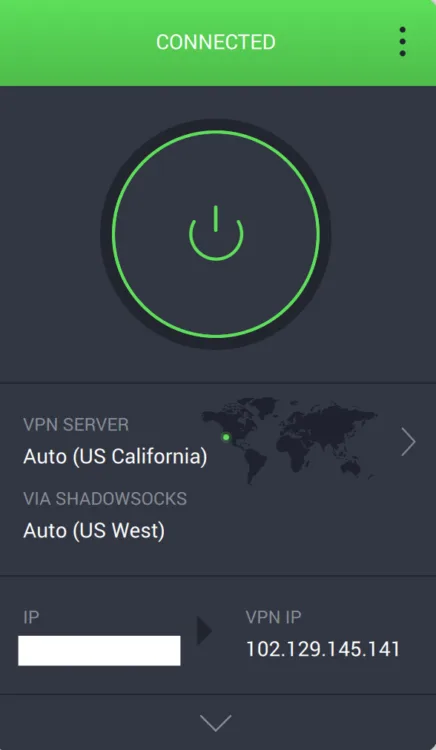
Private Internet Access provides an efficient home screen. Austin Aguirre | HighSpeedInternet.com
The Private Internet Access apps are exactly what I look for in a VPN interface. Space is used to give the most important information and provide access to useful features. Most VPN apps use their prime real estate to push upsells and add-ons, but there’s none of that here.
The initial interface is streamlined with the essentials: a big activation button, server location, and IPs. The right-side arrow button gives quick access to a server list, which includes up-to-date ping measurements for every server, hallelujah. I don’t know why it’s so rare for VPN apps to provide pings with their servers, but it is. So thank you, Private Internet Access.
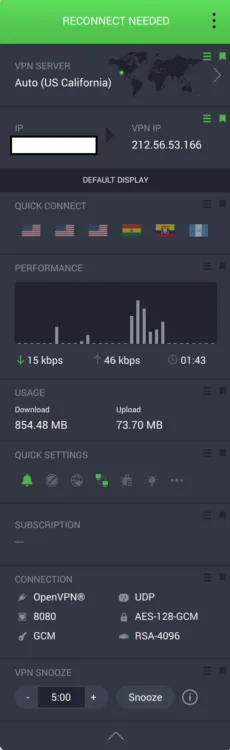
The bottom arrow opens access to useful info and settings. Austin Aguirre | HighSpeedInternet.com
The bottom arrow opens up a larger interface where you can start digging into details. In addition to the information above, you get some quick-connect server options, usage specs, and the status of several key settings. At the bottom, you can see your current protocol and encryption selection, along with a snooze button to temporarily deactivate the VPN.
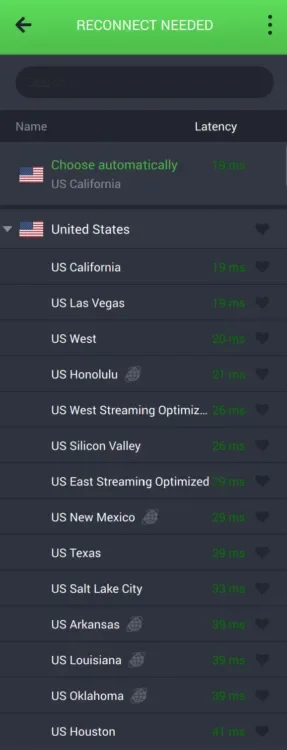
Ping measurements are provided for every server. Austin Aguirre | HighSpeedInternet.com
Does Private Internet Access have a good server network?
Server score: (3.2/4) ★ ★ ★
Private Internet Access has the most expansive server selection of all major VPN providers with an astounding 29,000+ servers in 140 locations dispersed throughout 91 different countries. This is more available servers than offered by any other major VPN provider.
Does Private Internet Access work for age-restricted content?
Yes, Private Internet Access can help you navigate around age-blocked content without creating a login on the blocked site. It can also help you get around regional blocks, such as elements of a site that don’t accept traffic from certain U.S. states.
To use Private Internet Access to get around regional login, age-verification, and site blocks, select or search for a server in a region in the U.S. or elsewhere that isn’t subject to the restriction. From the main interface, use the left-side arrow to open the server list and select an unrestricted location. You may need to refresh the browser page or restart your web browser after connecting to the VPN.
How secure is Private Internet Access?
Security, confidence, and features score: (4/4) ★ ★ ★ ★
Private Internet Access provides the best encryption and fastest protocols available, and maintains a third-party verified no-logs policy.
AES-128 and AES-256 encryption
AES is the gold standard of modern cybersecurity, used by the military and many government agencies. Private Internet Access is unique in that it gives you the option to use AES-128 (better for speed) or AES-256 (most secure) encryption.
No-logs policy
Private Internet Access doesn’t track or record any of your online activity and uses RAM-only servers that do not store data long-term. This no-logs policy was confirmed by an industry-standard third party (Deloitte) in February 2026, as well as in 2022 and 2024. Private Internet Access is uniquely transparent as it allows anyone to view the Deloitte audit report, while most VPN services only share this information with subscribers.
Open-source transparency
Private Internet Access’s code is 100% open source; anyone can access it on its website. While this is an outstanding trust signal, it also makes for a more secure VPN service. Public access to the code works as a check against vulnerabilities and shortcomings other brands may hide until it’s too late.
What features come with Private Internet Access?
| Plan | Features |
|---|---|
| Private Internet Access | |
| Add-ons |
Multiple encryption and protocol options
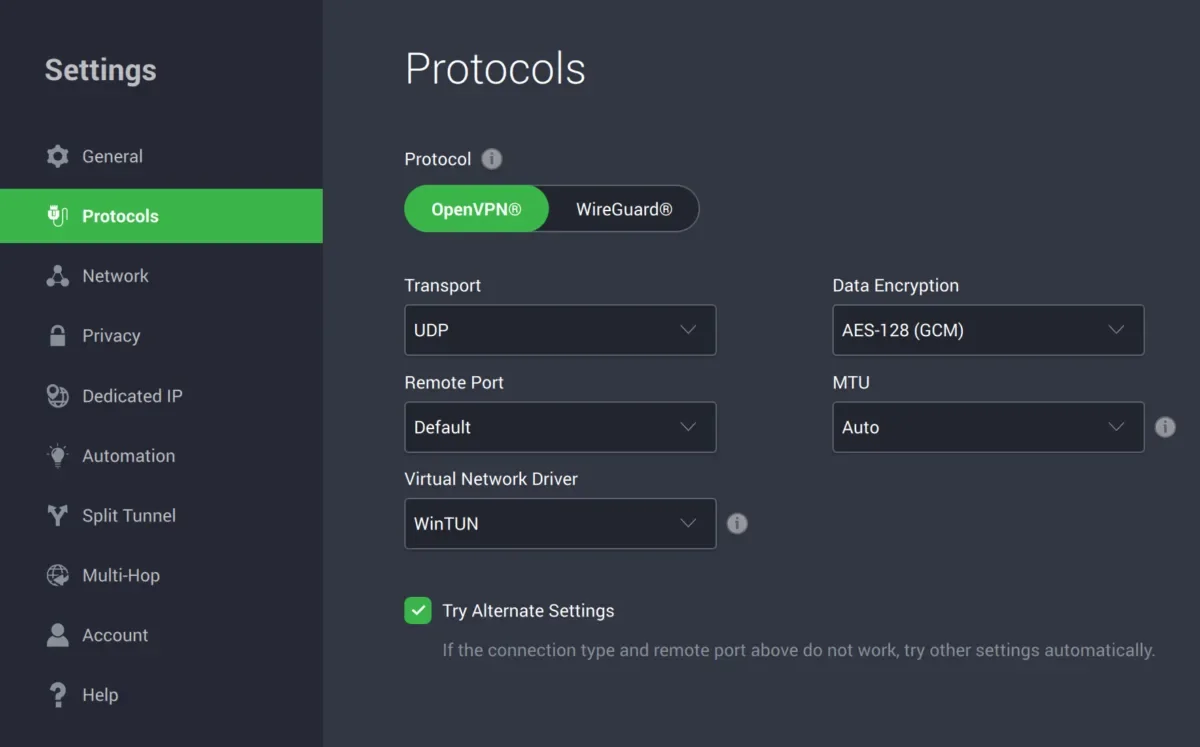
Customize protocols and encryption type in the app settings. Austin Aguirre | HighSpeedInternet.com
Private Internet Access allows you to select your encryption and VPN protocol. All its main operating system apps include OpenVPN and WireGuard protocols. When using OpenVPN, you can also choose between AES-128 or AES-256 encryption. You can customize your encryption in the settings menu under the Protocols menu.
These customization options are not available on the Private Internet Access browser extensions or Apple TV app.
Split tunneling
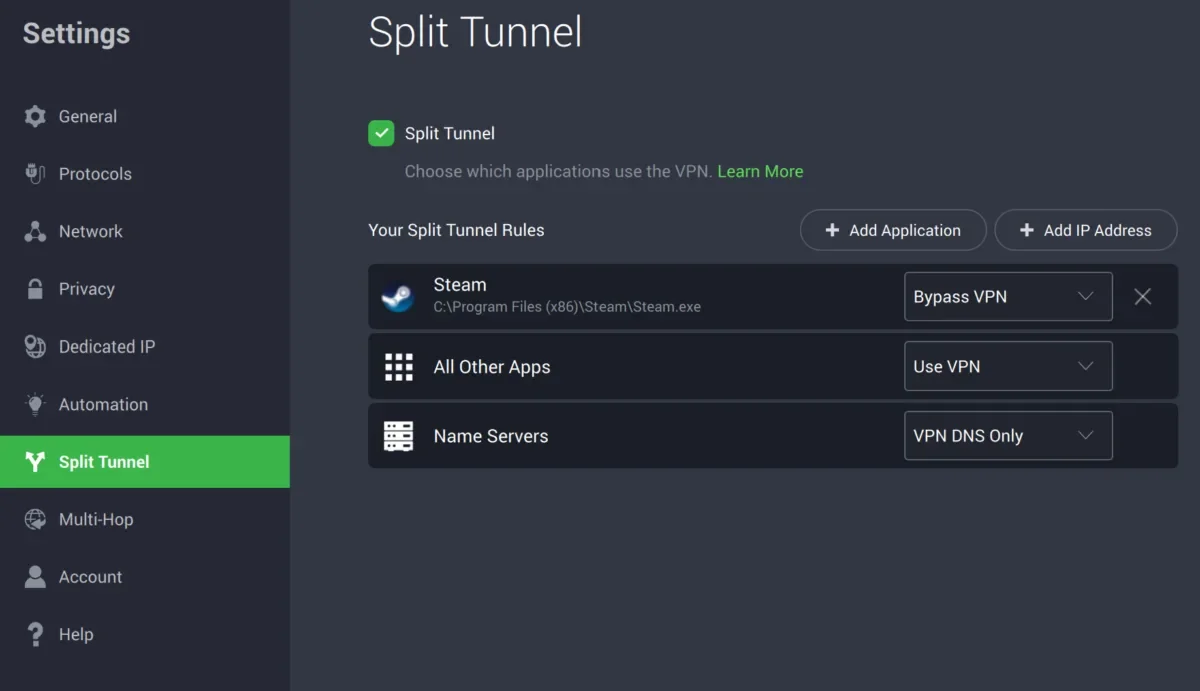
Bypass apps and websites around the VPN with split tunneling. Austin Aguirre | HighSpeedInternet.com
Split tunneling gives you a fast lane for programs you don’t want affected by the VPN. This is great for gamers or remote workers, as you can have your games or meeting apps running smoothly while keeping more sensitive personal and work data and apps encrypted with the VPN.
Private Internet Access makes setting up a split tunnel super easy. You can select programs you want to bypass the VPN in the app settings under the Split Tunnel tab. The app does a great job of detecting and listing your devices’ applications for selection.
Kill switch and advanced kill switch
The kill switch feature cuts your device off from the internet if the VPN shuts off for any reason other than manual deactivation, so you’re never online unprotected unwillingly. The advanced kill switch is great for those who don’t want to risk any unprotected traffic, as it blocks all internet traffic, even when the VPN isn’t activated, meaning that your device will not send or receive any internet traffic until you turn on the VPN.
You can activate the kill switch features in the app settings under the Privacy tab. There isn’t much to tweak, as it’s a simple on or off toggle.
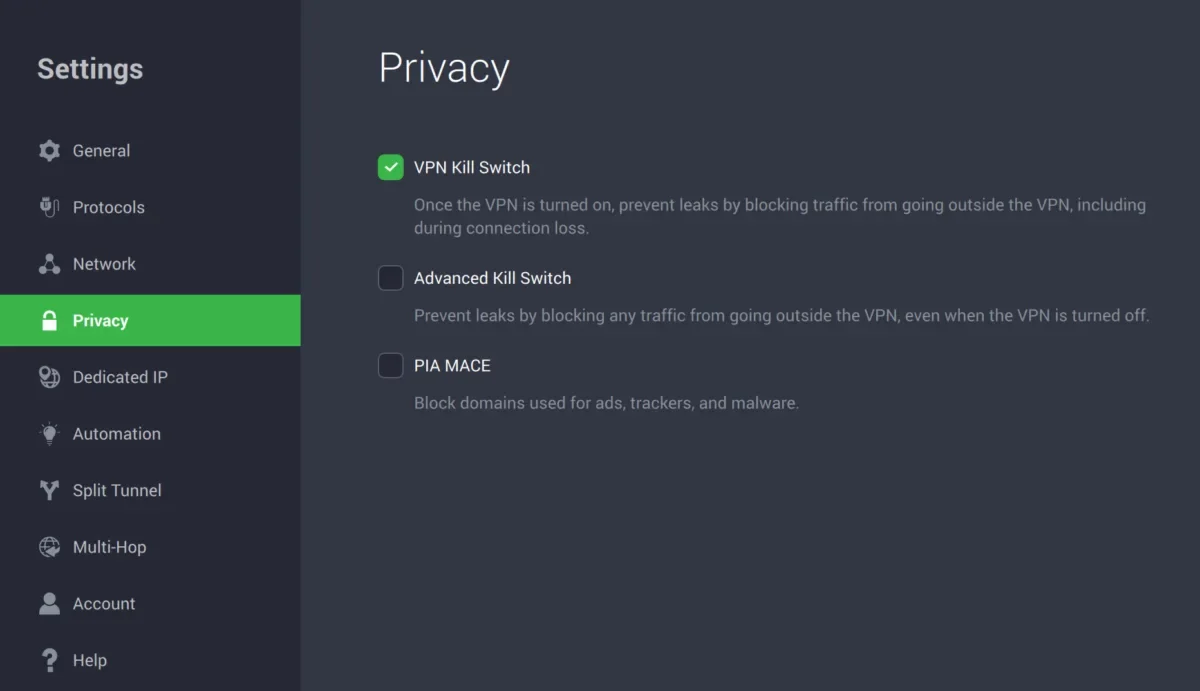
Use advanced kill switch for zero risk of unprotected internet traffic. Austin Aguirre | HighSpeedInternet.com
Multihop and Obfuscation
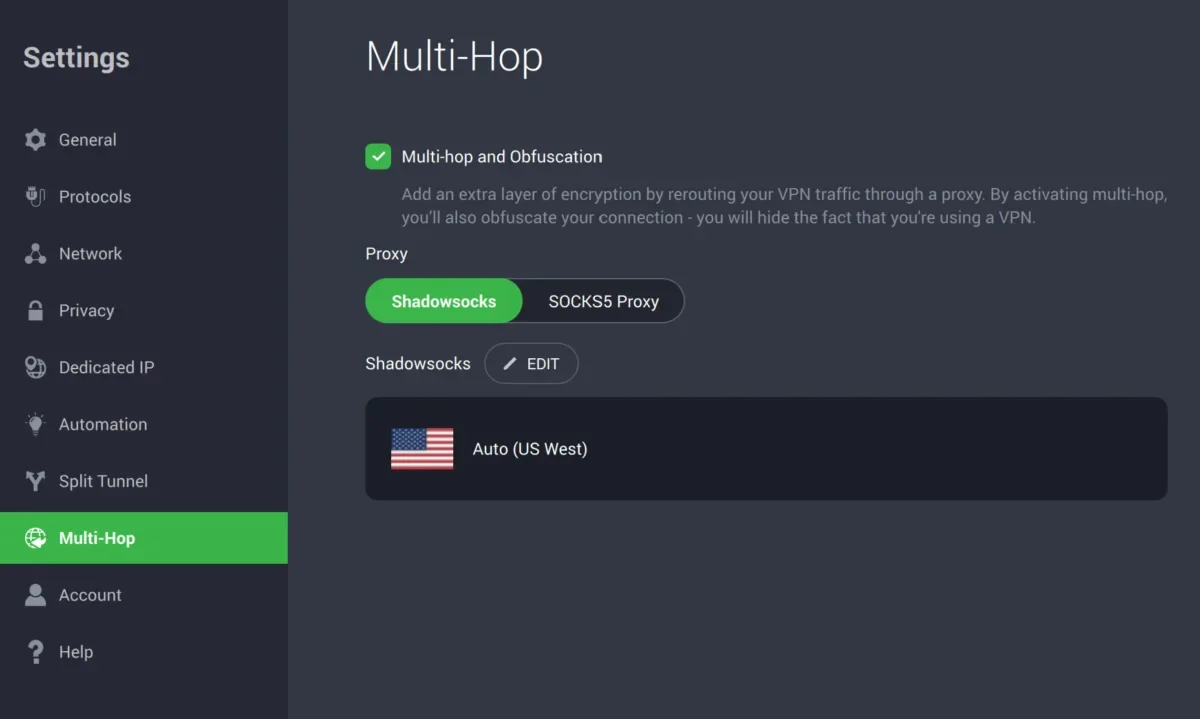
Multi-hop and obfuscation are linked. Austin Aguirre | HighSpeedInternet.com
Multi-hop doubles up your VPN security by sending your traffic through two VPN servers, and obfuscation hides the fact that you’re using a VPN from the internet, which really comes in handy when trying to get certain sites and services to behave normally.
You can activate both features in the app settings under the Multi-Hop tab. You can also select which multi-hop server you want to use with the Edit button.
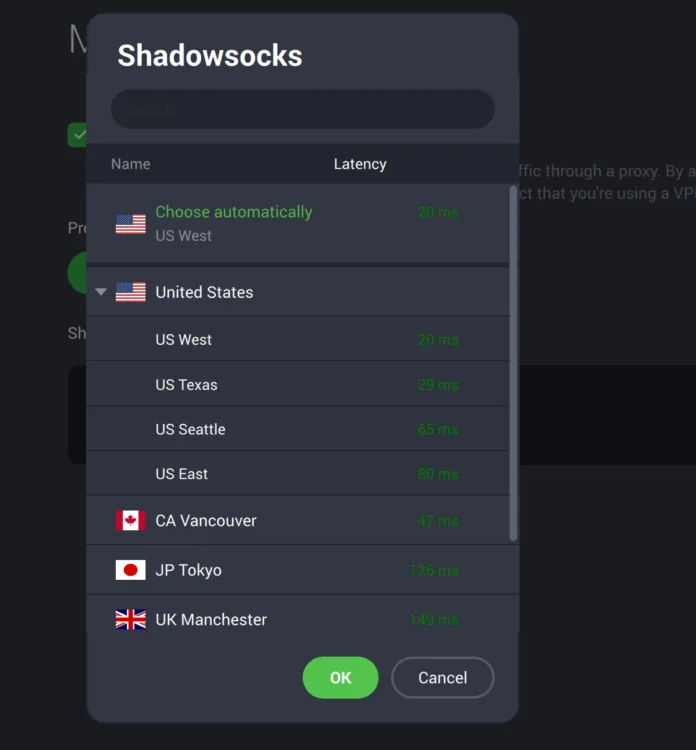
You can select a preferred multi-hop server. Austin Aguirre | HighSpeedInternet.com
Multi-hop and obfuscation are linked in Private Internet Access. Activating multi-hop automatically activates obfuscation.
What platforms and devices does Private Internet Access support?
Device count and compatibility score: (4/4) ★ ★ ★ ★
Private Internet Access includes extremely good device support. A single subscription can support an unlimited number of devices. You also have dedicated apps or extensions for all the major operating systems, smart TVs, and two browsers (Firefox and Chrome).
Supported operating systems
| Computers | Mobile | Browser extensions | Smart TVs |
|---|---|---|---|
How easy is Private Internet Access’ billing and cancellation?
Billing score: (2.8/4) ★ ★ ★
You can’t see much billing information in the apps; you need to log in to your account in a browser to view your subscription and manage any billing details. Once you’re there, billing, renewal, and payment details are displayed prominently with clear buttons for canceling your renewal or changing the payment method.
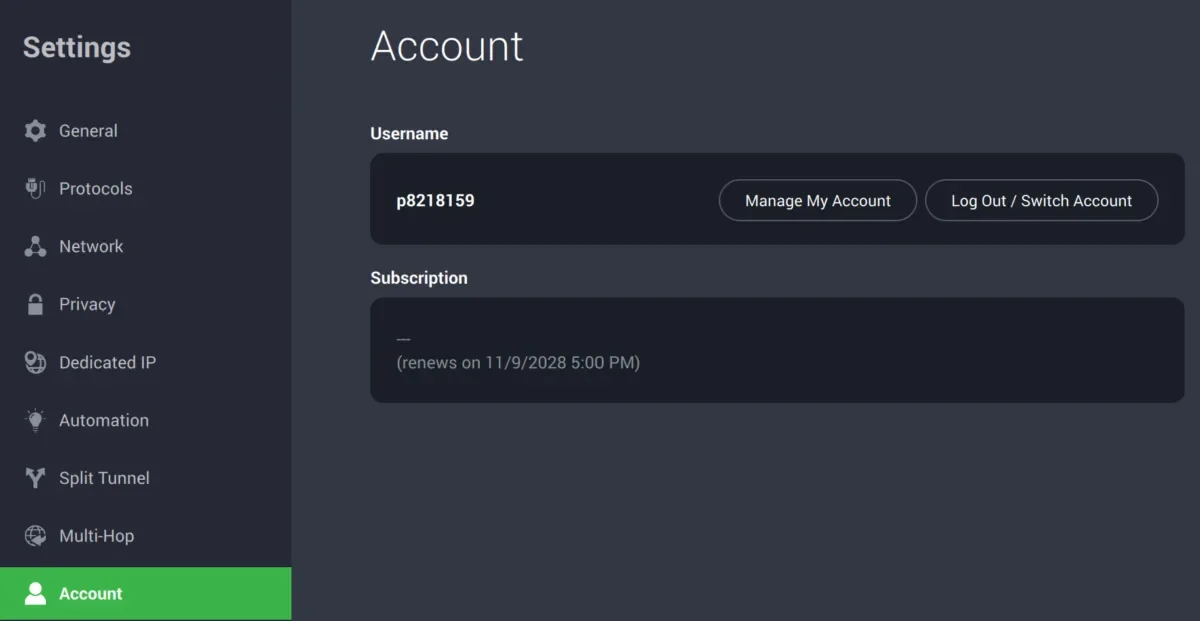
Billing settings are limited within the app. Austin Aguirre | HighSpeedInternet.com
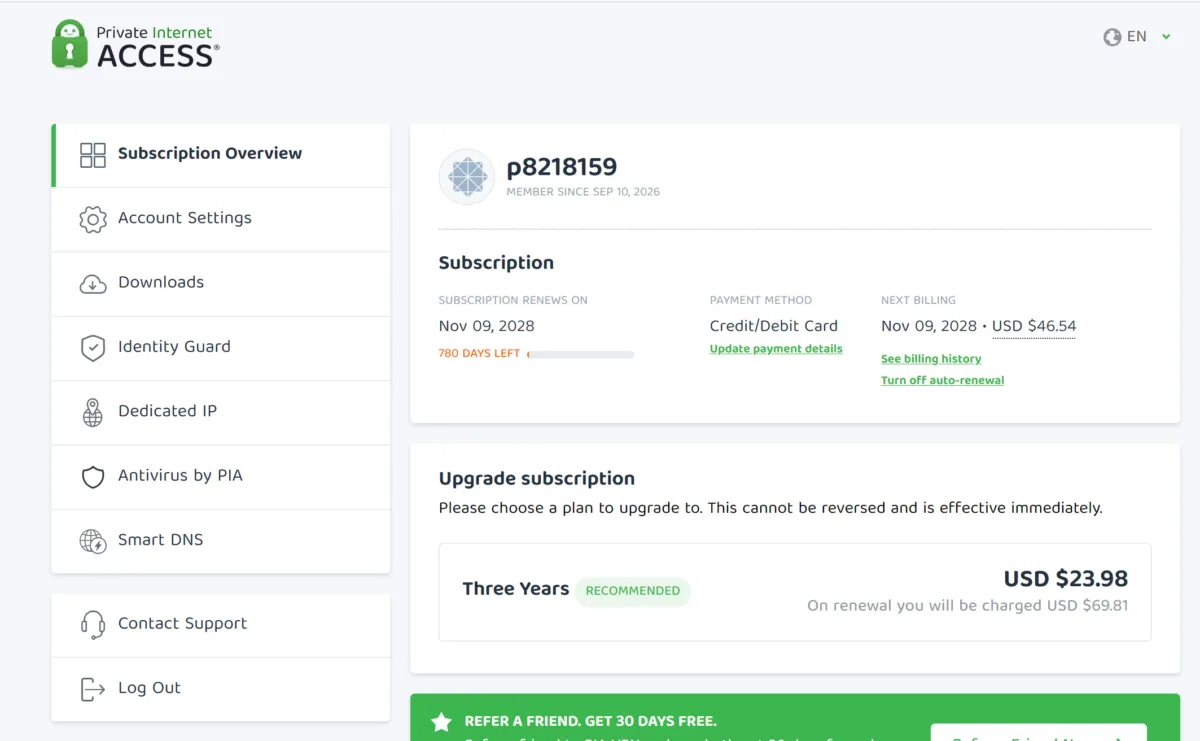
More billing settings are available when you log in on the website. Austin Aguirre | HighSpeedInternet.com
How do I cancel my Private Internet Access subscription?
Private Internet Access offers a 30-day money-back guarantee for new subscriptions purchased directly from its site. There are a few disqualifying circumstances, but the one with the most potential for upset is the fact that any subs purchased through the app stores are ineligible for a refund.
Private Internet Access’s instructions state refunds must be requested via a support ticket or via email.
My Experience canceling my Private Internet Access subscription
I tested the refund policy and was happy to report that Private Internet Access issued a prompt refund, and the process was painless.
Step 1: I submitted a support ticket using the link provided in the refund instructions.
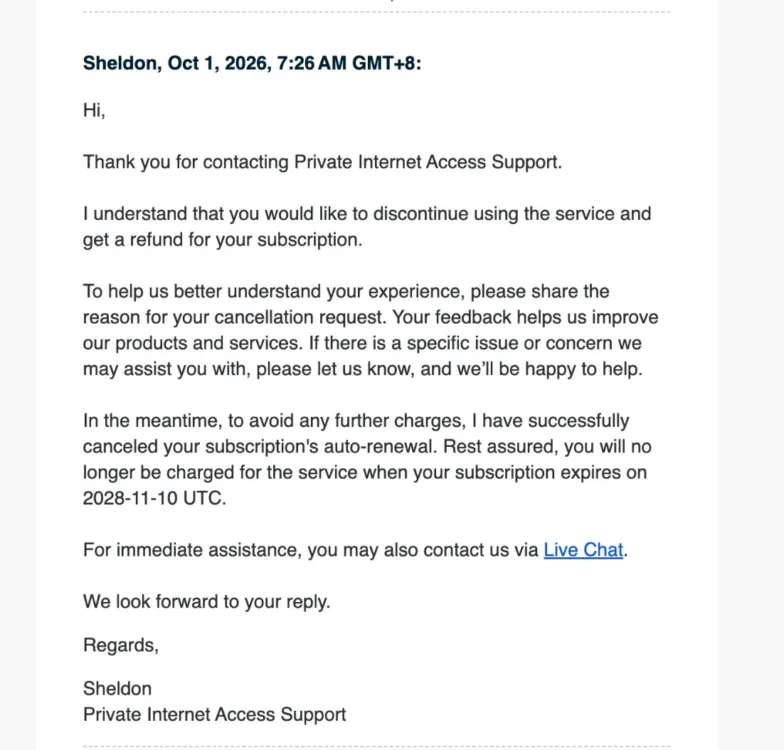
Private Internet Access responded to my refund request in about 24 hours. Austin Aguirre | HighSpeedInternet.com
Step 2: I received a reply after about 24 hours. Private Internet Access canceled my subscription to prevent further charges and simply asked for my reason for canceling.
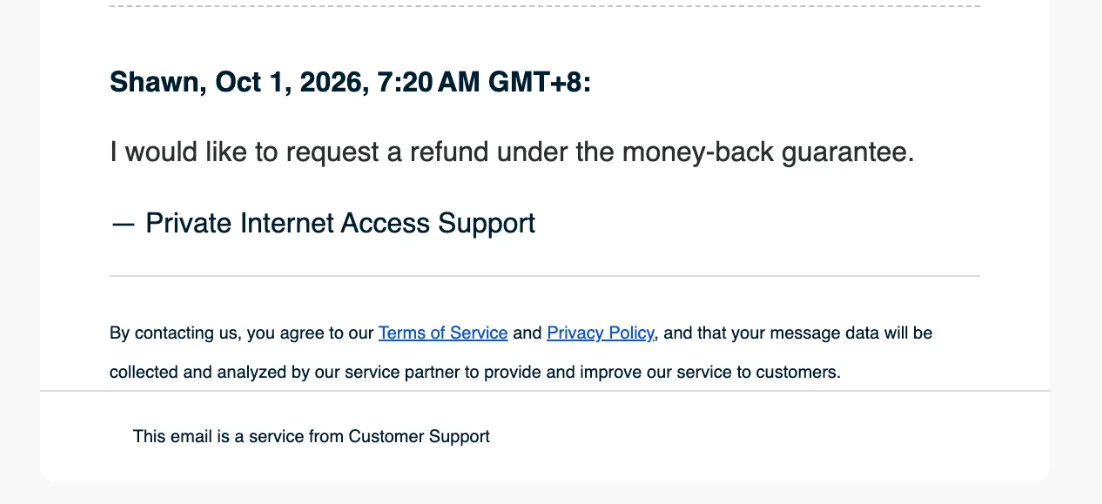
It isn’t necessary to provide a reason for canceling in your reply. You can simply confirm that you want a refund. Austin Aguirre | HighSpeedInternet.com
It’s important to note that providing a reason is not required to get your refund. I didn’t give a reason and only confirmed I wanted a refund. The refund was processed about eight hours after my reply.
Final call
Private Internet Access overall score: (85/100) ★ ★ ★ ★
This is one of the best VPN services available. It’s focused on its core mission of keeping your data private and doesn’t waste your time with constant upselling of adjacent services. Its apps are solid, its security is top-notch, and its transparency is unmatched. If you’re looking for a no-nonsense and trustworthy VPN at a fair price, look no further. Personally, this VPN is right up my alley. If I were looking to switch, it would be my first choice.
Private Internet Access score breakdown
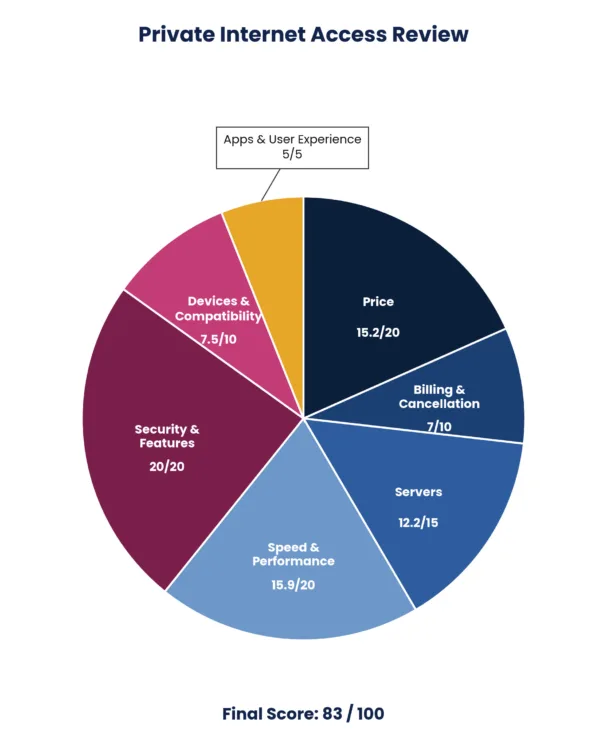
| Category | Points |
|---|---|
| Price | 15.2 / 20 (★ ★ ★) |
| Billing and cancellation | 7 / 10 (★ ★ ★) |
| Servers | 12.2 / 15 (★ ★ ★) |
| Speed and performance | 15.9 / 20 (★ ★ ★) |
| Security and features | 20 / 20 (★ ★ ★ ★) |
| Devices and compatibility | 9.5 / 10 (★ ★ ★ ½) |
| Apps and user experience | 5 / 5 (★ ★ ½ ) |
| Final score | 85 / 100 |
Disclaimers
Private Internet Access plans
All plans — All amounts are shown in USD, and any discounts reflect a reduction based on the current monthly service pricing at $11.95 per month. The 30-day money-back guarantee is available to new subscribers only; for subscriptions purchased via third-party app stores (e.g., Apple App Store), refunds are subject to their respective terms and conditions.


