Proton VPN Review: Can You Trust Proton to Protect Your Privacy?
Proton is a transparent open-source VPN service with independent audits, making it a reliable choice.
Availability and speed may vary by location, and prices are subject to change. Expand for disclaimers.
ProtonVPN plans
VPN Plus — The specially discounted price of US$71.76 is valid for the first 24 months. Then it will automatically be renewed at US$83.88 for 12 months. You can cancel at any time. Renewal pricing subject to change according to terms and conditions.
Proton Unlimited — Your subscription will automatically renew. You'll then be billed every 12 months at US$119.88. You can cancel at any time. Renewal pricing subject to change according to terms and conditions.
Why use Proton VPN
Proton VPN offers a free unlimited plan, making it a great option for those looking for a VPN on a budget. It also has one of the highest number of servers and countries to choose from.
Pros
 Free plan with unlimited data
Swiss headquarters
Audited and open-source
Cons
 No 24/7 live support
No streaming support on free plan
Hefty price hike
Proton VPN is a reliable and well-rounded service that includes everything you need to boost your privacy online. Proton doesn’t have an overwhelming amount of plan options, but instead keeps it simple with the VPN Plus plan. Proton is one of the few VPN services that offers a free plan with unlimited data, making it a great choice for those looking to test a service before committing to a long-term subscription.
I tested Proton VPN for two weeks while working from home, streaming, online shopping, and everyday browsing online. Setting up and downloading Proton was simple, making it straightforward enough and beginner-friendly. Luckily, I wasn’t bombarded with constant marketing and add-on purchase requests either. Proton is a solid deal for first-time users because you can get a two-year VPN Plus subscription at 65% off. Proton’s headquartered in Switzerland, so it lies outside of the Five Eyes alliance and benefits from some of the best privacy laws.
How much does Proton VPN cost?
Price score: (3.3/4) ★ ★ ★ ⅓
| Plan | Price* | Features |
|---|---|---|
| Proton Free | $0.00/mo. | |
| VPN Plus | $3.49–$9.99/mo. | |
| Proton Unlimited | $7.99–$12.99/mo. |
* Availability and speed may vary by location, and prices are subject to change. See disclaimers.
Compared to other popular VPN services, Proton’s VPN Plus monthly rate of $9.99 is on the more affordable end of the spectrum. Proton does offer a generous discount of up to 65% off for first-time customers, so you will see a price hike once your plan renews at the standard rate.
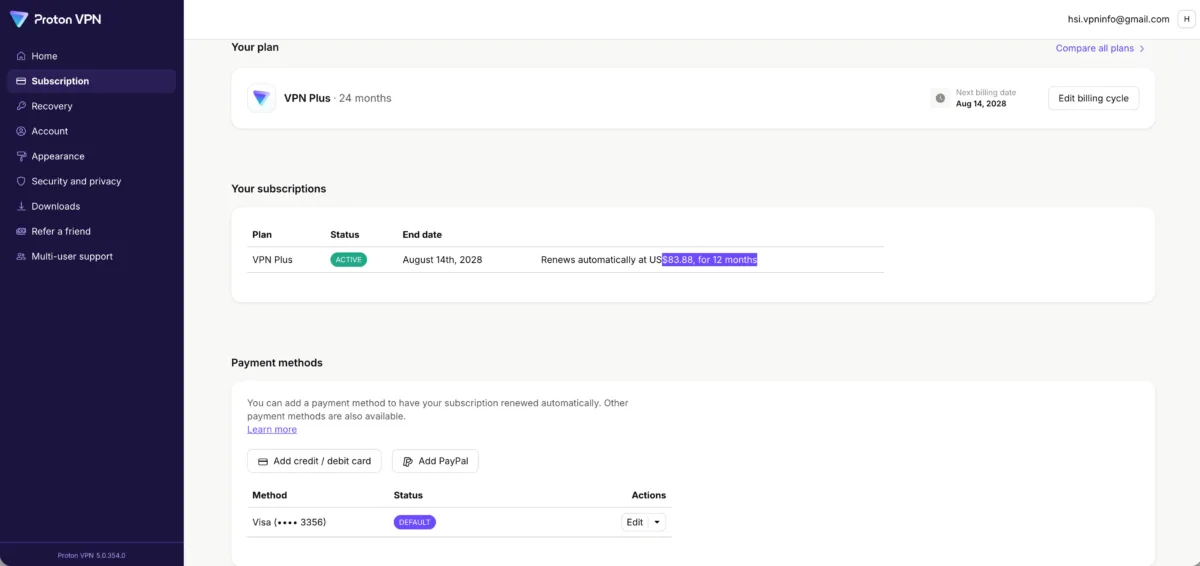
My subscription tab from Proton VPN that shows what my renewal rate will be. Andrea GutierrezPrieto | HighSpeedInternet.com
Like most VPN services, rates and discounts can change at any given moment. While you get a generous discount as a first-time customer, keep in mind that you will see a price hike after the initial discount. When I signed up for Proton VPN Plus, I paid $77.82, but in the subscription tab of my account, I can see that the renewal rate will be $83.88 for 12 months.
Streaming support is only available with Proton’s paid VPN Plus plan, so you won’t be able to access Netflix or Hulu if you want to stick with the free plan. If you want to bundle all of Proton’s services, you can upgrade to the Proton Unlimited plan and get access to the following services.
- Proton VPN
- Proton Pass
- Proton Mail
- Proton Calendar
- Proton Drive
If you just want to sign up for the VPN Plus plan, you can still access the free tiers of each service with your Proton account. You can easily manage your sessions and revoke access in one simple click of a button. You’ll also get an account monitor to audit authentication attempts for your account, adding an extra layer of security for your account.
It’s very easy to integrate Proton’s suite of security features into your VPN service, but if you only need the standalone VPN service, opt for the VPN Plus plan that will get you access to Proton VPN’s full list of features and up to 10 device connections.
Which Proton VPN plan should you get?
Proton’s VPN Plus plan includes all the basic features you’ll need from a VPN service and covers up to 10 devices. Competing VPN providers may include more features with base plans, but typically at a higher price point.
Proton’s VPN Plus plan includes all the VPN features you need to boost your privacy. You’ll get dark web monitoring, kill switch, auto-connect capabilities, and the ability to enable Proton VPN on a router. VPN Plus also includes a malicious site blocker (DNS) to protect against data collection from ads and other trackers.
How fast is Proton VPN?
Speed and performance score: (3.4/4) ★ ★ ★ ½
Proton VPN’s speeds were solid, and I didn’t notice any major lagging or slowdowns while using it on my laptop or phone. I was able to use all my daily work and personal apps and websites while using Proton. I didn’t have any issues with streaming either. At times, there were a few video and audio calls that lagged a bit, though this seems to be common across most VPN services.
Proton VPN speeds, latency, and jitter testing results
| Local server | Distant server | No VPN | |
|---|---|---|---|
| Download speed | 867Mbps (- 7.8%) | 548Mbps (- 41.7%) | 940Mbps |
| Upload speed | 311Mbps (- 67.2%) | 129Mbps (- 86.4%) | 948Mbps |
| Latency | 38.02 ms (+ 48%) | 419.59 ms (+ 1,535%) | 25.66 ms |
| Jitter | 4.63 ms (+ 38%) | 50.07 ms (+1,390%) | 3.36 ms |
Proton VPN speeds
Based on our controlled testing over a fiber connection with symmetrical upload and download speeds, Proton VPN’s impact on download speed is relatively minor. Average download speeds decreased by about 50Mbps compared to download speeds with the VPN turned off. We also tested speeds when connecting to a distant server in Hong Kong and saw a download speed decrease of about 400Mbps, which is pretty substantial but not surprising given how far away the server was.
Upload speeds in both the local and distant server testing took a substantial hit when using Proton’s VPN, with an average of about 637Mbps slower on local servers and a whopping 819Mbps slower on the Hong Kong server.
Proton VPN latency and jitter
Proton VPN’s latency only increased slightly on the local server, but increased from about 25 up to a hefty 419 milliseconds on the distant server. If you’re planning on gaming or making video calls while connected to a VPN, your best bet is to connect to the fastest server available—and luckily most VPN services, including Proton, make that as simple as clicking one button.
Latency and jitter increases are nearly unavoidable when connecting to any VPN service, so you may experience lagging while gaming or making video calls, especially when connected to distant servers.
Are the Proton VPN apps good?
Apps and UX score: (4/4) ★ ★ ★ ★
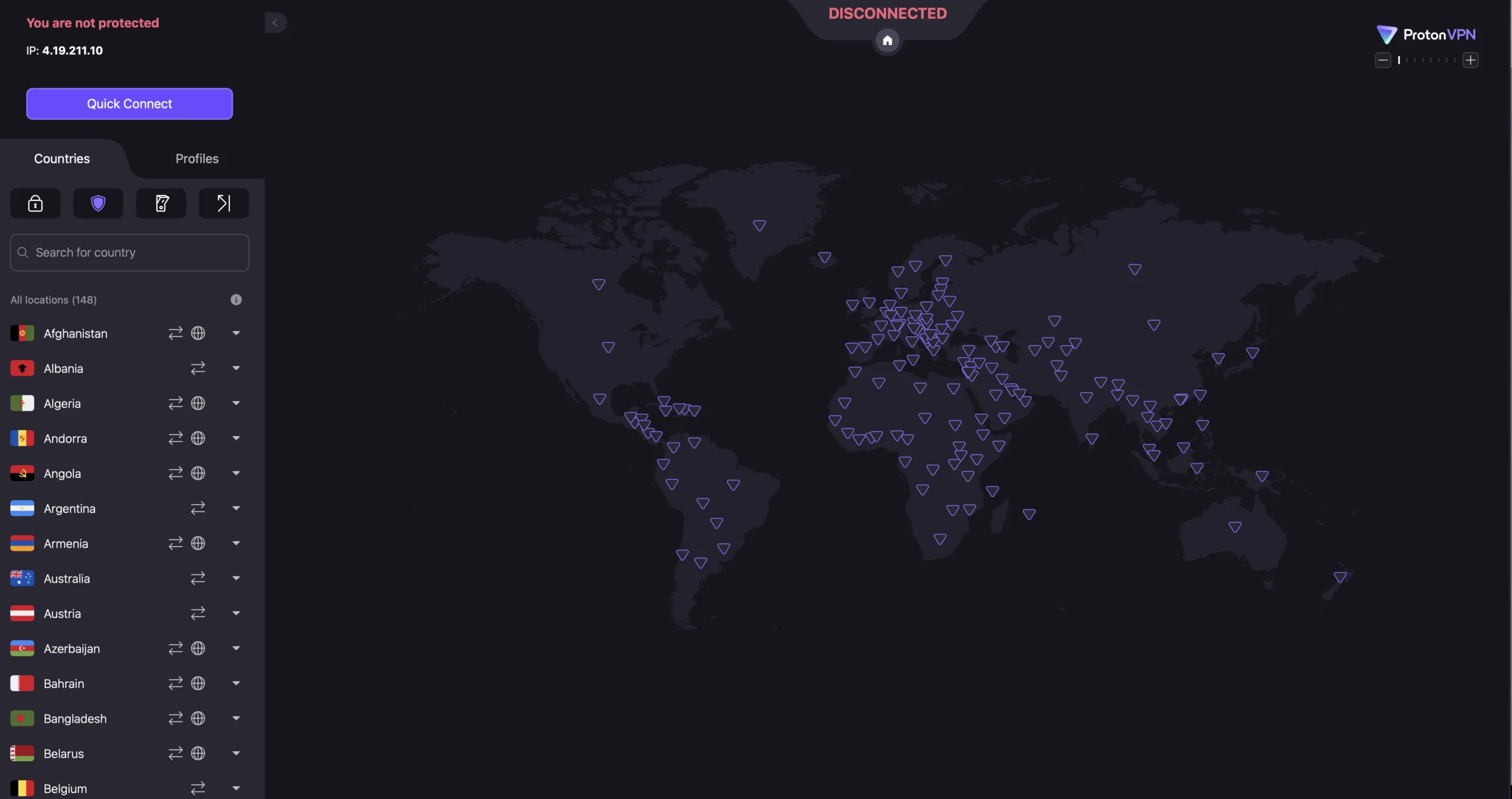
Proton VPN’s clickable map interface of servers I can connect to. Andrea GutierrezPrieto | HighSpeedInternet.com
Proton VPN’s apps and website are easy to navigate and straightforward. Getting connected to a VPN is as simple as clicking the Quick Connect button. The list of countries is easily accessible, and you can select the specific server you want to connect to within each country. You can also create and manage profiles with custom settings.
You can easily verify if you’re connected in the app and the browser extension. You can also easily access settings and customize your connection as needed. You can toggle between Smart, WireGuard, WireGuard (TPC), and Stealth protocols. You can also toggle malware, ad, tracker, and adult content blockers on and off.
Like most other VPN services, there isn’t any information on speed or latency, so if you want to know if your VPN is impacting your performance, you’ll need to verify that on your own. But Proton does have a VPN Accelerator setting that enables performance-enhancing technology to boost VPN speeds up to 400% that can be turned on and off.
Servers
Server score: (3.7/4) ★ ★ ★ ½
Proton VPN has 20,588 servers in 148 countries—making it one of the VPN services with the highest and most impressive number of servers. You can easily select the country and server you want to connect to. Each country has an icon next to it telling you if it supports the following features:
- Smart Routing: Provides faster speeds and additional security in “difficult-to-serve” countries.
- Streaming: Lets you know if a specific Proton VPN Plus server supports streaming.
- P2P/BitTorrent: Shows you which servers have the best performance for P2P and BitTorrenting.
- Tor over VPN: Routes your traffic through the Tor network for maximum privacy.
Does Proton VPN work for age-restricted content?
Yes, Proton VPN can help you get around age-restricted content without having to create an account on blocked websites. You can also use Proton VPN to bypass regionally blocked websites if you live in a state with harsh restrictions.
To bypass regional or age-restricted blocks using Proton VPN, all you need to do is connect to a server in a state in the U.S. that doesn’t have these restrictions. Once you’re connected, be sure to refresh the page or restart your browser.
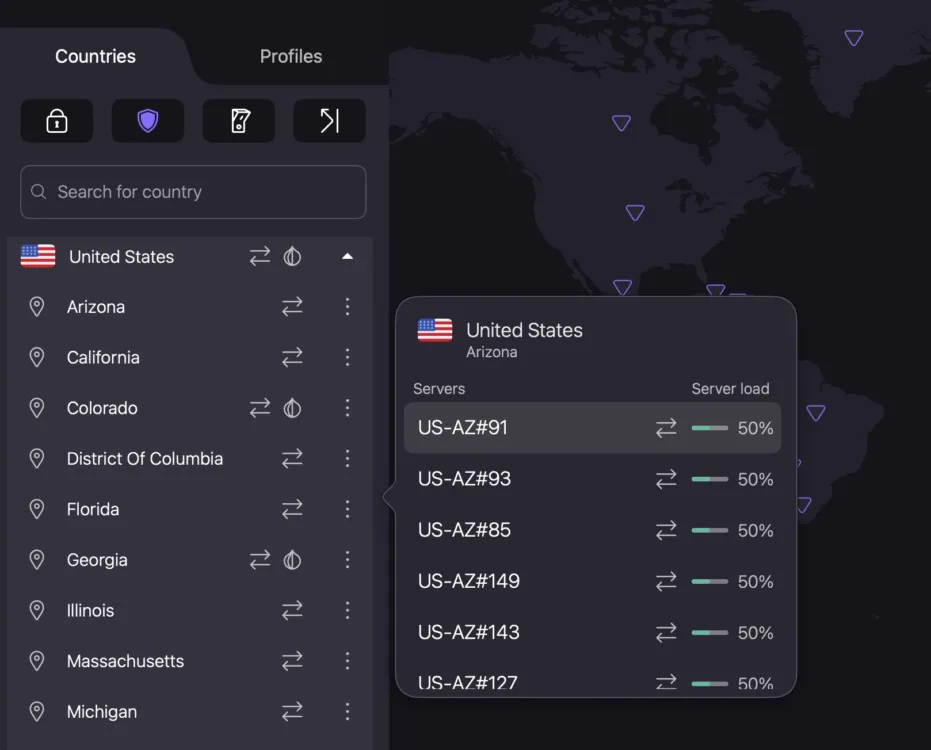
Proton VPN allows me to choose a server within a state and shows the server load. Andrea GutierrezPrieto | HighSpeedInternet.com
You can also see the load percentage that will tell you how full or close to capacity a server is before connecting. The Secure Core, NetShield blocker, kill switch, and port forwarding buttons can easily be accessed right below the countries tab.
Proton’s interface isn’t complicated, and activating the VPN is as simple as clicking one button. Customizations and additional features are also easily accessed, making Proton a great choice for both newbies and VPN pros.
How secure is Proton VPN?
Security, confidence, and features score: (3.6/4) ★ ★ ★ ½
Proton VPN is considered to be one of the overall best and safest VPN services you can get. Let’s go over how Proton VPN keeps customers safe.
AES-256 and ChaCha20 encryption
AES-256 encryption is the industry standard and is considered to be the most secure encryption to date. ChaCha20 is equally as secure and can be slightly faster. Proton uses both AES-256 encryption as well as ChaCha20 encryption, depending on the protocol you’re on. If you’re using Proton’s WireGuard® protocol, your connection is encrypted with ChaCha20.
No-logs policy
Proton VPN keeps a strict no-logs policy with a headquarters in Switzerland, which has some of the strongest privacy laws in the world. Proton offers a high level of transparency and is an open-source VPN, allowing researchers and the public to assess potential security risks. Proton’s open-source code also allows for verification of the no-logs policy and has been audited by third parties for the last five years.
The Proton VPN name
Proton launched in 2017 and was the first VPN provider to make the code for its apps public across macOS, Windows, iOS, and Android. Proton also published an independent security audit while open-sourcing across major platforms to boost transparency.
Proton has a strong reputation for proving its dedication to a strict no-logs policy in over 450 legal cases. Since Proton doesn’t keep logs or track data, all 458 requests received for identifying information have been denied.
- In 2021, Proton VPN received 121 legally binding orders for information to identify users connected to Proton servers, and all 121 orders were denied by Proton.
- Proton is headquartered in Switzerland and is prohibited from honoring foreign requests unless approved by the Swiss court.
Proton’s commitment to online privacy and protecting customer data is proven by its impeccable record protecting its no-logs policy in court.
What additional features come with Proton VPN?
| Plan | Features |
|---|---|
| VPN Plus | |
| Proton Unlimited |
Proton’s VPN Plus gives you everything you need to enhance your security and privacy, plus access to one of the largest server networks on the market. You can get access to the free tiers of Proton’s password manager, mail, calendar, and drive with your VPN Plus account, so there isn’t a need to get the Proton Unlimited bundle unless you need the premium versions.
Proton VPN multiple encryption protocols
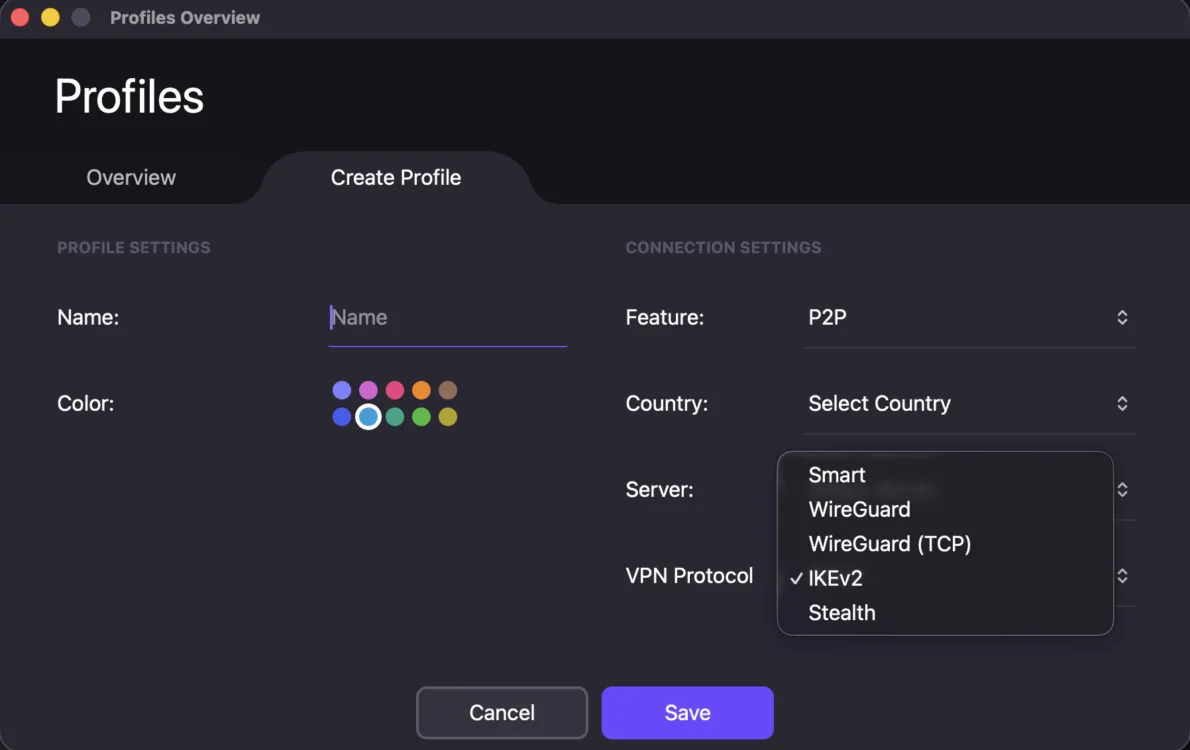
Creating my Proton VPN profile with the feature, server, and protocol of my choice. Andrea GutierrezPrieto | HighSpeedInternet.com
Proton VPN offers a variety of VPN protocols you can choose from to customize your connection and safety to tailor your needs. You can change the protocol in the profile settings tab. My only gripe with this process is that there is no explanation or differentiation while selecting your protocol. I couldn’t find a description for each protocol on my browser account either and had to look it up on a support page on Proton’s website.
Since I was using macOS, I did need to install network extensions in order to be able to use different protocols. I was able to follow the steps outlined on Proton’s website and didn’t have any trouble installing them.
You can switch between a few VPN protocols with Proton VPN, unless you’re on the free plan, which doesn’t allow you to switch protocols. You can select the following VPN protocols when using Proton VPN Plus.
- Smart: Selects the best protocol for your current network conditions and can switch between protocols using different ports.
- WireGuard: Uses ChaCha20 and aims to deliver faster speeds and lower CPU usage.
- WireGuard TCP: This protocol is recommended for blocking local censorship.
- IKEv2: Best for re-establishing connections when switching between Wi-Fi and mobile data.
- Stealth: This option is best for blocking censorship and also bypassing VPN blockers on websites.
If you’re on a platform other than macOS, you may see the following protocol options:
- OpenVPN: Best for ultimate security, but uses more CPU power compared to WireGuard
- OpenVPN UDP: Best for high-bandwidth activities like gaming, streaming, or large downloads
- OpenVPN TCP: Best used when connected to unreliable public Wi-Fi networks since it prioritizes a stable connection, but your speeds may be slower
NetShield
You can turn on NetShield to block malware, ads, trackers, and adult content while you browse online. You select the following settings in NetShield:
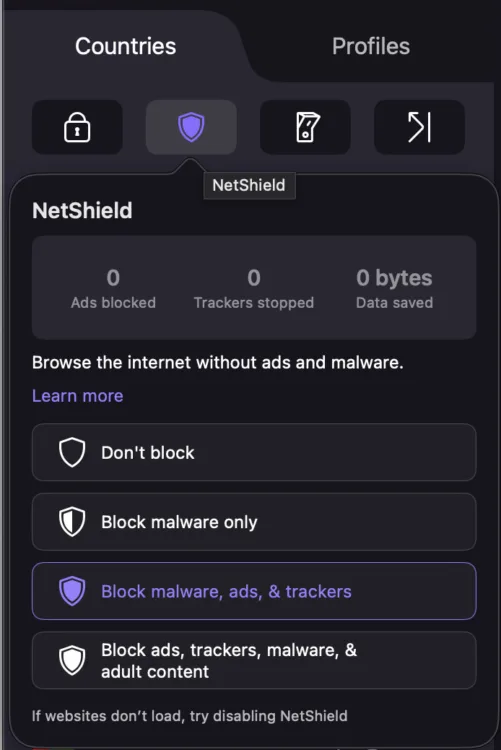
The NetShield feature in Proton VPN lets me select what I want to block while browsing. Andrea GutierrezPrieto | HighSpeedInternet.com
- Turn NetShield blocking off
- Block only malware
- Block malware, ads, and trackers
- Block malware, ads, trackers, and adult content
You can’t toggle each one of these options on and off like you can with other VPN services, so customization is limited, but you do have three options when it comes to choosing what to block.
Dark web monitoring
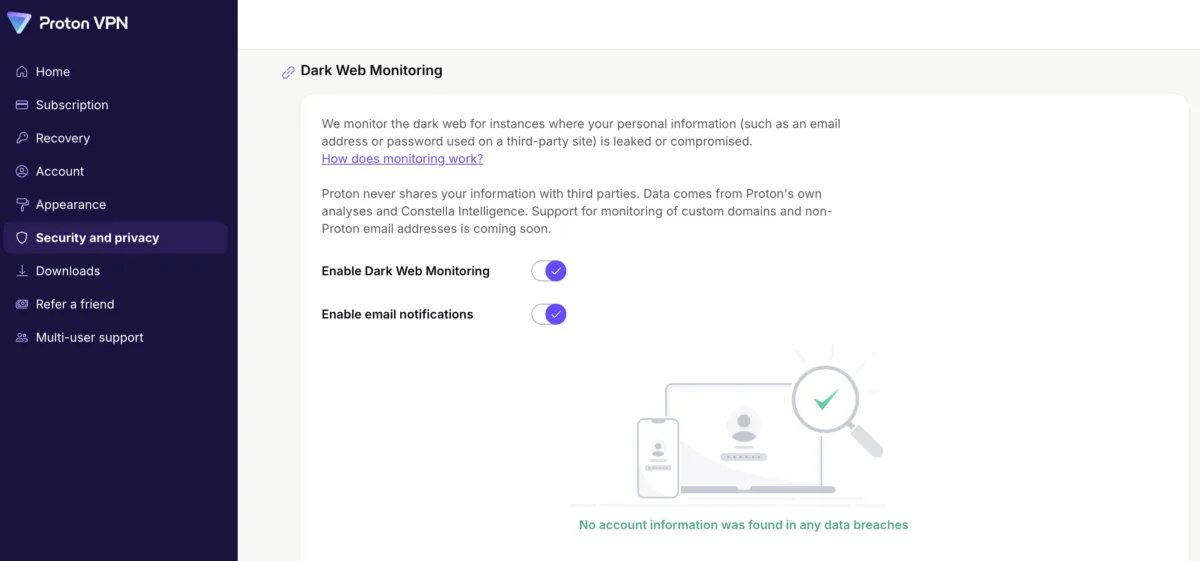
Enabling dark web monitoring and email notifications on Proton VPN. Andrea GutierrezPrieto | HighSpeedInternet.com
You can toggle Proton’s dark web monitoring on to get notified if your information is leaked on the dark web. You can also enable email notifications so you can be contacted if any data leaks are found. You can find this feature under the security and privacy tab in your Proton account.
How does Proton VPN do on major platforms and devices?
Device count and compatibility score: (3.2/4) ★ ★ ★
Proton VPN covers up to 10 devices, which is typical for a VPN service. This will provide coverage for small households, but larger families will likely have too many devices. If you need more than 10 devices covered, you’ll need to sign up for another Proton VPN account and manage that separately.
Supported operating systems
Proton VPN covers most major operating systems:
| Desktop client | Mobile | Browser | Other |
|---|---|---|---|
Proton VPN doesn’t cover operating systems like ChromeOS, Amazon Fire OS for Mobile, Volla OS, Ubuntu Touch, LineageOS, or GrapheneOS.
How easy is Proton VPN’s billing and cancellation?
Billing score: (3.6/4) ★ ★ ★ ½
You can easily access your Proton account and billing online. You can navigate to the Manage My Account section in the app, but it will redirect you to the Proton website. Proton offers a 30-day money-back guarantee, and I put it to the test to see how easy it is to get a refund.
Although I was initially skeptical of not being able to chat with an agent online, Proton’s customer service responded to my feedback form within an hour, and my refund was processed shortly after that. Since I ran into no issues and they responded to me in a timely manner, I was very satisfied with Proton VPN’s cancellation and refund process.
How do I cancel my Proton subscription?
Step 1: You will need to submit a form to customer service or reach out to Proton’s customer service via email at [email protected].
Step 2: You will receive an email response from Proton customer service, regardless of whether you opted to fill out the form or email.
Step 3: You will need to give one final confirmation of wanting to cancel or refund your order via email.
Step 4: Your refund will arrive within 1 to 10 days, depending on what payment method you used.
- Debit or credit card: 5–10 business days
- PayPal: 1–2 business days
- Bitcoin: 1–2 business days
- App Store: 5–10 business days
- Play Store: 3–5 business days
Step 5: Since Proton offers a free plan, they downgrade your account to the free tier after canceling your plan. If you want to delete your account, you can do that separately.
Proton doesn’t give a specific timeline as to when customer service will get back to you, so be sure to reach out ahead of time if you want to get a refund within the first 30 days.
I followed the instructions on Proton’s website to get a refund under the 30-day money-back guarantee and had no trouble following the steps and filling out the contact form. The process was very simple and only took a few minutes.
Final call
Proton VPN overall score: (87/100) ★ ★ ★ ½
Proton VPN is a reliable and easy-to-use VPN service. The website and app interfaces are straightforward and easy to navigate, even for a beginner like me. The setup and installation couldn’t have been easier, and the price point makes it an even better deal. Proton VPN was the first VPN service I’ve used, and I don’t think I could have asked for a better introduction into the VPN space.
Proton is an excellent choice for those who don’t just want a great VPN, but are also looking for extra services like a password manager, calendar, or storage solution. Proton’s VPN Plus plan will get you access to the free tier of Proton’s services, but opt for the Proton Unlimited bundle if you want to get the premium version of all Proton services.
Proton VPN score breakdown
| Category | Points |
|---|---|
| Price | 16.5 / 20 (★ ★ ★ ½ ) |
| Billing and cancellation | 9 / 10 (★ ★ ★ ½) |
| Servers | 13.7 / 15 (★ ★ ★ ½ ) |
| Speed and performance | 16.8 / 20 (★ ★ ★ ⅓ ) |
| Security and features | 18 / 20 (★ ★ ★ ½ ) |
| Devices and compatibility | 8 / 10 (★ ★ ★ ¼ ) |
| Apps and user experience | 5 / 5 (★ ★ ★ ★ ) |
| Final score | 87 / 100 |
Disclaimers
ProtonVPN plans
VPN Plus — The specially discounted price of US$71.76 is valid for the first 24 months. Then it will automatically be renewed at US$83.88 for 12 months. You can cancel at any time. Renewal pricing subject to change according to terms and conditions.
Proton Unlimited — Your subscription will automatically renew. You'll then be billed every 12 months at US$119.88. You can cancel at any time. Renewal pricing subject to change according to terms and conditions.