
My CyberGhost VPN Review After 7 Years: Speeds, Privacy, and Features
Fast speeds, solid apps, and audit-confirmed privacy make CyberGhost well worth the price

Availability and speed may vary by location, and prices are subject to change. Expand for disclaimers.
CyberGhost plans
All plans – All amounts shown are in US Dollars. Taxes may apply based on your jurisdiction. Any discounts reflect a reduction based on the current monthly servicing pricing at $12.99 per month.
Why use CyberGhost?
CyberGhost is great for customers who prioritize speed, as it’s a top performer in our speed testing. It’s also an excellent choice if you want a straightforward and trustworthy service. The apps are some of the best, and CyberGhost maintains an audit-confirmed commitment to customer privacy.
Pros
 Excellent speeds
Strong server selection
45-day refund window
Cons
 A bit pricey
No app-based split tunneling on PC (websites work well)
CyberGhost’s main strengths are fast speeds, strong encryption, and a large server selection. It also has some of the most intuitive apps, making it easy to dive into all its features. I’ve been using CyberGhost VPN since 2019, and the experience has been nearly perfect. If you’re looking for a high-performing, secure, and straightforward VPN, this one is worth a closer look.
This review combines controlled testing and analysis of CyberGhost against other VPN providers, along with my seven years of experience using the service. We’ll cover speeds, pricing, policies, security, and everything else you need to decide if CyberGhost is as good a fit for you as it has been for me.
How much does CyberGhost cost?
Price score: (3/4) ★ ★ ★
| Plan | Price |
|---|---|
| CyberGhost | $12.99/mo. |
| CyberGhost (6 mo.) | $41.64 for 6 mos. ($6.99/mo.) |
| CyberGhost (24 mo.) | $56.94 for 26 mos. ($2.19/mo.) |
CyberGhost doesn’t play games with pricing. It’s the main reason I’ve stuck with it for so long. I have never experienced a price hike during my seven-year subscription history. I signed up for a monthly subscription in June 2019 for $12.99, the same price currently advertised on the CyberGhost website as of writing. In 2022, I switched to an annual subscription for $22.88 per year, and that too has remained steady for four years.
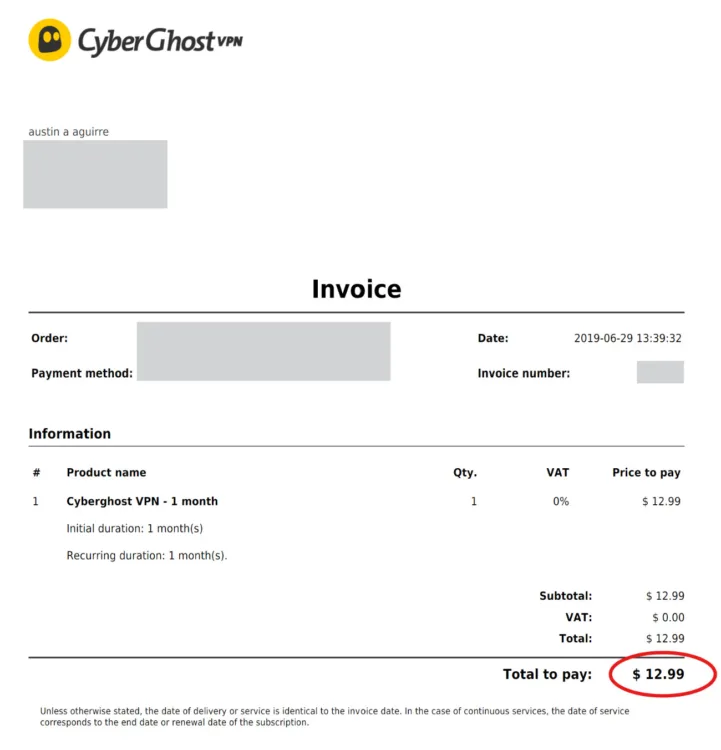
My first CyberGhost Bill showing the same pricing advertised today.
Steady pricing is great, but how does the price compare to other providers? CyberGhost’s monthly rate is on the pricier end, but not as much as some others, like Nord. The redeeming factor here is that purchasing any plan gets you every feature. No features are reserved for certain plans. And again, the price is very likely to remain steady. Many services will bait you in with a low promo, then quietly jack the price up in six months; there’s none of that here.
Which CyberGhost plan should you get?
I’d recommend the six-month contract, since there is a 45-day full-refund cancellation window. I wasted money on the monthly sub for three years, which I wouldn’t recommend if you know you need a VPN long-term. Normally, I’d say go for the annual plan that I have, but it looks like CyberGhost has removed it in lieu of a new two-year deal. The two-year subscription is a steal at $2.19 per month, but that’s a long commitment.
How fast is CyberGhost?
Speed and performance score: (3.6/4) ★ ★ ★ ½
CyberGhost is one of the fastest VPN services we’ve tested, especially when using nearby servers. This syncs with my experience over the past seven years. I usually can’t discern any drop in speeds or smoothness when using the VPN on my PC, Mac, or phone.
CyberGhost speeds, latency, and jitter testing results
| Local server | Distant server | No VPN | |
|---|---|---|---|
| Download speed | 887Mbps (- 5.6%) | 604Mbps (- 35.7%) | 940Mbps |
| Upload speed | 885Mbps (- 6.6%) | 130Mbps (- 86.3%) | 948Mbps |
| Latency | 33.15 ms (+ 29%) | 289 ms (+ 1026%) | 25.66 ms |
| Jitter | 5.1 ms (+ 52%) | 44 ms (+ 1210%) | 3.36 ms |
Speeds
We tested CyberGhost over a residential fiber connection, and the results are excellent. Download and upload speeds were only impacted by about 6% when connected through a local CyberGhost server. Speeds were significantly impacted (especially upload speed) when using a distant server (Hong Kong), but this is expected, and we see it with every VPN we test.
Latency and jitter
CyberGhost is a stand-out performer when it comes to latency and jitter. Over a local server, latency and jitter increased by only 29% and 52%, respectively. To compare, NordVPN increased latency and jitter by 332% and 910% over the same connection. CyberGhost maintains these metrics low enough to make fast-paced multiplayer gaming and video calls over VPN completely viable. We definitely can’t say that for every VPN provider.
Are the CyberGhost apps good?
Apps and UX score: (4/4) ★ ★ ★ ★
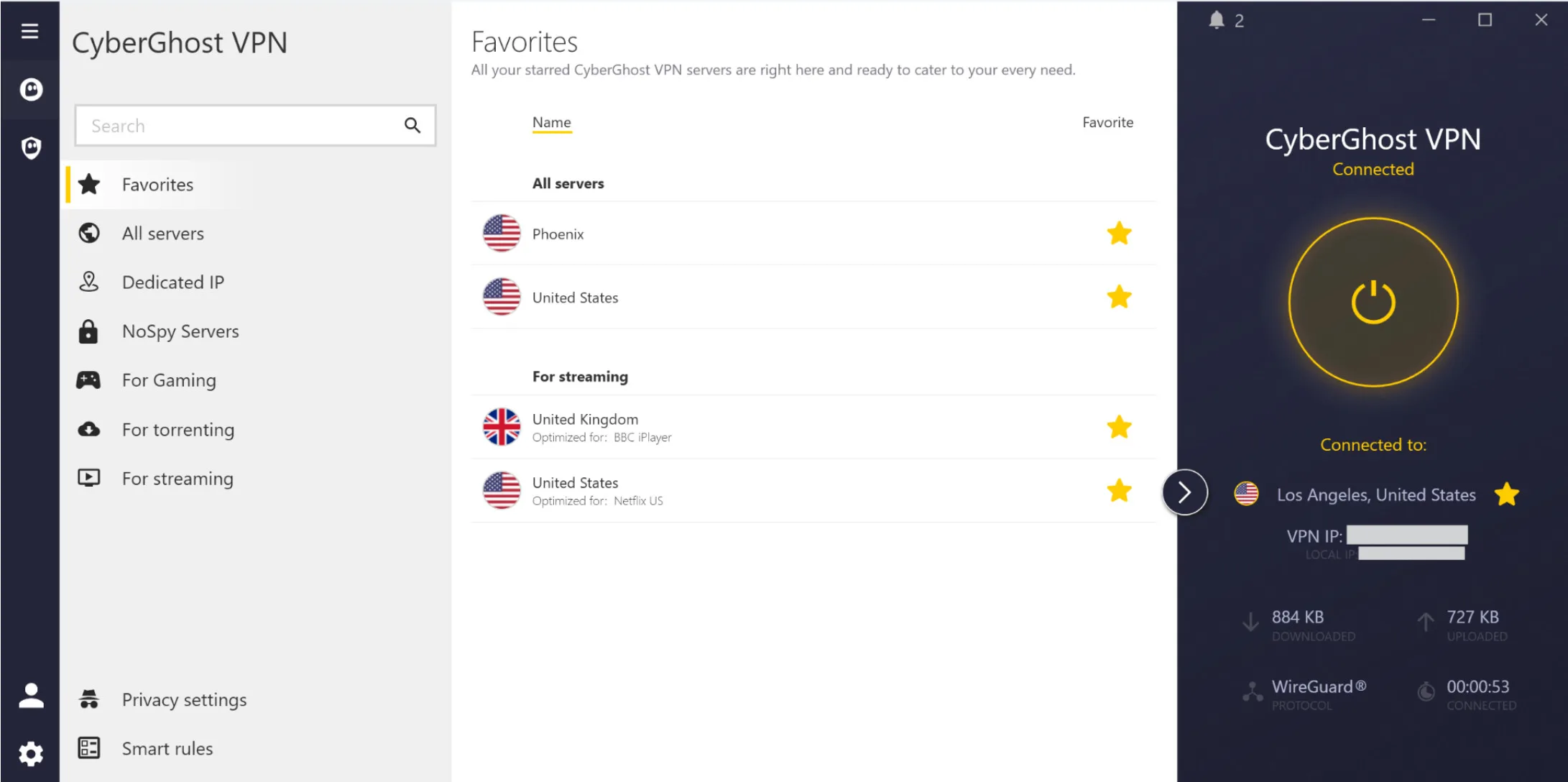
CyberGhost’s apps make finding an ideal server quick and easy. Austin Aguirre | HighSpeedInternet.com
After seven years with CyberGhost, I’m sure I’m a bit biased, but I think these are the best-designed VPN apps out there. Everything is where you’d expect it to be, with nothing more than a click or two away. Smart use of color allows the interface to communicate a lot of info without feeling cluttered or overstimulating.
Also, and this is important, there is very little, if any, marketing or upsells present in the apps. Using a VPN daily means that a provider, if it wants to, can really bombard you with offers and ads. I’m happy to report that CyberGhost is really good on this front; it’s kind to my email inbox as well.
Turning the VPN on and knowing when it’s on or off is very simple with a giant activation button, and its bright yellow color when the VPN is active. There’s also an app tray indicator (gray = off, yellow = on) displaying whether the VPN is on. That may seem like a given necessity, but not every provider includes it.
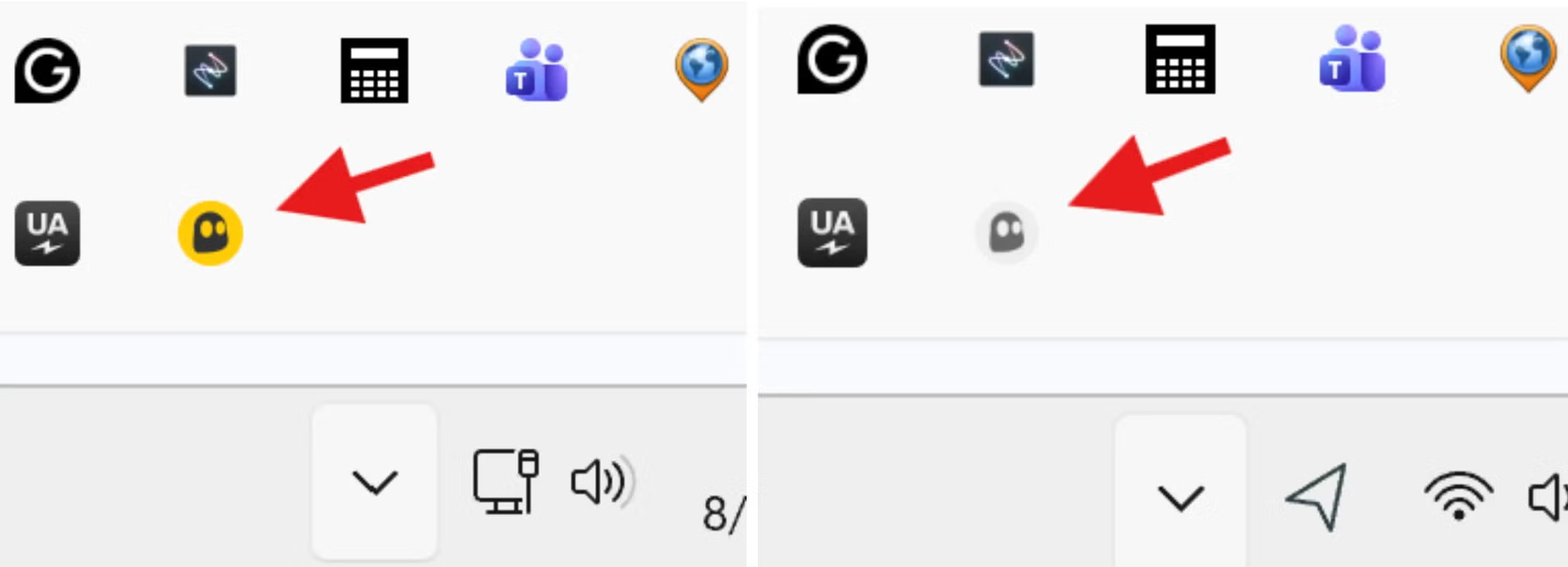
The CyberGhost icon turns yellow to indicate the VPN is active.
The main VPN panel displays the server location, VPN IP, and local IP, total data transferred, VPN protocol, and time connected. The only things missing are some performance stats; I’d appreciate a ping measurement.
Does CyberGhost have a good server network?
Server score: (3.3/4) ★ ★ ★ ½
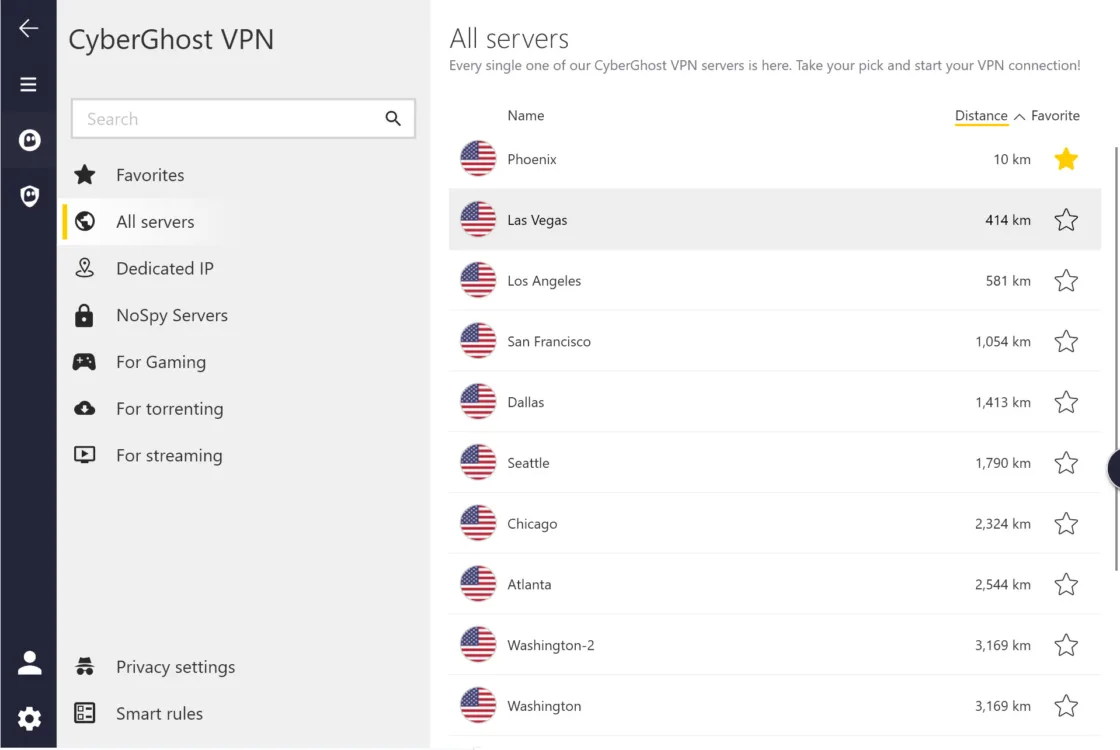
You can pick a server from the distance-sorted list, the category tabs on the left, or by using the search bar. Austin Aguirre | HighSpeedInternet.com
CyberGhost offers 11,500+ servers in 100 countries. Server selection in the apps is straightforward, while retaining enough complexity to get exactly what you want. The left server category menu offers specialized options for gaming, streaming, or torrenting. The servers are well organized. For example, you can select a server optimized for an individual streaming service in a specific region.
All server categories allow you to sort by distance, which is essential in my book. It’s surprising that not all providers offer this (looking at you, Nord). You can also select and sort by your favorite servers, which is my go-to. The gaming and “NoSpy” servers allow you to sort by ping, which is perfect, though I wish that option were available for all servers.
It’s worth noting that, while the gaming servers are a neat idea, I’ve actually achieved better pings by selecting the closest server to me over anything I find in the gaming servers list.
Does CyberGhost work for regionally-blocked or age-restricted content?
Yes, CyberGhost can help you navigate around regionally-blocked and age-restricted content without creating a login on the restricted site. It can also help you get around regional blocks, such as elements of a site that don’t accept traffic from certain U.S. states.
To use CyberGhost to get around regional login, age-verification, and site blocks, select or search for a server in a region in the U.S. or elsewhere that isn’t subject to the restriction. You may need to refresh the browser page or restart your web browser after connecting to the VPN.
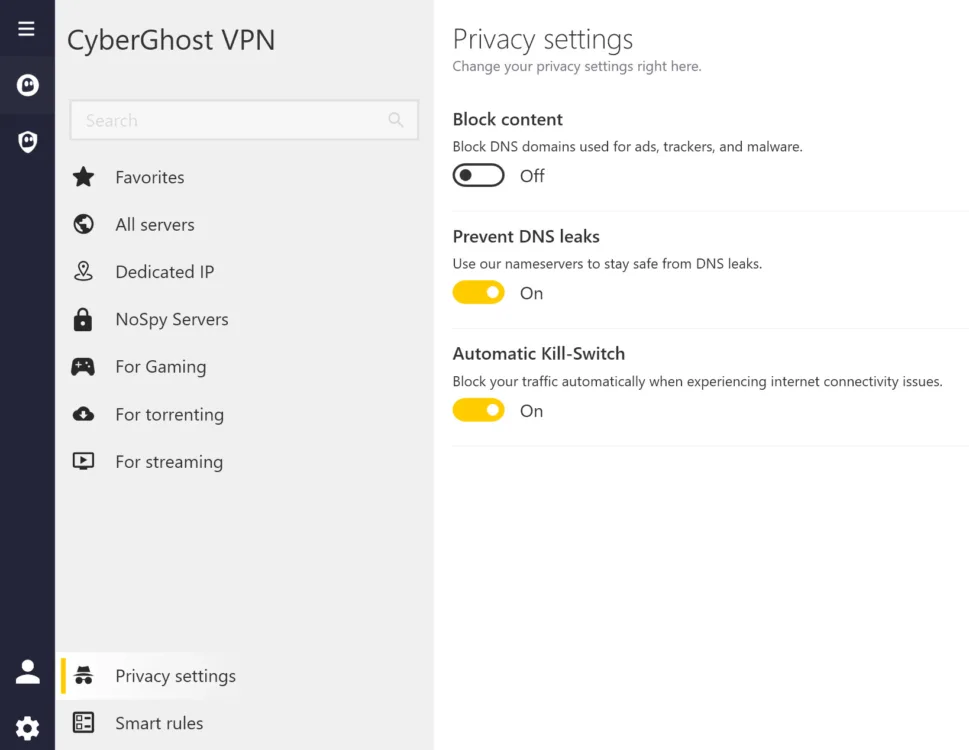
The ad blocker, DNS leak prevention, and kill switch are found in the privacy settings. Austin Aguirre | HighSpeedInternet.com
The remaining essential features are split between the following menus:
Settings (cog wheel)
- VPN protocol
- MTU size
- IPV6 disable
Privacy settings
- DNS leaks
- Ad and malware blocker
- Kill switch
Smart rules
- Auto connect
- Split tunneling
Every feature has been spot on in my time with CyberGhost, save for one: you can’t use split tunneling with apps on PC, only websites. You can split tunnel apps on mobile, but not on PC or Mac, which is where you need it most. Add this, please, CyberGhost.
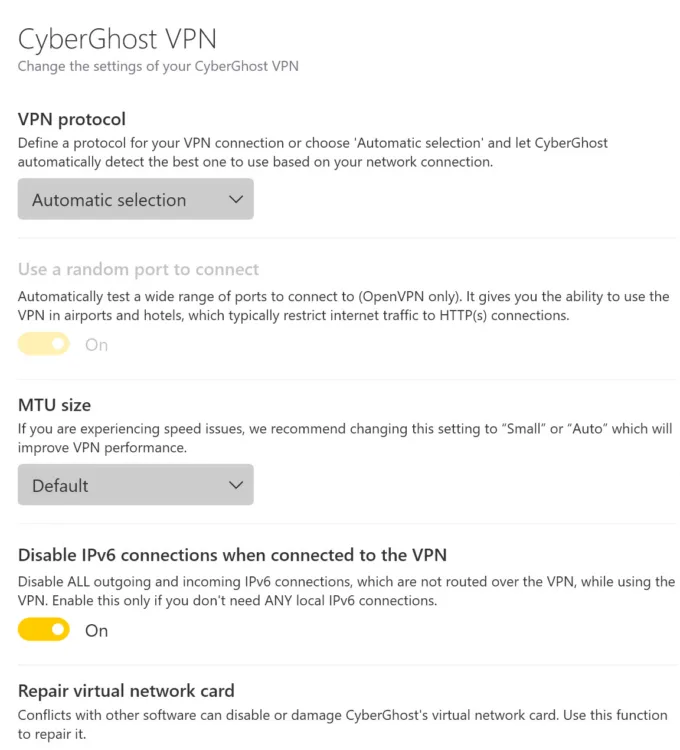
Protocol, split tunneling, and many other features are located in the app settings menu. Austin Aguirre | HighSpeedInternet.com
How secure is CyberGhost?
Security, confidence, and features score: (3.6/4) ★ ★ ★ ½
CyberGhost is highly secure, with military-grade encryption, multiple VPN protocols, and RAM-only servers that won’t log your activity.
AES-256 encryption
This is the gold standard of modern cybersecurity, used by the military and many government agencies. The number of possible combinations AES-256 creates makes it practically impossible to crack. Many believe AES-256 encryption will even hold its own against future quantum computing attacks.
Multiple VPN protocols
CyberGhost offers OpenVPN, IKEv2, and WireGuard VPN protocols. You can choose a specific protocol, or let CyberGhost auto-select the best one based on your activity.
No-logs policy
CyberGhost maintains a strict no-logs policy. In fact, the company makes it impossible to keep logs by using RAM-only servers, which don’t store data long-term. Third-party audits by Deloitte in 2022, 2024, and 2025 have confirmed this claim.
Full feature list
- OpenVPN, IKE2, WireGuard VPN protocols
- AES-256 encryption
- RAM-only servers (no logs)
- Kill switch
- Auto-connect
- Content blocker (blocks ads, malware, and trackers)
- Streaming and gaming-specific servers
- NoSpy servers
- Privacy Guard (customizes settings in operating systems, browsers, and apps to enhance privacy)
- Split tunneling (sites only, no apps on PC or Mac)
- IPV6 disable
- MTU size
- DNS leak prevention
How does CyberGhost do on major platforms and devices?
Device count and compatibility score: (2.8/4) ★ ★ ★
CyberGhost provides apps for a very wide range of devices and operating systems. You can use up to seven devices simultaneously on a single subscription. I have never found that limiting, but it is on the low end. Most VPN services offer at least 10 simultaneous devices, and many offer unlimited devices. It’s a bit ironic that the provider with the best OS and device support has such a relatively low device allowance. If you’re getting CyberGhost just for yourself, you’re unlikely to have any issues with the seven-device limit.
Supported operating systems
| Desktop and mobile devices | Browsers | Smart TVs and streaming devices | Gaming consoles | |
|---|---|---|---|---|
How easy is CyberGhost’s billing and cancellation?
Billing score: (4/4) ★ ★ ★ ★
CyberGhost makes it easy to see your current plan details and make any necessary changes. If you change plans, your old subscription records are easy to access, with every billing invoice available for download. Cancellations are super easy too. There’s a dedicated cancellation button on your subscription overview page, which is a breath of fresh air considering most platforms make you jump through a few hoops.
How to cancel CyberGhost subscription for refund
CyberGhost offers refunds for monthly subscriptions if you cancel within 14 days. If you purchase a six-month or longer subscription, you have 45 days to cancel for a refund. Purchases through the App Store or Google Play Store are not eligible for refunds.
CyberGhost’s instructions say you need to contact customer service via 24/7 live chat, email, or a support ticket to request a refund.
My experience canceling CyberGhost
I put CyberGhost’s money-back guarantee to the test and found it very easy to cancel and get a refund. I did this on the account used for testing, not my personal subscription, which I have no intention of canceling.
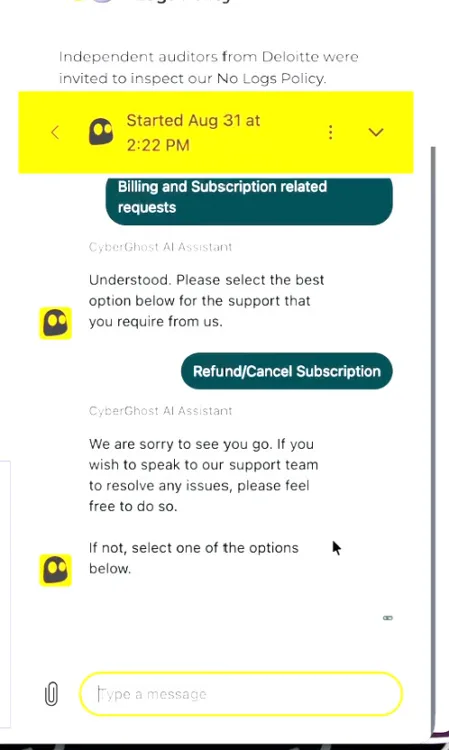
Getting my refund via live chat took less than five minutes. Austin Aguirre | HighSpeedInternet.com
I chose to use the live chat feature rather than wait for a reply by email or through a support ticket. The bot asked a few questions and then transferred me to a live agent. The agent asked two or three retention questions, but quickly initiated the refund after I answered. The entire process took less than five minutes.
Final call
CyberGhost overall score: (85/100) ★ ★ ★ ½
CyberGhost gets the VPN experience right. It supplies all the features you need to keep your activity private and provides an interface that makes those tools easy to access and use. You always know when the VPN is active, and there’s a robust, well-organized selection of servers.
After seven years of using CyberGhost, I’m happy to say that it fits perfectly into my daily life. It provides what I need out of a VPN service. Plus, most importantly, it stays in its lane, without constant marketing or upsells flooding the apps or my inbox. Even more importantly, my plans and prices never change unless I want them to.
Finally, it’s one of the fastest VPNs out there, according to both our controlled testing and my experience. This makes CyberGhost the obvious choice for gamers and remote workers, but it also means that, in general, choosing CyberGhost allows you to trust the service to work well with pretty much any web activity, meaning less hassle spent turning the VPN off and on throughout the day and less time spent online unprotected. It’s a service that runs transparently in the background with very minimal impact on internet speed, which is exactly what I want out of my VPN. I won’t be switching any time soon.
CyberGhost final score breakdown
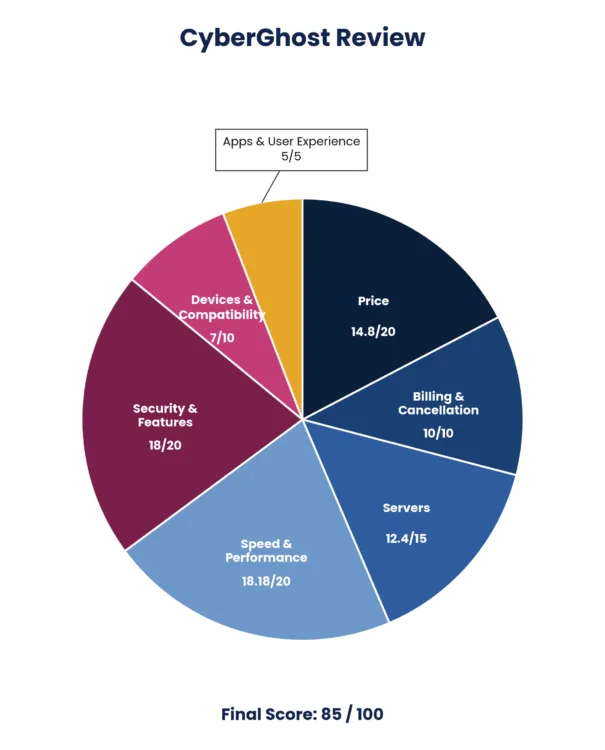
| Category | Points |
|---|---|
| Price | 14.8 / 20 |
| Billing and cancellation | 10 / 10 |
| Servers | 12.4 / 15 |
| Speed and performance | 18.2 / 20 |
| Security and features | 18 / 20 |
| Devices and compatibility | 7 / 10 |
| Apps and user experience | 5 / 5 |
| Final score | 85 / 100 |
Disclaimers
CyberGhost plans
All plans – All amounts shown are in US Dollars. Taxes may apply based on your jurisdiction. Any discounts reflect a reduction based on the current monthly servicing pricing at $12.99 per month.


