
Our Surfshark Review: Best VPN for Families?
One Surfshark sub covers a lot of ground with excellent speeds, tons of features, and unlimited devices

Availability and speed may vary by location, and prices are subject to change. Expand for disclaimers.
Surfshark plans
Surfshark Starter — You’ll be charged $72.91 today for a 27-month subscription. After this service period ends, your subscription will automatically renew every 12 months at the then-applicable renewal price. You can cancel or manage your subscription anytime through your account. Currency conversion may affect the price you’re charged, depending on your bank location or payment provider. Learn more about our currency and billing practices. By completing the purchase, you agree to our Terms of Service, including auto-renewal terms, to receive electronic documents, and acknowledge our Privacy Policy.
Surfshark One — You’ll be charged $81.70 today for a 27-month subscription. After this service period ends, your subscription will automatically renew every 12 months at the then-applicable renewal price. You can cancel or manage your subscription anytime through your account. Currency conversion may affect the price you’re charged, depending on your bank location or payment provider. Learn more about our currency and billing practices. By completing the purchase, you agree to our Terms of Service, including auto-renewal terms, to receive electronic documents, and acknowledge our Privacy Policy.
Surfshark One+ — You’ll be charged $131.47 today for a 27-month subscription. After this service period ends, your subscription will automatically renew every 12 months at the then-applicable renewal price. You can cancel or manage your subscription anytime through your account. Currency conversion may affect the price you’re charged, depending on your bank location or payment provider. Learn more about our currency and billing practices. By completing the purchase, you agree to our Terms of Service, including auto-renewal terms, to receive electronic documents, and acknowledge our Privacy Policy.
Why use Surfshark
Surfshark is an ideal choice for those who want a highly secure VPN that’s easy to use. All plans come with advanced security and privacy features, and its interface is very straightforward. It’s also a great choice for families as it provides unlimited devices and a content blocker (Surfshark One or One+ required).
Pros
 Fast download and upload speeds
Advanced VPN features with every plan
Unlimited devices
Cons
 Expensive
Heavy impact on latency and jitter
Customization requires menu diving
Surfshark is incredibly secure right out of the box. Every plan includes a robust set of VPN security and privacy tools, and its interface makes implementing them extremely easy. It has an independently verified no-logs policy, so it’s a brand you can trust not to snoop into your data. It also allows unlimited devices with support for all the major operating systems and devices, making it a great fit for families that want to run on a single subscription.
We won’t lie, this is an expensive service as far as VPNs go, but you get a lot of security and convenience for your money. No other VPN makes it easier to implement such a thorough level of privacy protection. If you want all the best VPN security features, protection for the whole family, and lightning-fast setup and use, Surfshark is worth a closer look.
How much does Surfshark VPN cost?
Price score: (2.4/4) ★ ★ ½
| Plan | Price* | Features |
|---|---|---|
| Surfshark Starter | $2.49–$16.45/mo. | |
| Surfshark One | $2.79–$18.95/mo. | |
| Surfshark One+ | $4.49–$21.86/mo. |
* Availability and speed may vary by location, and prices are subject to change. See disclaimers.
Many VPN services save their best features for their more expensive plans; Surfshark takes a different approach. Its Starter plan comes with advanced VPN protections, like double VPN and rotating IP.
But there’s no way around it: Surfshark is expensive. When we compared the monthly rates of all the major VPN providers, Surfshark Starter’s $16.49 monthly rate was the highest. If you go for an annual or biannual plan, the monthly rate reduces dramatically to something more in line with other providers, but this brand charges a premium to maintain a monthly commitment.
Is Surfshark worth it? Yes, definitely, for the right customer due to the advanced feature set provided with all plans. Combine that with the fact that a single subscription covers unlimited devices, and you get a base level of security that is second to none for your entire household. If you want top-shelf anonymity and security, no VPN does it better.
Which Surfshark plan should you get?
Those looking for privacy and anonymity online will find everything they need in Surfshark’s Starter plan. Enable double IP to maximize your privacy protection and turn on rotating IP to make it a moving target. Team that up with Surfshark’s AES-256 encryption over WireGuard and you’ve got a powerhouse of privacy protection that’s not only secure but fast.
If you’re looking to protect the whole household and manage the risk and online activity of others under your umbrella, the Surfshark One plan is worth the small price increase. Surfshark One includes content blocking along with two-factor authentication (2FA), which ensures only you can change the settings. You also get text and email scam protection and an antivirus.
How fast is Surfshark?
Speed and performance score: (3.1/4) ★ ★ ★
We performed controlled testing on Surfshark over a wired fiber-to-the-home connection to see how its performance stacks up. Let’s dig into the testing results.
Surfshark speeds, latency, and jitter testing results
| Local server | Distant server | No VPN | |
|---|---|---|---|
| Download speed | 870Mbps (- 7.4%) | 647Mbps (- 31.2%) | 940Mbps |
| Upload speed | 909Mbps (- 4.1%) | 125Mbps (- 86.8%) | 948Mbps |
| Latency | 130 ms (+ 407%) | 302 ms (+ 1077%) | 25.66 ms |
| Jitter | 38 ms (+ 1031%) | 45 ms (+ 1,239%) | 3.36 ms |
Speeds
Surfshark preserves speeds brilliantly. Both download and upload speeds are hardly touched by a local Surfshark VPN connection. As of this writing, it’s the second-fastest VPN we’ve tested (NordVPN takes the top prize). Using a distant server (Hong Kong) impacted speeds more heavily, especially upload speeds, as is the case with every VPN we test. With these results, it’s safe to say Surfshark is a particularly fast VPN.
Latency and jitter
This is where this VPN drops the ball a bit. Our latency and jitter recordings saw heavy increases when using Surfshark. Of course, the distant server results were worse, as physics demands, but even the local ping wasn’t great. Ping and jitter won’t affect much aside from video calls and real-time multiplayer gaming, so if you’re not looking for a VPN for those purposes, you can safely ignore these results.
My experience
As a user, I was impressed by how smooth the connection felt. Streaming, browsing, and everyday internet tasks felt just as they do without a VPN; the service was 100% transparent. However, I noticed video calls were more delayed and unstable than usual, which tracks with our latency and jitter test results.
Are the Surfshark apps good?
Apps and UX score: (3.2/4) ★ ★ ★
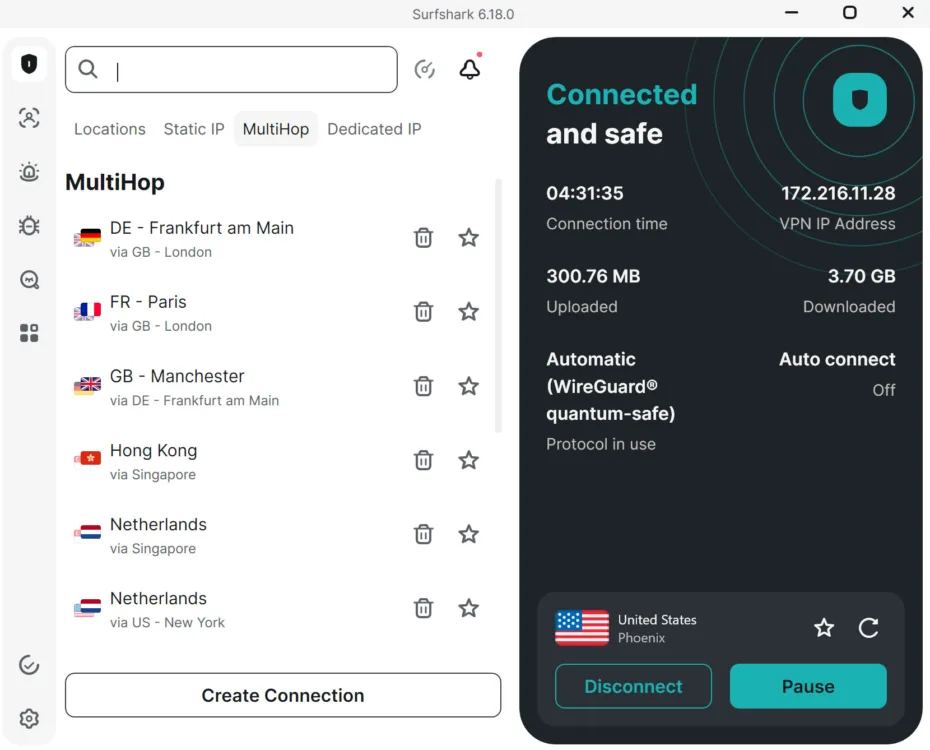
Surfshark’s apps are designed around convenience. This means faster operation but the loss of some control.
Functionally speaking, the Surfshark apps are solid; I didn’t encounter bugs. It’s easy to know when the VPN is active in the app and by the color of the Surfshark logo in your app tray on Windows.
The apps follow the usual VPN layout, with a large activation button for easy use and a quick-access server list. Surfshark also displays the VPN IP address and protocol by default; some services make you dig for that information, so I was happy to see it easy to access. I only wish they’d continued that trend. Why not display kill switch state and bypassed apps and sites? And what I wouldn’t give for a ping measurement to know how the VPN connection is performing.
The accessibility of important features could have been handled better. Non-VPN extras and upsells are easier to access than important VPN go-tos like split tunneling, the kill switch, and encryption protocols. The tabs on the left all lead to non-VPN functions, like alternative ID and the bundled antivirus. I signed up for the top plan, but my guess is that those without these features are asked to upgrade when they click on these tabs. Meanwhile, the important stuff? It’s two pages deep in the settings. To be fair, this isn’t just a Surfshark problem; nearly every provider uses its app’s best real estate for its own designs.
Does Surfshark have a good server network?
Server score: (1.8/4) ★ ★
Surfshark provides 4,500 VPN servers in 100 countries. Surfshark’s country list is solid, but its server count is less than half of what most other providers offer. If you live near any large city in the U.S., server availability is unlikely to be an issue, but I do wish finding a specific server in the app was easier.
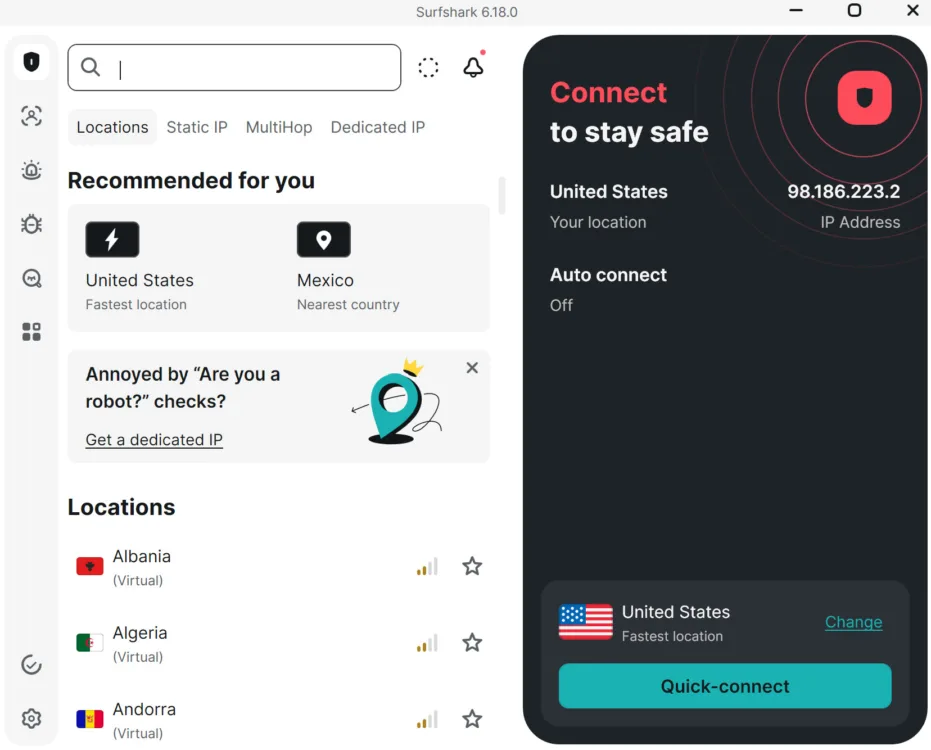
The server list offers two recommended servers and an alphabetical country list. To find a more specific server location, use the search bar.
The app offers two suggested server locations, below which you can choose from a list of countries. At first glance, I thought this meant you couldn’t choose a specific location within a country, but when I tried the search bar, a list of cities popped up. Thankfully, you can add servers to a favorites list that lives on the home screen for easy repeated access to your preferred locations.
While choosing specific locations is doable, the Surfshark app experience definitely favors auto-selecting a server with the giant “quick-connect” button. That, combined with the extra step of having to search locations rather than seeing them plainly on the main list, suggests that Surfshark is using its UX to push me towards letting it make the decisions. I suspect this makes managing server traffic easier on their end, but it reminds me of how tech giants like Meta, Apple, and Microsoft bury features and settings in layers of inconvenience to keep you from tampering with them.
One thing I did appreciate was a ping measurement for each server. Each server has a four-bar signal meter that displays a ping measurement if you hover over it. I’d rather have it displayed plainly, but many VPNs don’t even provide a measurement for their servers, so this is positive in my book.
Does Surfshark work for regional blocks and age-restricted content?
Yes, Surfshark can help you navigate around age-blocked content without creating a login on the blocked site. It can also help you get around regional blocks, such as elements of a site that don’t accept traffic from certain U.S. states.
To use Surfshark to get around regional login, age-verification, and site blocks, use the search bar to find a server in a region in the U.S. or elsewhere that isn’t subject to the restriction. The default server list in Surfshark only lists entire countries. For specific states, you must use the search bar. You may need to refresh the browser page or restart your web browser after connecting to the VPN.
How secure is Surfshark?
Security, confidence, and features score: (4/4) ★ ★ ★ ★
Surfshark is highly secure, providing the best encryption, tools, and policies with all its plans. Even the starter plan comes with highly advanced security and privacy features. Plus, the company does an excellent job of communicating policies that set it apart via the Surfshark Trust Center.
AES-256 encryption
AES-256 encryption is as good as it gets; it’s trusted by the military and several government agencies. What makes it strong is the sheer number of possible combinations it can use to encrypt data. In fact, AES-256 is so difficult to crack that it’s likely it will even hold its own against quantum computing attacks in the future.
No-logs policy
Surfshark doesn’t permanently record your online activity, including IP addresses, browsing history, session information, used bandwidth, connection timestamps, network traffic, or other types of data. It maintains a strict no-logs policy, employing RAM-only servers incapable of storing data long-term.
Third-party audits from Deloitte have confirmed Surfshark’s no-logs policy in 2023 and 2025. You need an account to view the audit reports from Deloitte (an unfortunate but common practice of VPN providers).
Advanced security features with every plan
Surfshark’s security and privacy feature baseline surpasses most VPN providers. In the features section below, I’ll go deeper into what each of these tools does, but every Surfshark plan comes with the following:
- Multi-hop VPN (double VPN)
- Rotating IP
- Bypasser (split tunneling)
- Kill switch
What additional features come with Surfshark?
| Plan | Features |
|---|---|
| Surfshark Starter | |
| Surfshark One | |
| Surfshark One+ | |
| Add-ons (available w/ any plan) |
Multiple VPN Protocols
Surfshark is unique in that it provides its best security features with all plans. These are my favorites.
WireGuard: This lightweight protocol is an industry standard. WireGuard keeps your speeds fast and your apps working. As a bonus, Surfshark has customized its WireGuard protocol to be quantum-safe, meaning it protects against future quantum computing attacks. It’s available on Windows, macOS, and Linux.
Dausos: Dausos is Surfshark’s proprietary protocol, built from the ground up for consumer use. Every connection gets a dedicated path, allowing for fast speeds. This protocol also uses post-quantum encryption. Currently, Dausos is only available on macOS.
OpenVPN: A highly reliable and accurate protocol celebrated for its compatibility with a wide range of routers.
IKEv2: On-demand network switching makes this protocol a good match for mobile users.
Dynamic MultiHop (double VPN)
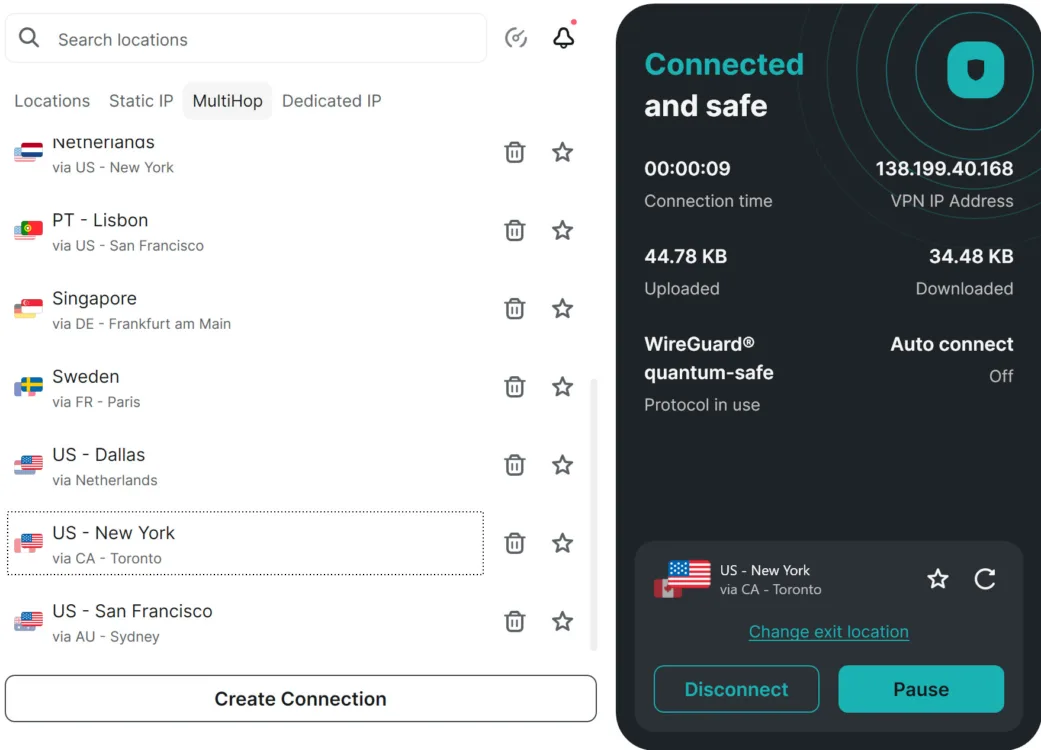
Use the MultiHop tab to select a double VPN set of locations.
Surfshark’s dynamic MultiHop, which comes standard with all plans, doubles up your VPN security by routing through two VPN servers. Using MultiHop is as simple as connecting to any other server in Surfshark; simply navigate to the MultiHop tab in the server list and choose a pair of locations. You can’t set custom MultiHop server locations; you must choose from a preset list of paired server locations.
Rotating IP
Most VPN sessions use a single IP address to mask your identity online. Surfshark’s rotating IP changes your IP address every five minutes, making it harder for advertisers and bad actors to track your online activity.
Bypasser (split tunneling)
The bypasser provides a fast lane for programs you don’t want affected by the VPN. This is great for gamers or remote workers, as you can switch to games or meetings without constantly toggling the VPN on and off.
I tested Surfshark’s bypasser on Firefox and found it to be easy and effective. You use the bypasser in the system settings by selecting the programs you don’t want affected by the VPN. Surfshark does a great job of auto-detecting your computer’s installed apps (not the case for all VPN apps), so finding what I needed and implementing the bypasser was quick and easy.
It even helped me discover internet service provider (ISP) throttling on my home network, as the browser running through Surfshark showed much faster speeds than the bypassed browser.
Content Blocker
Surfshark One and One+ plans come with Content Blocker, a firewall that refuses access to certain types of content that you select in the app settings. To keep you in complete control, this feature also has the option of 2FA security, so only you can change the settings.
I tested Surfshark’s Content Blocker and found it worked well for major sites, but it did allow smaller and more local sites through the firewall.
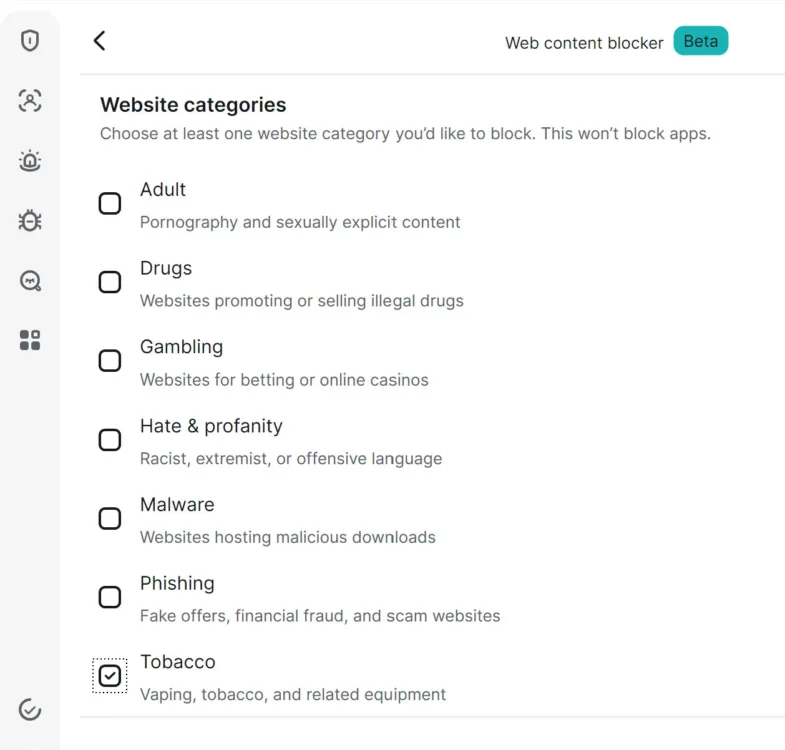
I set the content blocker settings to reject any tobacco or vaping sites.
I set the content blocker to reject any tobacco or vaping sites, and then attempted to access online vaping stores.
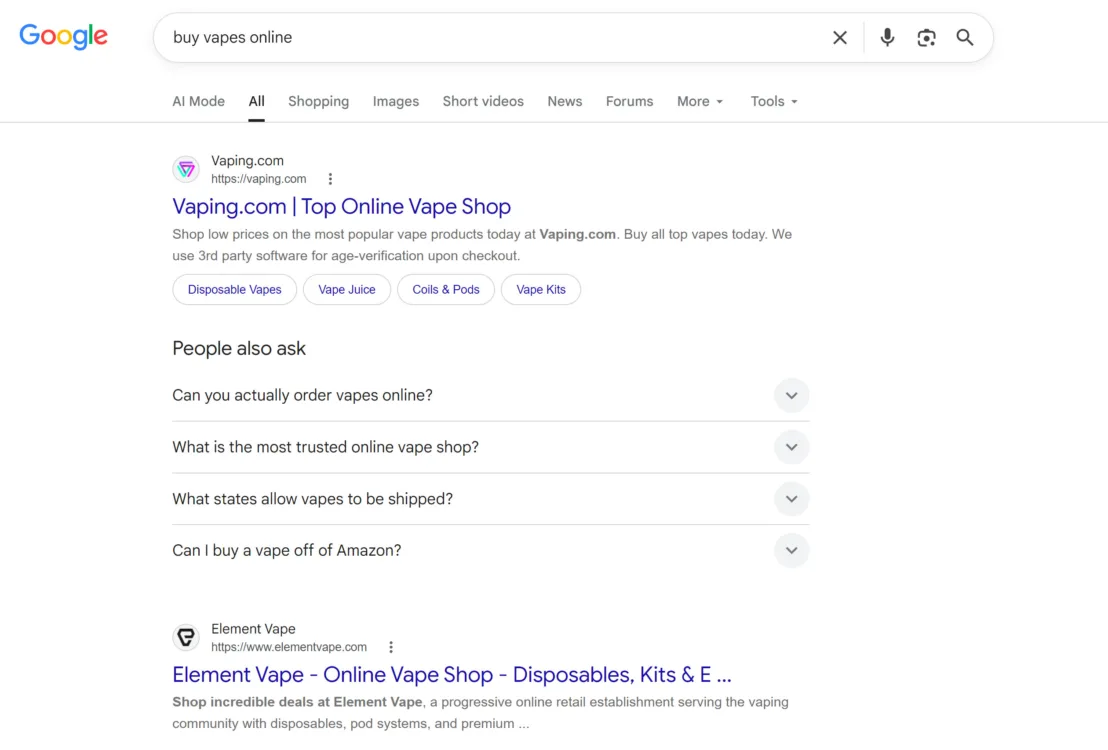
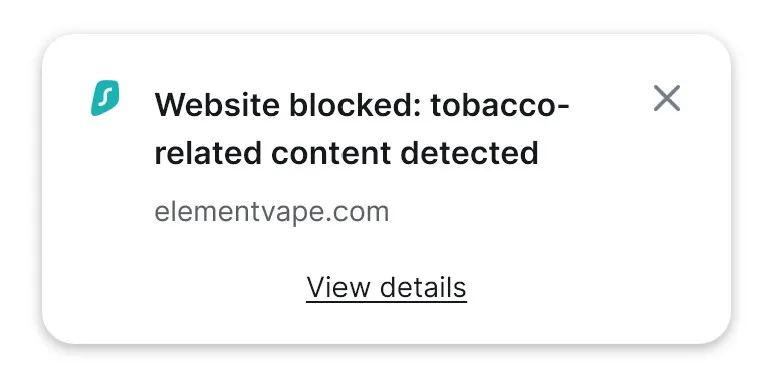
When I tried to access the top results, Surfshark blocked the sites.
The top results were indeed blocked; when I tried to access Vaping.com, Surfshark refused access.
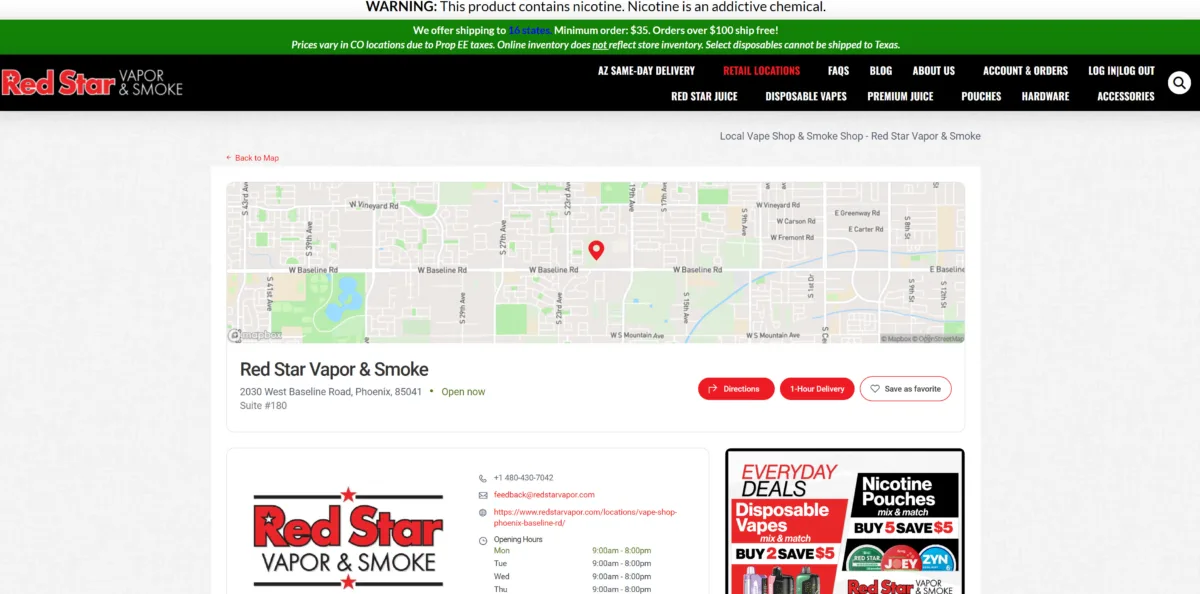
Content blocker failed to block access to this local vape shop’s website.

Content blocker also failed to block access to this lesser-known vaping website I found further down in the search results.
However, when I scrolled down to the lower search results and attempted to access lesser-known sites, the content blocker failed. I’m guessing it works off an index of known sites associated with the content categories you choose. Surfshark’s content blocker is still a great layer of protection to have if you want to keep certain types of sites off of your network; just know that it’s limited and not watertight.
What platforms and devices does Surfshark support?
Device count and compatibility score: (3.8/4) ★ ★ ★ ★
Surfshark gives you unlimited devices with every plan. You can install the app on as many devices as you want, making it an excellent option for households that want to run on a single Surfshark subscription.
Supported operating systems
| Desktop client | Mobile | Browser | Other |
|---|---|---|---|
How easy is Surfshark’s billing and cancellation?
Billing score: (2.8/4) ★ ★ ★
Access to billing information in the Surfshark app is limited. You can see your current subscription and renewal date in the app, but it doesn’t show prices or payment information. To access detailed billing information, you must log in to your account in a browser and navigate through a few menus.
Surfshark offers a 30-day money-back guarantee.
How do I cancel my Surfshark subscription for a refund?
Surfshark’s official instructions direct you to contact live chat support, and they will guide you through the process. No other detail on the process is provided.
How I had to cancel my Surfshark subscription for a refund
I decided to test Surfshark’s money-back guarantee and found the process to be quick and painless.
Step 1: I requested a refund via live chat.
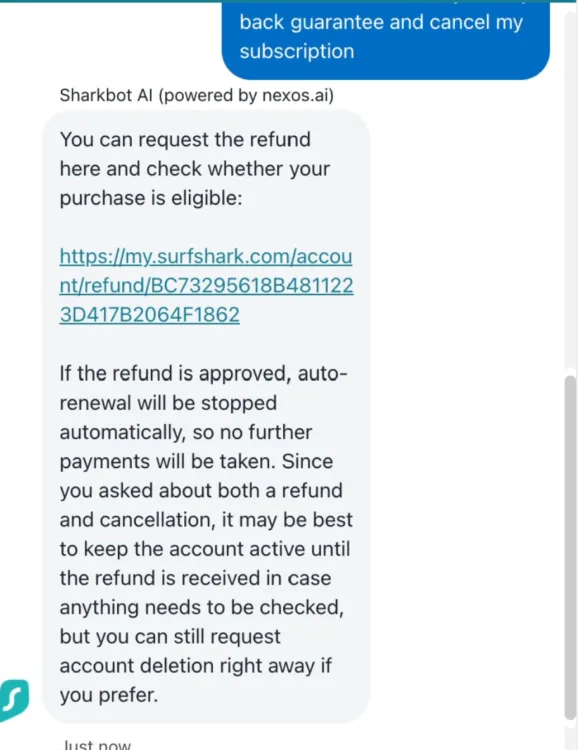
The chat agent provides a link to complete your refund request.
Step 2: The chat provided a link that asked two or three questions about why I was canceling. After those, I confirmed I wanted a refund on my recent payment, and that was it. The whole thing took less than five minutes.
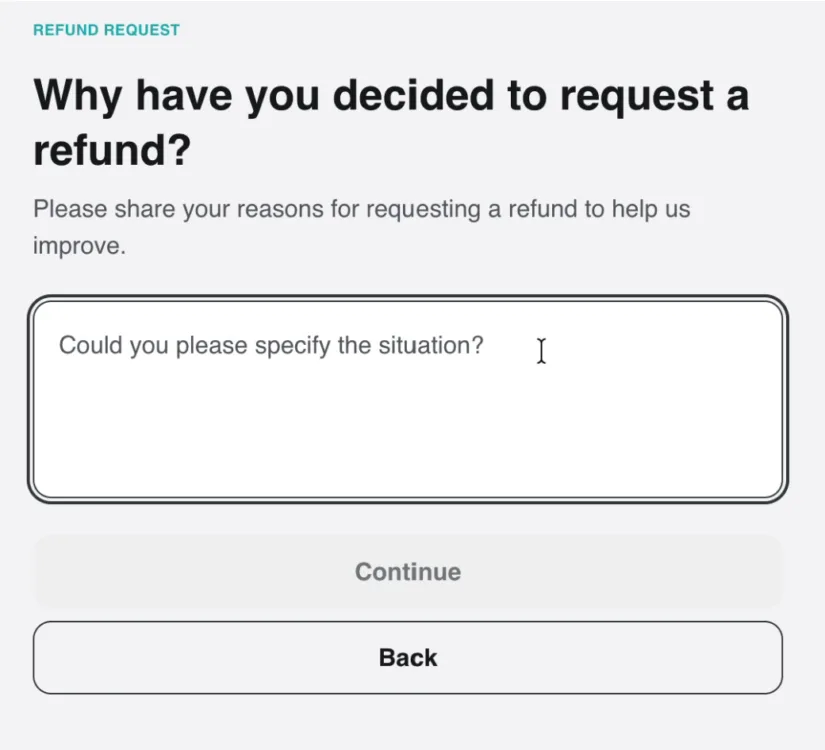
The refund questionnaire doesn’t take long to complete..
Final call
Surfshark overall score: (74.7/100) ★ ★ ★
The baseline security features Surfshark provides with every plan are impressive, and this VPN makes those features highly accessible. Out of all the services I’ve tried, Surfshark is perhaps the easiest to use across the board. It also supports multiple users on a single subscription better than most services.
Surfshark’s convenience and excellent feature set come at a price: It’s on the expensive side, and its interface definitely tries to make a few decisions for you, such as which servers you use.
This VPN is an ideal fit for parents who want to cover their entire household, retain control of sensitive settings, and not have to spend much time learning or managing the VPN’s settings. It’s best for those looking for a set-it-and-forget-it type of service. Who’s it not for? I’d say power users who want to know and adjust every aspect of their service. You can make all kinds of adjustments in Surfshark, but it feels designed to discourage too much tampering.
Surfshark score breakdown
| Category | Points |
|---|---|
| Price | 11.8 / 20 (★ ★ ½ ) |
| Billing and cancellation | 7 / 10 (★ ★ ★) |
| Servers | 6.8 / 15 (★ ★ ★) |
| Speed and performance | 15.6 / 20 (★ ★ ★) |
| Security and features | 20 / 20 (★ ★ ★ ★) |
| Devices and compatibility | 9.5 / 10 (★ ★ ★) |
| Apps and user experience | 4 / 5 (★ ★ ½ ) |
| Final score | 74.7 / 100 |
Disclaimers
Surfshark plans
Surfshark Starter — You’ll be charged $72.91 today for a 27-month subscription. After this service period ends, your subscription will automatically renew every 12 months at the then-applicable renewal price. You can cancel or manage your subscription anytime through your account. Currency conversion may affect the price you’re charged, depending on your bank location or payment provider. Learn more about our currency and billing practices. By completing the purchase, you agree to our Terms of Service, including auto-renewal terms, to receive electronic documents, and acknowledge our Privacy Policy.
Surfshark One — You’ll be charged $81.70 today for a 27-month subscription. After this service period ends, your subscription will automatically renew every 12 months at the then-applicable renewal price. You can cancel or manage your subscription anytime through your account. Currency conversion may affect the price you’re charged, depending on your bank location or payment provider. Learn more about our currency and billing practices. By completing the purchase, you agree to our Terms of Service, including auto-renewal terms, to receive electronic documents, and acknowledge our Privacy Policy.
Surfshark One+ — You’ll be charged $131.47 today for a 27-month subscription. After this service period ends, your subscription will automatically renew every 12 months at the then-applicable renewal price. You can cancel or manage your subscription anytime through your account. Currency conversion may affect the price you’re charged, depending on your bank location or payment provider. Learn more about our currency and billing practices. By completing the purchase, you agree to our Terms of Service, including auto-renewal terms, to receive electronic documents, and acknowledge our Privacy Policy.


