The Hidden Math of ‘Up To’ Speeds on Fixed Wireless
Wired internet gives you the most stable speeds

Jul 28, 2026 | Share 


Brand Guides, Sponsored, Technology
This article is sponsored by Spectrum.
Most internet providers display the phrase “up to” with their speed claims because maximum speeds are not sustained 100% of the time, even on wired connections.
With wired internet, there are some minimal speed variations in test results as processors move data through networks. The way the network is built and how data travels across it can also cause speeds to vary.
But there’s a huge difference in speed fluctuations when you compare wired and wireless connections. With the latter, distance, interference, and congestion at the access point make wireless far less reliable than wired.
We explain why a wired internet connection is a better service than a fixed wireless one, like 5G home internet.
How wired internet works
Internet providers that manage all-fiber or/and hybrid fiber-cable (HFC) networks deliver speeds at a mostly sustained rate.
Running a speed test from a wired device each hour over 24 hours will always show the small speed changes of a typical wired internet connection—there’s never a straight line from the first hour to the last.
For example, residential internet is a shared resource, meaning everyone’s connection converges at some point. Speeds will fluctuate based on the traffic at these points.
Some speed variations presented in testing can be the result of multiple devices in the home simultaneously accessing the internet during the test, as the software couldn’t flood the entire connection to record the total bandwidth.
Ultimately, most speed variations stem from surges and dips in traffic passing through all the connected networks that reside between the remote server and the device running the test.
We go over how Spectrum’s fiber-backed internet works and how it plans to introduce multi-gig internet by Q4 2026. However, here are some brief notes for clarification on a city’s network topology.
Headend
The headend is the master facility (distribution center) at the core of a provider’s city-wide network, connecting to fiber lines from other regions.
Generally, fiber lines and some Ethernet branch out from the headend to feed internet connections to specific networks installed throughout the city. Hubs manage these networks.
Hub
Hubs are cabinets that split a single fiber feed into multiple bidirectional fiber feeds, distributing internet service across a large area. These feeds connect to the next component in the wide-area network: the node.
Node
Nodes transmit internet signals through multiple fiber lines to homes or convert the signals into radio frequency (RF) signals for transmission over coaxial or telephone lines. All-fiber deployments do not require amplifiers, while coaxial and telephone lines do because signal strength degrades over distance.
The fiber, coaxial, or telephone lines connected to homes terminate at the provider’s edge device: the modem or optical network terminal (ONT).
Modem or Optical Network Terminal (ONT)
A cable modem connects to the incoming coaxial line and converts the RF signals into Ethernet-ready signals.
A DSL modem connects to the incoming telephone line and does the same thing.
A fiber ONT connects to the incoming fiber line and converts Ethernet-ready light signals into Ethernet-ready signals.
The bottom line
Wired internet is the best connection you can get. An all-fiber design is inherently more reliable because it’s less dependent on power-needy equipment. Plus, fiber has less latency and symmetrical speeds.
Coaxial internet requires powered amplifiers, making it less reliable, but it’s definitely a great alternative to an all-fiber service, especially with the introduction of DOCSIS 4.0 and higher bandwidth splits. Symmetrical speeds are possible, too, as providers like Spectrum upgrade their networks.
Nearly all HFC-based internet providers, such as Spectrum, Xfinity, Cox, and Mediacom, have residential internet networks that use all fiber or fiber-backed coaxial lines connected to your home.
How fixed wireless internet works
The infrastructure used to deliver 5G home internet is pretty straightforward:
Headend > Hub > Tower > Gateway
Like with wired internet, you’ll see peaks and valleys over a 24-hour period. However, due to the nature of fixed wireless, you’ll see far more noticeable fluctuations as congestion and interference take a toll on your connection.
First, let’s take a look at the two major types of fixed wireless used for 5G home internet.
The types of fixed wireless connectivity
5G home internet uses 5G cellular frequencies to deliver wireless internet into your home. At times, these connections downgrade to 4G LTE signals due to 5G availability and congestion.
First, let’s see what kinds of speeds 5G delivers.
Common 5G frequency use
| Frequencies | Range | Speed | |
|---|---|---|---|
| High-band | Short | 1,000–10,000Mbps+ | |
| Mid-band | Longer | 100–1,000Mbps | |
| Low-band | Longest | 0–100Mbps |
*The “n” is an acronym for “5G New Radio”
The 5G home internet equipment supplied by AT&T, T-Mobile, and Verizon has two radios: one for 5G connectivity and one for 4G LTE.
Of the three 5G home internet providers, Verizon is the only one that supports high-band (millimeter wave or mmWave) connections.
Take a look at the 5G bands supported by their latest gateways:
| High-band | Mid-band | Low-band | |
|---|---|---|---|
| AT&T | – | n30, n66, n77 | n2, n5, n12 |
| T-Mobile | – | n25, n41, n48, n66, n77 | n71 |
| Verizon | n260, n261 | n48, n66, n77 | n2, n5 |
Common 4G LTE frequency use
| Frequencies | Range | Speed | |
|---|---|---|---|
| High-band | Short | 50–100Mbps | |
| Mid-band | Longer | 20–100Mbps | |
| Low-band | Longest | 10–50Mbps |
*The “B” is an acronym for “Band”
As shown above, 5G home internet downshifts to extremely slow speeds when a 5G connection isn’t available: 100Mbps at the most, depending on the 4G LTE band the equipment uses.
Take a look at the 4G LTE bands the latest 5G home internet gateways from AT&T, Verizon, and T-Mobile support:
| Mid-band | Low-band | |
|---|---|---|
| AT&T | B2, B4, B66 | B5, B12, B29 |
| T-Mobile | B2, B4, B25, B48, B66 | B5, B12, B71 |
| Verizon | B2, B4,B48, B66 | B5, B13 |
Note that the current gateways do not use 4G LTE’s higher bands.
So, what do all these numbers mean?
5G home internet speed depends squarely on the signal. Users may or may not get the advertised speed range, depending on the frequencies the internet equipment can access.
Next, let’s see how a home receives 5G and 4G LTE transmissions.
Cell towers
Cellular internet providers use huge fiber lines (trunks) to feed the cell towers that transmit and receive 5G and 4G LTE signals. These towers distribute radio waves over a set distance—think of Wi-Fi as a miniature, home-based version. And like mesh networking, cellular devices shift from one tower to another as they move from place to place.
But like a home router, too many devices can overwhelm the tower. There’s only so much bandwidth cell towers can process at once, so high latency and slow speeds kick in. Plus, the wired and wireless “backroads” used by towers can also become congested, causing reduced speeds.
That said, 5G home internet uses the same towers that other cellular-connected devices use, such as smartphones, tablets, and cellular dongles for computers. But to get 5G home internet in your home, you need a gateway with built-in cellular modems.
Gateway
5G home internet uses a device called a gateway, which combines two separate networking functions into one device.
With traditional cable internet, a gateway includes the cable modem and the Wi-Fi router. For 5G home internet, the gateway includes a 5G radio, a 4G LTE radio, and a Wi-Fi router.
The typical 5G home internet setup requires the customer to use an app to find the best place for the gateway, connect it to the provider’s network, and then set up the home network.
The bottom line about fixed wireless vs. wired
Wired internet provides mostly sustained speeds with notable peaks and valleys. 5G home internet is wired with fiber until the lines reach cell towers. From there, light signals convert into RF signals, which are then transmitted to gateways in homes. At that point, those RF signals convert into Ethernet data or are retransmitted over Wi-Fi.
That said, you will never see wired-like sustained speeds from a 5G connection because distance, interference, congestion, and bandwidth are huge factors.
Our speed tests: Fixed wireless vs. wired
We ran internet speed tests using one 5G home internet provider and one wired internet provider. Both tests ran on a wired Windows 11 machine connected directly to the provider’s equipment using Ethernet. At no point did we run these tests over Wi-Fi.
First, let’s examine the inconsistent speeds of 5G home internet.
Number of users with this service: 2
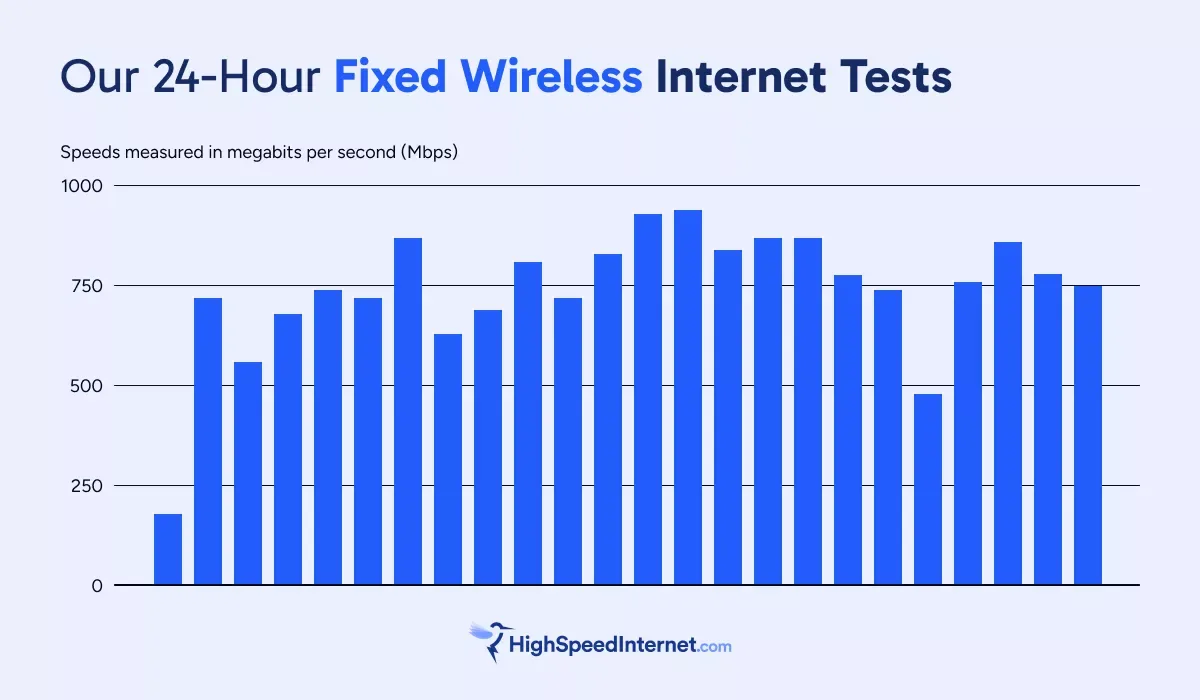
Our 5G home internet test shows download speeds ranging from 181 to 937Mbps. That’s a considerable seesaw in speed performance over 24 hours. If we don’t count the first speed test run (which is the lowest in this example), the lowest recorded speed is 479Mbps. That’s still a considerable 458Mbps difference between the slowest and fastest speeds we recorded.
We ran the test using a discontinued internet plan, which appears to be uncapped. Currently, the fastest advertised speed for 5G home internet is 1,000Mbps, so we can clearly see our test hit the Gigabit Ethernet’s ~940Mbps limit.
The chart above shows a 24-hour window, but we let it run for 41 hours and saw the same seesaw performance.
Now, let’s look at our wired internet test.
Number of users with this service: 6
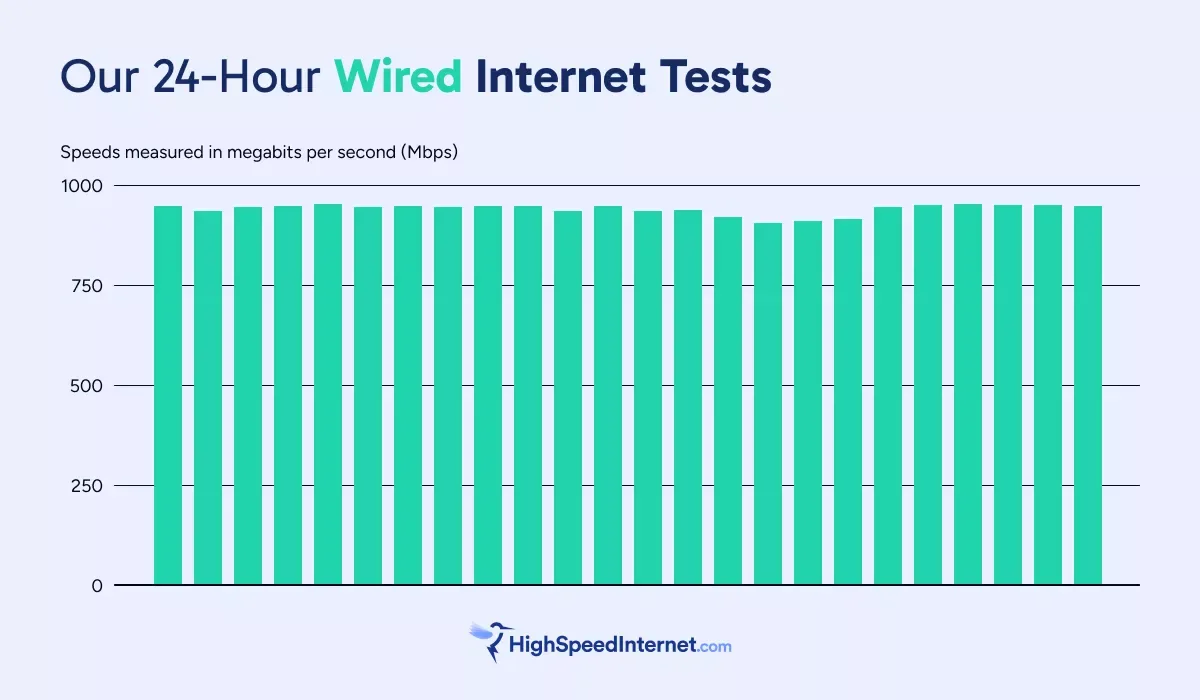
Our wired test used a symmetrical 940Mbps internet plan. As you can see, it provides a more consistent speed within a 24-hour time frame than fixed wireless, ranging from 908 to 952Mbps. That’s a mere 44Mbps between the top and slowest speeds we recorded within the first 24 hours.
But we also let the test run for over 123 hours. With a top speed of 954Mbps and a lowest-end speed of 878Mbps, we only saw a 76Mbps difference. That’s a tiny gap compared to the 761Mbps difference we observed in our 5G home internet test.
Our speed test summary
Both tests clearly show why internet providers advertise “up to” with their speeds. Fixed wireless and wired internet do not provide a consistent speed. Plus, most of us use Wi-Fi to access the internet, which delivers fluctuating and diminishing speeds based on the environment and distance.
Download
| Highest speed* | Lowest speed* | Difference* | |
|---|---|---|---|
| Fixed wireless | 937.24 | 180.75 | 756.49 |
| Wired | 952.30 | 908.23 | 44.07 |
* Speeds in megabits per second
Upload
| Highest speed* | Lowest speed* | Difference* | |
|---|---|---|---|
| Fixed wireless | 47.85 | 20.20 | 27.65 |
| Wired | 949.29 | 908.43 | 40.86 |
* Speeds in megabits per second
Spectrum Internet delivers the speed and reliability you need
The last time we ran an ongoing speed test with Spectrum, the speeds were high and steady over 30 days. We noted only one speed dip concern, which appeared after a major tropical storm blew through town.
Spectrum has huge plans for multi-gig internet over the next few years, shooting to deliver 5Gbps download speeds to 50% of its customers by the end of 2026. Some customers in Kentucky already have access to Spectrum’s 7Gbps 100% fiber internet.
5G can deliver up to 10Gbps, but currently only in a laboratory using millimeter waves.
If you need near-consistent speeds and reliable connections, then choose a provider like Spectrum that delivers on both.
All Spectrum Internet® plans and pricing
| Get the plan | Your price* | Download speed |
|---|---|---|
| Spectrum Internet® Advantage | $30/mo. for 1 yr. | Up to 100Mbps (wireless speeds may vary) |
| Spectrum Internet® Premier | $40/mo. for 1 yr. | Up to 500Mbps (wireless speeds may vary) |
| Spectrum Internet® Gig | $60/mo. for 1 yr. | Up to 1,000Mbps (wireless speeds may vary) |
| Spectrum Internet® 2 Gig | $70/mo. for 1 yr. | Up to 2,000Mbps (wireless speeds may vary) |
* Availability and speed may vary by location, and prices are subject to change. See disclaimers.
FAQ about fixed wireless vs wired
What 5G bands does AT&T support?
AT&T uses the following bands, but not necessarily for 5G home internet:
Low band
- 850 MHz (n5)
Mid-band
- 3.45 GHz (n77)
- 3.7 GHz (n77)
High-band
- 24 GHz (n258)
- 28 GHz (n261)
- 39 GHz (n260)
What 5G bands does Verizon support?
Verizon uses the following bands, but not necessarily for 5G home internet:
Low-band
- 850 MHz (n5)
- 1700/2100 MHz (n66)
- 1900 MHz (n2)
Mid-band
- 3.7 GHz (n77)
High-band
- 28 GHz (n261)
- 39 GHz (n260)
What 5G bands does T-Mobile support?
T-Mobile uses the following bands, but not necessarily for 5G home internet:
Low-band
- 600 MHz (n71)
Mid-band
- 1.9 GHz (n25)
- 2.5 GHz (n41)
- 3.7 GHz (n77)
High-band
- 24 GHz (n258)
- 28 GHz (n261)
- 39 GHz (n260)
Why are some gigabit plans capped at 940Mbps?
Some gigabit plans have a 940Mbps cap due to hardware limitations. A Gigabit Ethernet port has a real-world maximum speed of 940Mbps because 60Mbps of the total throughput is for networking information: what’s in the payload, where it’s coming from, where it’s going, and so on. This data is called “transport overhead.”
Likewise, a 10Gbps plan has a usable 9.4Gbps bandwidth if the wired ports on the modem/ONT and router are 10 Gigabit Ethernet. A 5Gbps plan is reduced to 4.7Gbps if the equipment uses five Gigabit Ethernet ports; 5Gbps when using 10 Gigabit Ethernet ports.
Plans disclaimers
Spectrum Internet plans
All plans — Limited-time offer; subject to change; new residential customers only (no Spectrum service in past 30 days). Standard rates apply after promo period or service change. Actual speeds (including wireless) vary and are not guaranteed. Activation fee additional; taxes may apply. Gig speeds require a compatible modem; see spectrum.net/modem for list. Terms and conditions apply, subject to change. Not available in all areas. Restrictions apply. Spectrum Internet® is powered by fiber and connected to the premises by coaxial lines.
Internet Gig | Internet 2 Gig | Internet 7 Gig — Spectrum Advanced WiFi included in price.
Internet 2 Gig | Internet 7 Gig — Invincible WIFI included in price.
Author - Kevin Parrish
Kevin Parrish has more than a decade of experience working as a writer, editor, and product tester. He began writing about computer hardware and soon branched out to other devices and services such as networking equipment, phones and tablets, game consoles, and other internet-connected devices. His work has appeared in Tom’s Hardware, Tom's Guide, Maximum PC, Digital Trends, Android Authority, How-To Geek, Lifewire, and others. At HighSpeedInternet.com, he focuses on network equipment testing and review.
Editor - Jessica Brooksby
Jessica loves bringing her passion for the written word and her love of tech into one space at HighSpeedInternet.com. She works with the team’s writers to revise strong, user-focused content so every reader can find the tech that works for them. Jessica has a bachelor’s degree in English from Utah Valley University and seven years of creative and editorial experience. Outside of work, she spends her time gaming, reading, painting, and buying an excessive amount of Legend of Zelda merchandise.
Related Posts