Surfshark vs. IPVanish: Which VPN Is Better?
Nov 18, 2026 | Share 


Security, VPN Vs.


* Availability may vary by location, and prices are subject to change. See Surfshark disclaimers | IPVanish disclaimers.
Compare Surfshark and IPVanish head-to-head
Which VPN is better, Surfshark or IPVanish? The easy answer for most is Surfshark because it has a perfect security score, faster raw speeds, and easier-to-use apps. IPVanish also makes a strong case, with lower prices, 24/7 phone support, and one of the quickest refunds around. And whichever you pick, you’ll get unlimited devices on every plan.
But you can read that anywhere. We actually tested both of these providers, and here’s how it nets out.
Overall, our research gives Surfshark the nod in scoring, coming in at 74.7/100 to IPVanish’s 70/100. For more, check out our Surfshark and IPVanish reviews. For the true head-to-head comparison, here’s how these two top-notch VPNs compare.
Surfshark vs. IPVanish at a glance
| Surfshark | IPVanish | |
|---|---|---|
| Overall score | 74.7/100 | 70/100 |
| Starting price | $2.49/mo. (Starter) | $2.19/mo. |
| Month-to-month price | $16.45/mo. | $14.99/mo. |
| Free plan | No | No |
| Servers | 4,500 in 100 countries | 3,400 in 113 countries |
| Simultaneous devices | Unlimited | Unlimited |
| Money-back guarantee | 30 days | 30 days |
| Company background | Launched 2018; Amsterdam, Netherlands headquarters; merged with Nord Security in 2022 | Launched 2012; U.S. headquarters; owned by Ziff Davis since 2019 |
In this comparison:
Pricing | Speed and performance | Features | Security and privacy | Apps | Billing and cancellation | Final verdict | FAQ
In this comparison:
 Pricing: IPVanish costs less
IPVanish earned the higher price score. It’s a little cheaper on a long-term plan and noticeably cheaper month to month, where Surfshark’s rate is the highest of any major VPN we’ve compared. IPVanish also throws in travel eSIM data on every plan, and the gap between its three tiers is small, so the top-tier Advanced plan is worth the few extra dollars.
Surfshark’s entry-level Starter plan earns its keep with advanced tools like double VPN and a rotating IP, and both VPNs cover unlimited devices on every plan.
Watch the renewal with both, though. IPVanish’s post-promo hikes are steep, and our account didn’t show what we’d pay at renewal. Surfshark doesn’t spell out its renewal rate either, only that you’ll pay its then-current price. You’d think a VPN would be upfront about what you’ll pay next, right? Not these two.
Here are the renewal rates you can expect if you commit to either of them.
| Plan | Price range | Renewal rate | What's included |
|---|---|---|---|
| Surfshark Starter | $2.49-$16.45/mo. | Disclosed at renewal | |
| Surfshark One | $2.79-$18.95/mo. | Disclosed at renewal | |
| Surfshark One+ | $4.49-$21.86/mo. | Disclosed at renewal | |
| IPVanish Essential | $2.19-$12.99/mo. | $89.99/yr. | |
| IPVanish Complete | $3.09–$14.99/mo. | Disclosed at renewal | |
| IPVanish Advanced | $3.29-$17.99/mo. | $109.99/yr. |
* Availability and speed may vary by location, and prices are subject to change. See disclaimers.
 Speed and performance: Surfshark pulls ahead
Surfshark earned the higher speed score, mostly on raw bandwidth. It’s one of the fastest VPNs we’ve tested, barely denting our downloads and uploads, while IPVanish cut our upload speed by about a quarter.
But IPVanish added far less lag on a nearby server. We took a lot of video calls on IPVanish and only noticed one minor lag, while our calls on Surfshark were noticeably delayed and choppy. Here’s the speed breakdown so you can see where each one wins.
| Local server result | Surfshark | IPVanish | Winner |
|---|---|---|---|
| Download speed | 870Mbps (-7.4%) | 860Mbps (-8.5%) | Surfshark |
| Upload speed | 909Mbps (-4.1%) | 700Mbps (-26.2%) | Surfshark |
| Latency | 130 ms (+407%) | 47.3 ms (+84.3%) | IPVanish |
| Jitter | 38 ms (+1,031%) | 6.6 ms (+96.4%) | IPVanish |
A quick note on distant servers: On a far-off server, Surfshark held onto more download and upload speed, while lag was about even between the two.
What does that mean for you? If you download big files or connect to servers overseas, Surfshark is the better pick. If you game or live on video calls with nearby servers, IPVanish’s steadier connection will serve you better.
 Features: Surfshark builds a privacy bundle, IPVanish piles on security tools
Surfshark and IPVanish have more in common than most pairs we’ve compared. Both cover unlimited devices on every plan and include split tunneling, ad and tracker blocking, a way to route your traffic through two servers, and help getting around age-verification and regional blocks. Upgrade, and both add antivirus and alerts if your personal info leaks.
Where they split is the extras. Surfshark builds toward privacy and identity protection, with post-quantum protection, a kill switch, an IP address that rotates every five minutes, and Alternative ID for signing up online without your real details. Its higher plans add identity theft coverage, Incogni data removal, and a content blocker you can lock with two-factor authentication.
IPVanish piles on everyday security tools. Every plan includes travel eSIM data, a link checker for suspicious URLs, a QR code scanner, and a password generator, and its higher plans add phone support, ransomware protection, a secure browser, and 1TB each of cloud storage and backup.
The unique offerings won’t change how either VPN protects you day to day. If you want identity protection and family tools, go Surfshark. If you want cloud storage, phone support, and a grab bag of security tools, go IPVanish.
 Security and privacy: Surfshark is the safer bet
Let’s be clear: Both Surfshark and IPVanish are reliable choices. Each uses AES-256 encryption and has a no-logs policy verified by independent audits. Both are also part of bigger companies: Surfshark merged with Nord Security, NordVPN’s parent company, in 2022, and IPVanish has been owned by Ziff Davis since 2019.
What sets Surfshark ahead is that it doesn’t hold anything back. It earned a perfect security score from us, its RAM-only servers can’t store your data long-term, and even its entry-level plan includes double VPN, a rotating IP, split tunneling, and a kill switch. Deloitte has confirmed its no-logs policy twice, though you’ll need an account to read those reports.
IPVanish has a bit more baggage. It’s headquartered in the U.S., part of the Five Eyes alliance, and in 2016, under previous ownership, it handed user logs to U.S. authorities during a criminal investigation. There hasn’t been another incident since, and its most recent independent audit in 2025 confirmed it doesn’t store your activity or original IP address. Still, if privacy is your top priority, that history is worth knowing.
 Apps: Surfshark is easier to use
Surfshark’s apps are built for convenience. A big quick-connect button gets you protected in one click, your VPN IP address and protocol are right on the home screen, and you can check each server’s ping by hovering over it. They’re not perfect, since extras get the best real estate while settings like split tunneling and the kill switch sit two pages deep.
But IPVanish’s app gave us real trouble. On our Mac, the connect button simply didn’t work, with no error message, and it took a bot, a live agent, and a switch to the IKEv2 protocol before we could get online. Once it was running, it was usable, but you can’t search for locations from the home screen.
 Billing and cancellation: IPVanish makes it painless
Good news: Both providers got our refund underway in under five minutes, and both offer a 30-day money-back guarantee. IPVanish gets the edge because we never had to talk to anyone. We canceled and got our refund processed right from our online account in about two minutes, and the cancel screen even told us we were eligible.
Surfshark was nearly as quick, but we had to start in live chat, where an agent sent us a link to a short questionnaire. Check out the step-by-step breakdown for cancellation below.
| Surfshark | IPVanish | |
|---|---|---|
| How to request a refund | Live chat, then a short questionnaire | Self-serve in your online account |
| Our reviewer's experience | Done in under five minutes, no issues | Canceled and refunded in a few clicks, no issues |
| Refund timing | Done in less than an hour | Processed in about two minutes |
 Pro tip: Surfshark’s app hides your price and payment details, so log in through a browser before your renewal date to see what you’ll be charged. IPVanish doesn’t show your renewal price even in your online account, so set a reminder before your first term ends.
 Final verdict for Surfshark vs. IPVanish: Surfshark wins!
Yes, Surfshark wins overall, 74.7/100 to 70/100. It came out ahead on speed, security, devices, and apps, while IPVanish led on price, billing, and servers. What tipped the scales was security, where Surfshark’s perfect score outpaced IPVanish by a wide margin.
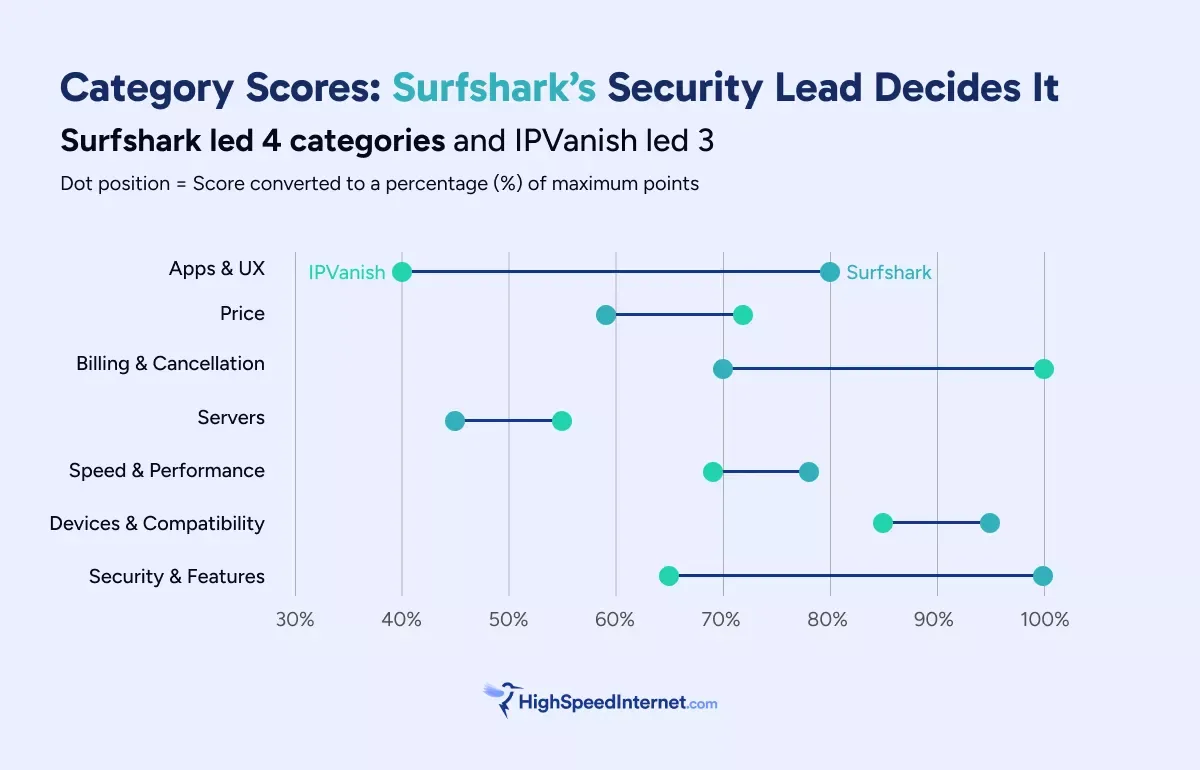
IPVanish is a strong pick if you want a lower price, 24/7 phone support, the quickest refund around, or cloud storage and backup bundled in. For everyone else, Surfshark gives you stronger privacy, faster raw speeds, and an easier app.
Surfshark vs. IPVanish: FAQ
Is Surfshark or IPVanish faster?
Which is cheaper, Surfshark or IPVanish?
Do Surfshark or IPVanish have a free plan?
Can I use Surfshark or IPVanish for streaming?
Disclaimers
Prices and plan offerings are accurate as of July 2026. We update VPN pricing data on a quarterly basis in order to compare providers fairly and to present stable pricing expectations. VPN services update prices frequently, so plans, prices, and offers may vary based on when you order.
IPVanish plans
IPVanish Essential – By clicking the subscribe button you agree to be charged $56.48. After your first term, your plan will automatically renew annually at $89.99 until canceled through your IPVanish account. By signing up with IPVanish, you agree to our Terms of Service, including mandatory arbitration, and the Privacy Policy.
IPVanish Advanced — By clicking the subscribe button you agree to be charged $84.84. After your first term, your plan will automatically renew annually at $109.99 until canceled through your IPVanish account. By signing up with IPVanish, you agree to our Terms of Service, including mandatory arbitration, and the Privacy Policy.
Surfshark plans
Surfshark Starter — You’ll be charged $72.91 today for a 27-month subscription. After this service period ends, your subscription will automatically renew every 12 months at the then-applicable renewal price. You can cancel or manage your subscription anytime through your account. Currency conversion may affect the price you’re charged, depending on your bank location or payment provider. Learn more about our currency and billing practices. By completing the purchase, you agree to our Terms of Service, including auto-renewal terms, to receive electronic documents, and acknowledge our Privacy Policy.
Surfshark One — You’ll be charged $81.70 today for a 27-month subscription. After this service period ends, your subscription will automatically renew every 12 months at the then-applicable renewal price. You can cancel or manage your subscription anytime through your account. Currency conversion may affect the price you’re charged, depending on your bank location or payment provider. Learn more about our currency and billing practices. By completing the purchase, you agree to our Terms of Service, including auto-renewal terms, to receive electronic documents, and acknowledge our Privacy Policy.
Surfshark One+ — You’ll be charged $131.47 today for a 27-month subscription. After this service period ends, your subscription will automatically renew every 12 months at the then-applicable renewal price. You can cancel or manage your subscription anytime through your account. Currency conversion may affect the price you’re charged, depending on your bank location or payment provider. Learn more about our currency and billing practices. By completing the purchase, you agree to our Terms of Service, including auto-renewal terms, to receive electronic documents, and acknowledge our Privacy Policy.
Author -
Editor - Jessica Brooksby
Jessica loves bringing her passion for the written word and her love of tech into one space at HighSpeedInternet.com. She works with the team’s writers to revise strong, user-focused content so every reader can find the tech that works for them. Jessica has a bachelor’s degree in English from Utah Valley University and seven years of creative and editorial experience. Outside of work, she spends her time gaming, reading, painting, and buying an excessive amount of Legend of Zelda merchandise.
Related Posts