ASUS ROG Rapture GT-BN98 Pro Review
It's a Wi-Fi 8 router, but that doesn't mean you need to wait

Sep 22, 2026 | Share 


Equipment Guides, Product Reviews, Router Reviews
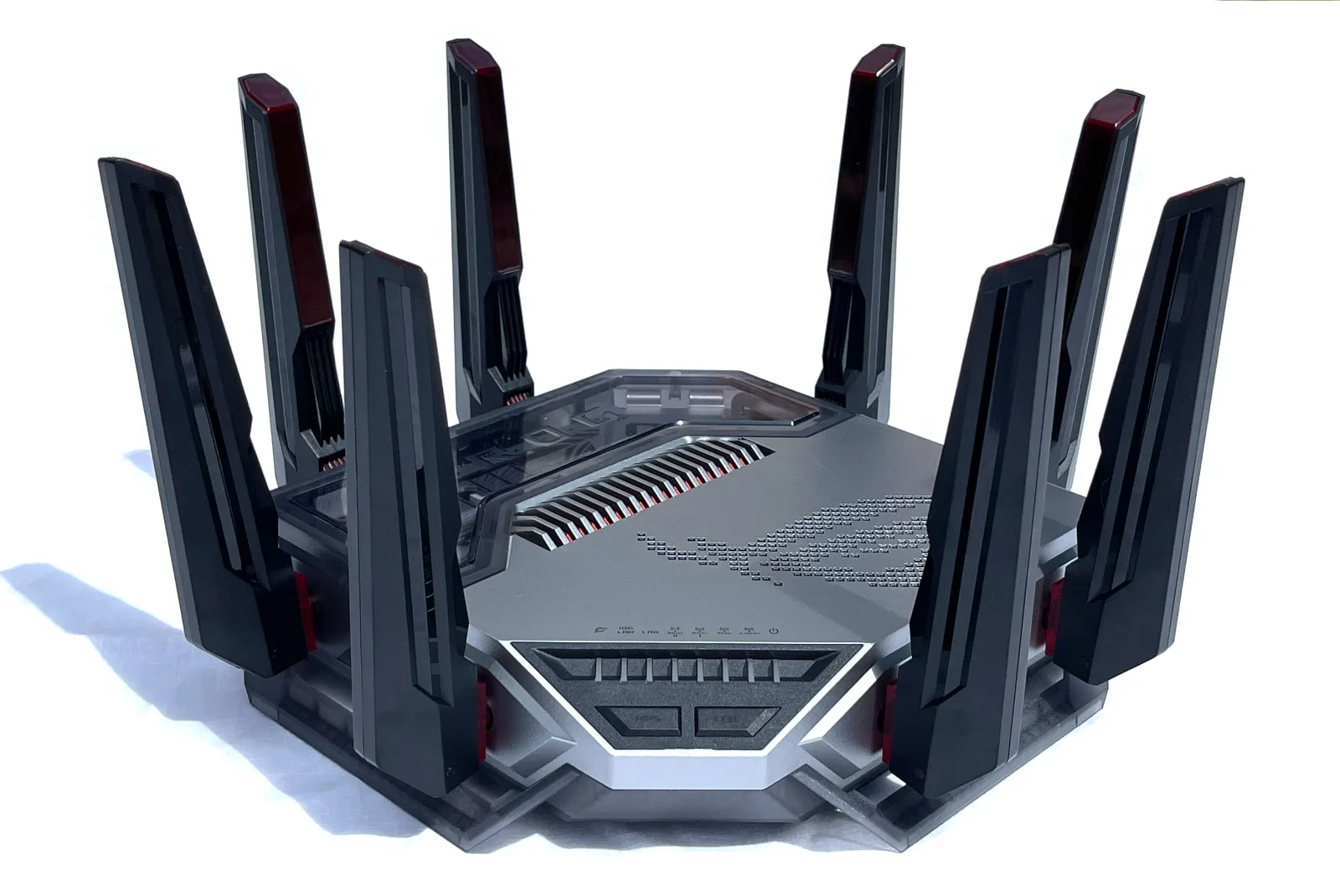
The ASUS ROG Rapture GT-BN98 Pro is the first Wi-Fi 8 router on the market. Kevin Parrish | HighSpeedInternet.com
Our score
(4.9/5)Specs:
- Up to 1,376Mbps (2.4 GHz)
- Up to 5,764Mbps (5 GHz)
- Up to 11,529Mbps (6 GHz)
- Up to 11,529Mbps (6 GHz)
Max internet speed:
- 9,400Mbps
Retail price:
- $899
The ASUS ROG Rapture GT-BN98 Pro is an awesome router, whether users have Wi-Fi 8 devices or not (and they don’t as of September 2026). It clearly targets gamers with its built-in tools and bling, but it can be used by anyone who needs a powerhouse to manage their home network.
We tested the GT-BN98 Pro using Wi-Fi 7 and Wi-Fi 6E devices and saw some significant improvements when compared to a similar ASUS Wi-Fi 7 router. I see no reason not to invest in this Wi-Fi 8 router when shopping for a home network upgrade unless price is an issue—and this router has a hefty one.
Pros
 Free security tools
Free parental controls
Cons
 No EasyMesh support
High price tag
In this review:
Standout features | Competitor comparisons | Scoring breakdown | The verdict | FAQ | Methodology
In this review:
GT-BN98 Pro standout features
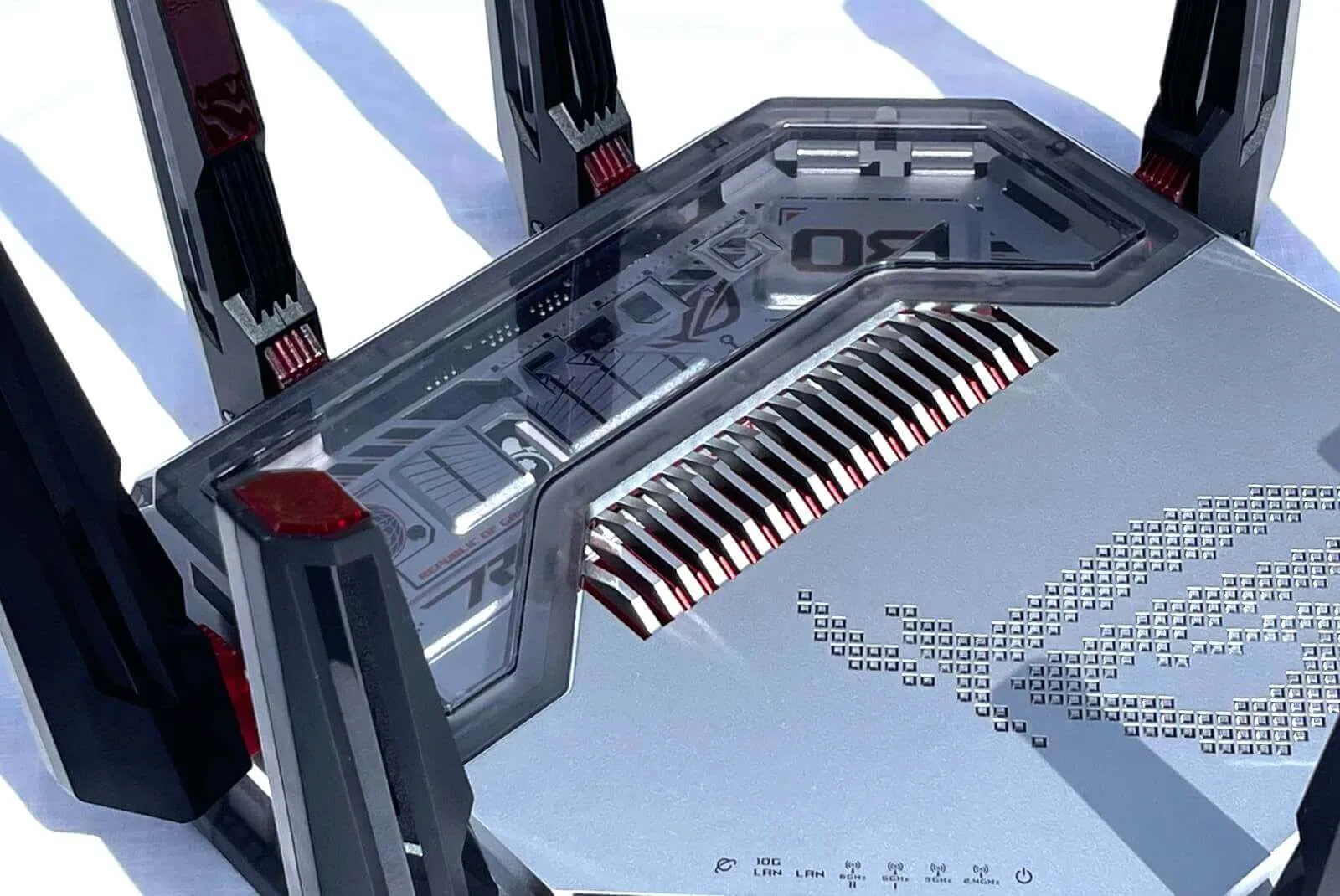
The ASUS ROG Rapture GT-BN98 Pro has one of the best designs we’ve seen in a router. Kevin Parrish | HighSpeedInternet.com
ASUS is all about value. Most of the routers and mesh systems I’ve reviewed for ASUS include security and parental controls at no extra cost—unlike the competition. Other goodies thrown into the mix include built-in VPN tools, media sharing, and more.
The best features at a glance
Free security tools
Free parental controls
Game device optimization
Compare the GT-BN98 Pro to the competition
| Product | Max throughput | Tested speed @ 40 ft.* | Where to buy† |
|---|---|---|---|
| ASUS ROG Rapture GT-BN98 Pro | 30,000Mbps | 2,331Mbps | Preorder on ASUS |
| ASUS RT-BE96U | 19,000Mbps | 2,179Mbps | Get on Amazon |
| NETGEAR Nighthawk RS700S | 19,000Mbps | 2.126Mbps | Get on Amazon |
* Speed recorded using a Wi-Fi 7 client and a 320 MHz channel. See speed test disclaimer.
† See Amazon disclaimer.
The GT-BN98 Pro is the first Wi-Fi 8 router, so we can only compare it to Wi-Fi 7 models at this point. Based on tests, the optimized Wi-Fi 8 specification does provide slightly more throughput at long range, although I expect to see even higher benchmarks when ASUS releases additional firmware updates.
Like the RT-BE96U model, it doesn’t require subscriptions to get the most out of it. The only extra expense users can expect is through VPN subscriptions and AdGuard, both of which are optional third-party services.
Read more router coverage
GT-BN98 Pro scoring breakdown
| Category | Score* | Summary |
| Performance | 5 | Provides great speeds at a long range |
| Features | 5 | Includes free security tools and parental controls |
| Design | 5 | Packs loads of connectivity for wired and wireless devices |
| Setup | 3 | Gets your network up and running quickly |
| Ease of use | 5 | Presents one of the best and easiest user interfaces we’ve seen |
* out of 5 points
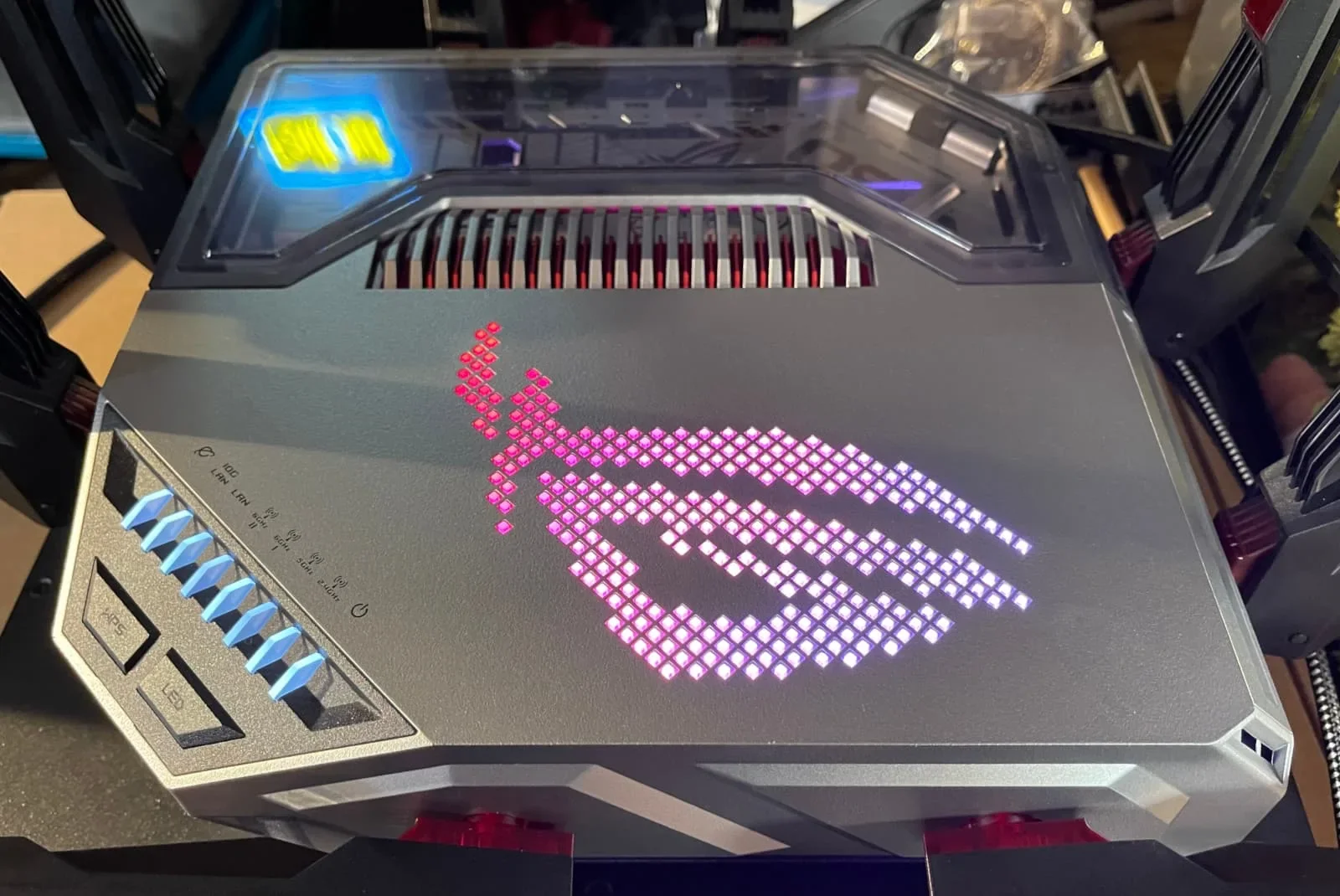
The ROG logo on the ASUS ROG Rapture GT-BN98 Pro is huge and can be modified using the Router App or the web interface. Kevin Parrish | HighSpeedInternet.com
Performance
5
Wi-Fi configuration
- 4 GHz band: 1,376Mbps (4 x 344Mbps)*
- 5 GHz band: 5,764Mbps (4 x 1,441Mbps)†
- 6 GHz band-1: 11,529Mbps (4 x 2,882Mbps)‡
- 6 GHz band-2: 11,529Mbps (4 x 2,882Mbps)‡
* Using a 40 MHz channel width
† Using a 160 MHz channel width
‡ Using a 320 MHz channel width
Here’s the thing: Wi-Fi 8 client devices are not available at the time of this review—Wi-Fi 7 devices still saturate the market.
So, what’s the point in testing the router’s speeds without compatible Wi-Fi 8 clients?
Well, hang on there, bubba. Wi-Fi 8 isn’t meant to increase throughput, as seen with the transition from Wi-Fi 6 to Wi-Fi 7. The peak theoretical speeds remain unchanged. The point of Wi-Fi 8 is to improve reliability and range for all connected devices, not just Wi-Fi 8 ones.
The result appears to be slightly better real-world throughput thanks to how Wi-Fi 8 uses modulation on multiple streams, uses more MCS levels, divides channels, and more. But don’t worry—that’s a rabbit hole we can travel down together in a separate article.
So, for this review, I decided to compare the GT-BN98 Pro with the similar RT-BE96U Wi-Fi 7 model. However, keep in mind that AFC support is not available at the time of this review, so we won’t see the associated mid-range improvements on the 6 GHz band.
6 GHz tests
| GT-BN98 Pro* | RT-BE96U* | |
|---|---|---|
| 2 ft. | 3,610 | 3,590 |
| 10 ft. | 3,516 | 3,494 |
| 20 ft. | 3,321 | 3,271 |
| 30 ft. | 3,198 | 3,064 |
| 40 ft. (porch) | 2,331 | 2,179 |
| 120 ft. (across the street) | 967 | 940 |
| 20 ft. (hallway) | 2,273 | 2,133 |
* Speeds in megabits per second (Mbps) using a 320 MHz channel width and a 5,764Mbps starting link rate.
At first glance, it appears that the two routers have roughly the same performance in terms of real-world throughput at specific distances. The Wi-Fi 8 model had slightly higher numbers, presumably due to improvements under the hood.
At 10 feet, both router speeds dropped around 95Mbps compared to their ground-zero benchmarks. At 20 feet, the Wi-Fi 7 router had a slightly larger speed drop, and by 30 feet, it lost another 207Mbps in throughput compared to 123Mbps with the Wi-Fi 8 router.
That all said, the GT-BN98 Pro does show a lower speed drop than the Wi-Fi 7 unit—even without the AFC support.
5 GHz tests
| GT-BN98 Pro* | RT-BE96U* | |
|---|---|---|
| 2 ft. | 2,116 | 2,062 |
| 10 ft. | 1,945 | 1,879 |
| 20 ft. | 1,854 | 1,788 |
| 30 ft. | 1,750 | 1,621 |
| 40 ft. (porch) | 1,555 | 1,455 |
| 120 ft. (across the street) | 804 | 798 |
| 20 ft. (hallway) | 1,523 | 1,436 |
* Speeds in megabits per second (Mbps) using a 160 MHz channel width and a 2,882Mbps starting link rate.
Like with the 6 GHz tests, both routers had a similar speed decline rate at 10 feet—this time around 175Mbps average (although the Wi-Fi 7 model had a slightly larger reduction).
From that point, the speed decline was similar until the test at 30 feet, where the Wi-Fi 8 router had a 104Mbps speed reduction versus 167Mbps with the Wi-Fi 7 model.
Again, we can assume Wi-Fi 8 enables a bit more throughput at longer distances based on these tests, but we can also chalk it up to using different radios on different days—either scenario is possible.
2.4 GHz tests
The 2.4GHz tests show the most promise in terms of long-range improvements. I recorded a 17Mbps difference from ground zero to 10 feet with the Wi-Fi 8 model, and a 54Mbps difference on the Wi-Fi 7 model.
From there, the Wi-Fi 8 model saw an 8Mbps reduction at 20 and 30 feet, while the Wi-Fi 7 model recorded 82Mbps and 52Mbps speed drops, respectively.
Overall, the speeds and reliability are excellent, so I see no reason not to upgrade to the GT-BN98 Pro right now. As previously mentioned, ASUS expects to release firmware supporting AFC in mid-October, so we’ll have to return and see how those benchmarks compare.
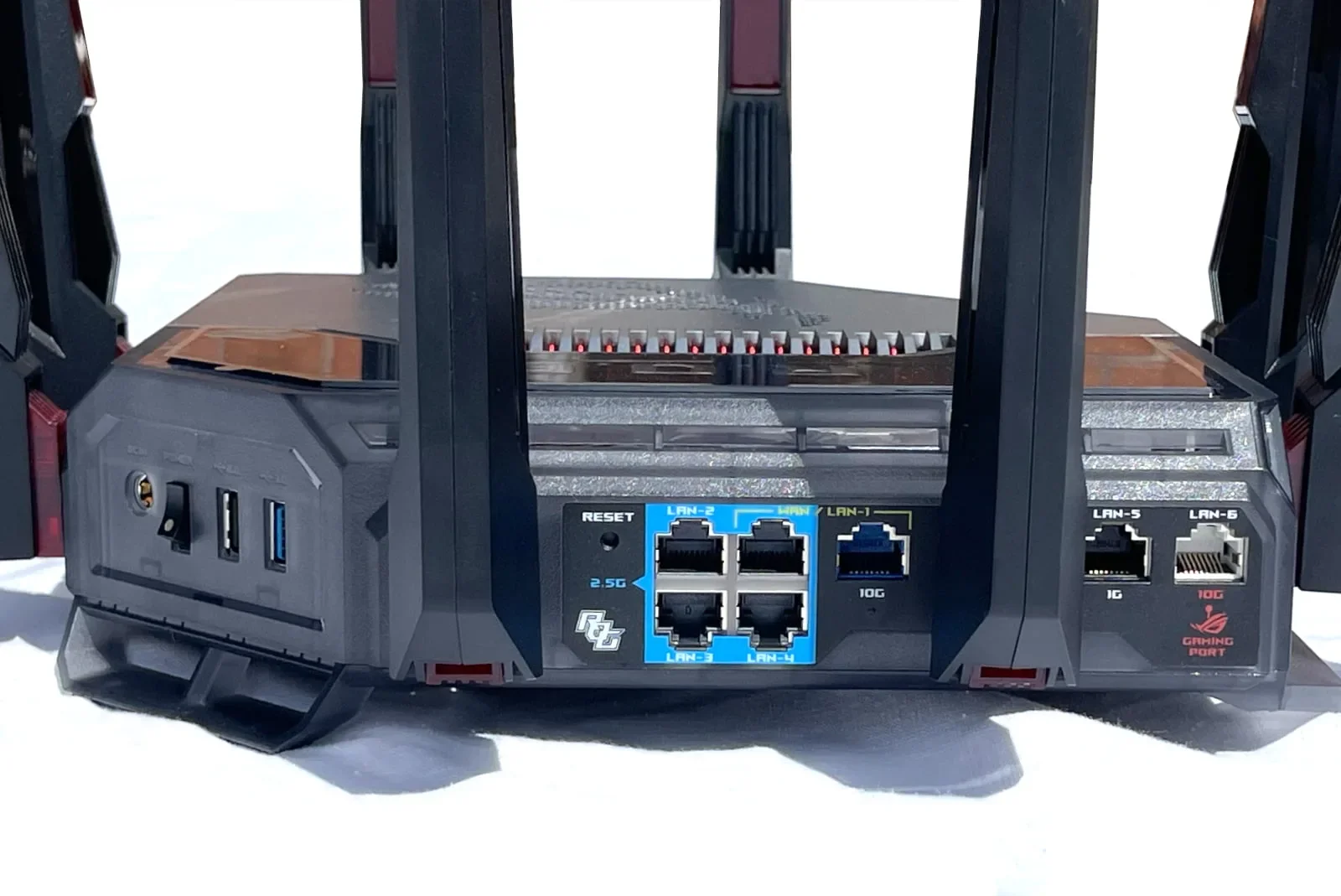
The ASUS ROG Rapture GT-BN98 Pro has loads of wired connectivity, ranging from 1Gbps to 10Gbps. Kevin Parrish | HighSpeedInternet.com
Features
5
Notable features
- Free security
- Free parental controls
- Game device optimization
Like the ASUS Wi-Fi 7 routers and mesh systems I previously reviewed, the GT-BN98 Pro is packed full of features that don’t nickel-and-dime you to death. Free security, free parental controls, and built-in VPN tools—you can’t beat that. It even includes printer sharing, which for a long while I figured had died with the mullet hairdo. Take a look at the features list:
- Mesh networking (AiMesh only)
- Free security
- Free parental controls
- Free VPN server and client tools
- USB-based media streaming and sharing
- USB-based printer sharing
- USB-based 4G/5G tethering
- Adaptive Quality of Experience (QoE) using AI to manage traffic
- Multiple SSIDs (I created at least 5) with their own policies, permissions, and security settings
- Dual WAN connectivity with failover and load balancing support
- VLAN tagging (to isolate devices and users)
- WAN Aggregation connectivity (up to 20Gbps)
- Three-year warranty
Of course, the GT-BN98 Pro is a gaming router, so we need to display a second list. Take a look:
- Aura RGB: Provides seven different RGB effects for the ROG logo.
- Device Identification: Detects gaming devices and prioritizes their network traffic.
- ROG First: Optimizes network traffic on ASUS devices.
- Game Boost: Uses AI to allocate network sources smartly between gaming, file transferring, multimedia, and real-time app use.
- GTNet: Optimizes connections to servers using AI.
- Mobile game mode (app only): Prioritizes gaming traffic on mobile devices.
It’s safe to say the GT-BN98 Pro is the best gaming router I’ve tested in years, feature-wise.
What the GT-BN98 Pro could do better
- EasyMesh support
EasyMesh is the only standout feature this router is missing, as it checks all the other boxes for features I typically call for in router reviews. ASUS says it sticks with AiMesh for the best user experience, and that’s fine. But when users invest a lot of money into their home network, they should have the option to use a mesh platform that works with all brands, not just a proprietary one.
Design
5
Buttons
- 1x Power switch (side)
- 1x Reset button (back)
- 1x WPS button (top)
- 1x LED on/off button (top)
Internet ports
- 1x Gigabit Ethernet WAN port (back)
- 1x 10 Gigabit Ethernet WAN/LAN port (back)
LAN ports
- 3x 2.5 Gigabit Ethernet LAN ports (back)
- 1x 2.5 Gigabit Ethernet LAN/WAN port (back)
- 1x 10 Gigabit Ethernet LAN port (back)
Other ports
- 1x USB 3.2 port Gen 1 (side)
- 1x USB 2.0 (side)
There’s no room for complaints with the GT-BN98 Pro. There are seven wired ports to use, ranging from 1 to 10Gbps—two of which can be used for 2.5Gbps or 10Gbps internet. The link aggregation aspect is a little weird, setting up one wired device to have a 5Gbps LAN connection with 10Gbps internet (ideal for desktops with two 2.5GbE ports) or one wired device to have a 20Gbps LAN connection with 2.5Gbps internet (ideal for a NAS sharing files on the local network).
On the Wi-Fi front, users have two 6 GHz bands they can use for gaming—just shove all the streaming devices on the 5 GHz one and all the Internet of Things (IoT) devices on the slower 2.4 GHz one. In fact, there are multiple network types users can create, spanning from a dedicated gaming network with game profile presets to a dedicated VPN network that accesses whichever VPN service the user sets up in the router’s VPN Fusion client.
Setup
4
Inside the box
- 1x router
- 1x power adapter
- 1x Ethernet cable
- 1x Quick Start Guide
- 1x instructions for Antennas sheet
- 1x instructions on updating NIC drivers sheet
- 1x app setup instructions sheet
- 1x tech support info sheet
- 1x warranty info
- 1x default login info sticker
- 1x ASUS ROG stickers sheet
Out of the box, the internet was disabled on the router, so I couldn’t use the www.asusrouter.com address to access the web interface. I had to retrieve the router’s IP address from the Wi-Fi connection and use that. And while I could have progressed from there once the web interface setup eventually appeared, I switched to the app to continue.
The address hiccup was the only roadblock I faced in setting up this router. I do like the fact that it separates all bands by default—I’ve never liked Smart Connect (band steering), although users can still select it for simplicity. Since this is a gaming router, I highly doubt players want their devices defaulting to the 2.4 GHz band anyway.
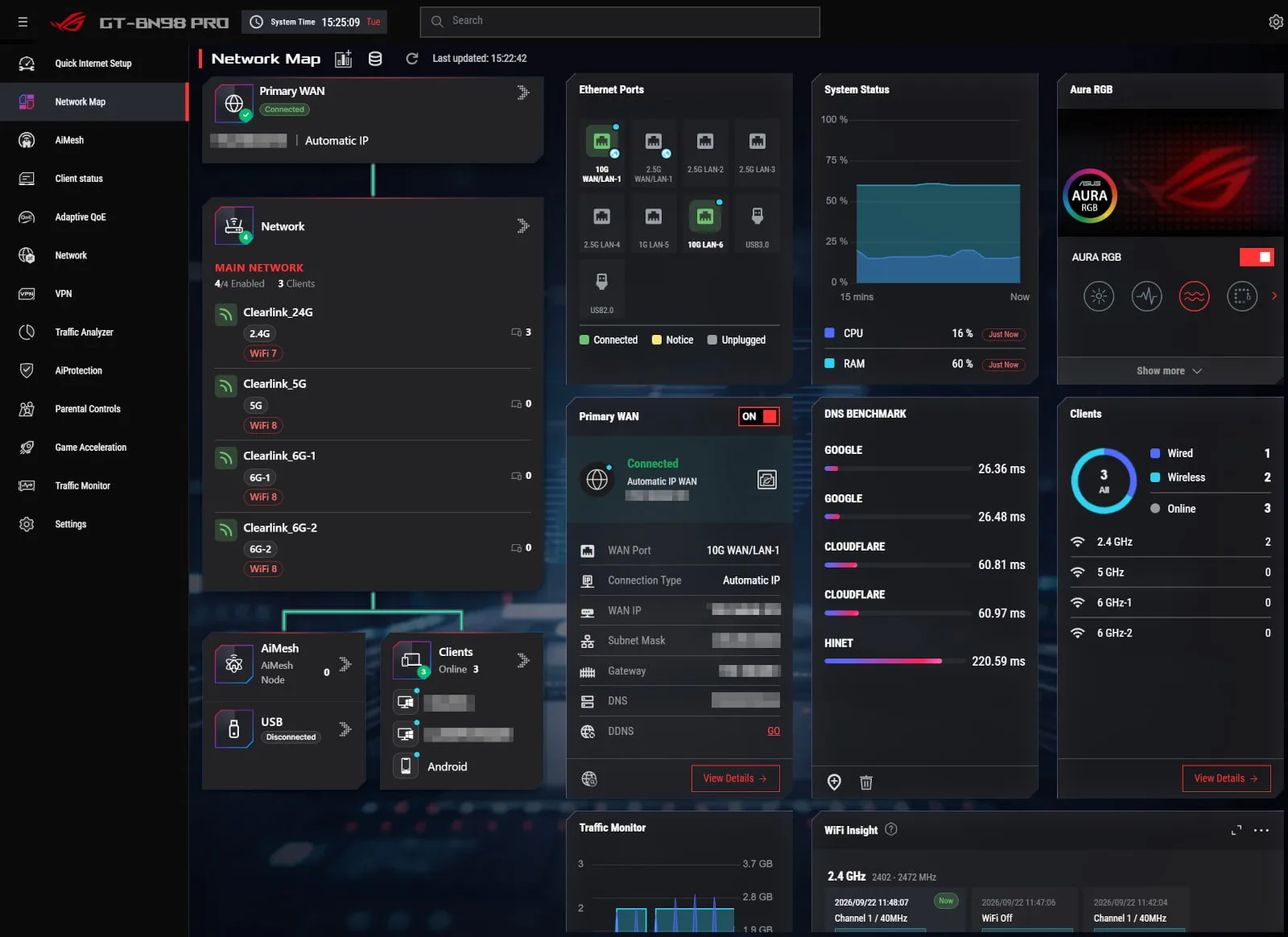
The WRT 6.0 interface on the ASUS ROG Rapture GT-BN98 Pro is one of the best we’ve used. Kevin Parrish | HighSpeedInternet.com
Ease of use
5
Router interface
- Web interface:asusrouter.com (192.168.50.1)
- Mobile app: ASUS Router App (App Store, Google Play)
The ASUS WRT 6.0 web interface is the best I’ve used to date, hands down. I’ve probably said something similar before in other reviews, but this one is my new favorite. It doesn’t divide everything into General and Advanced categories like with the RT-BE96U, presumably because gamers are a down-the-rabbit-hole technical bunch anyway, who fine-tune every minute setting most users don’t even know exist.
Overall, the interface presents a dark design with red highlights by default, although users can switch to a Light mode and toggle on ROG wallpaper. There are 12 categories in total, spanning from the cool Network Map presenting all the at-a-glance info gamers need, to the Settings section where the hardcore Wireless, LAN, WAN, and USB settings reside.
The ASUS Router App does a good job of cramming most of everything gamers need into a mobile-friendly interface. The Settings tab is where most of the controls reside, whereas the Family tab is where users create profiles and set content filters—two things they can’t do using the web interface. Instant Guard requires a separate app.
Additional costs and fees
AdGuard DNS Starter is optional and free to use, but limited to five devices and 300,000 monthly requests. The Personal plan costs $2.49 per month and supports 20 devices and 10 million monthly requests. Get a 33% discount by selecting the annual billing option.
The cost of using a VPN depends on the service and selected plan. Be sure to consult our VPN provider suite to compare prices and determine which service works best.
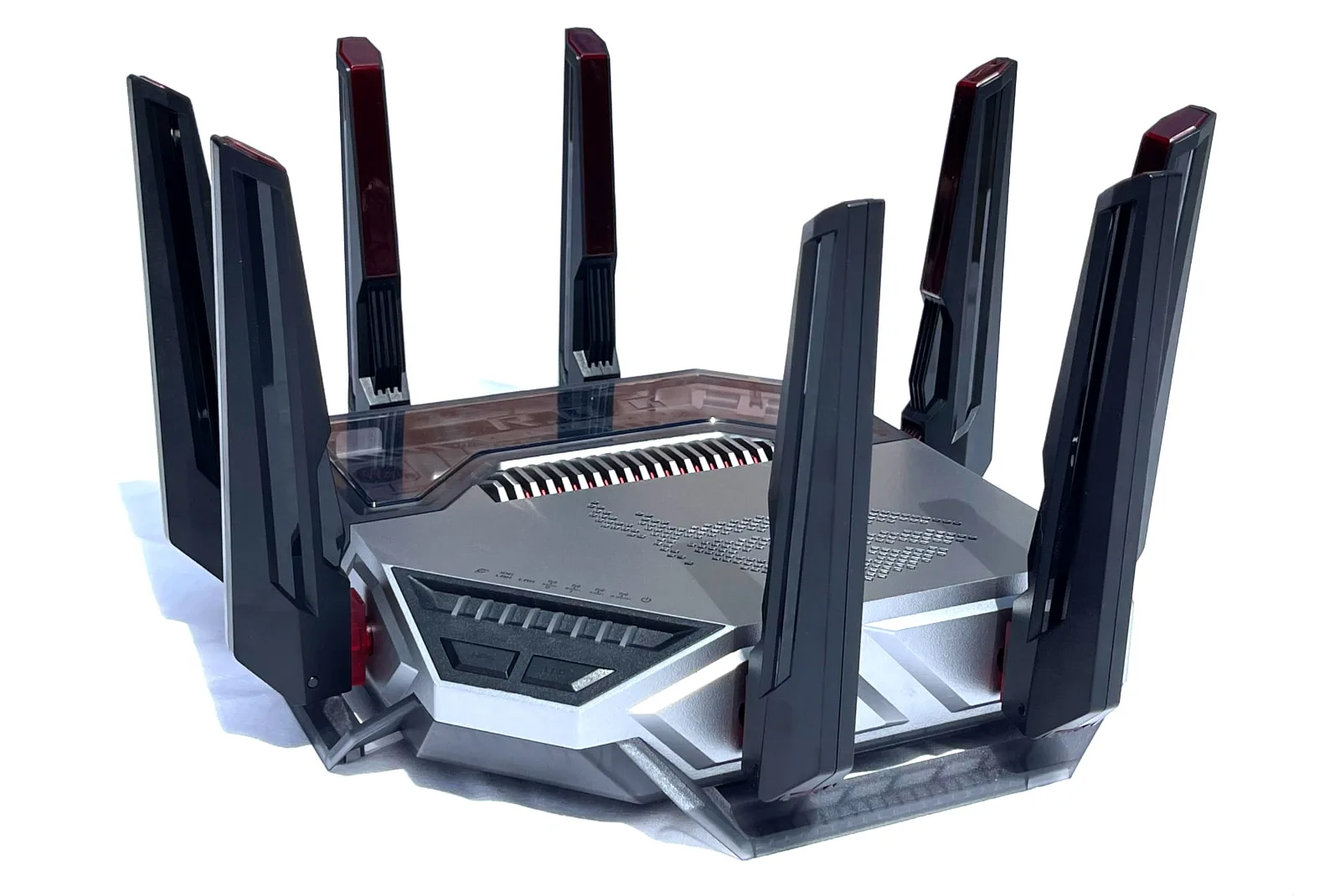
The ASUS ROG Rapture GT-BN98 Pro is worth the upgrade, even if you don’t have Wi-Fi 8 devices. Kevin Parrish | HighSpeedInternet.com
My Rapture GT-BN98 Pro review: The verdict
At this time, the Wi-Fi 8 specification isn’t finalized, yet here we are, benchmarking the very first Wi-Fi 8 router on the market. There are no Wi-Fi 8 devices to take advantage of it, but that doesn’t mean you need to hold off. There’s a lot to love here, just like there’s value in a Wi-Fi 7 router if users still rock Wi-Fi 6 devices.
There’s absolutely nothing negative I can say about the GT-BN98 Pro, except maybe it needs EasyMesh support in addition to AiMesh for users who want to mix-and-match routers of their choice. I’ll always advocate for an open platform, even if it makes ASUS cringe a little.
Would I buy this router right now even though Wi-Fi 8 isn’t etched in stone? Absolutely, and I’m a penny-pincher. We’ll see Wi-Fi 8 products roll out all through 2027 and into 2028 anyway, so I see no reason not to upgrade right now if a Wi-Fi 6 router still oversees the home network.
The ASUS ROG Rapture GT-BN98 Pro is expected to be available in mid to late October for $899.
FAQ about ROG Rapture GT-BN98 Pro
Does the GT-BN98 Pro support Automated Frequency Coordination (AFC)?
What security features does the GT-BN98 Pro include?
What parental control features does the GT-BN98 Pro include?
What VPN services does the GT-BN98 Pro natively support?
My methodology
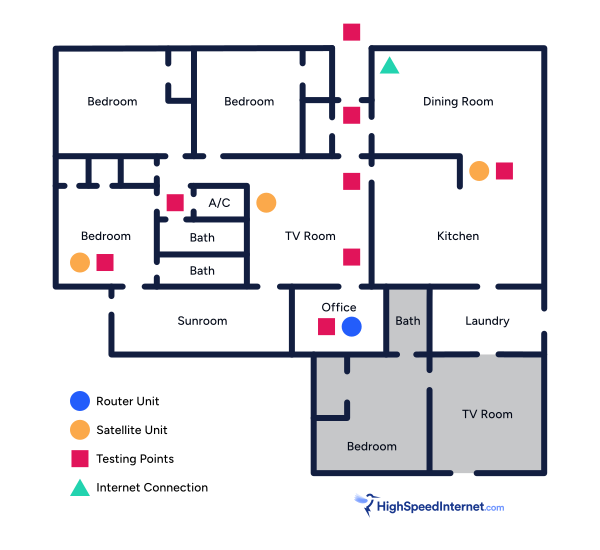
I benchmark a standalone router or mesh system by setting it up in my office and connecting it to a local server running speed test software. By using my own local server and software, I can control the input versus relying on fluctuating speeds caused by the connection between me and a remote test server. Routers aren’t internet equipment, so I exclude the internet from testing.
Once I connect the router or first mesh system unit to my local server, I transmit test data between my wireless devices and the server, taking numerous measurements to account for signal degradation, interference, and fluctuations. Here’s the testing path:
Wi-Fi client → router → local wired server → router → Wi-Fi client
The first tests occur close to the router or mesh system node wired to the test server, without obstructions, to get the strongest signal and record the fastest speed possible.
After that, I repeat the process straight out at 10, 20, and 30 feet, with only a glass door obstructing my view of the router.
Next, I go outside and run the speed test from the sidewalk (40 feet) and across the street (120 feet). The same glass door and an exterior door block my path when I run these tests.
Finally, I come back inside and run tests in a hallway to the left of the TV room and office—where a glass door, three walls, and an air handler unit block my view of the router. The dining room, another testing point, sits to the right of the kitchen, TV room, and office—two walls and a glass door block the path in this test.
Client devices used in testing
| OnePlus 11 5G | Google Pixel 6 | |
|---|---|---|
| Wi-Fi version | Wi-Fi 7 | Wi-Fi 6E |
| Stream configuration | 2 x 2 | 2 x 2 |
| Max channel width | 320 MHz | 160 MHz |
| 6 GHz | ||
| 6 GHz—max speed (BE) | 5,764Mbps | – |
| 6 GHz—max speed (AXE) | – | 2,402Mbps |
| 5 GHz | ||
| 5 GHz—max speed BE | 2,882Mbps | – |
| Max rate – AX | 2,402Mbps | 2,402Mbps |
| Max rate – AC | 866Mbps | 866Mbps |
| 2.4 GHz | ||
| Max rate – BE | 688Mbps | – |
| Max rate – AX | 574Mbps | 286Mbps |
| Max rate – N | 144Mbps | 144Mbps |
GT-BN98 Pro benchmarks
6 GHz tests
| OnePlus 11 5G* | Google Pixel 6† | |
|---|---|---|
| 2 feet | 3,610 | 1,955 |
| 10 feet | 3,516 | 1,875 |
| 20 feet | 3,321 | 1,744 |
| 30 feet | 3,198 | 1,620 |
| 40 feet (porch) | 2,331 | 1,492 |
| 120 feet (across street) | 967 | 656 |
| 20 feet (hallway) | 2,273 | 1,483 |
* Speeds in megabits per second (Mbps) using a 320 MHz channel width and a 5,764Mbps starting link rate.
† Speeds in megabits per second (Mbps) using a 160 MHz channel width and a 2,402Mbps starting link rate.
5 GHz tests
| OnePlus 11 5G* | Google Pixel 6† | |
|---|---|---|
| 2 feet | 2,116 | 1,947 |
| 10 feet | 1,945 | 1,845 |
| 20 feet | 1,854 | 1,803 |
| 30 feet | 1,750 | 1,720 |
| 40 feet (porch) | 1,555 | 1,594 |
| 120 feet (across street) | 804 | 801 |
| 20 feet (hallway) | 1,523 | # |
* Speeds in megabits per second (Mbps) using a 160 MHz channel width and a 2,882Mbps starting link rate.
† Speeds in megabits per second (Mbps) using a 160 MHz channel width and a 2,402Mbps starting link rate.
Disclaimers
Amazon
Amazon.com Availability as of 2/19/26 17:35 MST. Product availability is accurate as of the date/time indicated and is subject to change. Any price and availability information displayed on Amazon.com at the time of purchase will apply to the purchase of this product. Highspeedinternet.com utilizes paid Amazon links.
CERTAIN CONTENT THAT APPEARS ON THIS SITE COMES FROM AMAZON. THIS CONTENT IS PROVIDED ‘AS IS’ AND IS SUBJECT TO CHANGE OR REMOVAL AT ANY TIME.
Speed test results
Our router and mesh system benchmark results are based on several factors, including:
- Router or mesh system configurations
- Client device configurations
- Local interference (neighboring Wi-Fi, radar, etc.)
- Local obstructions (walls, doors, etc.)
Our stated speed test numbers reflect the router-to-client connection only and do not include the internet. Reported speeds are not guaranteed. Your speeds will vary based on the list provided above.
Author - Kevin Parrish
Kevin Parrish has more than a decade of experience working as a writer, editor, and product tester. He began writing about computer hardware and soon branched out to other devices and services such as networking equipment, phones and tablets, game consoles, and other internet-connected devices. His work has appeared in Tom’s Hardware, Tom's Guide, Maximum PC, Digital Trends, Android Authority, How-To Geek, Lifewire, and others. At HighSpeedInternet.com, he focuses on network equipment testing and review.
Editor - Jessica Brooksby
Jessica loves bringing her passion for the written word and her love of tech into one space at HighSpeedInternet.com. She works with the team’s writers to revise strong, user-focused content so every reader can find the tech that works for them. Jessica has a bachelor’s degree in English from Utah Valley University and seven years of creative and editorial experience. Outside of work, she spends her time gaming, reading, painting, and buying an excessive amount of Legend of Zelda merchandise.
Related Posts