Is Frontier Internet Down?
Find out if you're in a Frontier outage, and get tips on getting back online fast

Aug 11, 2026 | Share 


Brand Guides, Equipment Guides, Internet Outage
If Frontier is your internet provider and you’re having trouble connecting, start with an internet speed test to see if you’re in an outage.
First, reconnect to your Frontier Wi-Fi. Then, tap or click below.
Download speed
000 Mbps
Upload speed
000 Mbps
Latency (ping)
00 ms
Jitter
00 ms
What to look for in your speed test results
If you’re in a Frontier outage, the speed test will say “Loading,” and a light blue circle will spin, but you won’t get any results.
If you get results that show download speeds, upload speeds, and latency, though, you aren’t in an outage.
You could still be having problems, of course. Ideally, you should get speeds reasonably close to what your plan promises, but you need the following for a healthy fiber or fixed wireless connection:
- Download speeds of at least 20Mbps
- Upload speeds of at least 5Mbps
- Latency of less than 100 ms
In this guide:
Troubleshoot | Get a refund | Leave a review | Decide whether to switch | My take | FAQs
In this guide:
How to troubleshoot Frontier connection issues
If you get stuck on “Loading” on the speed test above, go through the steps below one by one.
Step 1: Try logging into your Frontier network with a different device, such as a gaming console, smart TV, or smartphone. Try both Wi-Fi and Ethernet connections.
Step 2: Check your Frontier router. A solid white light indicates a healthy connection, and a red light signifies no internet connection.
Step 3: Check your Ethernet and power cables to make sure they are connected securely and haven’t been damaged.
Step 4: Restart or power cycle your affected devices and your router. A full reset usually takes about 10 minutes.
Step 5: Check your MyFrontier app or Frontier account for any outage-related notifications.
Check the lights on your gateway
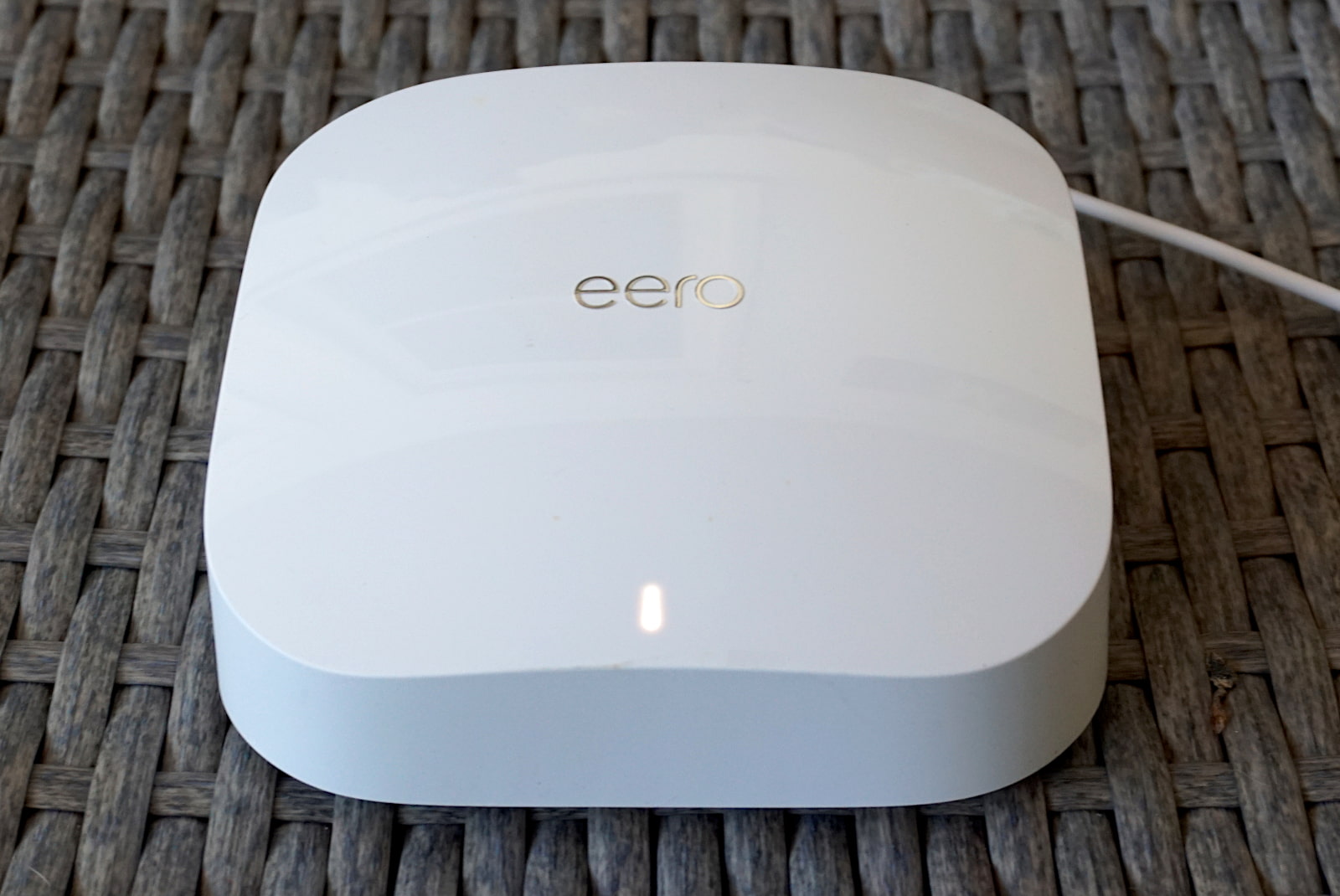
Frontier uses Eero routers. A bright white light on the front of the unit shows a steady internet connection. Kevin Parrish | HighSpeedInternet.com
To diagnose an outage with your Eero equipment from Frontier Fiber, check the status light on the front of the device: A solid white light indicates a healthy connection, while a red light signifies that the system has lost its internet connection. If the light is off entirely, check your power cables to ensure the device is securely connected to a working power source.
Learn more and troubleshoot your Frontier connection
Still can’t get online? Contact Frontier
If you can’t get online and can’t figure out why, it’s time to reach out to Frontier. Here are the best ways:
- Visit the Frontier service outage page and enter your address.
- Text OUTAGE to 70994, and if you’re affected by a service outage, you’ll get notifications.
- Call Frontier at +1-800-921-8101.
- Call Frontier through your MyFrontier mobile app.
- Use the Support Wizard.
- Use the chat function at Frontier.com.
Does Frontier offer refunds?
Frontier doesn’t promise refunds in case of service outages, but you can get a refund if you decide to cancel within your first 30 days of switching to Frontier.
Rather than guaranteeing uptime, Frontier’s terms and conditions remind its customers that backup power may be required to keep equipment working in case of a power outage.
Learn more about backup 5G internet and how to prepare your internet for a power outage.
Leave a review about your Frontier service
If you’re a Frontier customer, we want to hear from you! Your honest reviews help us give better advice to other customers looking for great home internet. Once you’re done, check out what other Frontier customers have to say.
How Frontier compares
Frontier offers fiber internet service in 25 states, reaching roughly 21.9 million people, with its heaviest concentration in California, Texas, Florida, Connecticut, and pockets of the Midwest and Northeast.
As of early 2026, Frontier is officially a Verizon company. Frontier’s fiber connections are usually the fastest and most reliable option in any given neighborhood, but depending on where you live, you may have a choice of cable or 5G home internet providers instead.
Frontier vs. T-Mobile 5G Home Internet: Frontier offers lower starting prices than T-Mobile, and its fiber internet is a better pick for speed and reliability. However, the customer experience with T-Mobile might be a little better. In our 2026 Annual Internet Provider Review, Frontier scored 6.9 on customer feedback while T-Mobile 5G Home Internet scored a 7.3.
Frontier vs. Spectrum: Starting prices for Frontier and Spectrum are similar, but you might have a better customer experience with Spectrum. Just be aware of big Spectrum price hikes in your second year unless you bundle your home internet with other Spectrum services.
Frontier vs. Starlink: Starlink seems to be everywhere these days, and it can make sense in rural areas or for people who travel around a lot. But if you live in a Frontier Fiber footprint and you’re shopping for home internet, Starlink doesn’t make sense. Frontier is cheaper, faster, and more reliable.

Tired of slowdowns and outages with Frontier?
Enter your zip code to find other home internet providers where you live.
My take: Frontier’s a fair bet
Frontier Fiber is fast and reliable, and it doesn’t nickel-and-dime you. Equipment comes included with your plan price instead of showing up as a monthly rental fee, and the sign-up perks are legitimately good. We’ve seen gift card offers, solid discounts on home electronics, and free access to entertainment add-ons like NFL Sunday Ticket.
If you’re nervous about Frontier being owned by Verizon, don’t be. Verizon Fios and Frontier run neck-and-neck on both our speed ratings and customer service scores. Now that they’re under the same roof, the perks are starting to overlap too. Same fiber lines, same fast speeds, just a bigger name on the bill.
Read more about Frontier
Frontier outage FAQ
How do I know if Frontier is down in my area?
Why isn't Frontier internet working?
How do I check my Frontier signal?
Why is my Frontier Wi-Fi connected, but I don't have internet?
Does Frontier Fiber internet work when the power is out?
Author - Chili Palmer
Chili Palmer covers home tech services, with a special focus on understanding what families need and how they can stay connected on a budget. She handles internet access and affordability, breaking news, mobile services, and consumer trends. Chili’s work as a writer, reporter, and editor has appeared in publications including Telecompetitor, Utah Business, Idaho Business Review, Benton Institute for Broadband & Society, and Switchful.com.
Editor - Jessica Brooksby
Jessica loves bringing her passion for the written word and her love of tech into one space at HighSpeedInternet.com. She works with the team’s writers to revise strong, user-focused content so every reader can find the tech that works for them. Jessica has a bachelor’s degree in English from Utah Valley University and seven years of creative and editorial experience. Outside of work, she spends her time gaming, reading, painting, and buying an excessive amount of Legend of Zelda merchandise.
Related Posts